giriiş
Satın aldığınız için teşekkür ederizasing the Mistral MHV9812DRW-SB 12-inch DC High Velocity Stand Fan. This manual provides important information for the safe operation, installation, and maintenance of your fan. Please read it thoroughly before use and retain it for future reference.
Önemli Güvenlik Bilgileri
Yangın, elektrik çarpması veya yaralanma riskini azaltmak için aşağıdaki güvenlik önlemlerine uyun:
- Devrilmeyi önlemek için vantilatörün her zaman sabit ve düz bir yüzeye yerleştirildiğinden emin olun.
- Fan çalışırken parmaklarınızı veya herhangi bir nesneyi ızgaradan içeri sokmayın.
- Temizlik, taşıma veya herhangi bir bakım işlemi yapmadan önce vantilatörü elektrik prizinden çıkarın.
- Vantilatörü hasarlı bir kablo veya fişle çalıştırmayın. Kablo veya fiş hasarlıysa, kalifiye servis personeliyle iletişime geçin.
- Keep the fan away from water and moisture. Do not use it in bathrooms or other wet environments.
- Bu cihaz, fiziksel, duyusal veya zihinsel yetenekleri kısıtlı olan veya deneyim ve bilgi eksikliği bulunan kişiler (çocuklar dahil) tarafından, güvenliklerinden sorumlu bir kişi tarafından cihazın kullanımıyla ilgili olarak gözetim veya talimat sağlanmadığı sürece kullanılmak üzere tasarlanmamıştır.
- Çocukların cihazla oynamamalarını sağlamak için gözetim altında tutulmaları gerekir.
- Çalışma sırasında fanın üzerini örtmeyin veya hava akışını kısıtlamayın.
- Yalnızca verilen güç adaptörünü kullanın.
Paket İçeriği
Tüm bileşenlerin mevcut ve iyi durumda olduğunu doğrulayın:
- Fan Kafası Komplesi
- Ayarlanabilir Stand Direği
- Temel
- Uzaktan kumanda
- AC Adaptörü
- Kullanım Kılavuzu (bu belge)
Kurulum ve Montaj
Follow these steps to assemble your stand fan:
- Destek direğini tabana takın: Carefully insert the adjustable stand pole into the base. Ensure it is securely fastened according to the markings or locking mechanism.
- Attach the Fan Head: Connect the fan head assembly to the top of the stand pole. Ensure it clicks into place or is tightened securely.
- Yüksekliği Ayarlayın: Loosen the height adjustment knob/collar on the stand pole, extend or retract the pole to your desired height, and then securely tighten the knob/collar. The fan is height adjustable from approximately 860mm to 1050mm.
- Fanı Konumlandırın: Monte edilmiş fanı, yeterli hava akışı için etrafında yeterli boşluk kalacak şekilde sağlam ve düz bir yüzeye yerleştirin.
- Gücü bağlayın: Plug the AC adapter into the fan's power input, then plug the adapter into a standard 220-240V~, 50/60Hz electrical outlet.
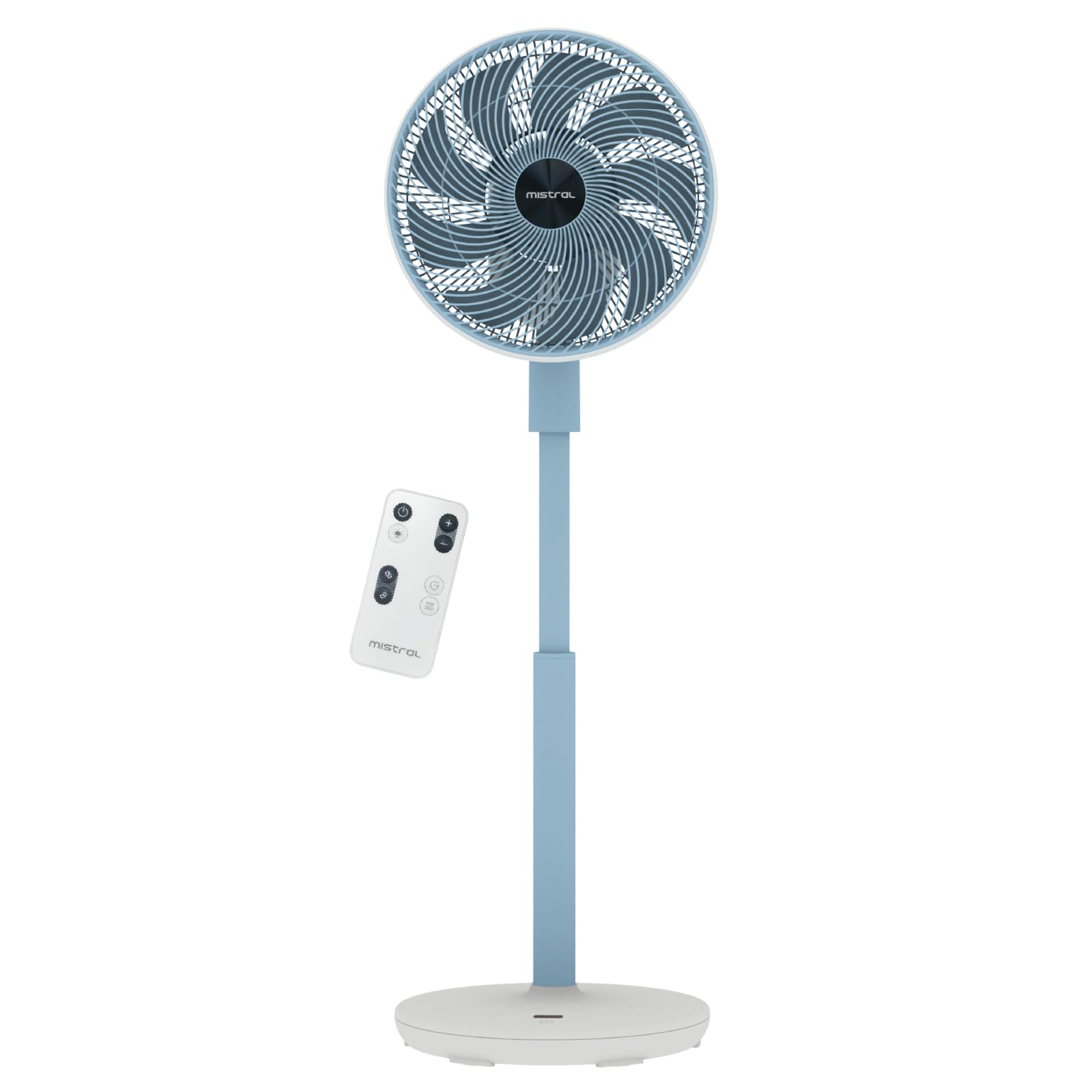
Image: The Mistral MHV9812DRW-SB stand fan in Sky Blue, illustrating its assembled form with the fan head tilted upwards, adjustable pole, and stable base. The image also shows icons for Wi-Fi and voice control features.
Kullanım Talimatları
Your Mistral fan can be operated using the touch control panel on the unit, the included remote control, or via Wi-Fi voice control.
Kontrol Paneli ve LED Ekran
The fan features an LED display and touch control panel on its base for direct operation. Refer to the specific icons on the panel for power, speed, mode, oscillation, and timer functions.
Uzaktan kumanda
The remote control provides convenient access to all fan functions from a distance. Ensure batteries are correctly inserted (not included, typically AAA). Point the remote control towards the fan's receiver.
Wi-Fi ve Ses Kontrolü
This fan supports Wi-Fi connectivity and voice control for smart home integration. Download the "Mayer Home" application (or specified app) from your device's app store and follow the in-app instructions to connect your fan to your home Wi-Fi network. Once connected, you can control the fan using the app or compatible voice assistants.
Fan Fonksiyonları
- Güç Açma/Kapatma: Kontrol panelindeki veya uzaktan kumandadaki güç düğmesine basın.
- Hız Ayarları: The fan offers 12 speed settings. Adjust using the speed control buttons.
- Çalışma Modları: 4 farklı moddan birini seçin:
- Doğal: Fan hızını değiştirerek doğal esintiyi simüle eder.
- Uyumak: Rahatsız edilmeyen bir uyku için daha düşük ve daha sessiz bir hızda çalışır.
- Eko: Adjusts fan speed based on ambient temperature for energy efficiency.
- Döngü: Provides a continuous, consistent airflow.
- Salınım:
- Left-Right Oscillation: Choose between 45° or 90° horizontal oscillation.
- Up-Down Oscillation: Choose between 45° or 90° vertical oscillation.
- Zamanlayıcı: Vantilatörün belirli bir süre sonra, en fazla 12 saat sonra otomatik olarak kapanmasını ayarlayın.
- Moodlight: The fan includes a moodlight feature with 2 settings. Activate and adjust via the control panel or remote.
Bakım ve Temizlik
Düzenli temizlik, fanın performansını korumaya ve kullanım ömrünü uzatmaya yardımcı olur.
- Gücü Kesin: Temizlemeden önce vantilatörün fişini mutlaka prizden çekin.
- Dış Yüzeyleri Temizleyin: Fanın dış yüzeylerini yumuşak bir bezle silin.amp bezle silin. Aşındırıcı temizleyiciler veya çözücüler kullanmayın.
- Clean Fan Grilles and Blades: Use a vacuum cleaner with a brush attachment or a soft cloth to remove dust from the front and rear grilles and fan blades. For thorough cleaning, the front grille may be removable (refer to specific assembly instructions if applicable, not detailed here).
- Depolamak: If storing the fan for an extended period, cover it to protect it from dust and store it in a cool, dry place.
Sorun giderme
Fanınızla ilgili sorunlarla karşılaşırsanız, aşağıdaki yaygın sorunlara ve çözümlere bakın:
| Sorun | Olası Neden | Çözüm |
|---|---|---|
| Fan çalışmıyor. | No power supply; Power button not pressed; Remote control batteries depleted. | Ensure the power cord is securely plugged into a working outlet. Press the power button on the unit or remote. Replace remote control batteries. |
| Zayıf hava akışı. | Fan speed too low; Grilles are blocked by dust. | Increase the fan speed setting. Clean the fan grilles and blades as per maintenance instructions. |
| Vantilatör alışılmadık bir ses çıkarıyor. | Vantilatör düz bir yüzeyde değil; Gevşek parçalar; Engel. | Place the fan on a stable, level surface. Check for any loose components or foreign objects near the blades. Unplug and inspect. |
| Uzaktan kumanda çalışmıyor. | Batteries depleted or incorrectly inserted; Obstruction between remote and fan. | Replace batteries, ensuring correct polarity. Remove any obstructions and ensure the remote is pointed at the fan's receiver. |
| Wi-Fi bağlantı sorunları. | Incorrect Wi-Fi password; Fan too far from router; Router issues. | Verify Wi-Fi password. Move the fan closer to the Wi-Fi router. Restart your router. Follow the app's troubleshooting guide for connection. |
Bu çözümleri denedikten sonra sorun devam ederse lütfen müşteri desteğiyle iletişime geçin.
Özellikler
| Özellik | Detay |
|---|---|
| Örnek | MHV9812DRW-SB |
| Cilttage | 220-240V~, 50/60Hz |
| Netage | 30W |
| Hava Hacmi | 38.12 m³ / dak |
| Maksimum Hava Akışı | 6.9 m / sn |
| Gürültü Seviyesi | 23dBA (Lowest Speed) | 45dBA (Highest Speed) |
| Ürün Boyutları (U*G*Y) | 350 * 350 * 860-1050 mm |
| Net ağırlığı | 3.7 KG |
| AC Adaptör Girişi | 100-240V~, 50/60Hz |
| AC Adaptör Çıkışı | 12.0V 3.0A 36.0W |
| Kontrol Türü | LED Display Touch Control Panel, Remote Control, Wi-Fi Voice Control |
| Hız Ayarları | 12 Hız |
| Çalışma Modları | Natural, Sleep, Eco, Cycle |
| salınım | Left-Right (45°/90°), Up-Down (45°/90°) |
| Zamanlayıcı | 12 Saat |
| Özel Özellikler | Moodlight (2 settings) |
| Güvenlik İşareti | 240788-11 |
Garanti ve Destek
Garanti Bilgileri
This Mistral MHV9812DRW-SB fan comes with a 1 yıllık garanti on the entire unit and an extended 3 yıllık garanti specifically for the motor. This warranty covers manufacturing defects under normal use. Please retain your proof of purchase for warranty claims.
The warranty does not cover damage resulting from misuse, accident, unauthorized modification, or failure to follow the instructions in this manual.
Müşteri Desteği
For technical assistance, warranty claims, or general inquiries, please contact Mistral customer support through their official website or the retailer where the product was purchased. Please have your model number (MHV9812DRW-SB) and proof of purchase ready when contacting support.
Note: Contact information for specific regions may vary. Refer to the official Mistral webEn güncel destek detayları için siteyi ziyaret edin.


