1. Giriş
The EPOMAKER EK21 is a versatile and highly functional numeric keypad designed for enhanced productivity and gaming. It features a 20-key layout with an aluminum alloy knob, hot-swappable switches, and customizable RGB lighting. The EK21 supports triple connectivity modes (wired, Bluetooth 5.0, and 2.4GHz wireless) and is programmable via VIA software, offering seamless compatibility across Windows, Mac, and Android operating systems.
2. Paket İçeriği
Lütfen paketinizde tüm öğelerin mevcut olduğundan emin olun:
- EPOMAKER EK21 VIA Gasket Number Pad
- 2-in-1 Keycap-and-Switch Puller
- 1.8m Detachable USB A-to-C Braided Cable
- 2.4Ghz Wireless Dongle
- Kullanıcı Kılavuzu
- Extra “Back” Keycap
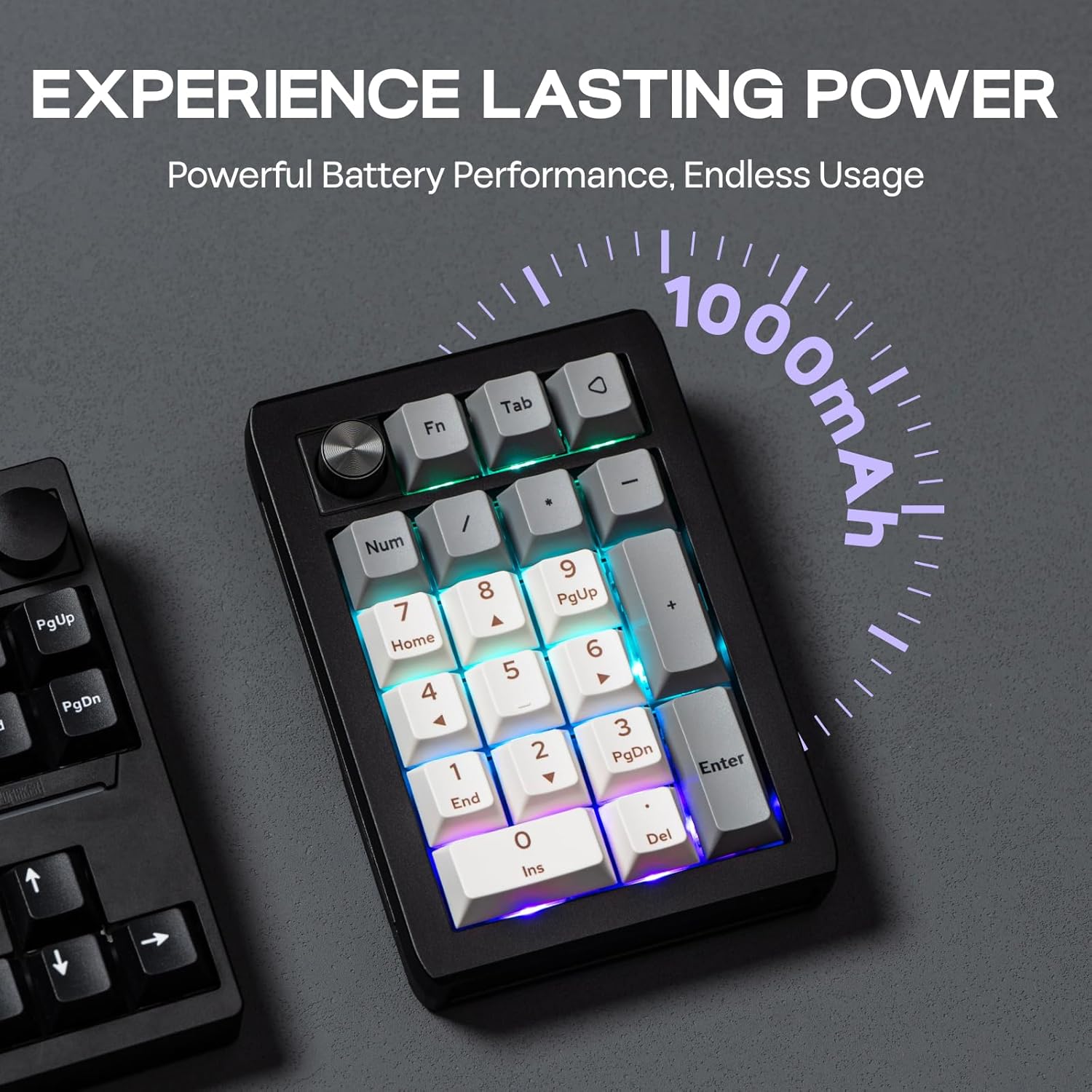
Figure 2.1: Contents included in the EPOMAKER EK21 package.
3. Ürün Bittiview
The EK21 is a 20-key mechanical number pad featuring a gasket-mounted design for a comfortable typing experience. It includes an aluminum alloy knob for versatile control and per-key RGB backlighting. The device supports hot-swappable switches, allowing users to easily change switches without soldering.

Şekil 3.1: Üzeriview of the EPOMAKER EK21 Number Pad and its key features.
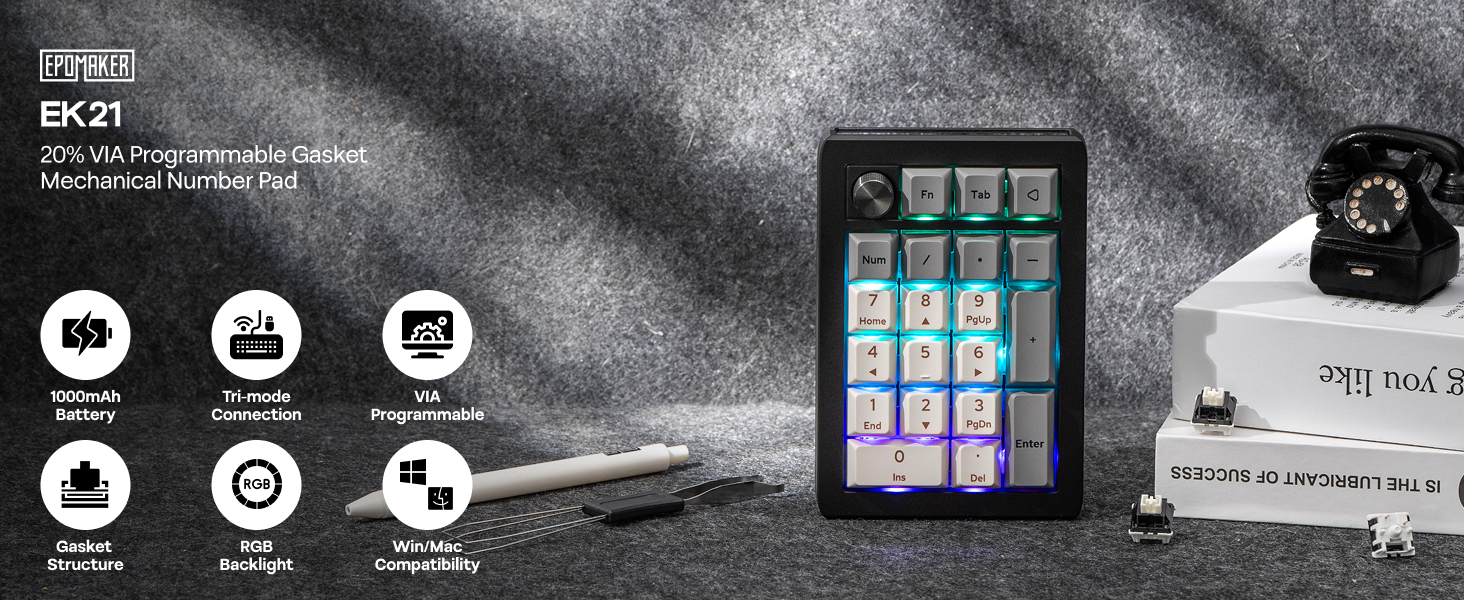
Figure 3.2: EPOMAKER EK21 VIA Mechanical Numpad.
4. Kurulum
The EK21 offers three connectivity options: wired, 2.4GHz wireless, and Bluetooth. Choose the method that best suits your needs.
4.1. Kablolu Bağlantı
- Connect the provided USB A-to-C cable to the USB-C port on the EK21.
- Kablonun USB-A ucunu bilgisayarınızdaki boş bir USB bağlantı noktasına takın.
- Ensure the mode switch on the side of the numpad is set to 'USB'. The device will be recognized automatically.
4.2. 2.4 GHz Kablosuz Bağlantı
- Locate the 2.4GHz wireless dongle in the package.
- Dongle'ı bilgisayarınızdaki kullanılabilir bir USB bağlantı noktasına takın.
- Set the mode switch on the side of the numpad to '2.4G'. The device should connect automatically.
4.3. Bluetooth 5.0 Bağlantısı
- Set the mode switch on the side of the numpad to 'BT'.
- Bilgisayarınızda veya cihazınızda Bluetooth'u etkinleştirin ve yeni cihazları arayın.
- Select 'EPOMAKER EK21' from the list of available devices to pair.
- The EK21 supports up to three Bluetooth devices. Switch between paired devices using Fn + Q/W/E.

Figure 4.1: Tri-Mode Connectivity options for the EK21.

Figure 4.2: Convenient Connectivity Hub on the EK21.
5. Kullanım Talimatları
5.1. Temel Tuş Fonksiyonları
The EK21 functions as a standard numeric keypad. Keys are pre-programmed for numerical input, arithmetic operations, and navigation (Home, End, PgUp, PgDn, Ins, Del).
5.2. Multi-functional Aluminum Alloy Knob
The aluminum alloy knob provides quick access to various functions. By default, it controls volume:
- Saat yönünde döndür: Sesi Aç
- Rotate counter-clockwise: Volume Down
- Basın: Sessiz/Sesi Aç
The knob's functionality can be customized using the VIA software (see Section 6).

Figure 5.1: Functions of the Multi-functional Aluminum Alloy Knob.
5.3. Fonksiyon Tuşu Kombinasyonları
Utilize the 'Fn' key for additional controls:
- Fn + . (dot key): Pil Kontrolü
- Fn + Enter: Arka Işık Efektini Değiştir
- Fn + - / +: Arka Işık Parlaklığını Ayarla

Figure 5.2: Dynamic RGB Backlight and Function Key Combinations.
6. Customization with VIA Software
The EK21 is fully programmable via VIA software, allowing you to customize key assignments, create macros, and fine-tune the knob's functionality. This feature enables you to adapt the numpad to your specific workflow or gaming setup.
- VIA Yazılımını İndirin: EPOMAKER'ın resmi sitesini ziyaret edin. website or the VIA website to download the latest version of the VIA software.
- JSON'ları indirin File: Obtain the specific JSON keymap file for the EK21 from the EPOMAKER webalan. Bu file is necessary for VIA to recognize and configure your numpad.
- Load Keymap: Open the VIA software. If the EK21 is not automatically detected, load the downloaded JSON file manually within the software.
- Özelleştirmek: Once recognized, you can remap any key, create complex macros, and assign custom functions to the aluminum alloy knob. Changes are applied in real-time.
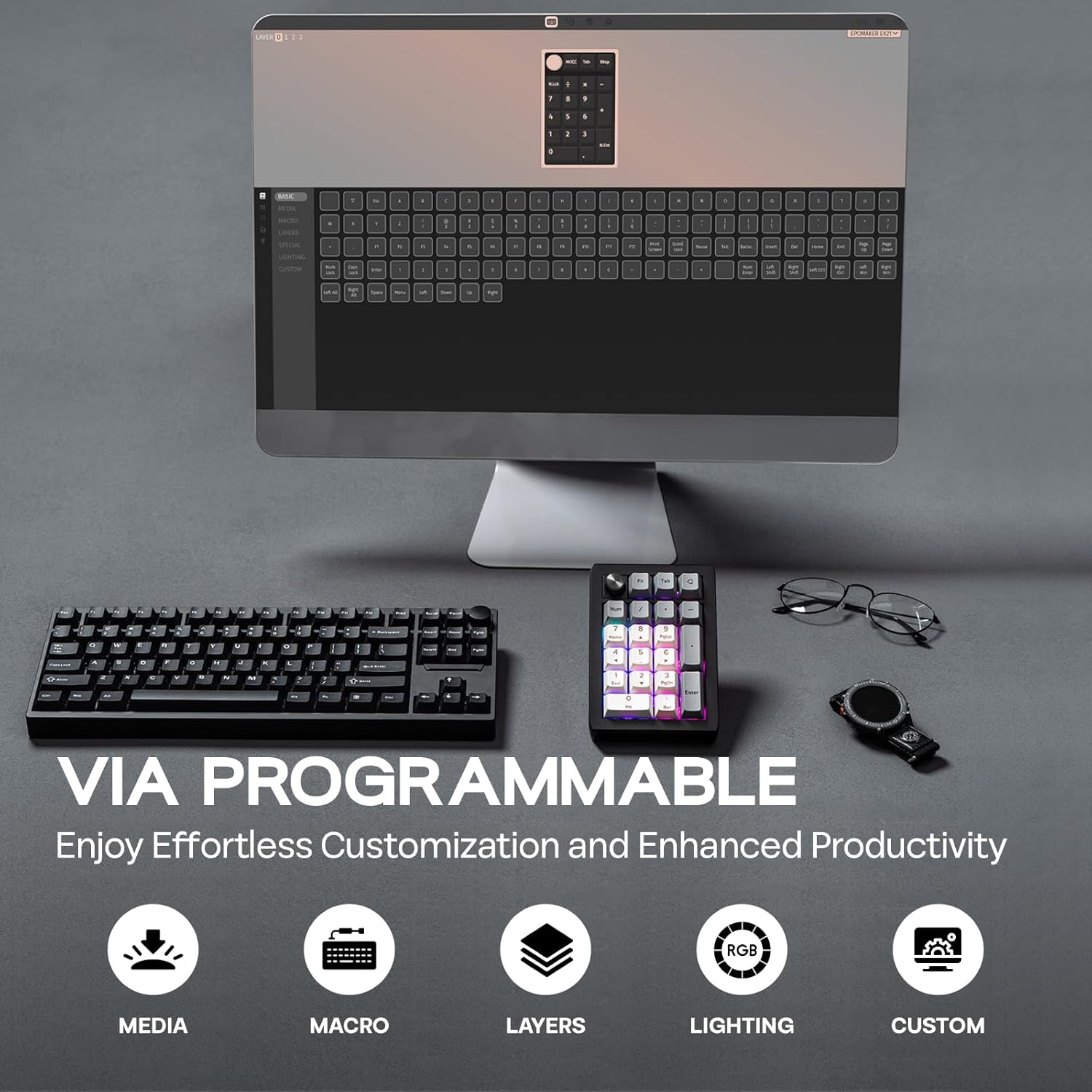
Figure 6.1: VIA Programmable features for effortless customization.
7. Dynamic RGB Backlight
The EK21 features per-key RGB backlighting, allowing for various lighting effects and colors. You can adjust these settings directly on the numpad using function key combinations or through the VIA software for more advanced customization.
- Efektleri Aç/Kapat: Use Fn + Enter to cycle through different backlight effects.
- Parlaklığı Ayarla: Use Fn + - (minus) and Fn + + (plus) to increase or decrease backlight brightness.

Figure 7.1: Per-Key RGB Backlight in action.
Video 7.1: Demonstration of the EK21 VIA Numeric Keypad's lighting display.
8. Pil Yönetimi
The EK21 is equipped with a 1000mAh battery, providing extended usage in wireless modes. The battery status can be checked using a function key combination.
- Pil Kontrolü: Press Fn + . (dot key) to check the current battery level. The RGB lighting may indicate the charge status.
- Şarj: Connect the numpad to a power source using the provided USB-C cable. The device can be used while charging.

Figure 8.1: The EK21 features a 1000mAh battery for extended use.

Figure 8.2: The 1000mAh battery ensures powerful and lasting performance.
9. Comfort and Ergonomics
The EK21 is designed with user comfort in mind, incorporating several features to enhance the typing experience and reduce fatigue.
- Conta Yapısı: The gasket-mounted design provides a cushioned and flexible typing feel, reducing harsh impacts and improving sound profile.
- Poron Bottom Layer & Sandwich Foam: These internal layers absorb sound and vibrations, contributing to a quieter and more pleasant typing sound.
- IXPE Switch Pad: Further enhances the typing feel by providing a soft landing for switches.
- Finely Tuned Stabilizers: Ensures consistent and stable key presses, especially for larger keys like 'Enter' and '0'.
- PC Plate with CNC Cutting: Offers a robust and aesthetically pleasing finish, contributing to the overall durability.

Figure 9.1: Internal structure and components contributing to comfort and sound.
Şekil 9.2: Patlatılmış view of the EK21's gasket-mount construction.
10. Bakım
10.1. Temizlik
To maintain the longevity and appearance of your EK21, regular cleaning is recommended:
- Use a soft, dry cloth to wipe the surface of the numpad.
- For deeper cleaning, remove keycaps using the provided keycap puller.
- Anahtarlar arasındaki toz ve kalıntıları temizlemek için basınçlı hava kullanın.
- Keycaps can be cleaned with mild soap and water, ensuring they are completely dry before reattaching.
10.2. Çalışırken Değiştirilebilen Anahtarlar
The EK21 features hot-swappable sockets, allowing you to change mechanical switches without soldering. Use the provided switch puller for this process:
- Gently grip the switch with the switch puller and pull upwards until it detaches from the PCB.
- Yeni anahtarın pimlerini PCB üzerindeki deliklerle hizalayın.
- Press down firmly until the switch clicks into place. Ensure the pins are not bent during insertion.

Figure 10.1: Hot-swappable switches allow for easy customization and maintenance.
11. Sorun Giderme
If you encounter issues with your EK21, try the following troubleshooting steps:
- Bağlantı Sorunları:
- Ensure the mode switch is set correctly (USB, 2.4G, or BT).
- 2.4GHz için, dongle'ın güvenli bir şekilde takılı olduğundan emin olun.
- For Bluetooth, ensure your device's Bluetooth is enabled and the numpad is paired. Try re-pairing if necessary.
- Kablosuz sorunlarını elemek için USB-C kablosuyla bağlanmayı deneyin.
- VIA Software Not Recognizing Device:
- Ensure the numpad is connected via USB-C cable. VIA typically requires a wired connection for initial setup and flashing.
- Verify you have downloaded and loaded the correct EK21 JSON file in the VIA software.
- Restart the VIA software and/or your computer.
- RGB Arka Aydınlatma Çalışmıyor:
- Check backlight brightness using Fn + + (plus).
- Toggle backlight effects using Fn + Enter.
- Ensure the numpad is sufficiently charged if in wireless mode.
- Tuşlar Yanıt Vermiyor:
- If only specific keys are affected, try hot-swapping the switch with a known working one to check if the switch is faulty.
- Anahtarların yuvalarına tam olarak oturduğundan emin olun.
12. Özellikler
| Özellik | Detay |
|---|---|
| Ürün Boyutları | 3.66 x 5.43 x 1.14 inç (9.3 x 13.8 x 2.9 cm) |
| Ürün Ağırlığı | 13.4 ons (0.38 kg) |
| Bağlantı Teknolojisi | 2.4Ghz Wireless, Bluetooth 5.0, USB-C Wired |
| Pil Kapasitesi | 1000mAh |
| Klavye Açıklaması | Mekanik |
| Özel Özellikler | Backlit (RGB), Ergonomic, Hot-Swappable PCB, Lightweight, VIA Programmable |
| Uyumlu Cihazlar | Laptop, PC, Smartphone, Tablet (Windows, Mac, Android) |
| Tuş Malzemesi | Boya sübstitüe PBT |
| Plaka Malzemesi | PC (Polycarbonate) with CNC Cutting |
| İç Yapı | Gasket Mount with Poron bottom layer, sandwich foam, IXPE switch pad |

Figure 12.1: Dimensions and Weight of the EK21 Number Pad.

Figure 12.2: Switch Specifications for the EK21.
13. Garanti ve Destek
EPOMAKER products come with a standard manufacturer's warranty. For specific warranty details, duration, and terms, please refer to the warranty information provided with your purchase or visit the official EPOMAKER webSiteyle ilgili herhangi bir sorunla karşılaşırsanız veya teknik yardıma ihtiyacınız olursa, lütfen EPOMAKER müşteri desteğiyle resmi kanalları aracılığıyla iletişime geçin.
EPOMAKER Desteği: https://www.epomaker.com/pages/contact-us


