1. Giriş
Thank you for choosing the NIMO 15.6" IPS FHD-Gaming-Laptop. This manual provides essential information for setting up, operating, maintaining, and troubleshooting your new laptop. Designed for versatile performance, this laptop is equipped with an AMD Ryzen 5 6600H processor, 32GB DDR5 RAM, and a 1TB SSD, making it suitable for work, gaming, and everyday use. Please read this manual thoroughly before using your device to ensure optimal performance and longevity.

Figure 1.1: NIMO 15.6" IPS FHD-Gaming-Laptop
The NIMO 15.6" IPS FHD-Gaming-Laptop features a sleek design with a vibrant Full HD IPS display, ideal for both productivity and entertainment.
2. Kutuda Neler Var?
Lütfen pakette tüm öğelerin mevcut olduğundan emin olun:
- 1 x Nimo N153 Dizüstü Bilgisayar
- 1 x Type-C 100W PD Hızlı Şarj Cihazı
- 1 x Kullanım Kılavuzu
- Windows 11 Home (Önceden yüklenmiş)
- 2 Years Warranty, 90 Days Return Information
3. Kurulum Kılavuzu
3.1 İlk Açma ve Şarj Etme
Before first use, ensure your laptop is fully charged. Connect the provided Type-C 100W PD Fast Charger to the laptop's Type-C port and a power outlet. The charge LED indicator will illuminate.
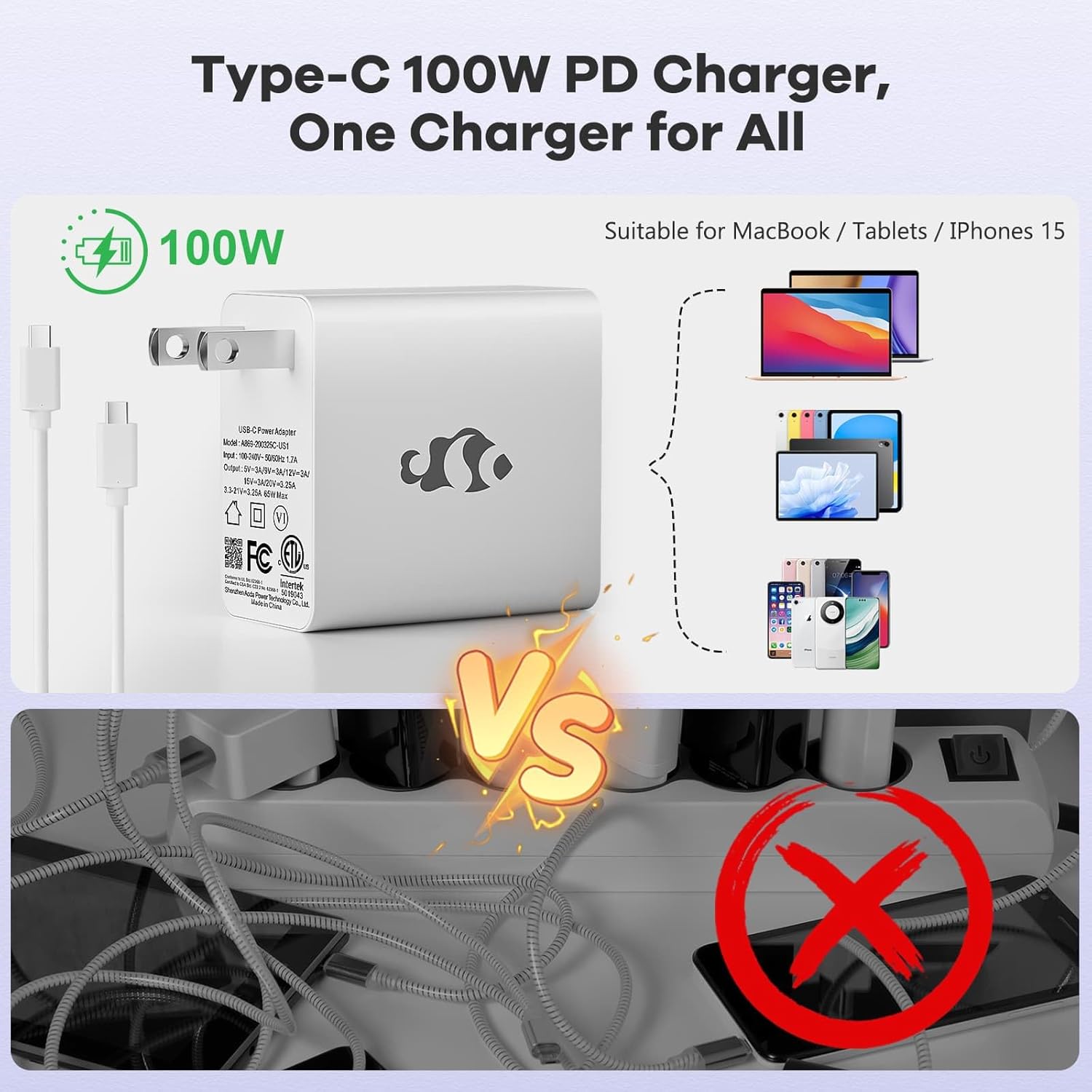
Şekil 3.1: Tip-C 100W PD Hızlı Şarj Cihazı
The compact 100W USB-C PD fast charger and 6.56ft cable provide efficient power delivery, compatible with various devices.
3.2 Çevre Birimlerini Bağlama
Your NIMO laptop offers multiple ports for enhanced versatility. Refer to the diagram below for port locations and types:
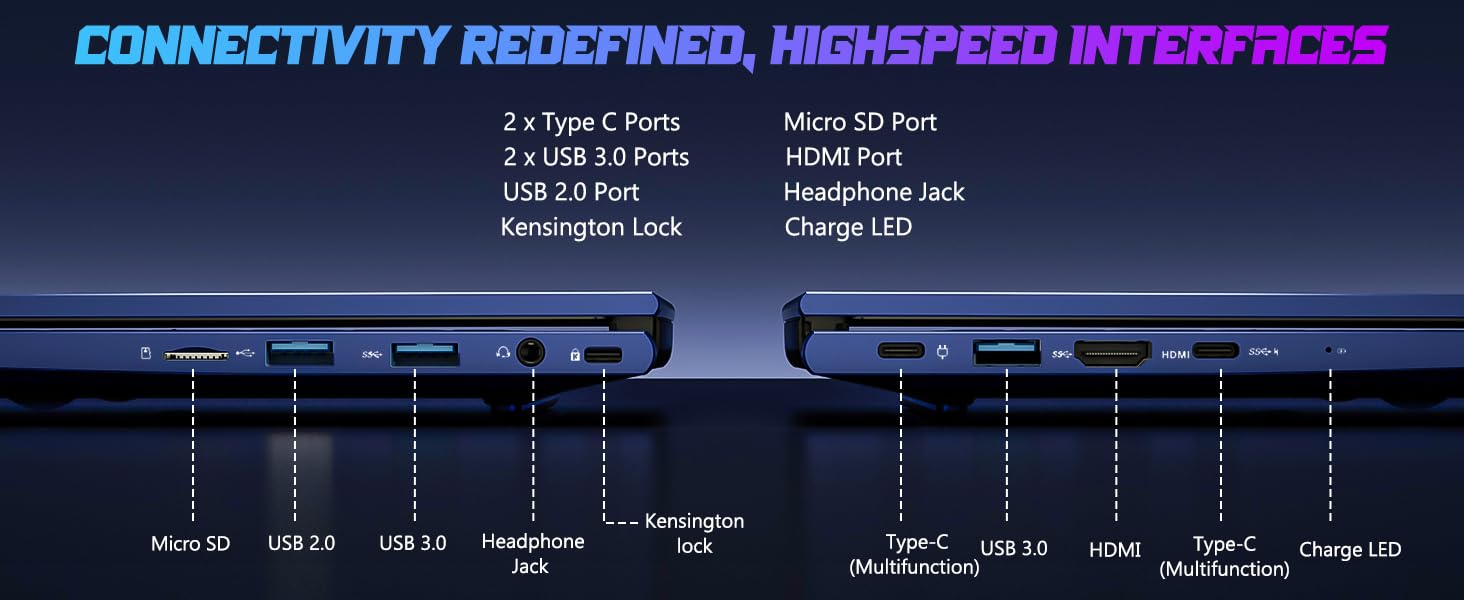
Figure 3.2: Connectivity Ports
The laptop includes 2x Type-C ports, 2x USB 3.0 ports, 1x USB 2.0 port, Micro SD port, HDMI port, Headphone Jack, and Kensington Lock for comprehensive connectivity.
- USB Bağlantı Noktaları: Connect external devices such as mice, keyboards, or external storage drives.
- HDMI Bağlantı Noktası: Daha büyük bir ekran için harici bir monitöre veya televizyona bağlayın.
- Kulaklık girişi: Kulaklıklara veya harici hoparlörlere ses çıkışı için.
- Mikro SD Yuvası: Insert a Micro SD card for additional storage or data transfer.
4. Dizüstü Bilgisayarınızı Çalıştırma
4.1 Ekran Özellikleri
The NIMO laptop features a 15.6" FHD IPS (1920x1080) anti-glare display with an 85% screen-to-body ratio, providing clear and vibrant visuals for all your tasks.
4.2 Keyboard and Fingerprint Reader
The laptop is equipped with a backlit keyboard for comfortable typing in various lighting conditions and a multi-touch touchpad for precise navigation. The built-in fingerprint reader allows for secure, one-touch login.

Figure 4.1: Backlit Keyboard and Fingerprint Reader
The backlit keyboard enhances visibility, while the integrated fingerprint reader provides quick and secure access to your system.
4.3 Webcam Privacy
For enhanced privacy, the laptop includes a built-in privacy camera switch, allowing you to easily disable the 2.0M webkullanılmadığında kam.

Şekil 4.2: WebKamera Kalkanı
The physical webcam shield provides an extra layer of privacy, ensuring your camera is off when you need it to be.
4.4 Performans Üzerineview
The NIMO laptop is powered by an AMD Ryzen 5 6600H CPU (6 cores, 12 threads, up to 4.5 GHz) and an integrated AMD Radeon 660M GPU (6nm process, 6 GPU cores, 1900 MHz). This configuration provides balanced performance for productivity and light gaming.

Figure 4.3: Outstanding Performance
The AMD Ryzen 5 6600H processor and Radeon 660M iGPU deliver robust performance for various computing tasks.
With 32GB of DDR5 RAM and a 1TB PCIe 4.0 SSD, the laptop ensures seamless multitasking, faster load times, and ampsizin için dosya depolama files and applications. The memory is upgradable to 64GB and the SSD is detachable for future expansion.

Figure 4.4: Seamless Multitasking and AmpDepolama
The combination of 32GB DDR5 RAM and a 1TB PCIe 4.0 SSD provides lightning-fast performance and significant storage capacity.
4.5 Pil Ömrü
The laptop is equipped with a 54Wh smart battery, providing up to 5 hours of active use and up to 10 hours of standby time. A 15-minute charge can provide up to 2 hours of standby time with the 100W PD fast charger.

Figure 4.5: 54Wh Smart Battery
The efficient 54Wh smart battery offers extended usage and quick charging capabilities.
5. Bakım
NIMO dizüstü bilgisayarınızın uzun ömürlü ve optimum performans göstermesi için aşağıdaki bakım yönergelerini izleyin:
- Temiz Tutun: Ekranı düzenli olarak mikrofiber bezle, klavyeyi ise basınçlı hava ile temizleyerek toz ve kirlerden arındırın.
- Yazılım Güncellemeleri: Keep your Windows 11 operating system and drivers updated to ensure security and performance improvements.
- Pil Bakım: Avoid completely draining the battery frequently. For long-term storage, charge the battery to about 50-60%.
- Uygun Havalandırma: Ensure the laptop's vents are not obstructed to prevent overheating. Use it on a hard, flat surface.
- Güvenli Kullanım: Dizüstü bilgisayarı düşürmekten veya şiddetli darbelere maruz bırakmaktan kaçının.
6. Sorun Giderme
Bu bölümde, NIMO dizüstü bilgisayarınızla karşılaşabileceğiniz yaygın sorunlar ele alınmaktadır.
| Sorun | Olası Neden | Çözüm |
|---|---|---|
| Dizüstü bilgisayar açılmıyor | Pil zayıf; Güç adaptörü sorunu | Connect the charger and wait a few minutes. Ensure the power adapter is securely connected to both the laptop and the outlet. |
| Yavaş performans | Çok fazla uygulama çalışıyor; Düşük disk alanı; Eski sürücüler | Gereksiz uygulamaları kapatın. Disk alanını boşaltın. Windows ve aygıt sürücülerini güncelleyin. |
| Wi-Fi bağlantı sorunları | Wi-Fi adaptörü kapalı; Yönlendirici sorunu; Sürücü sorunu | Windows ayarlarında Wi-Fi'nin etkin olduğundan emin olun. Yönlendiricinizi yeniden başlatın. Wi-Fi sürücülerini güncelleyin. |
| Klavye arka ışığı çalışmıyor. | Backlight disabled; Driver issue | Press the dedicated backlight key (usually Fn + F key). Check keyboard drivers in Device Manager. |
Burada listelenmeyen sorunlarla karşılaşırsanız veya daha fazla yardıma ihtiyacınız olursa, lütfen NIMO müşteri desteğiyle iletişime geçin.
7. Özellikler
Detailed technical specifications for the NIMO 15.6" IPS FHD-Gaming-Laptop:
| Özellik | Detay |
|---|---|
| Ayakta Ekran Görüntüleme Boyutu | 15.6 inç |
| Maksimum Ekran Çözünürlüğü | 1920 x 1080 Piksel (FHD IPS) |
| İşlemci | AMD Ryzen 5 6600H (6 Çekirdek, 4.5 GHz'e kadar) |
| Veri deposu | 32 GB DDR5 (4800 MHz) |
| Sabit Sürücü | 1 TB SSD (PCIe 4.0) |
| Grafik Eş İşlemcisi | AMD Radeon 660M (Entegre) |
| İşletim Sistemi | Windows 11 |
| Kablosuz Tip | 802.11a/b/g/n/ac |
| USB Bağlantı Noktaları | 1 adet USB 2.0, 3 adet USB 3.0, 2 adet Type-C |
| Ortalama Pil Ömrü | 5 Hours (active use) |
| Ürün Ağırlığı | 3.8 pound |
| Ürün Boyutları | 14.07 x 8.98 x 0.76 inç |
| Renk | Mavi |
| Özel Özellikler | Arkadan Aydınlatmalı Klavye, Parmak İzi Okuyucu, HD Ses, Sayısal Tuş Takımı |
8. Garanti ve Destek
NIMO, yüksek kaliteli ürünler ve mükemmel müşteri hizmeti sunmaya kendini adamıştır.
8.1 Garanti Bilgileri
Your NIMO laptop comes with a comprehensive 2 Yıllık Üretici Garantisi. This warranty covers defects in materials and workmanship under normal use. Additionally, we offer a 90 Günlük Sorunsuz İade Politikası satın alma tarihinden itibaren.
8.2 Müşteri Desteği
Our dedicated support team is ready to assist you with any questions or issues. For technical support, warranty claims, or general inquiries, please contact us via:
- E-posta: service@nimopc.com
- Çevrimiçi: NIMO'nun resmi sitesini ziyaret edin. webSSS ve destek kaynakları için site.
We strive to resolve any issues swiftly and ensure your satisfaction.
8.3 Ürün Üzeriview Video
Hızlı bir genel bakış için bu resmi videoyu izleyin.view of the NIMO laptop's features and benefits:
Video: NIMO Laptop Overview
This video provides a brief look at the NIMO 15.6" laptop, highlighting its key features and user experience, including its display, camera, and overall performance.


