1. Giriş
Satın aldığınız için teşekkür ederizasing the SENCOR SPT 3907 Bluetooth Radio Player. This compact and versatile device offers multiple audio playback options, including CD, Bluetooth, USB, and FM radio. This manual provides essential information for safe and efficient use of your new player. Please read it thoroughly before operation and retain it for future reference.
2. Güvenlik Talimatları
- Güç Kaynağı: Güç kaynağı hacmini sağlayıntage matches the rating indicated on the unit. Use only the provided power cable.
- Su ve Nem: Cihazı yağmur, nem veya damlayan/sıçrayan sıvılara maruz bırakmayın. Cihazın üzerine vazo gibi sıvı dolu nesneler koymayın.
- Havalandırma: Havalandırma açıklıklarını hiçbir şekilde kapatmayın. Uygun hava akışı için ünitenin etrafında yeterli boşluk olduğundan emin olun.
- Sıcaklık: Üniteyi radyatörler, kalorifer ızgaraları, sobalar veya diğer cihazlar (dahil) gibi ısı kaynaklarından uzak tutun. amp(ısı üreten)
- Temizlik: Temizlemeden önce cihazı prizden çıkarın. Yumuşak, kuru bir bez kullanın. Sıvı temizleyiciler veya aerosol temizleyiciler kullanmayın.
- Servis: Bu ürüne kendiniz servis vermeye çalışmayın. Tüm servis işlemleri için kalifiye servis personeline başvurun.
- Piller: When using batteries, ensure correct polarity. Do not mix old and new batteries, or different types of batteries. Remove batteries if the unit is not used for extended periods.
3. Paket İçeriği
Paketin içinde tüm öğelerin mevcut olduğundan emin olun:
- SENCOR SPT 3907 Radio Player
- Uzaktan kumanda
- AC Güç Kablosu
- Belgeler (bu kılavuz)
4. Ürün Özellikleri
The SENCOR SPT 3907 is designed for versatile audio entertainment:
- Çıkış Gücü: 4W RMS for clear sound.
- CD Çalar: Supports CD-R/RW discs with programmable playback for up to 20 songs.
- Bluetooth Bağlantısı: Bluetooth V2.1 + EDR for wireless audio streaming from compatible devices.
- USB Oynatma: USB connection for MP3 file playback with programmable playback for up to 99 songs.
- FM Radyo: Stereo FM radio receiver with digital tuning and 30 station presets.
- YARDIMCI: 3.5mm auxiliary input for connecting external audio sources.
- Görüntülemek: Backlight LCD display for easy navigation.
- Uzaktan kumanda: Full-function remote control for convenient operation.
- Güç Seçenekleri: Operates on AC 100-240V or D/LR20 batteries for portability.
- Ek Fonksiyonlar: Repeat and random playback modes.
5. Kontroller ve İşlevler
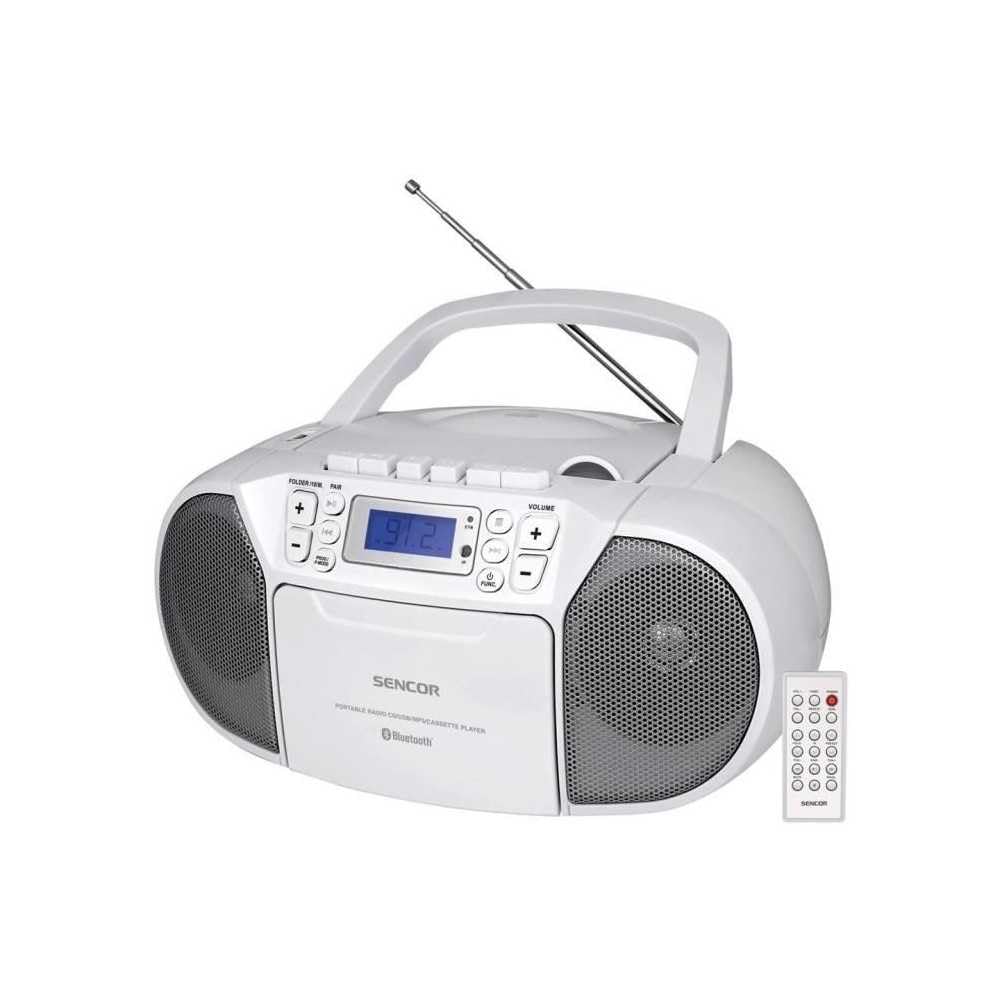
Ön view of the SENCOR SPT 3907 unit, highlighting the control buttons, LCD screen, CD tray, and speakers. The remote control is also visible.
Ön Panel Kontrolleri:
- Güç düğmesi: Üniteyi açar veya kapatır.
- MOD Düğmesi: Switches between CD, Bluetooth, USB, FM Radio, and AUX-IN modes.
- SES +/- Düğmeleri: Ses çıkış seviyesini ayarlar.
- PLAY/PAUSE (►/▮▮) Button: Starts or pauses playback in CD, Bluetooth, or USB mode.
- SKIP (◀◀ / ►►) Buttons: Önceki veya sonraki parçaya/istasyona atlar.
- DURDUR (■) Düğmesi: Oynatmayı durdurur.
- FOLDER / PAIR Button: Navigates folders in USB mode; initiates Bluetooth pairing.
- FUNC Düğmesi: Accesses additional functions (e.g., program, repeat, random).
- LCD Ekran: Geçerli modu, parça numarasını, frekansı ve diğer bilgileri gösterir.
- CD Bölmesi: Ses CD'lerini takmak için.
- USB Bağlantı Noktası: USB depolama aygıtlarını bağlamak için.
- AUX-IN Jakı: Harici ses aygıtlarını bağlamak için.
- Kulaklık Çıkışı: Özel dinleme için.
Arka Panel Kontrolleri:
- AC Güç Girişi: Connects the AC power cable.
- FM Anteni: Extendable telescopic antenna for FM reception.
Uzaktan kumanda:
The remote control duplicates most of the front panel functions for convenient operation from a distance. Refer to the remote control diagram in the included documentation for specific button layouts.
6. Kurulum
6.1 Güç Bağlantısı
The SENCOR SPT 3907 can be powered by AC mains or batteries.
AC Gücü:
- Ünitenin kapalı olduğundan emin olun.
- Connect the supplied AC power cable to the AC input jack on the rear of the unit.
- Plug the other end of the AC power cable into a standard wall outlet (AC 100-240V, 50/60Hz).
Pil Gücü:
- Ünitenin altında bulunan pil bölmesi kapağını açın.
- Insert 6 x D/LR20 size batteries (not included), ensuring correct polarity (+/-) as indicated inside the compartment.
- Pil bölmesi kapağını sıkıca kapatın.
Note: When the AC power cable is connected, battery power is automatically disconnected. Remove batteries if the unit will not be used for an extended period to prevent leakage.
6.2 Anten Kurulumu
For optimal FM radio reception, fully extend the telescopic FM antenna located on the rear of the unit. Adjust its position for the best signal.
7. Kullanım Talimatları
7.1 Güç Açma/Kapatma ve Mod Seçimi
- Basın GÜÇ button to turn the unit on. The LCD display will light up.
- Basın MOD button repeatedly to cycle through available modes: CD, Bluetooth, USB, FM Radio, AUX-IN. The selected mode will be shown on the LCD display.
- Basın GÜÇ üniteyi kapatmak için tekrar düğmesine basın.
7.2 CD Oynatma
- Basın MOD CD modunu seçmek için düğmesine basın.
- CD bölmesinin kapağını açın.
- Place a CD (CD-R/RW compatible) with the label side facing up onto the spindle.
- Close the CD compartment cover. The unit will read the disc, and the total number of tracks will appear on the display.
- Basın OYNAT/DURDUR oynatmayı başlatmak için düğmesine basın.
- Kullanın ATLA (◀◀ / ►►) Parçaları atlamak için düğmeler.
- Basın DUR (■) Oynatmayı durdurmak için düğmesine basın.
- Program Oynatma: While in STOP mode, press the FUNC Program moduna girmek için düğmeyi kullanın. ATLAMAK buttons to select tracks and FUNC again to confirm. Up to 20 CD songs can be programmed.
7.3 Bluetooth Çalışması
- Basın MOD button to select Bluetooth mode. The display will show 'BT' and flash, indicating it's in pairing mode.
- Bluetooth özellikli cihazınızda (örneğin, akıllı telefon, tablet) Bluetooth'u etkinleştirin ve kullanılabilir cihazları arayın.
- Select 'SPT 3907' from the list of devices. Once paired, the 'BT' indicator on the display will stop flashing and remain solid.
- Start playing audio on your connected device. The sound will be streamed through the SENCOR SPT 3907.
- Kullanın OYNAT/DURDUR Ve ATLAMAK Oynatmayı yönetmek için cihaz üzerindeki düğmeler veya uzaktan kumanda kullanılır.
7.4 USB Oynatma
- Insert a USB flash drive (containing MP3 files) USB portuna takın.
- Basın MOD button to select USB mode. The unit will automatically read the files.
- Basın OYNAT/DURDUR oynatmayı başlatmak için düğmesine basın.
- Kullanın ATLA (◀◀ / ►►) Parçaları atlamak için düğmeler.
- Basın KLASÖR button to navigate between folders on the USB drive.
- Program Oynatma: While in STOP mode, press the FUNC Program moduna girmek için düğmeyi kullanın. ATLAMAK buttons to select tracks and FUNC again to confirm. Up to 99 MP3 songs can be programmed.
7.5 FM Radyo Çalışması
- Basın MOD button to select FM Radio mode. The current frequency will appear on the display.
- Daha iyi alım için teleskopik anteni uzatın.
- Otomatik Ayarlama: Basılı tutun ATLA (◀◀ / ►►) Birkaç saniye boyunca düğmelere basarak bir sonraki müsait istasyonu otomatik olarak tarayabilirsiniz.
- Manuel Ayarlama: Kısaca basın ATLA (◀◀ / ►►) buttons to fine-tune the frequency step-by-step.
- Önceden Ayarlanmış İstasyonlar: To save a station, tune to the desired frequency, then press the FUNC buton. Kullanmak ATLAMAK Önceden ayarlanmış bir numara (P01-P30) seçmek için düğmelere basın, ardından basın. FUNC Tekrar onaylamak için.
- Önceden ayarlanmış bir istasyonu geri çağırmak için tuşuna basın. FUNC Kaydedilmiş istasyonlar arasında geçiş yapmak için düğmeye art arda basın.
7.6 AUX-IN Bağlantısı
- Connect one end of a 3.5mm audio cable (not included) to the AUX-IN jack on the SENCOR SPT 3907.
- Kablo ucunun diğer ucunu harici ses cihazınızın (örneğin, MP3 çalar, akıllı telefon) kulaklık girişine veya ses çıkışına bağlayın.
- Basın MOD AUX-IN modunu seçmek için düğmeye basın.
- Start playback on your external device. The audio will be played through the SENCOR SPT 3907.
- kullanarak ses seviyesini ayarlayın. HACİM +/- buttons on the unit or remote control, and also on your external device.
8. Bakım
8.1 Ünitenin Temizlenmesi
Wipe the exterior of the unit with a soft, dry cloth. Do not use abrasive cleaners, waxes, or solvents as they may damage the finish. Ensure the unit is unplugged from the power source before cleaning.
8.2 CD Lens Bakımı
If the CD player experiences reading errors, the lens may need cleaning. Use a commercially available CD lens cleaner disc. Do not touch the lens directly.
8.3 Pil Değişimi
When the unit operates on batteries and the sound becomes distorted or the unit stops functioning, replace all batteries with new D/LR20 batteries, ensuring correct polarity.
9. Sorun Giderme
| Sorun | Olası Neden | Çözüm |
|---|---|---|
| Güç yok | Güç kablosu bağlı değil; piller bitmiş veya yanlış takılmış. | Check AC power connection; Replace batteries, ensuring correct polarity. |
| Ses yok | Ses seviyesi çok düşük; Yanlış mod seçildi; Kulaklık bağlı. | Increase volume; Select correct mode (CD, BT, USB, FM, AUX); Disconnect headphones. |
| CD çalmıyor / Atlıyor | CD dirty or scratched; CD inserted incorrectly; CD lens dirty. | Clean or replace CD; Insert CD with label side up; Use a CD lens cleaner. |
| Bluetooth bağlanmıyor | Unit not in pairing mode; Device too far; Bluetooth not enabled on external device. | Ensure unit is in BT pairing mode; Move device closer; Enable Bluetooth on your device. |
| Zayıf FM alımı | Anten doğru şekilde uzatılmamış veya konumlandırılmamış; Sinyal zayıf. | Teleskopik anteni tamamen uzatın ve ayarlayın; Cihazı farklı bir yere taşımayı deneyin. |
10. Özellikler
| Özellik | Şartname |
|---|---|
| Örnek | SPT3907 |
| Çıkış Gücü | 4W RMS |
| Desteklenen Medya | CD-R, CD-RW, Bluetooth, MP3, USB |
| Bluetooth Sürümü | V2.1 + EDR |
| FM Radyo Ön Ayarları | 30 istasyon |
| Bağlantı | Auxiliary (3.5mm), USB |
| Güç Kaynağı | AC 100-240V, 50/60Hz; 6 x D/LR20 batteries |
| Ürün Ağırlığı | 1 kilo 960 gr |
| Boyutlar | (Sağlanan verilerde belirtilmemiştir) |
11. Garanti ve Destek
SENCOR products are manufactured to high-quality standards and are warranted against manufacturing defects. For specific warranty terms and conditions, please refer to the warranty card included with your purchase or visit the official SENCOR website. For technical support, service, or inquiries, please contact your local SENCOR distributor or authorized service center.


