1. Giriş
This manual provides detailed instructions for the Tenlamp G9 Podcast Equipment Audio Mixer. Please read this manual thoroughly before using the device to ensure proper operation and to maximize its features. The G9 mixer is designed for podcasting, live streaming, short video recording, and other audio content creation, offering a range of audio control and enhancement functions.
2. Ürün Bittiview
The Tenlamp G9 is a versatile audio mixer featuring a 4.5-inch HD screen for real-time audio adjustments. It includes a 3-band EQ, dual reverb, voice changer, and noise reduction capabilities. The device is designed for plug-and-play compatibility with PCs, Macs, and mobile devices.
2.1 Temel Özellikler
- Tak ve Çalıştır: Quick connection to PC, Mac, or mobile devices without complex setup.
- Visual Audio Mixing: 4.5-inch HD screen displays audio adjustments in real-time.
- Gürültü Azaltma: Ensures clear voice output for recordings and live broadcasts.
- Kapsamlı Kontrol: Individual controls for microphone, music, headphone, main output, 3-band EQ, dual reverb, and pitch.
- Ses Özelleştirme: Includes voice changer and auto-tune functions.
2.2 Paket İçeriği
- 1x Tenlamp G9 Audio Mixer
- 1x USB A-C Cable
- 1x 3.5mm TRRS Audio Cable
- 1x USB-C OTG Cable
- 1x Kullanım Kılavuzu (bu belge)
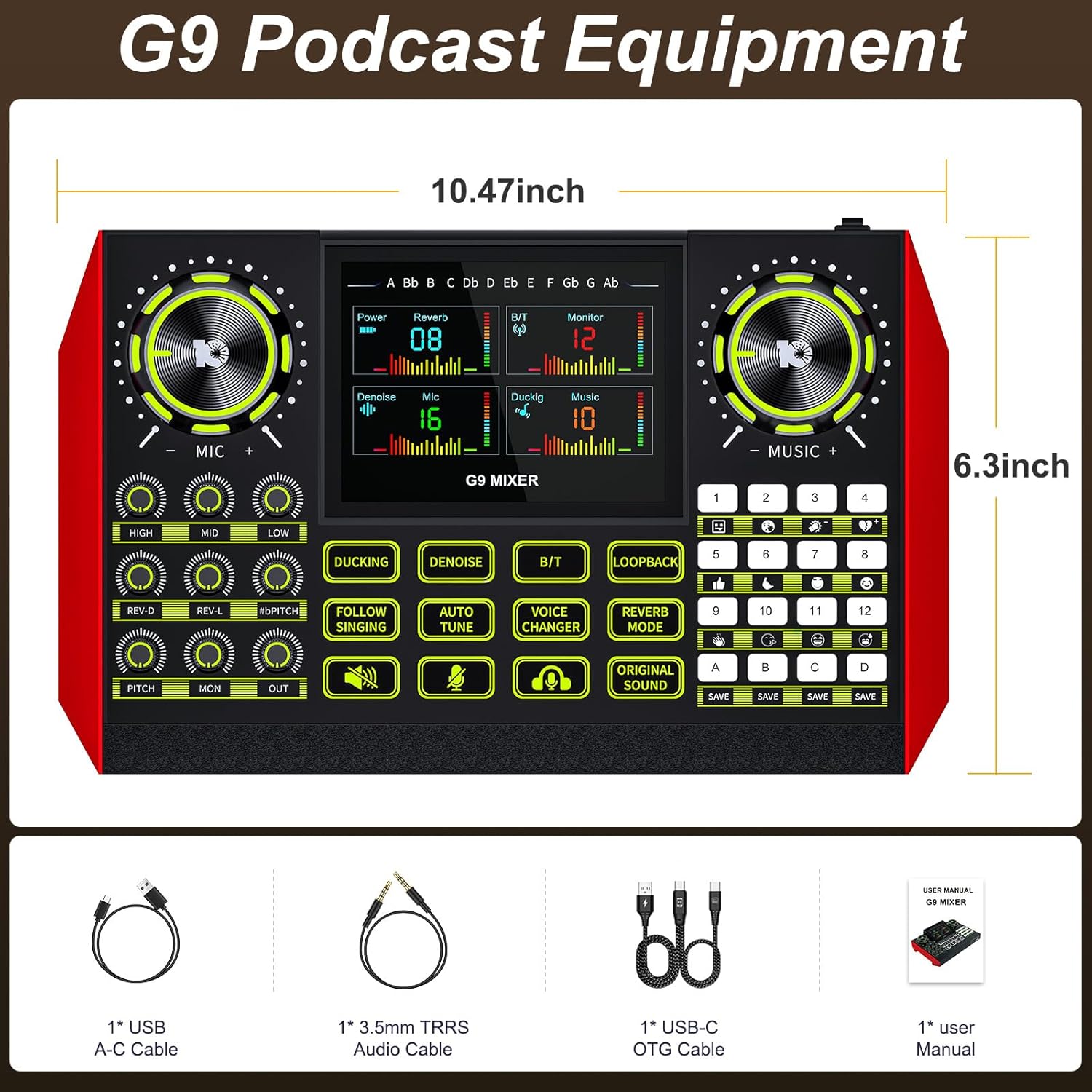
The G9 mixer measures approximately 10.47 inches in width and 6.3 inches in height.
3. Kurulum
The Tenlamp G9 mixer is designed for straightforward setup. Follow these steps to connect your device.
3.1 Güce Bağlama
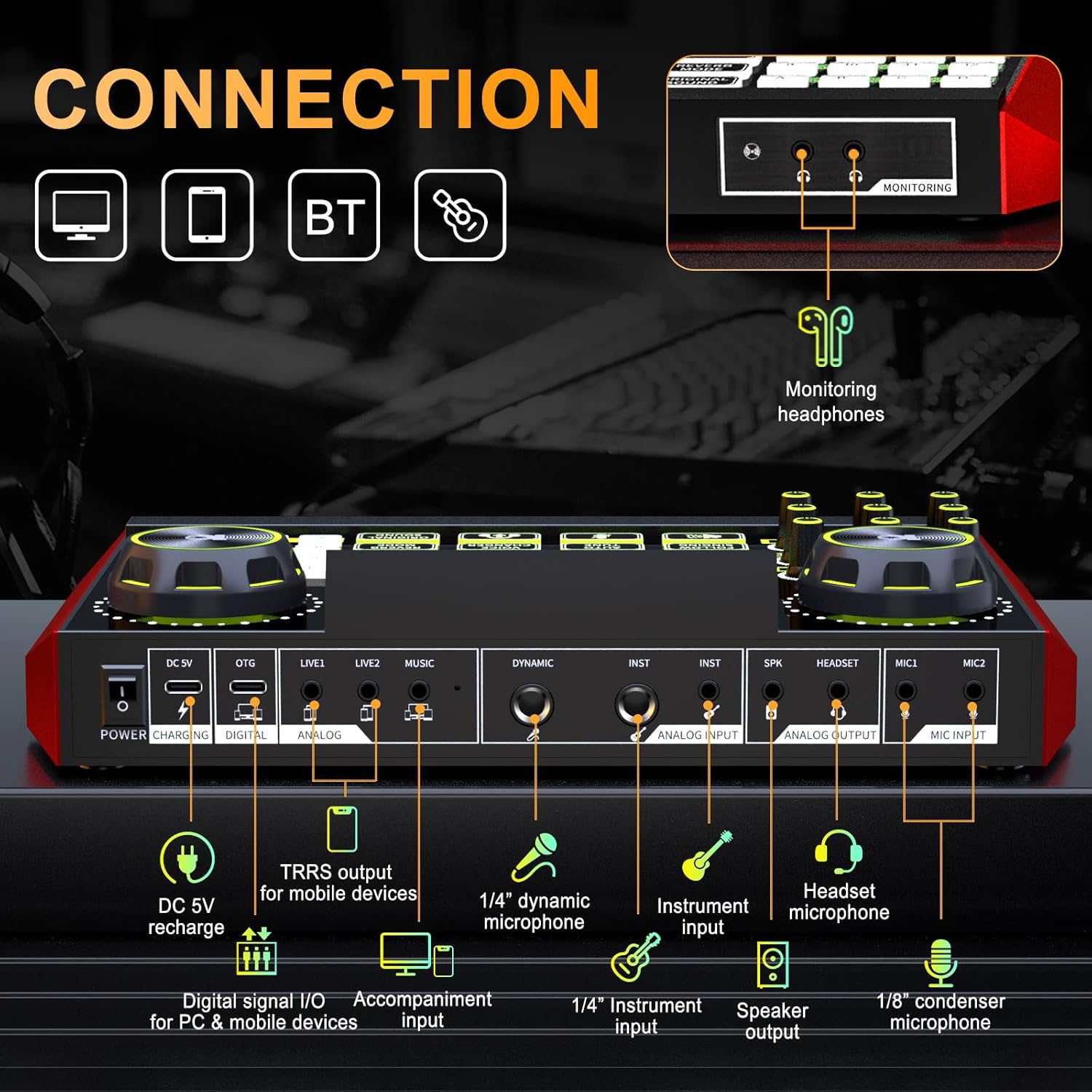
Connect the provided USB A-C cable to the DC 5V port on the mixer and to a power source (e.g., computer USB port, USB wall adapter). The mixer also features a built-in battery for portable use.
3.2 Mikrofon ve Enstrümanların Bağlanması
- Microphone Input (MIC1, MIC2): Use 1/8" (3.5mm) condenser microphones.
- Dynamic Microphone Input (DYNAMIC): Use a 1/4" dynamic microphone.
- Instrument Input (INST): Connect instruments via a 1/4" jack.
- Kulaklık Mikrofonu: Connect a headset with a microphone to the dedicated headset port.
3.3 Connecting to Devices (PC, Mac, Mobile)
- Digital Signal I/O (DIGITAL): Use the USB-C OTG cable to connect to a PC, Mac, or compatible mobile device for digital audio input and output.
- Analog Input/Output (LIVE1, LIVE2, MUSIC): Use 3.5mm TRRS audio cables for analog connections to mobile devices or other audio sources.
- Bluetooth (BT): Activate Bluetooth on the mixer and your device to pair wirelessly for music input.
3.4 Monitoring Headphones and Speaker Output
- Monitoring Headphones (MONITORING): Connect headphones to the 3.5mm monitoring jack to hear your mix in real-time.
- Speaker Output (SPK): Ses çalma için harici hoparlörleri bağlayın.
4. Operasyon
The G9 mixer provides intuitive controls for managing your audio. The 4.5-inch HD screen displays current settings and levels, allowing for precise adjustments.
4.1 Güç Açma/Kapatma
Press and hold the Power button to turn the mixer on or off. The screen will illuminate upon activation.
4.2 Adjusting Microphone Settings
Use the dedicated knobs for YÜKSEK, ORTA, Ve DÜŞÜK to adjust the 3-band equalizer for your microphone. The REV-D Ve REV-L knobs control the dual reverb depth and length. The SAHA knob adjusts the microphone's pitch.

4.3 Music and Output Volume
The MÜZİK knob controls the input volume of background music. The Pzt knob adjusts the monitoring volume for your headphones, and the DIŞARI knob controls the main output volume.
4.4 Özel Fonksiyonlar
- ISLANMA: Automatically lowers background music volume when you speak.
- GÜRÜLTÜDEN KORUNMA: Activates the noise reduction feature for clearer vocals.
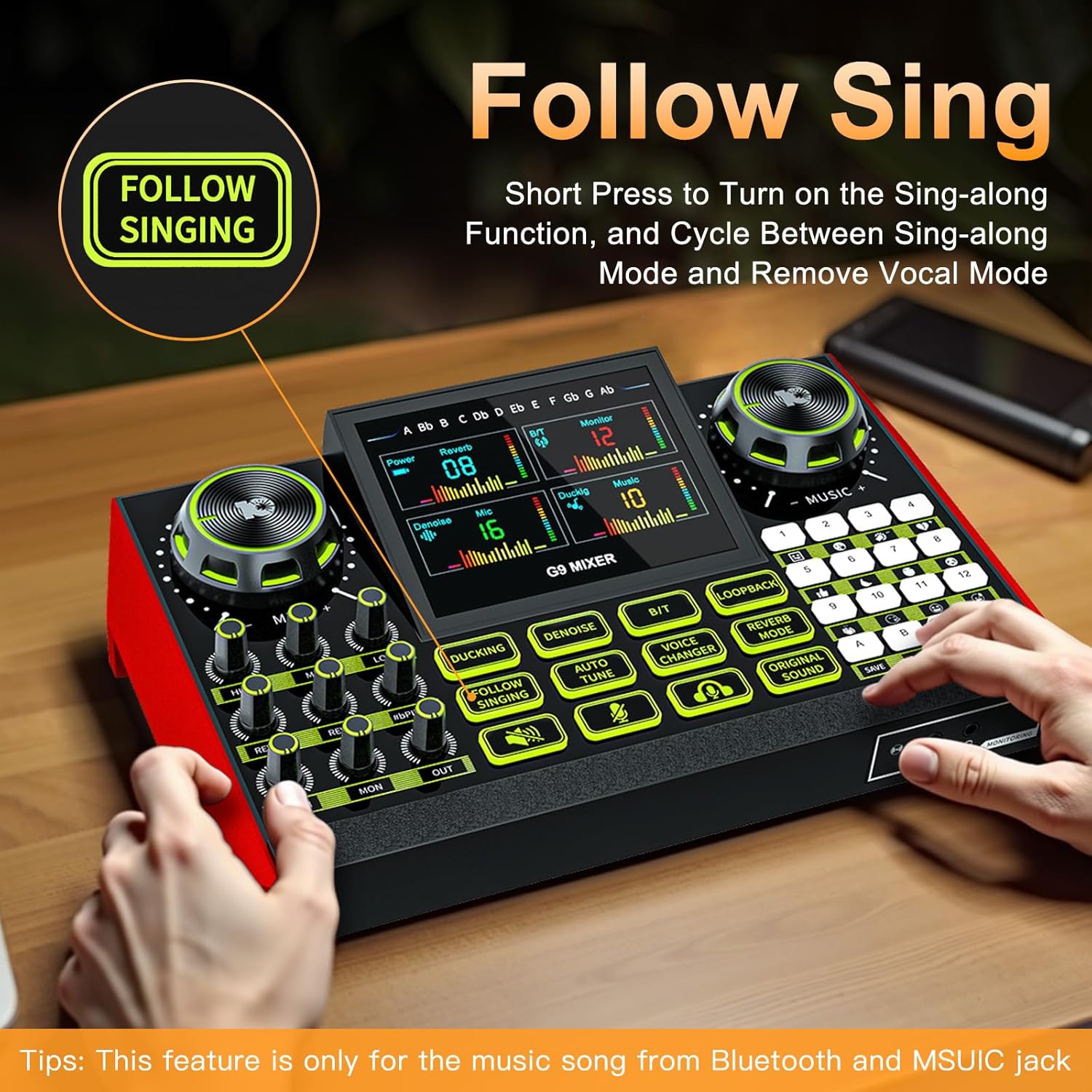
- FOLLOW SINGING: Short press to turn on the sing-along function, which cycles between sing-along mode and vocal removal mode. Note: This feature is primarily for music from Bluetooth and the MUSIC jack.
- OTOMATİK AYAR: Engages the auto-tune effect for vocals.
- SES DEĞİŞTİRİCİ: Cycles through four different voice changing modes (female voice, uncle voice, baby voice, magic voice).
- GERİ DÖNGÜ: Enables or disables the loopback function, which sends the output audio back to the input for recording or streaming.
- REVERB MODU: Yankı efektini ayarlar.
- ORIGINAL SOUND: Restores the original sound without effects.

4.5 Customizable Sound Pads
The G9 mixer features four customizable sound pads (A, B, C, D). You can save your favorite voice modes, including current microphone volume, EQ, reverb, pitch, and auto-tune settings, to these pads for quick recall.

5. Bakım
To ensure the longevity and optimal performance of your Tenlamp G9 Audio Mixer, follow these maintenance guidelines:
- Temizlik: Use a soft, dry cloth to clean the surface of the mixer. Avoid using abrasive cleaners, solvents, or harsh chemicals.
- Depolamak: Mikseri serin, kuru ve doğrudan güneş ışığından ve aşırı sıcaklıklardan uzak bir yerde saklayın.
- İşleme: Cihazı dikkatli kullanın. Düşürmeyin veya sert darbelere maruz bırakmayın.
- Sıvıya Maruz Kalma: Keep the mixer away from liquids. Moisture can damage internal components.
6. Sorun Giderme
If you encounter issues with your Tenlamp G9 Audio Mixer, refer to the following common problems and solutions:
6.1 Ses Çıkışı Yok
- Bağlantıları Kontrol Edin: Ensure all audio cables (microphone, headphones, speakers, device connections) are securely plugged into the correct ports.
- Ses Seviyeleri: Şunu doğrulayın: MİKROFON, MÜZİK, Pzt, Ve DIŞARI volume knobs are not set to minimum or muted.
- Cihaz ayarları: On your connected PC, Mac, or mobile device, ensure the G9 mixer is selected as the default audio input and output device.
- Güç: Confirm the mixer is powered on and has sufficient battery charge or is connected to a power source.
6.2 Kötü Ses Kalitesi / Gürültü
- Gürültü Azaltma: Etkinleştir GÜRÜLTÜSÜ AZALTMAK function to reduce background noise.
- Mikrofon Yerleşimi: Ensure the microphone is positioned correctly and not too far from the sound source.
- Kablo Kalitesi: Use high-quality, shielded audio cables to minimize interference.
- Seviye Kazanın: Adjust microphone gain to prevent clipping or distortion.
6.3 Voice Changer / Effects Not Working
- Fonksiyon Aktivasyonu: Ensure the specific effect button (e.g., SES DEĞİŞTİRİCİ, OTOMATİK AYAR) is pressed and active.
- Mikrofon Girişi: Confirm that your microphone is properly connected and receiving input.
6.4 Difficulty with Initial Setup
While the G9 is plug-and-play, some users may find initial setup challenging. Double-check all physical connections and ensure the mixer is recognized by your operating system. Refer to the
İlgili Belgeler - G9
 |
onlukamp KB11 Outdoor Sound Card User Manual Comprehensive user manual for the Tenlamp KB11 Outdoor Sound Card, covering setup, features, connections, troubleshooting, and technical specifications for live streaming, podcasting, and recording. |
 |
G1 Audio Console User Manual: Portable Sound Mixer for Streaming & Podcasting This user manual provides detailed information on the Tenlamp G1 Audio Console, a multi-function sound mixer for beginners. It covers product overview, specifications, panel layout, connection guides for smartphones and computers, Bluetooth setup, troubleshooting, and noise treatment tips for live streaming, podcasting, and recording. |
 |
onamp G5Pro Ses Konsolu Kullanım Kılavuzu - Canlı Yayın, Podcast Yayını, Kayıt Tenl için kapsamlı kullanıcı kılavuzuamp Canlı yayın, podcast, kayıt ve şarkı söyleme için çok yönlü, hepsi bir arada bir çözüm olan G5Pro Ses Konsolu. Özellikleri arasında vokal efektleri, dijital kayıt, BT bağlantısı ve tak-çalıştır özelliği bulunur. |
 |
onamp OU200 USB Microphone User Manual Tenl için kapsamlı kullanıcı kılavuzuamp OU200 USB microphone, covering features, setup for Windows and Mac, specifications, and usage for podcasting, streaming, and home studio recording. |
 |
onamp G10 Taşınabilir Ses Mikseri Kullanım Kılavuzu Tenl için kapsamlı kullanıcı kılavuzuamp G10 Portable Audio Mixer, detailing its features, specifications, connection guides, and troubleshooting tips for live streaming, podcasting, and recording on mobile devices and PCs. |
 |
onamp G3 Audio Console User Manual: Live Streaming & Podcast Mixer Tenl için kapsamlı kullanıcı kılavuzuamp G3 Audio Console, a portable USB audio mixer for live streaming, podcasting, and recording on smartphones and PCs. Learn about features, connections, and troubleshooting. |