giriiş
This manual provides essential information for the safe and efficient operation of your Ulefone Armor 34 Pro Plus 5G Rugged Phone. It covers device setup, feature usage, maintenance, and troubleshooting. Please read this manual thoroughly before using your device to ensure optimal performance and longevity.
Video: Ulefone Armor 34 Pro Rugged Phone overview, gösterasinsağlam tasarımı ve temel özellikleriyle öne çıkıyor.
Kutuda Neler Var?
Ürün paketinizde tüm öğelerin mevcut olduğunu doğrulayın:
- 1 x Telefon
- 1 x AC Power Charger, 66W
- 1 x Tip-C - Tip-C Veri Kablosu (100 cm)
- 1 x Koruyucu Film (Önceden Takılmış)
- 1 x Temperli Cam Ekran Koruyucu
- 1 x SIM İğne
- 1 x Boyun Askısı
- 1 x Çok Dilli Kullanıcı Kılavuzu
- 1 x Şarj Talimatı Kartı
- 1 x Güvenlik Uyarı Kartı

Image: Contents of the Ulefone Armor 34 Pro Plus retail package.
Kurmak
1. SIM Kart ve Depolama Kurulumu
- Cihazın yan tarafında bulunan SIM kart tepsisini bulun.
- SIM kartın iğnesini, tepsinin yanındaki küçük deliğe takarak kartı çıkarın.
- Place your Nano-SIM cards and/or a microSD card (up to 2TB) into the designated slots on the tray. Ensure correct orientation.
- Tepsiyi yerine oturana kadar dikkatlice telefona yeniden yerleştirin.
2. İlk Güç Açma ve Yapılandırma
- Ulefone logosu görünene kadar Güç düğmesini basılı tutun.
- Dilinizi seçmek, Wi-Fi'ye bağlanmak ve Google hesabınızı kurmak için ekrandaki talimatları izleyin.
- Configure security settings such as fingerprint unlock or face unlock for enhanced device protection.
3. Cihazın Şarj Edilmesi
Connect the provided 66W AC power charger and Type-C cable to the phone's charging port. The device supports fast charging. Ensure the charger is connected to a compatible power outlet. The phone also supports 10W reverse charging, allowing it to act as a power bank for other devices.
Kullanım Talimatları
1. General Phone Operation
The Ulefone Armor 34 Pro Plus runs on Android 15. Navigate the interface using touch gestures. Swipe up from the bottom for the app drawer, swipe down from the top for notifications and quick settings. Customize your home screen by long-pressing on empty space.
2. 5G Network Connectivity
The device supports global 5G networks with dual SIM dual standby functionality. Ensure your SIM cards are properly installed and your mobile data plan supports 5G. Access network settings via Ayarlar > Ağ ve internet > Mobil ağ Tercihleri yapılandırmak için.
3. Projector Functionality
The Ulefone Armor 34 Pro Plus features a built-in DLP projector with 150 lumens brightness and 854x480 resolution. It supports smart autofocus and ±40° keystone correction for clear projection. The integrated 98 dB loudspeaker enhances the audio experience.
- Etkinleştirme: Use the dedicated projector button or access the projector app to activate.
- Otomatik odaklama: The projector automatically adjusts focus. Manual adjustment options are available in the projector settings.
- Keystone Düzeltmesi: Adjust vertical keystone up to ±40° to correct distorted images.
- Projeksiyon Mesafesi: Project a screen size of up to 100 inches from a distance of 3 meters.
Video: Demonstration of the Ulefone Armor 34 Pro Plus projector features, including autofocus and keystone correction.

Image: The Ulefone Armor 34 Pro Plus projecting a movie for outdoor entertainment.

Image: Visual representation of screen sizes achievable with the projector at different distances.
4. Kamera Sistemi
Cihaz çok yönlü bir kamera sistemiyle donatılmıştır:
- 64MP Gece Görüş Kamerası: Features 4 infrared LEDs and NightEif Ultra 3.0 algorithm for clear images in low-light conditions.
- 50 MP Ana Kamera: Utilizes a large 1/1.3" sensor for high-resolution photos.
- 50MP Ultra-wide Macro Camera: Offers a 117.3° field of view for expansive shots and detailed close-ups.
- 32MP Ön Kamera: Yüksek kaliteli özçekimler ve görüntülü görüşmeler için.

Image: Night vision camera capabilities comparison.
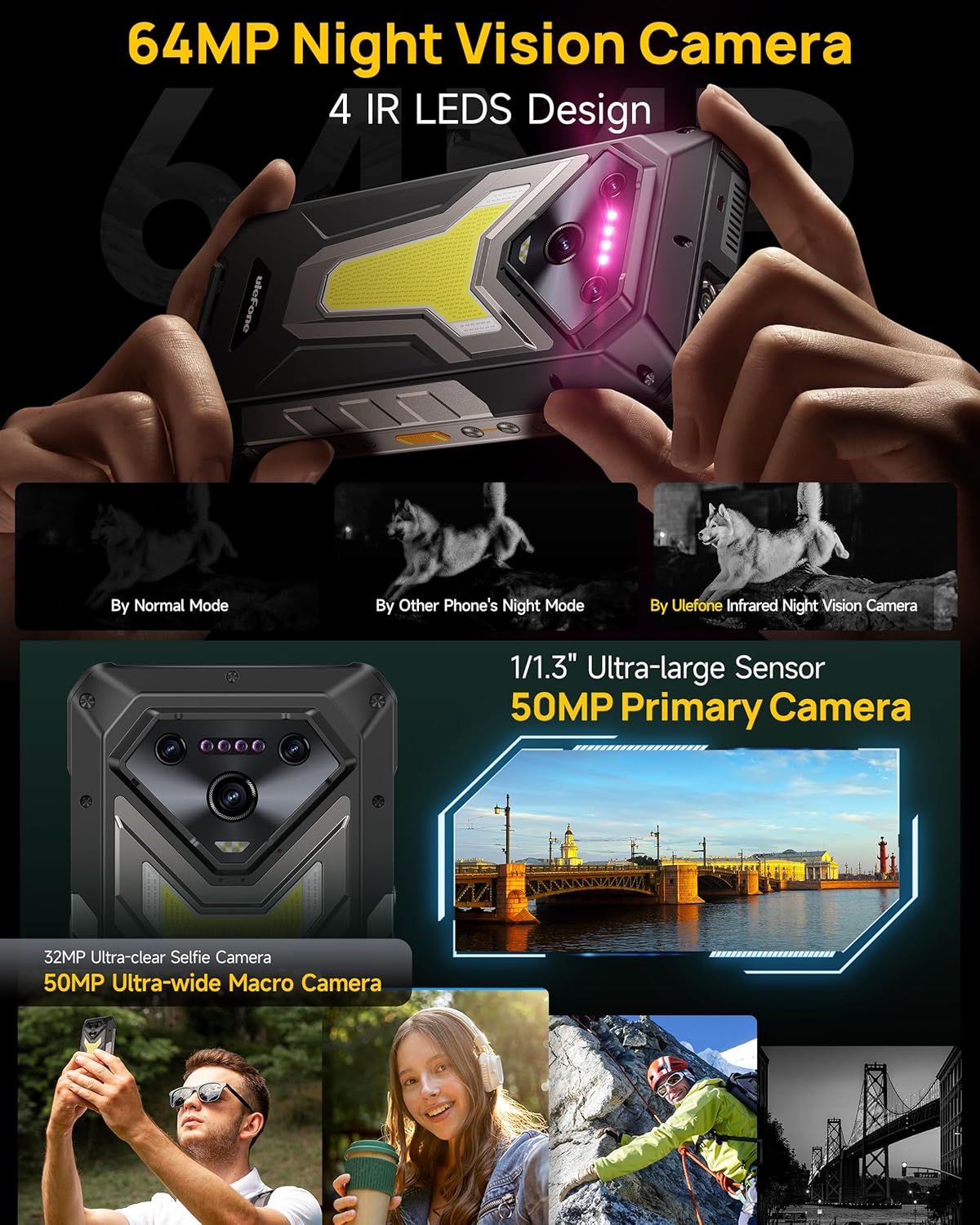
Resim: Ayrıntılı view of the Ulefone Armor 34 Pro Plus camera setup.
5. LED Light and Warning Lights
The device integrates an 1100 Lumens camping light and red/blue warning lights for various situations.
- CampIşık: Provides powerful illumination for outdoor activities. Adjustable brightness and duration settings are available in the dedicated app.
- Uyarı Işıkları: Red and blue lights can be activated for emergency alerts, signaling for help, or increasing görünürlüğü.
Video: Demonstration of the Ulefone Armor 34 Pro Plus LED camping light and warning light functions.

Image: The 1100 Lumens LED light in use during campIng.
6. Pil Yönetimi
The Armor 34 Pro Plus features a 25500mAh battery, providing extended usage. It supports 66W fast charging for quick power replenishment and 10W reverse charging to power other compatible devices.

Image: The 25500mAh battery and 66W fast charging feature.
7. Sağlam Özellikler
Designed for durability, the phone is MIL-STD-810H certified and boasts IP68/IP69K ratings for water and dust resistance. The 6.95-inch FHD+ display is protected by Corning Gorilla Glass 5.

Image: Demonstrating the IP68/IP69K and MIL-STD-810H ruggedness of the device.
8. uSmart Genişletme Konektörü
The uSmart Expansion Connector allows for integration with various external accessories, such as endoscopes and microscopes, expanding the phone's utility for specialized tasks.
Video: Showcase of various accessories compatible with the Ulefone Armor 34 Pro Plus, including the uSmart ecosystem.

Image: The uSmart Expansion Connector in use with an endoscope accessory.
9. Diğer Özellikler
The device includes additional functionalities:
- NFC: Temassız ödeme ve veri transferi için.
- Widevine L1: Enables high-definition streaming from supported platforms.
- Kızılötesi Patlayıcı: Uyumlu kızılötesi cihazları kontrol edin.
- Fingerprint Unlock & Face Unlock: Biometric security options.
- Özel Anahtar: Fonksiyonlara hızlı erişim için programlanabilir düğme.
- GPS + GLONASS + Beidou + Galileo: Comprehensive navigation support.

Resim: Üzeriview of additional functionalities available on the device.
Bakım
To ensure the longevity and optimal performance of your Ulefone Armor 34 Pro Plus, follow these maintenance guidelines:
- Temizlik: Cihazı yumuşak bir bezle silin.amp cloth. Avoid harsh chemicals or abrasive materials. Ensure all ports are dry before charging or connecting accessories.
- Yazılım Güncellemeleri: Cihazınızın en son güvenlik yamalarına ve özelliklerine sahip olduğundan emin olmak için düzenli olarak sistem güncellemelerini kontrol edin ve yükleyin. Şuraya gidin: Ayarlar > Sistem > Sistem güncellemesi.
- Pil Bakım: Avoid extreme temperatures. Do not fully discharge the battery frequently. Use only the provided charger for optimal charging.
- Ekran koruması: While the screen is durable, using the provided tempered glass screen protector can offer additional protection against scratches.
Sorun giderme
Cihazınızla ilgili sorunlarla karşılaşırsanız, aşağıdaki yaygın sorun giderme adımlarına bakın:
- Cihaz Yanıt Vermiyor: Yeniden başlatmayı zorlamak için Güç düğmesini yaklaşık 10-15 saniye basılı tutun.
- Şarj Sorunları: Ensure the charger and cable are securely connected and undamaged. Try a different power outlet. Clean the charging port if necessary.
- Ağ Bağlantı Sorunları: Check if airplane mode is off. Restart the device. Verify your SIM card is correctly inserted and your mobile data plan is active.
- Projeksiyon Cihazı Çalışmıyor: Ensure the projector is enabled in settings. Check for any obstructions in front of the lens. Adjust focus and keystone correction.
- Uygulama Çöküyor/Donuyor: Uygulamanın önbelleğini ve verilerini şu şekilde temizleyin: Ayarlar > Uygulamalar > [Uygulama Adı] > Depolama ve önbellekSorun devam ederse, uygulamayı kaldırıp yeniden yükleyin.
- Aşırı Isınma: Close background applications and reduce screen brightness. Avoid direct sunlight exposure during heavy use or charging.
For more complex issues, refer to the built-in Service Center 2.0 application on your device or contact customer support.

Image: The Service Center 2.0 application for device diagnostics and support.
Özellikler
| Özellik | Şartname |
|---|---|
| Marka | Ulefone |
| Model Numarası | Armor 34 Pro Plus |
| İşletim Sistemi | Android 15 |
| İşlemci | MediaTek Dimensity 7400X |
| Veri deposu | 32GB (16GB + 16GB adjustable) |
| Dahili Depolama | 512GB ROM (expandable up to 2TB) |
| Görüntülemek | 6.95 inch FHD+ 120Hz Corning Gorilla Glass 5 |
| Birincil Kamera | 50MP (1/1.3" sensor) |
| Ultra geniş açılı makro kamera | 50MP (117.3° FOV) |
| Gece Görüş Kamerası | 64MP (4 IR LEDs) |
| Ön Kamera | 32 MP |
| Projektör | 150 Lumens DLP (854x480 resolution), Autofocus, ±40° Keystone Correction |
| Pil Kapasitesi | 25500mAh |
| Şarj etme | 66W Hızlı Şarj, 10W Ters Şarj |
| Sağlamlık | IP68/IP69K, MIL-STD-810H Sertifikalı |
| Bağlantı | 5G, Wi-Fi 6E, Bluetooth 5.4, NFC, IR Blaster |
| Özel Özellikler | 1100 Lumens Camping Light, Red & Blue Warning Lights, uSmart Expansion Connector, Widevine L1, Custom Key, GPS |
| Boyutlar | 7.21 x 3.41 x 1.29 inç |
| Ağırlık | 3.14 pound |
Garanti ve Destek
Your Ulefone Armor 34 Pro Plus comes with a 12 aylık üretici garantisi hizmeti in the US, covering defects in materials and workmanship under normal use. Please retain your proof of purchase for warranty claims.
For technical assistance, warranty inquiries, or product support, please contact Ulefone customer service through the Service Center 2.0 app on your device or visit the official Ulefone website for contact information. Our support team is available to assist you with any questions or concerns regarding your product.