1. Giriş
The Elitech LDM-50S is a digital laser distance meter designed for accurate and efficient measurement of distances, areas, and volumes. This device is suitable for various applications including home renovation, construction, and DIY projects. It offers a range of up to 165 feet (50 meters) with high precision.
Temel Özellikler:
- Fast & Highly Accurate: Measures distances up to 165ft (50m) with ±2mm precision, providing results in approximately 0.5 seconds.
- Çok Yönlü İşlevler: Supports single/continuous measuring, area, volume, and Pythagoras modes for indirect height or diagonal measurements.
- Easy to Read & Operate: Features a backlit screen for clear readings in dim conditions and a simple button layout for one-hand operation.
- Smart Memory & Calibration: Stores up to 99 measurements and includes a self-calibration function to maintain accuracy.
- Portable & Ready: Compact, lightweight design, supplied with batteries, a wrist strap, and a quick-start guide.

Image: Elitech LDM-50S Laser Distance Meter, showing its display and control buttons.
2. Güvenlik Bilgileri
Please read and understand all safety instructions before using the Elitech LDM-50S Laser Distance Meter. Failure to follow these instructions may result in laser radiation exposure, electric shock, fire, or serious injury.
Lazer Güvenliği:
- The Elitech LDM-50S uses a Class 2 laser product (630-670nm, <1mW).
- Lazer ışınına doğrudan bakmayın.
- Lazer ışınını insanlara veya hayvanlara yöneltmekten kaçının.
- Optik aletleri (örneğin, dürbün, teleskop) aşağıdaki amaçlarla kullanmayın: view Lazer ışını.
- Ensure the device is used in a manner consistent with its intended purpose to prevent unintended exposure.
Genel güvenlik:
- Cihazı çocukların erişemeyeceği yerde saklayınız.
- Cihazı değiştirmeye veya parçalarına ayırmaya çalışmayın.
- Use only specified batteries (2x AAA alkaline batteries).
- Cihazı aşırı sıcaklıklara, neme veya doğrudan güneş ışığına maruz bırakmaktan kaçının.
3. Paket İçeriği
Upon unpacking your Elitech LDM-50S Laser Distance Meter, please ensure all the following items are present:
- Elitech LDM-50S Laser Distance Meter
- 1.5V AAA Batteries (2 pcs)
- Kullanım Kılavuzu (bu belge)
- Depolama Kutusu
- El Kayışı

Image: Elitech LDM-50S package contents, including the meter, batteries, user manual, box, and hand strap.
4. Başlarken
4.1 Pil Kurulumu
- Cihazın arkasındaki pil bölmesi kapağını bulun.
- Kapağı kaydırarak açın.
- Insert two 1.5V AAA alkaline batteries, ensuring correct polarity (+/-).
- Pil bölmesi kapağını sıkıca kapatın.
4.2 Güç Açma/Kapatma
- Açmak İçin: Basın OKUMAK Düğmeye basın. Ekran aydınlanacaktır.
- Kapatmak İçin: Basılı tutun KAPALI/TEMİZ button for a few seconds until the display turns off. The device also features an auto shut-off function to conserve battery power after a period of inactivity.
5. Operasyon
5.1 Temel Mesafe Ölçümü
- Cihazı açmak için tuşuna basın OKUMAK düğme.
- Basın OKUMAK button again to activate the laser beam. A red laser dot will appear.
- Aim the laser dot at the target point from which you want to measure the distance.
- Basın OKUMAK button once more. The measured distance will be displayed on the screen.
5.2 Ölçüm Modları
The LDM-50S offers several measurement modes. Press the FUNC button (often labeled with a square/triangle icon) to cycle through the available modes:
- Tek Ölçüm: İki nokta arasındaki mesafeyi ölçer.
- Sürekli Ölçüm (Takip): Cihazı hareket ettirdikçe gerçek zamanlı mesafe güncellemeleri sağlar.
- Alan Ölçümü: Measures length and width to calculate the area of a surface.
- Hacim Ölçümü: Measures length, width, and height to calculate the volume of a space.
- Pythagoras Mode: Calculates indirect measurements (e.g., height or diagonal) using the Pythagorean theorem. Follow the on-screen prompts to take the required measurements.

Image: Elitech LDM-50S illustrating various measurement modes including distance, area, volume, and Pythagorean calculations.
5.3 Setting the Measurement Reference Point
The device can measure from its front edge or its rear edge. Press the BAŞVURU button (often labeled with an arrow icon) to switch between these reference points. An icon on the display will indicate the currently selected reference point.
5.4 Ünite Değiştirme
To change the measurement units (e.g., meters, feet, inches), press the BİRİM button (often labeled 'U'). Continue pressing to cycle through available units: meters (m), centimeters (cm), feet (ft), inches (in), decimal inches, and fractional inches.
5.5 Veri Depolama
The LDM-50S can store up to 99 measurement records. To view saklanan veriler, basın MEME button (often labeled with a document icon). Use the arrow buttons (if available) to navigate through the records.
5.6 Kalibrasyon
The device features a self-calibration function to ensure accuracy over time. Refer to the on-screen menu or specific button combinations (usually involving holding a button during power-on) for calibration instructions if you suspect accuracy issues. Always calibrate against a known, precise distance.
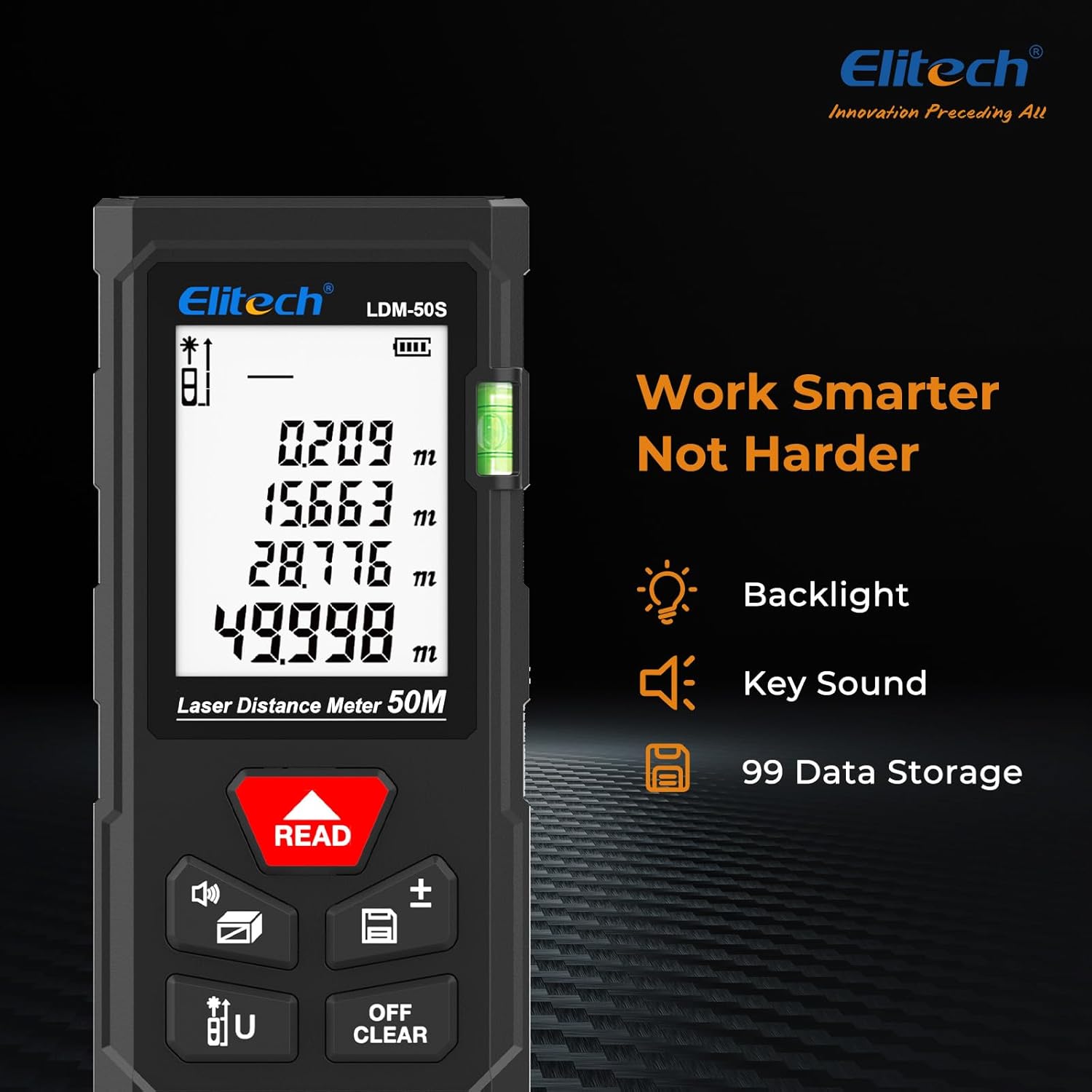
Image: Elitech LDM-50S display, showing backlight, key sound indicator, and data storage icon.
6. Bakım
6.1 Temizlik
- Cihazı yumuşak bir bezle silin.amp bezle silin. Aşındırıcı temizleyiciler veya çözücüler kullanmayın.
- Doğru ölçümler elde etmek için lazer merceğini yumuşak, tüy bırakmayan bir bezle dikkatlice temizleyin.
6.2 Depolama
- Store the device in its original box or a protective case when not in use.
- Cihazınızı uzun süre kullanmayacaksanız pil sızıntısını önlemek için pilleri çıkarın.
- Kuru bir yerde, doğrudan güneş ışığından ve aşırı sıcaklıklardan uzakta saklayın.
7. Sorun Giderme
If you encounter issues with your Elitech LDM-50S, refer to the table below for common problems and solutions:
| Sorun | Olası Neden | Çözüm |
|---|---|---|
| Cihaz açılmıyor | Düşük veya bitmiş piller; Yanlış pil montajı | Replace batteries with new AAA alkaline batteries; Ensure correct polarity. |
| Yanlış ölçümler | Laser lens dirty; Incorrect reference point; Device needs calibration | Clean laser lens; Verify the correct measurement reference point is selected; Perform self-calibration. |
| Lazer ışını görünmüyor | Device not powered on; Bright ambient light | Press READ button to activate laser; Use in lower light conditions or use a target plate. |
| Ekran soluk veya okunamıyor | Low batteries; Extreme temperatures | Pilleri değiştirin; Belirtilen sıcaklık aralığında çalıştırın. |
| Ekranda hata mesajı | Measurement out of range; Obstruction; Internal error | Ensure target is within 165ft (50m); Clear any obstructions; Power cycle the device. If error persists, contact support. |
8. Özellikler
| Özellik | Detay |
|---|---|
| Örnek | LDM-50S |
| Ölçüm Aralığı | 0.05 m ila 50 m (0.16 ft ila 165 ft) |
| Ölçüm Doğruluğu | ±2 mm (±1/16 inç) |
| Ölçüm zamanı | Yaklaşık. 0.5 saniye |
| Lazer Tipi | Class 2, 630-670nm, <1mW |
| Ölçüm Birimleri | m, cm, ft, in, ft+in (decimal and fractional) |
| Veri Depolama | 99'e kadar kayıt |
| Otomatik Kapanma | Yes (to conserve battery) |
| Pil Türü | 2 x 1.5V AAA Alkaline batteries |
| Malzeme | ABS Mühendislik Plastiği |
| Toz/Suya Dayanıklılık | IP54 |
| Düşmeye Karşı Dayanıklı | 1m (3.3ft) |
| Ürün Ağırlığı | Yaklaşık 5.3 ons (150 g) |
| Paket Boyutları | Yaklaşık. 6.3 x 3.54 x 1.46 inç |

Image: Elitech LDM-50S displaying its precision (±2mm), range (50m), and laser type (Class 2).

Image: Elitech LDM-50S highlighting its robust construction with ABS engineering plastic, IP54 dust/water resistance, and 1m drop-proof capability.
9. Garanti Bilgileri
The Elitech LDM-50S Laser Distance Meter comes with a 1 Yıllık Garanti Satın alma tarihinden itibaren geçerlidir. Bu garanti, normal kullanım koşullarında malzeme ve işçilik kusurlarını kapsar. Yanlış kullanım, kazalar, yetkisiz değişiklikler veya uygunsuz bakım nedeniyle oluşan hasarları kapsamaz.
Garanti talepleri için lütfen satın alma belgenizi saklayın.
10. Müşteri Desteği
For technical assistance, warranty claims, or any questions regarding your Elitech LDM-50S Laser Distance Meter, please contact Elitech customer support.
- Webalan: Elitech'in resmi sitesini ziyaret edin. website for FAQs, product information, and support resources.
- E-posta/Telefon: Refer to the contact information provided on the Elitech website or in your product packaging for direct support.
Elitech is headquartered in the USA and is committed to providing high-quality products and customer service.


