1. Giriş
This manual provides detailed instructions for the safe and effective operation, setup, and maintenance of your Firecore Laser Level 360 Self Leveling with Tripod. Please read this manual thoroughly before use and retain it for future reference.
Güvenlik Bilgileri
UYARI: Laser radiation. Avoid direct eye exposure. Do not stare into the laser beam. Always wear appropriate protective eyewear when operating the laser level to prevent potential eye injury. Do not attempt to modify or disassemble the device.
The Firecore Laser Level 360 is designed for precision leveling tasks in construction, home renovation, and DIY projects. It features bright green laser lines, self-leveling capabilities, and versatile mounting options.

Image: The Firecore Laser Level being used for diverse applications including framing, cabinet installation, tiling, and picture hanging, demonstrating its versatility in achieving precision.
2. Paket İçeriği
Aşağıda listelenen tüm ürünlerin paketinizde mevcut olduğundan emin olun. Eksik veya hasarlı bir ürün varsa, lütfen müşteri hizmetleriyle iletişime geçin.
- 1x F95T-XG Laser Level
- 1x 60-Inch Tripod
- 2x 4000mAh Rechargeable Li-ion Batteries
- 1x Uzaktan Kumanda
- 1x Güç Adaptörü
- 1 adet Type-C güç kablosu
- 1 adet Lazer Hedef Plakası
- 1x Kullanım Kılavuzu (bu belge)
- 1x Taşıma Çantası

Image: A visual representation of the complete Firecore Laser Level kit, including the laser level unit, tripod, two rechargeable batteries, Type-C cord, power adapter, remote control, laser target plate, user manual, and carry pouch.
3. Ürün Bittiview
The Firecore Laser Level 360 (Model F95T-XG) is a high-precision tool designed for various leveling and alignment tasks. It projects bright green laser lines, offering superior visibility compared to red lasers.
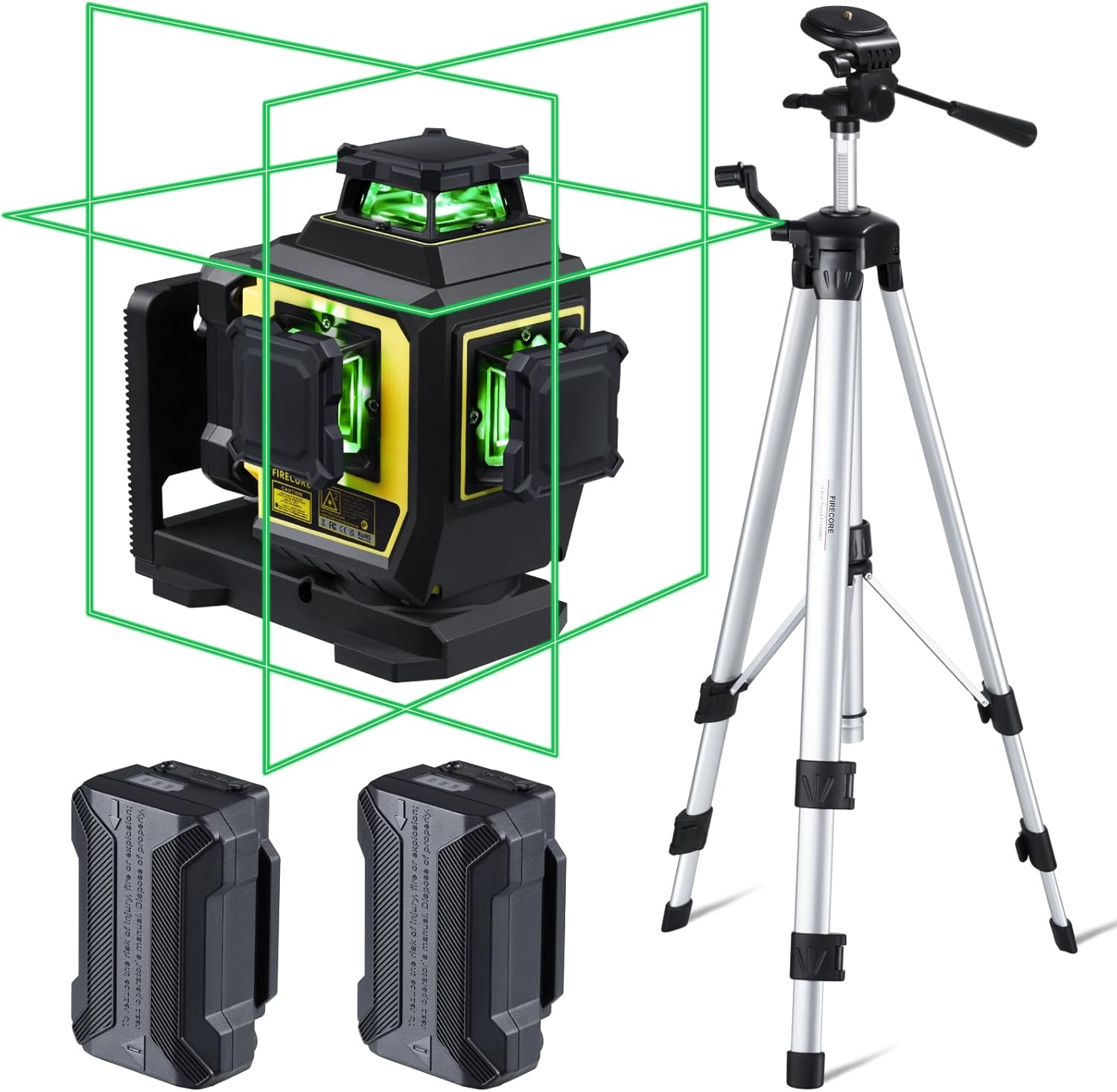
Image: The Firecore Laser Level 360 unit displaying its green laser lines, accompanied by two rechargeable batteries and the included 60-inch tripod.
Temel Özellikler:
- Parlak Yeşil Lazer: Up to 4X brighter than standard red beams, with a working range up to 98 ft.
- Yüksek Doğruluk: ±1/13" at 33 ft. (±2mm at 10m).
- 3 x 360° Line Lasers: One horizontal and two vertical planes cover the entire room.
- Otomatik Tesviye Modu: ±4° hassasiyetle otomatik olarak seviye ayarlaması yapar.
- Manuel Mod: Allows locking the pendulum for use at any angle.
- Dış Mekan Darbe Modu: Extends range up to 197 ft. with a Firecore Line Laser Receiver (sold separately).
- Çift Güç Sistemi: Two 4400mAh Li-ion batteries provide up to 16 hours of continuous runtime.
- Uzaktan kumanda: Adjust laser lines, brightness, and modes remotely.
- Sağlam Tasarım: IP54 dust/water resistance with over-molded construction.
- Çok Yönlü Montaj: Integrated magnetic bracket with 1/4-20 & 5/8-11 threads.
- 60-Inch Tripod: Lightweight aluminum construction, adjustable height from 26 to 60 inches.

Image: An illustration comparing the high accuracy of the Firecore laser level (±2mm at 10m) with other brands (±3mm at 10m), highlighting its precision.

Image: The Firecore Laser Level positioned on a rough concrete surface, illustrating its IP54 dust and water resistance and robust over-molded housing for increased durability.
4. Kurulum
4.1 Pilin Takılması ve Şarj Edilmesi
- Lazer seviyeleme cihazının pil bölmesi kapağını açın.
- Insert one of the provided 4400mAh Li-ion batteries, ensuring correct polarity.
- Pil bölmesi kapağını sıkıca kapatın.
- To charge, connect the Type-C power cord to the laser level's charging port and the power adapter, then plug into a power outlet. The battery indicator will show charging status.
The laser level comes with two rechargeable batteries, providing extended operational time. A full charge can last up to 16 hours of continuous use.

Image: The Firecore Laser Level unit being charged via its Type-C port, with two additional 4400mAh Li-ion batteries shown, emphasizing the 16 hours of continuous runtime and convenient charging.
4.2 Tripod Setup
- Unfold the legs of the 60-inch tripod.
- Adjust the height of the tripod legs using the quick-release levers to achieve the desired working height (from 26 to 60 inches).
- Ensure the tripod is stable and level using the built-in bullseye level.
- Attach the laser level to the tripod using the 1/4-20 mounting thread on the quick-release plate.
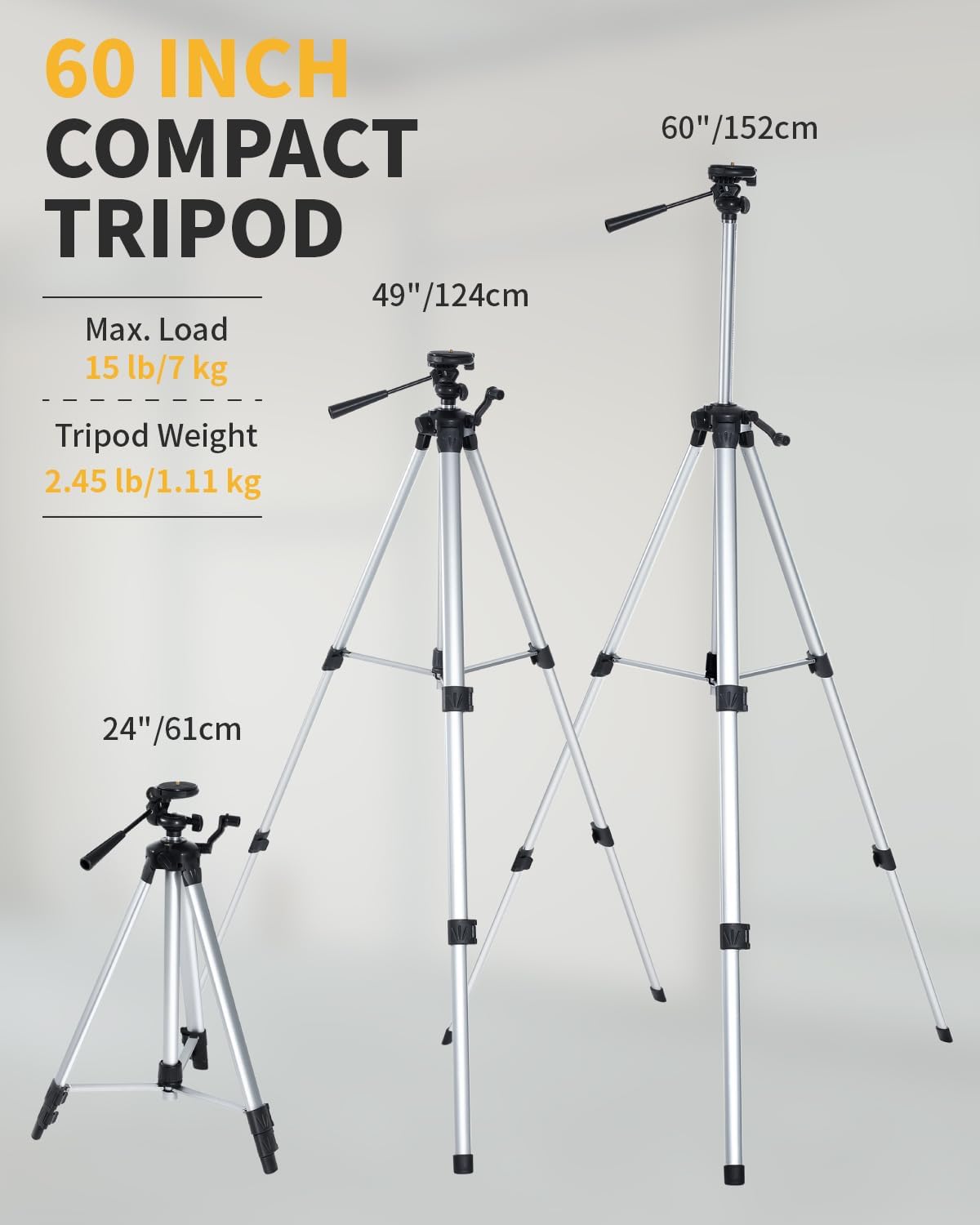
Image: The 60-inch compact tripod displayed at its minimum (24 inches), mid-range (49 inches), and maximum (60 inches) heights, illustrating its adjustable nature and portability.
4.3 Alternatif Montaj Seçenekleri
The laser level features an integrated magnetic bracket with 1/4-20 and 5/8-11 threads, as well as rear-mounted magnets. This allows for attachment to steel studs, wooden surfaces, or other compatible tripods/poles.

Image: The Firecore Laser Level unit highlighting its versatile attachment options, including an integrated dual-size tripod mount base and rear-mounted magnets for secure placement on various surfaces.
5. Çalışma Modları
The Firecore Laser Level offers multiple operating modes to suit different application needs.
5.1 Otomatik Seviye Ayarı Modu
- Sarkaç kilitleme anahtarını kilitsiz konuma getirin.
- The laser level will automatically self-level within ±4°.
- If the tool is out of its self-leveling range, the laser beam will blink as an alarm. Adjust the position of the laser level until the beam stabilizes.
5.2 Manuel Mod
- Slide the pendulum lock switch to the locked position.
- Press and hold the Manual button for 3 seconds.
- The laser tool can now be placed at any angle, and the laser lines will remain fixed, allowing for sloped line projection.

Image: A split image showing the Firecore Laser Level in Self-Leveling Mode, projecting a horizontal line for a worker, and in Manual Mode, projecting angled lines for a worker on stairs.
5.3 Darbe Modu (Dış Mekan Modu)
- Activate Pulse Mode by pressing the Receiver Button on the laser level.
- In this mode, the laser's power is optimized for use with a Firecore Line Laser Receiver (sold separately).
- This extends the working range of the laser up to 197 ft. for outdoor or bright light conditions.

Image: The Firecore Laser Level projecting a green line across a large room, with an inset showing the laser receiver, indicating its ability to extend the working range up to 197 ft. in Pulse Mode.
5.4 Switching Line Modes and Brightness
The laser level allows independent selection of horizontal (H) and vertical (V) lines. You can also adjust the brightness of the laser lines.
- Use the H/V buttons on the laser level or the remote control to cycle through different line combinations (e.g., one 360° horizontal, two 360° vertical, or all three).
- The remote control also allows adjustment of laser brightness (100%, 75%, 50%) for optimal visibility and battery life.

Image: A hand holding the remote control, pointing it towards the Firecore Laser Level, which is projecting multiple green lines in a corner, demonstrating the ability to independently switch line modes.

Image: The Firecore Laser Level projecting a green line on a wooden floor, illustrating the feature of adjustable laser line strength (100/75/50 percent) which provides thinner laser lines for increased precision.
6. Bakım
6.1 Temizlik
- Regularly clean the laser level's housing with a soft, damp Kumaş.
- Sert kimyasallar, aşındırıcı temizleyiciler veya çözücüler kullanmayın.
- Keep the laser apertures clean and free from dust or debris to ensure clear beam projection.
6.2 Depolama
- When not in use, store the laser level in its carry pouch to protect it from dust and impact.
- Doğrudan güneş ışığından ve aşırı sıcaklıklardan uzakta, serin ve kuru bir yerde saklayın.
- Ensure the pendulum lock is engaged during storage and transport to prevent damage to the internal mechanism.
- Uzun süre saklayacaksanız, sızıntıyı önlemek için pilleri çıkarın.
7. Sorun Giderme
| Sorun | Olası Neden | Çözüm |
|---|---|---|
| Laser beam is blinking rapidly. | The laser level is out of its self-leveling range (±4°). | Adjust the position of the laser level until it is within its self-leveling range. Ensure it is placed on a relatively flat surface. |
| Lazer çizgileri yansıtılmıyor. | Pil zayıf veya bitmiş. Güç anahtarı kapalı. Pendulum lock is engaged and Manual Mode is not activated. | Pili şarj edin veya değiştirin. Güç anahtarını açın. Unlock the pendulum for self-leveling mode, or activate Manual Mode by holding the button for 3 seconds if the pendulum is locked. |
| Lazer çizgileri soluktur. | Parlaklık ayarı düşük. Pil zayıf. Operating in very bright conditions. | Increase brightness using the remote control or device buttons. Pili şarj edin. Use Pulse Mode with a laser receiver for outdoor or bright environments. |
| Uzaktan kumanda çalışmıyor. | Remote control battery is depleted. Obstruction between remote and laser level. | Uzaktan kumanda pilini değiştirin. Ensure a clear line of sight between the remote and the laser level. |
8. Özellikler
| Özellik | Şartname |
|---|---|
| Marka | Ateş çekirdeği |
| Model Numarası | F95T-PRO-WT |
| Lazer Tipi | Yeşil Işın |
| Kesinlik | ±1/13" at 33 ft. (±2mm at 10m) |
| Çalışma Aralığı | Up to 98 ft. (197 ft. with receiver in Pulse Mode) |
| Kendinden Tesviye Aralığı | ±4° |
| Çalışma Modları | Self-Leveling Mode / Manual Mode / Pulse Mode |
| Güç Kaynağı | Battery Powered (2x 4400mAh Li-ion batteries included) |
| Sürekli Çalışma Zamanı | 16 saate kadar |
| Malzeme | Thermoplastic Elastomers, Acrylonitrile Butadiene Styrene, Aluminum |
| IP Derecelendirmesi | IP54 (Dust/Water Resistance) |
| Ürün Ağırlığı | 7.05 pound |
| Tripod Yükseklik Ayarı | 26 inç ila 60 inç |
| Tripod Max. Load | 15 lb / 7 kg |
| Tripod Ağırlığı | 2.45 lb / 1.11 kg |
9. Garanti ve Destek
9.1 Garanti Bilgileri
Firecore provides a 24 aylık satış sonrası servis for this product, covering manufacturing defects and malfunctions under normal use. This warranty period begins from the date of purchase.
9.2 Teknik Destek
Biz sunuyoruz ömür boyu teknik destek for the Firecore Laser Level 360. If you have any concerns, questions, or require assistance with your product, please do not hesitate to contact our customer service team. Refer to the contact information provided in your purchase documentation or on the official Firecore webalan.


