1. Giriş
This manual provides detailed instructions for the FOXWELL BT630 Bluetooth Battery Monitor with Shunt and the FOXWELL BT705 Plus Car Battery Tester. The BT630 offers real-time battery monitoring via Bluetooth, while the BT705 Plus is a comprehensive 12V and 24V car battery analyzer. Please read this manual thoroughly before operating the devices to ensure proper usage and safety.
2. Ürün Bittiview
2.1 FOXWELL BT705 Plus Car Battery Tester
The BT705 Plus is designed for comprehensive battery health testing, supporting 12V and 24V systems. It performs various tests to assess the condition of different battery types, including Flooded (Regular), EFB, GEL, AGM Flat Plate, and Spiral batteries. It is suitable for a wide range of vehicles and equipment.

Image: The BT705 Plus display showing various battery health tests including State of Health (SOH), State of Charge (SOC), Charging Test, Voltage Test, Ripple Analysis, Cranking Test, Resistance Test, and Load Test.

Image: The BT705 Plus features a 2.8-inch color LCD display for easier navigation and clearer results, offering step-by-step guidance during testing.

Image: The BT705 Plus is compatible with 12V and 24V batteries, including EFB, GEL, Flooded, and AGM types, and can be used for Cars, RVs, SUVs, ATVs, Motorcycles, Tractors, Trucks, Boats, Mowers, and Yachts.
2.2 FOXWELL BT630 Bluetooth Battery Monitor with Shunt
The BT630 is a Bluetooth-enabled battery monitor designed for real-time tracking of battery performance. It supports high-current monitoring up to 600A and a wide voltage range from 10V to 120V. This device is ideal for RVs, EVs, marine systems, off-grid setups, portable power stations, and outdoor devices, providing critical data through a dedicated mobile application.
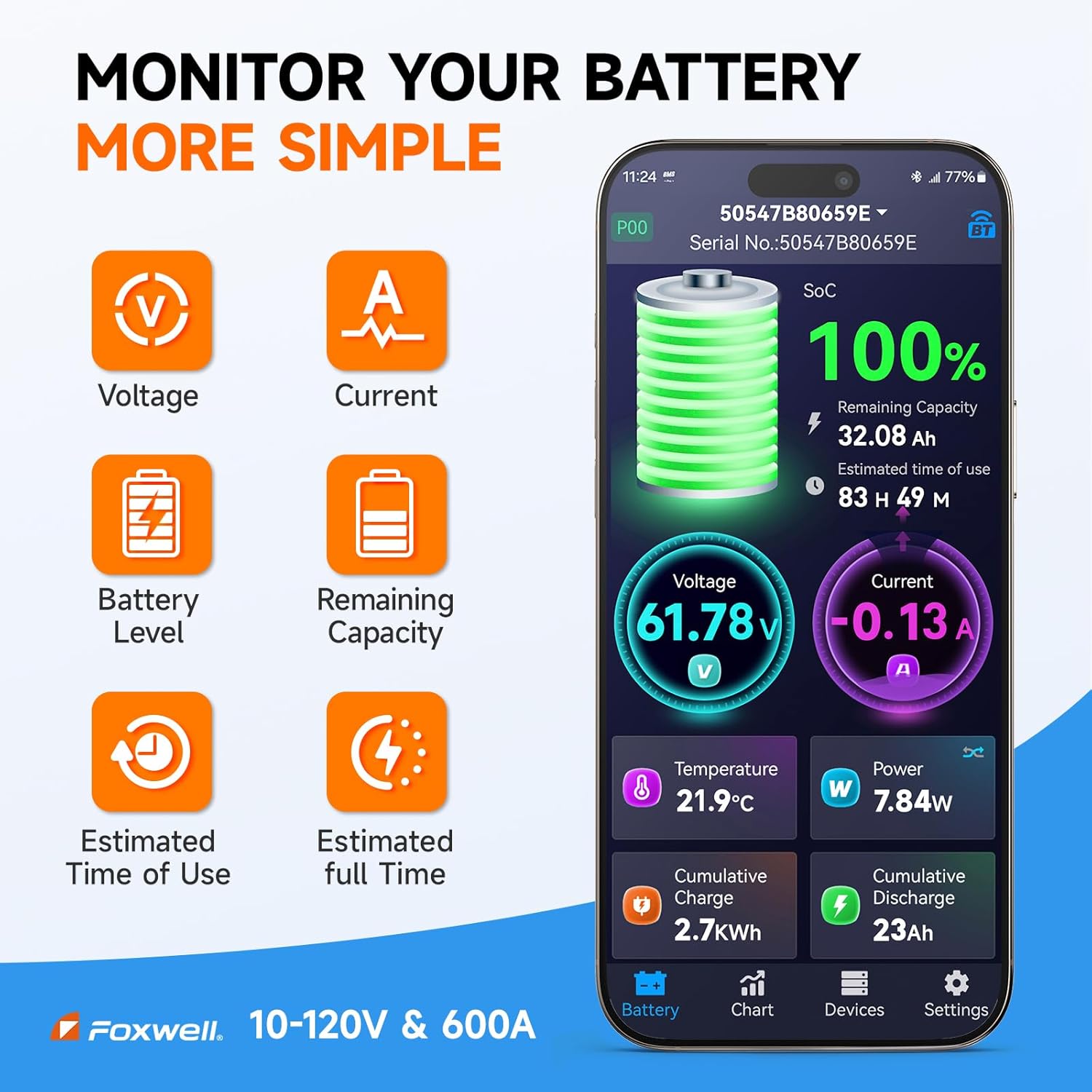
Image: The BT630 app displays real-time metrics such as Voltage, Current, Battery Level, Remaining Capacity, Estimated Time of Use, Estimated Full Time, Temperature, Power, Cumulative Charge, and Cumulative Discharge.

Image: The BT630 shunt features an 8-layer safety protection system, including safeguards against low voltage, aşırı hacimtage, discharge overcurrent, charging overcurrent, overpower, over temperature, low temperature, and low State of Charge (SoC).

Image: The BT630 is engineered for high precision, featuring a built-in shunt with an error margin of only ±0.4% for accurate measurements.
3. Kurulum ve Kurulum
3.1 FOXWELL BT705 Plus Car Battery Tester Setup
- Cl'yi bağlayınamps: Ensure the vehicle ignition is off. Connect the red positive (+) clamp to the positive terminal of the battery and the black negative (-) clamp negatif terminale.
- Güç Açık: The BT705 Plus will power on automatically once connected to the battery.
- Pil Tipini Seçin: Use the navigation buttons to select the correct battery type (e.g., Flooded, EFB, GEL, AGM) from the menu.
3.2 FOXWELL BT630 Bluetooth Battery Monitor with Shunt Installation
The BT630 requires careful installation of the shunt for accurate monitoring. Professional installation is recommended if you are unfamiliar with electrical systems.
- Mount the Shunt: Choose a dry, secure location near the battery bank for mounting the shunt. Ensure good ventilation.
- Pilin Bağlantısını Kes: Before wiring, disconnect the negative terminal of your battery bank to prevent electrical hazards.
- Wire the Shunt:
- Connect the main negative cable from your battery bank to the 'BATTERY' terminal of the shunt.
- Connect the main negative cable from your load/charger system to the 'LOAD' terminal of the shunt.
- Connect the small positive wire from the BT630 unit to the positive terminal of your battery bank.
- Connect the small negative wire from the BT630 unit to the 'BATTERY' terminal of the shunt (or a dedicated negative terminal on the shunt if available for the monitor).
- Pili Yeniden Bağlayın: Once all wiring is secure, reconnect the main negative terminal of your battery bank.
- App Installation & Pairing: Download the dedicated BMS app from your device's app store. Enable Bluetooth on your mobile device and pair with the BT630 monitor. Follow the in-app instructions for initial setup and calibration.
4. Kullanım Talimatları
4.1 Operating the FOXWELL BT705 Plus Car Battery Tester
- Ana Menü: After powering on, the main menu will appear. Use the 'MENU' and arrow buttons to navigate.
- Select Test: Choose the desired test from options such as 'Battery Test', 'Cranking Test', 'Charging Test', 'Voltage Test', 'Ripple Analysis', 'Resistance Test', or 'Load Test'.
- Ekrandaki Komutları Takip Edin: The device provides step-by-step guidance for each test. For example, during a 'Cranking Test', it will prompt you to start the engine.
- View Sonuçlar: After the test is complete, the results will be displayed on the screen. Interpret the State of Health (SOH), State of Charge (SOC), and other relevant metrics.
- Print/Save Results: If connected to a printer or computer (optional), you may be able to print or save test reports.
4.2 Operating the FOXWELL BT630 Bluetooth Battery Monitor
- Uygulamayı başlat: Open the dedicated BMS app on your paired mobile device.
- Gerçek Zamanlı İzleme: The app will display real-time battery metrics including SOC%, Voltage, Current, Remaining Capacity, Power, Temperature, Estimated Runtime, and Charge/Discharge History.
- Veri Grafikleri: View historical data and trends in clear graphical format to understand battery performance over time.
- Özelleştirilebilir Uyarılar: Set up alerts for various parameters such as over/under-voltage, overcurrent, overpower, and temperature extremes. The app can notify you when these thresholds are met.
- Power Cutoff (Optional): If an external relay is integrated, the app can be configured to trigger a power cutoff based on predefined safety parameters.
- Kalibrasyon: The BT630 features dual-calibration precision. It uses an automatic error calibration system based on a long-term model database. Manual calibration for Voltage, Current, and Temperature can also be performed via the app for fine-tuning.
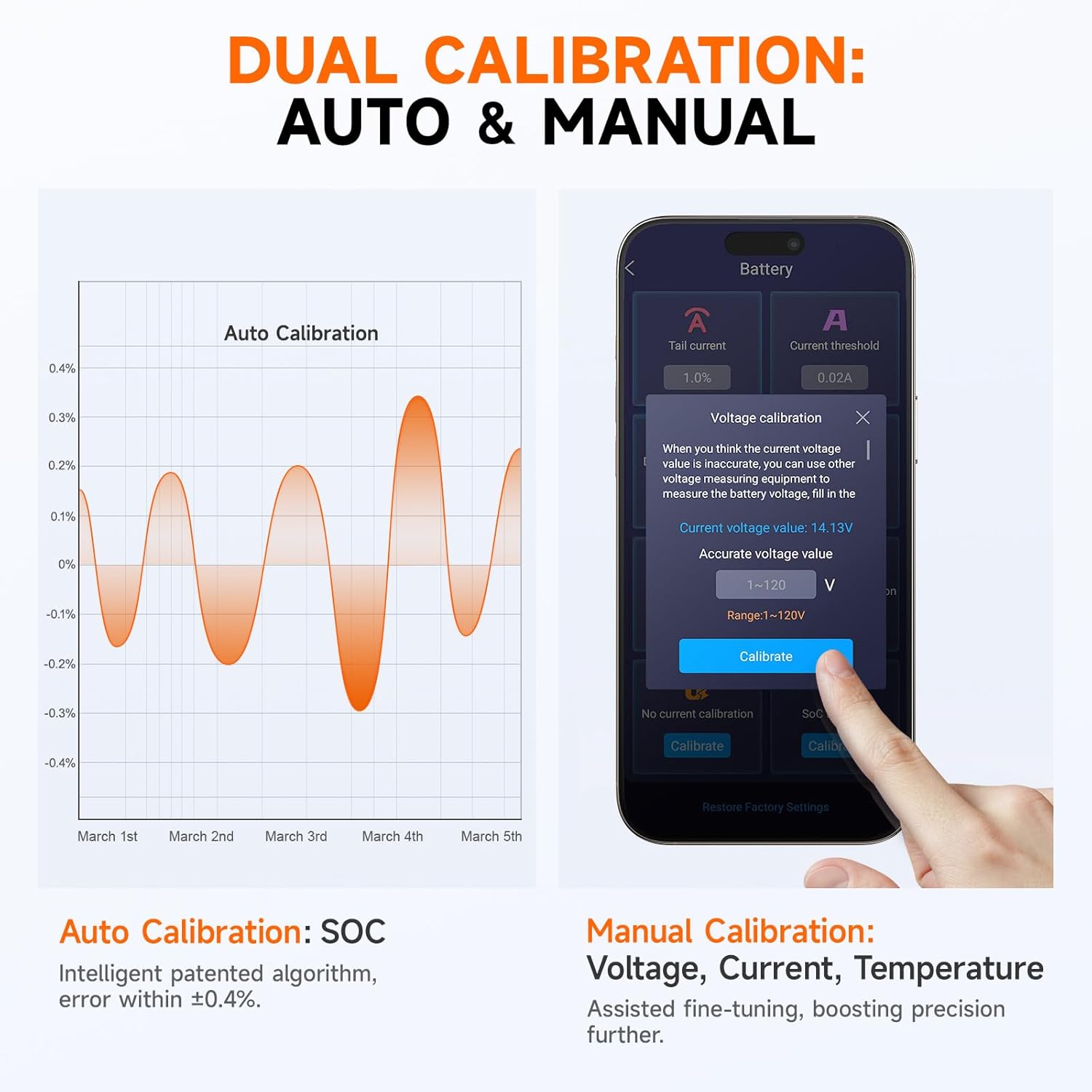
Image: The BT630 supports both automatic SOC calibration and manual calibration for Voltage, Current, and Temperature, allowing for precise adjustments.
5. Bakım
5.1 Genel Bakım
- Keep both devices clean and dry. Use a soft, damp Yüzeyleri silmek için bez kullanın. Aşındırıcı temizleyiciler veya çözücüler kullanmayın.
- Cihazlarınızı kullanmadığınız zamanlarda serin, kuru ve doğrudan güneş ışığından ve aşırı sıcaklıklardan uzak bir yerde saklayın.
- Cihazları düşürmekten veya sert darbelere maruz bırakmaktan kaçınınız.
5.2 BT705 Plus Maintenance
- Inspect the test clampKabloları ve bağlantı noktalarını hasar, yıpranma veya korozyon belirtileri açısından düzenli olarak kontrol edin. Gerekirse değiştirin.
- Ensure the display screen is free from scratches or cracks that could impair readability.
5.3 BT630 Maintenance
- Periodically check all wiring connections to the shunt and the BT630 unit to ensure they are secure and free from corrosion.
- Ensure the shunt's ventilation holes are clear of debris to maintain optimal thermal management.
- Keep the mobile app updated to the latest version for optimal performance and new features.
6. Sorun Giderme
- Device Not Powering On (BT705 Plus): cl'yi sağlayınamps are correctly and securely connected to the battery terminals. Check battery voltage; eğer değer çok düşükse, cihaz açılmayabilir.
- Inaccurate Readings (BT630): Verify all shunt wiring connections are correct and tight. Perform a manual calibration via the app if automatic calibration does not resolve the issue. Ensure the app is updated.
- Bluetooth Connectivity Issues (BT630): Ensure Bluetooth is enabled on your mobile device. Restart both the BT630 (by temporarily disconnecting power) and your mobile device. Ensure the BT630 is within range.
- Test Failure/Error Message (BT705 Plus): Refer to the specific error code or message displayed on the screen. This often indicates an issue with the battery, connections, or test parameters. Recheck connections and battery condition.
- Proactive Monitoring: The BT630's visualized data graphs can help detect potential battery issues up to 30 days in advance by monitoring trends in current, voltage, and temperature. Regularly review these graphs to preempt failures.
7. Özellikler
| Özellik | Şartname |
|---|---|
| Marka | TilkiWell |
| Model Numaraları | BT630, BT705 Plus |
| ASIN | B0FBRK7C78 |
| BT630 Cilttage Aralık | 10 V ila 120 V |
| BT630 Current Monitoring | 600A'ya kadar |
| BT630 Shunt Error | ±%0.4 |
| BT630 Power Consumption | 0.4W (ultra-low) |
| BT630 Safety Protection | 8-layer (Over/Under-voltage, Overcurrent, Overpower, Over/Low-temperature, Low SOC) |
| BT705 Plus Voltage Uyumluluk | 12V ve 24V |
| BT705 Plus Display | 2.8 inç Renkli LCD |
| İlk Mevcut Tarih | 2 Haziran 2025 |
8. Garanti ve Destek
For warranty information, please refer to the documentation included with your product or visit the official FOXWELL webSite. Garanti şartları ve koşulları bölgeye ve ürüne göre değişiklik gösterebilir.
For technical support, troubleshooting assistance, or further inquiries, please visit the official FOXWELL support page or contact their customer service directly. Contact details are typically available on the FOXWELL webalan.