giriiş
Thank you for choosing the GOBOULT Soniq Over Ear Bluetooth Headphones. These headphones are designed to provide a superior audio experience with features like 70 hours of playtime, 40mm bass drivers, Zen™ ENC microphone, Type-C fast charging, and dual device pairing. This manual will guide you through the setup, operation, and maintenance of your new headphones to ensure optimal performance.
Kutuda Neler Var?
Lütfen paket içeriğini kontrol ederek tüm öğelerin mevcut olduğundan emin olun:
- Soniq Headphone
- C Tipi Şarj Kablosu
- Kullanıcı Kılavuzu
- Kulak Yastıkları (önceden takılmış)
- Garanti Kartı
Ürün Özellikleri Bittiview
The GOBOULT Soniq headphones come equipped with several advanced features:
- Uzatılmış Çalma Süresi: Tek şarjla 70 saate kadar ses çalma süresi.
- Customizable EQ Modes: Sesi ayarlafiles for bass boost, balanced audio, or vocal clarity.
- Çevresel Gürültü Engelleme (ENC): Arka plan gürültüsünü azaltarak arama netliğini artırır.
- Çift Cihaz Eşleştirme: Seamlessly connect and switch between two devices simultaneously.
- Powerful Audio Drivers: 40mm bass-boosted drivers for rich sound.
- En Son Bluetooth Teknolojisi: Bluetooth 5.4 for faster pairing and stable connections.
- Rahat Tasarım: Lightweight build with cushioned earcups for prolonged wear.
- Suya Dayanıklılık: IPX5 rating for splash, rain, and sweat protection.
- Tactile Controls: Easy-to-use physical buttons for volume, playback, and mode switching.
- Yapay Zeka Sesli Asistan Desteği: Compatible with Google Assistant and Siri.

Resim: Üzeriview of key features including 70H battery, EQ modes, ENC, dual pairing, 40mm drivers, and Bluetooth 5.4.

Image: Close-up of the GOBOULT Soniq headphone earcup highlighting the 40mm power-packed bass neodymium drivers with BoomX™ Technology and Memory Foam.
Kurulum Kılavuzu
1. Kulaklıkları Şarj Etme
Before first use, fully charge your GOBOULT Soniq headphones. Use the provided Type-C charging cable to connect the headphones to a compatible USB power source.
- Tam şarjla 70 saate kadar oynatma süresi sağlar.
- Fast charging feature: 10 minutes of charge provides approximately 8 hours of playtime.
- LED göstergesi şarj durumunu gösterecek ve tamamen şarj olduğunda sönecek veya renk değiştirecektir.

Image: GOBOULT Soniq headphones connected via Type-C cable, illustrating 70 hours playtime and fast charging capability.
2. Açma/Kapama
To power on, press and hold the Power button for approximately 3 seconds until the LED indicator lights up. To power off, press and hold the Power button again for 3 seconds until the LED indicator turns off.
3. Bluetooth Eşleştirme
Kulaklığınızı Bluetooth özellikli bir cihazla eşleştirmek için şu adımları izleyin:
- Kulaklığın tamamen şarj edilmiş ve kapalı olduğundan emin olun.
- Eşleştirme modunu göstermek için LED göstergesi kırmızı ve mavi renkte dönüşümlü olarak yanıp sönene kadar Güç düğmesini 5-7 saniye basılı tutun.
- Cihazınızda (akıllı telefon, tablet, dizüstü bilgisayar) Bluetooth'u etkinleştirin ve kullanılabilir cihazları arayın.
- Select "GOBOULT Soniq" from the list of found devices.
- Bağlantı kurulduktan sonra, LED göstergesi yavaşça mavi renkte yanıp sönecek veya sürekli mavi kalacaktır.

Image: GOBOULT Soniq headphones highlighting Bluetooth 5.4 for fast and stable connection.
Kullanım Talimatları
1. Temel Kontroller
The headphones feature tactile buttons for easy control:
- Güç Düğmesi: Açmak/kapatmak için basılı tutun. Oynatmak/duraklatmak için kısa basın.
- Sesi Aç (+): Kısa basışla sesi açın. Uzun basışla sonraki parçaya geçin.
- Sesi kıs (-): Kısa basıldığında ses kısılır. Uzun basıldığında önceki parça çalınır.
- Multi-function Button (often combined with Power or a dedicated button): Answer/End calls, activate voice assistant.

Image: Close-up of the right earcup showing tactile button controls for volume and play/pause.
2. EQ Modları
Customize your audio experience with multiple EQ modes. Press the dedicated EQ button (or a specific combination, refer to quick start guide if available) to cycle through modes:
- Bas Güçlendirme Modu: Enhances low frequencies for a deeper bass sound.
- Dengeli Mod: Tarafsız bir ses sağlar.file suitable for various genres.
- Vokal Modu: Optimizes mid-range frequencies for clearer vocals.
- Oyun Modu: Reduces latency for a more synchronized gaming audio experience (60ms ultra-low latency).
- Müzik Modu: Standart ses işlemefile genel müzik dinleme için.
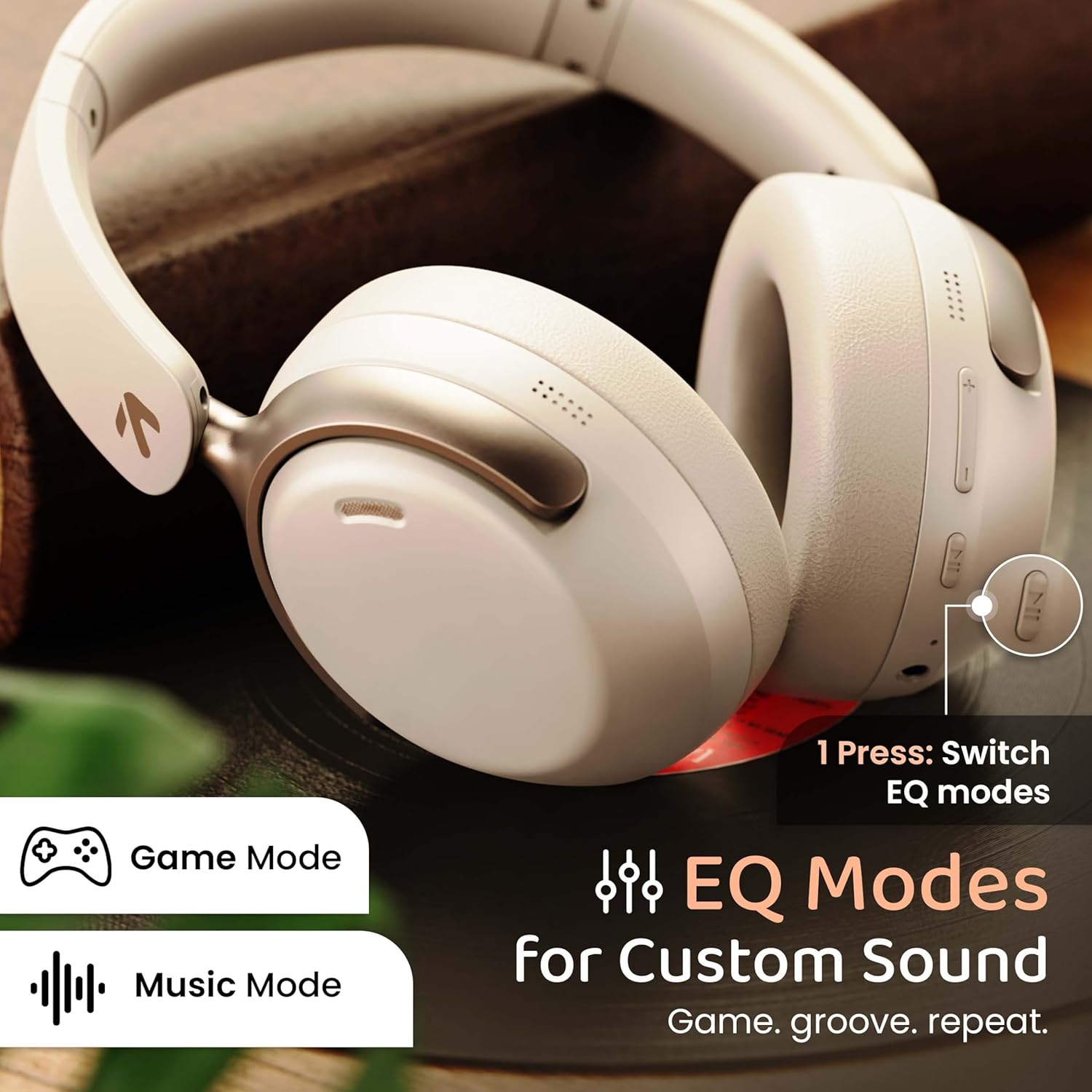
Image: GOBOULT Soniq headphones illustrating the EQ modes for custom sound, including Game Mode and Music Mode.

Image: GOBOULT Soniq headphones highlighting Combat™ Gaming Mode with 60ms ultra-low latency, tailored for mobile gaming and real-time sound accuracy.
3. Çift Cihaz Eşleştirme
The headphones support dual device pairing, allowing you to connect to two devices simultaneously and switch between them seamlessly.
- Kulaklıkları, "Bluetooth Eşleştirme" bölümünde açıklandığı gibi ilk cihazla eşleştirin.
- Birinci cihazda Bluetooth'u devre dışı bırakın.
- Kulaklıkları ikinci cihazla eşleştirin.
- İlk cihazda Bluetooth'u yeniden etkinleştirin. Kulaklıklar her iki cihaza da otomatik olarak bağlanmalıdır.
- Audio will play from the device currently active. To switch, pause audio on the first device and start playing on the second.

Image: GOBOULT Soniq headphones demonstrating dual device connectivity with a laptop and a smartphone.
4. Wired Mode (AUX)
For a wired connection, use a standard 3.5mm AUX cable (not included) to connect the headphones to your audio source. In wired mode, the headphones operate passively, and the built-in microphone will not function.

Image: GOBOULT Soniq headphones showing the option for wireless mode and an optional wired mode via AUX cable, noting that the mic is off in wired mode.
5. Environmental Noise Cancellation (ENC) for Calls
The Zen™ ENC microphone technology helps reduce ambient noise during calls, ensuring clearer conversations. This feature is automatically active during phone calls.

Image: Close-up of the GOBOULT Soniq headphone earcup highlighting the Zen™ ENC Mic for processed calling, ambient noise isolation, enhanced call experience, and sharper voice clarity.
6. Sesli Asistan
Activate your device's voice assistant (Google Assistant or Siri) by pressing the multi-function button (or specific button, refer to quick start guide) for approximately 2 seconds.

Image: GOBOULT Soniq headphones with icons for Google Assistant and Siri, indicating personalized AI assistant support.
Bakım ve Özen
- Temizlik: Kulaklığınızı yumuşak ve kuru bir bezle silin. Aşındırıcı temizleyiciler veya çözücüler kullanmayın.
- Suya Dayanıklılık: The headphones are IPX5 water resistant, meaning they are protected against splashes, rain, and sweat. Do not submerge them in water or expose them to strong jets of water.
- Depolamak: Kullanmadığınız zamanlarda kulaklığınızı serin ve kuru bir yerde, doğrudan güneş ışığından ve aşırı sıcaklıklardan uzakta saklayın. Katlanabilir tasarımı sayesinde kompakt bir şekilde saklayabilirsiniz.
- Pil Bakım: Pil ömrünü uzatmak için kulaklıkların pilini sık sık tamamen boşaltmaktan kaçının. Sürekli kullanılmasa bile düzenli olarak şarj edin.
Image: GOBOULT Soniq headphones illustrating IPX5 water resistance, indicating protection against splash, rain, and sweat.

Image: GOBOULT Soniq headphones showcasing their adjustable headband, foldable design, and movable earcups for maximum comfort and portability.
Sorun giderme
| Sorun | Olası Çözüm |
|---|---|
| Kulaklık açılmıyor. | Kulaklıkların şarjının dolu olduğundan emin olun. Type-C kablosunu kullanarak bir güç kaynağına bağlayın. |
| Cihazla eşleştirilemiyor. |
|
| Ses yok veya ses seviyesi düşük. |
|
| Microphone not working in wired mode. | The built-in microphone is not active when using the AUX wired connection. This is normal operation. |
| Bağlantı kesintisi. |
|
Özellikler
| Özellik | Detay |
|---|---|
| Model Adı | AirBass |
| Bağlantı Teknolojisi | Bluetooth, Wired, Wireless |
| Kablosuz İletişim Teknolojisi | Bluetooth 5.4 |
| Bluetooth Menzili | 10 Metre |
| Ses Sürücüsü Boyutu | 40 Milimetre |
| Ses Sürücüsü Türü | Dinamik Sürücü |
| Pil Ömrü | 40 Saat |
| Şarj Portu | Type-C Hızlı Şarj Girişi |
| Gürültü Kontrolü | Çevresel Gürültü Engelleme (ENC) |
| Su Direnç Seviyesi | IPX5 (Splash, Rain, Sweat Proof) |
| Ses Gecikmesi | 60 Milisaniye (Oyun Modu) |
| Kulaklık Şekli | Kulak Üstü |
| Malzeme | Memory Foam (Ear Cushions) |
| Ürün Ağırlığı | 227 Gram |
| Ürün Boyutları (UxGxY) | 17 x 5.5 x 19 Santimetre |
| Denetleyici Türü | Button, Google Assistant |
| Empedans | 32 Ohm |
| Hassasiyet | 118 dB |
Garanti ve Destek
Your GOBOULT Soniq Over Ear Bluetooth Headphones come with a 1 yıllık üretici garantisi from the date of purchase. This warranty covers manufacturing defects and ensures the reliability of your product.
For warranty claims, technical support, or any inquiries, please refer to the contact information provided on the warranty card included in your package or visit the official GOBOULT support webalan.
Garanti onayının alınabilmesi için lütfen satın alma fişinizi saklayın.


