1. Giriş
This manual provides essential information for the safe and effective use of your Mibro GS Pro2 Multisport Smartwatch. Please read this manual thoroughly before using the device and retain it for future reference.
Ürün Bittiview
The Mibro GS Pro2 is a versatile multisport smartwatch designed for various activities, featuring a 1.43-inch AMOLED display, Bi-Band GNSS for precise positioning, and extensive health and fitness tracking capabilities.

Image 1.1: Mibro GS Pro2 Smartwatch. This image displays the Mibro GS Pro2 smartwatch from an angled perspective, showcasing its round dark gray casing, black silicone strap, and the digital watch face with various data points like time, date, and weather.
2. Kurulum
2.1 İlk Şarj
Before first use, fully charge your Mibro GS Pro2 smartwatch. Connect the magnetic charging cable to the charging contacts on the back of the watch and plug the USB end into a standard USB power adapter (not included).
- Tam şarj genellikle yaklaşık 2.5 saat sürer.
- The watch will display a charging indicator on the screen.
2.2 Akıllı Telefonunuzla Eşleştirme
To unlock the full functionality of your Mibro GS Pro2, pair it with your smartphone via the dedicated Mibro Fit application.
- Uygulamayı indirin: Arama "Mibro Fit" in your smartphone's app store (iOS or Android) and install it.
- Hesap oluşturmak: Mibro Fit uygulamasını açın ve hesap oluşturmak veya oturum açmak için ekrandaki talimatları izleyin.
- Bluetooth'u etkinleştir: Akıllı telefonunuzda Bluetooth'un etkinleştirildiğinden emin olun.
- Cihaz Ekle: In the Mibro Fit app, navigate to the "Device" or "Add Device" section.
- Select Watch: Select "Mibro GS Pro2" from the list of available devices.
- Eşleştirmeyi Onayla: Hem saatinizde hem de akıllı telefonunuzda bir eşleştirme isteği görünecektir. Her iki cihazda da eşleştirmeyi onaylayın.
Eşleştirme tamamlandıktan sonra, saat verileri uygulamayla senkronize edecek ve ayarları özelleştirebilir, bildirimler alabilir ve view detailed activity reports.
3. Cihazı Çalıştırma
3.1 Temel Gezinme
The Mibro GS Pro2 features a responsive touchscreen and physical buttons for navigation.
- Dokunmatik ekran: Menüler ve widget'lar arasında gezinmek için yukarı, aşağı, sola veya sağa kaydırın. Öğeleri seçmek için dokunun.
- Yan Düğmeler: Use the physical buttons on the side of the watch to access specific functions (e.g., power on/off, return to home screen, quick access to sports modes). Refer to the watch's on-screen prompts for specific button assignments.
3.2 Güç Açma/Kapatma
- Güç Açık: Mibro logosu görünene kadar güç düğmesini (genellikle sağ üstteki düğme) basılı tutun.
- Kapat: Press and hold the power button, then select "Power Off" from the options displayed on the screen.
3.3 Arama Yapma ve Alma
When connected to your smartphone, the Mibro GS Pro2 allows you to manage calls directly from your wrist.
- Çağrı Alma: When a call comes in, the watch will display the caller ID. You can tap the green icon to answer or the red icon to reject the call.
- Arama Yapma: Access the call function on your watch (usually through the phone icon or a dedicated widget) to dial numbers or select contacts from your synced phonebook.
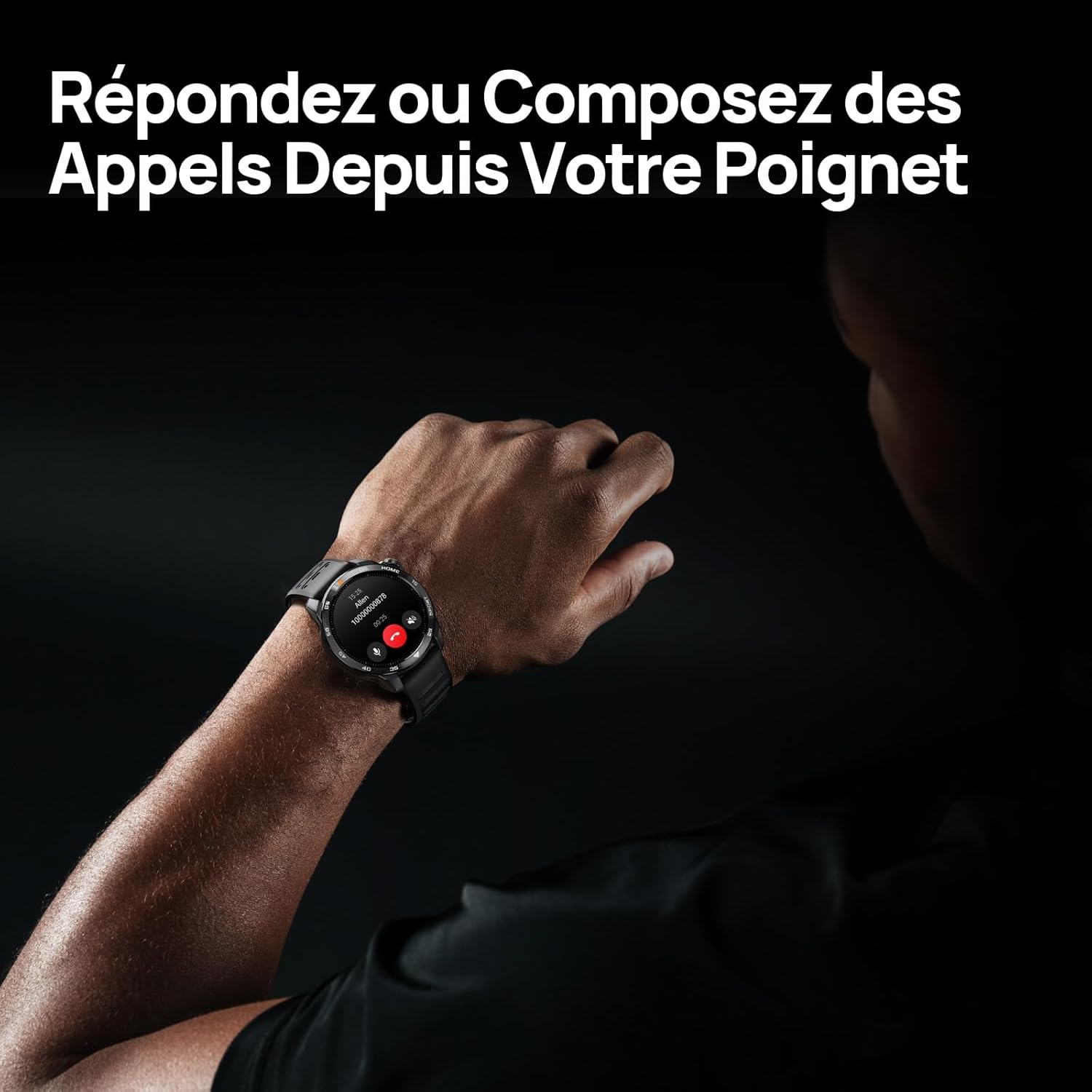
Image 3.1: Responding to calls on the Mibro GS Pro2. This image shows a person's wrist with the Mibro GS Pro2 smartwatch displaying an incoming call notification, illustrating the ability to answer or decline calls directly from the watch.
4. Özellikler
4.1 Ekran
The Mibro GS Pro2 features a vibrant 1.43-inch AMOLED display, offering clear visibility even in bright outdoor conditions.
- Boyut: 1.43 inç
- Tip: AMOLED
- Çözünürlük: 466x466 piksel
- Parlaklık: 1200 nit'e kadar tepe parlaklık
- Özellikler: Touchscreen, Anti-fingerprint coating.

Image 4.1: Mibro GS Pro2 1.43" AMOLED High Brightness Screen. This image highlights the smartwatch's display specifications, including 1200 nits peak brightness, 466x466 resolution, and 60 fps refresh rate, demonstrating its clarity and responsiveness.
4.2 Multisport Modes
The watch supports over 150 sports modes, providing tailored data analysis for each activity. This includes intelligent transitions for multi-discipline events like triathlons.
- Aquatic Sports: Suitable for open water swimming and pool swimming, calculating parameters such as distance, pace, and trajectory. The watch is 5ATM water resistant.
- Bisikletçilik: Tracks various cycling metrics, including outdoor cycling, indoor cycling, mountain biking, and short-distance modes.
- Koşma: Offers professional running algorithms, including running dynamics, performance index, and physical analysis based on real-time data. It records trajectories and provides long-term training plans.
- Diğer Sporlar: Includes modes for hiking, skiing, padel, and many more.

Image 4.2: Mibro GS Pro2 with 150+ Sports Modes. This image shows the smartwatch displaying various sports icons, indicating its extensive support for over 150 different physical activities, including swimming, cycling, and running.

Image 4.3: Mibro GS Pro2 5ATM Water Resistant. This image depicts a swimmer wearing the Mibro GS Pro2 smartwatch, with on-screen data showing swimming metrics like distance, stroke count, and calories burned, highlighting its water resistance and aquatic sport tracking capabilities.
4.3 GPS and Outdoor Navigation
The smartwatch features precise dual-frequency geolocation (Bi-Band GNSS) with real-time deviation alerts. It provides accurate route data and altitude variation measurements for outdoor activities like cycling tours or hiking.
- Dynamically adjust start/end points directly on the watch.
- Store up to 10 backup routes for navigation in areas without signal.
- Includes Barometer and Altimeter functions for environmental data.

Image 4.4: Mibro GS Pro2 Dual-Frequency GPS for Precise Outdoor Navigation. This image shows the smartwatch displaying a map and route tracking, alongside a smartphone app showing a detailed outdoor run trajectory, emphasizing its accurate GPS capabilities for outdoor activities.

Image 4.5: Mibro GS Pro2 Barometer and Altimeter. This image displays the watch showing barometric pressure, a compass, and altitude readings, with a person climbing in the background, illustrating its environmental sensing capabilities.
4.4 Sağlık İzleme
The Mibro GS Pro2 provides comprehensive health tracking features to help you monitor your well-being.
- Nabız İzleme: Sürekli kalp atış hızı takibi.
- Kan Oksijen (SpO2) İzlemesi: Kan oksijen saturasyon seviyelerini ölçer.
- Uyku Takibi: Monitörler uyku stagUyku türlerini (hafif, derin, REM) gösterir ve bir uyku puanı verir.
- Stres İzleme: Gün boyunca stres seviyenizi takip eder.
- VO2 Max & Recovery Time: Professional metrics for training optimization.
- Etkinlik Takibi: Records calories burned, total distance, and steps taken.

Image 4.6: Mibro GS Pro2 VO2 Max & Recovery Time. This image shows the smartwatch displaying VO2 Max percentage and recovery time recommendations, along with training effect metrics, aiding in professional workout analysis.

Image 4.7: Mibro GS Pro2 Blood Oxygen (SpO2) Monitoring. This image illustrates the watch's ability to track blood oxygen saturation levels over a 24-hour period, displayed as a graph on the watch face.

Image 4.8: Mibro GS Pro2 Sleep Tracking. This image shows the smartwatch displaying sleep quality metrics (Good, BPM, Stress) and a breakdown of sleep stages (Awake, Light Sleep, Deep Sleep), with a person sleeping in the background.
4.5 Pil Ömrü
The Mibro GS Pro2 offers extended battery life to support prolonged use.
- Günlük Mod: Yaklaşık 20 gün.
- GPS Modu: Yaklaşık 20 saat.
- Enerji tasarrufu modu: Up to 50+ days.

Image 4.9: Mibro GS Pro2 Ultra-Long Battery Life and Fast Charging. This image illustrates the watch's battery performance, showing 2.5 hours for a full charge and estimated usage times for daily mode (20+ days), power-saving mode (50+ days), and GPS mode (20 hours).
4.6 Akıllı Fonksiyonlar
Beyond fitness tracking, the Mibro GS Pro2 integrates seamlessly with your digital life.
- Mesaj Bildirimleri: Receive alerts for calls, SMS, and app notifications (e.g., TikTok, WhatsApp, Telegram, Instagram, Facebook, Snapchat).
- Müzik Kontrolü: Akıllı telefonunuzdaki müzik çalmayı doğrudan saatinizden kontrol edin.
- Telefonumu Bul: Saati kullanarak eşleştirilmiş akıllı telefonunuzu bulun.
- Özelleştirilebilir Saat Yüzleri: Personalize your watch with various watch face designs.

Image 4.10: Mibro GS Pro2 New Daily Health & Well-being Features. This image shows icons representing sleep tracking, wake-up reminders, music control, and 'find my phone' functionality, indicating the watch's smart features for daily use.

Image 4.11: Mibro GS Pro2 Message Push Notifications. This image shows the smartwatch displaying a message notification, surrounded by logos of popular social media and messaging apps, illustrating its capability to receive alerts from various platforms.

Image 4.12: Mibro GS Pro2 Personalized Watch Faces. This image displays a variety of digital watch faces, showcasing the customization options available to users for personalizing their smartwatch display.
5. Bakım
5.1 Akıllı Saatinizi Temizleme
- Saati düzenli olarak temizleyin.asing and strap with a soft, damp Kumaş.
- İnatçı kirler için hafif bir sabunlu su çözeltisi kullanın ve temiz suyla iyice durulayın.
- Korozyonu önlemek için şarj etmeden önce şarj kontaklarının temiz ve kuru olduğundan emin olun.
- Saatinizin yüzeyine ve contalarına zarar verebileceğinden, sert kimyasallar, aşındırıcı temizleyiciler veya çözücüler kullanmaktan kaçının.
5.2 Suya Dayanıklılık
The Mibro GS Pro2 is 5ATM water resistant, meaning it can withstand pressures equivalent to a depth of 50 meters. This makes it suitable for swimming and showering. However, it is not recommended for diving or high-pressure water activities.
- Düğmeleri su altında çalıştırmayın.
- Tuzlu suya maruz kaldıktan sonra saati tatlı suyla durulayın ve iyice kurulayın.
5.3 Pil Bakımı
- Pilin sık sık tamamen boşaltılmasından kaçının.
- Uzun süre kullanılmayacaksa saati serin ve kuru bir yerde saklayın.
- Yalnızca birlikte verilen şarj kablosunu kullanın.
6. Sorun Giderme
6.1 Saat Açılmıyor
- Saatinizin tam şarjlı olduğundan emin olun. Saatinizi en az 30 dakika şarj cihazına takın.
- Zorla yeniden başlatmayı denemek için güç düğmesini 10-15 saniye basılı tutun.
6.2 Akıllı Telefonla Eşleştirme Yapılamıyor
- Akıllı telefonunuzda ve saatinizde Bluetooth'un etkin olduğundan emin olun.
- Saatin telefonunuzun Bluetooth menzili içinde olduğundan emin olun.
- Hem akıllı telefonunuzu hem de saatinizi yeniden başlatın.
- Telefonunuzdaki Bluetooth önbelleğini temizleyin (varsa) ve tekrar eşleştirmeyi deneyin.
- Mibro Fit uygulamasının en son sürüme güncellendiğinden emin olun.
6.3 Hatalı GPS Okumaları
- Açık ve net bir dış mekanda olduğunuzdan emin olun view gökyüzünün.
- Aktivitenize başlamadan önce saatin istikrarlı bir GPS sinyali almasını bekleyin.
- Ensure the watch's firmware is up to date via the Mibro Fit app.
6.4 Bildirimler Görünmüyor
- Check notification settings in the Mibro Fit app to ensure they are enabled for desired applications.
- Verify that your phone's notification permissions are granted to the Mibro Fit app.
- Saatinizin Bluetooth aracılığıyla telefonunuza bağlı olduğundan emin olun.
7. Özellikler
| Özellik | Detay |
|---|---|
| Marka | Mikro |
| Model Numarası | GS Pro2 |
| Ekran Boyutu | 1.43 inç |
| Görüntü Türü | AMOLED |
| İşletim Sistemi | RTOS |
| Bağlantı | Bluetooth |
| Özel Özellikler | Touchscreen, Water Resistant (5ATM), Bi-Band GNSS, Health Monitoring |
| Uyumlu Cihazlar | Akıllı telefon |
| Pil Bileşimi | Lityum iyon |
| Pil Ömrü (Günlük Mod) | Yaklaşık. 20 gün |
| Pil Ömrü (GPS Modu) | Yaklaşık 20 saat |
| Suya Dayanıklılık | 5 ATM |
| Ölçüler (Saat Gövdesi) | 48 mm (çap) x 12 mm (kalınlık) |
| Kayış Uzunluğu | 265mm |
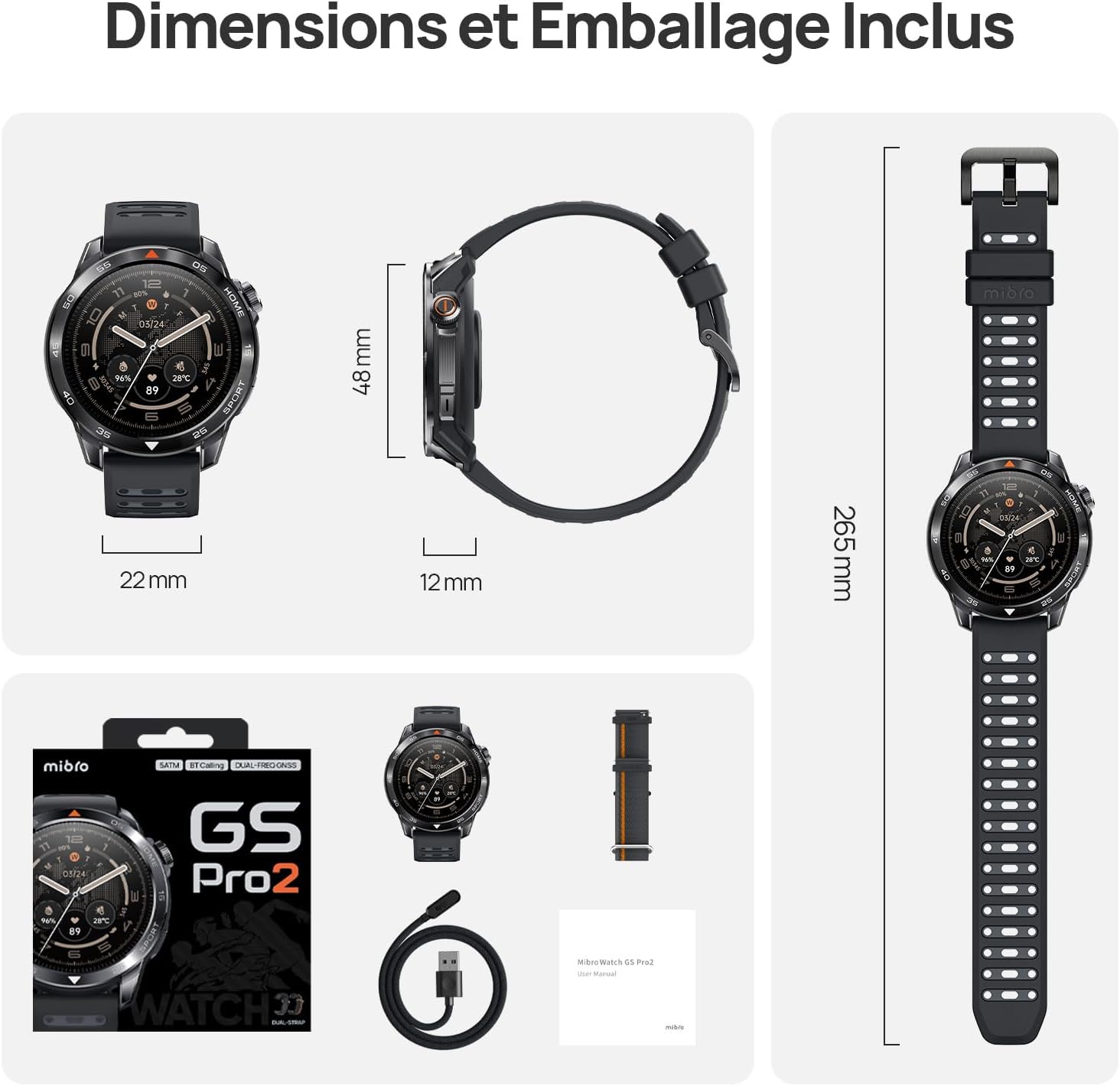
Image 7.1: Mibro GS Pro2 Dimensions and Included Packaging. This image provides a visual representation of the watch's dimensions (48mm diameter, 12mm thickness, 265mm strap length) and shows the contents of the product packaging, including the watch, charging cable, and user manual.
8. Garanti ve Destek
8.1 Üretici Garantisi
The Mibro GS Pro2 comes with a 1 yıllık üretici garantisiBu garanti, normal kullanım koşullarındaki malzeme ve işçilik kusurlarını kapsar. Garanti talepleriniz için lütfen satın alma belgenizi saklayın.
Garanti, yanlış kullanım, kaza, yetkisiz değişiklikler veya normal aşınma ve yıpranma nedeniyle oluşan hasarları kapsamaz.
8.2 Müşteri Desteği
For technical assistance, troubleshooting, or warranty inquiries, please refer to the official Mibro website or contact their customer support channels. Specific contact details may be found on the product packaging or the official Mibro webalan.


