giriiş
This manual provides detailed instructions for the installation, operation, and maintenance of your DDPAI 4G LTE Module. Designed to enhance the functionality of your DDPAI Z60 Pro Dash Cam, this module enables advanced remote monitoring, real-time tracking, and cloud storage capabilities. Please read this manual thoroughly before use to ensure optimal performance and safety.
Kutuda Neler Var?
The DDPAI 4G LTE Module package includes the following components:
- 4G Cloud Box
- SIM Card (with 30GB free data for the first 90 days)
- Akıllı Kablolu Kit
- 3M Çıkartmalar
- SIM İtici Aracı
- Kullanıcı Kılavuzu
Image: A visual representation of all items included in the DDPAI 4G LTE Module package.
Temel Özellikler
- SIM Kart Dahil: Comes with a DDPAI SIM card offering 30GB of free data for the first 90 days.
- Powerful 4G Remote Connectivity: Enables remote real-time viewing, screen recording, photo capture, and remote dash cam wake-up via the DDPAI app.
- Instant App Alerts: Receive real-time notifications with location, time, and footage for collisions or emergencies.
- GPS Tracking & Geofencing: Track your vehicle's location in real-time and set virtual boundaries with instant alerts.
- Akıllı Bulut Depolama: Provides 2GB of cloud storage for collision photos and 10-second video clips (720P@30fps, 4Mbps), with full control over your cloud album.
- Intelligent Hardwire Kit: Features IPS low-voltage protection to prevent vehicle battery drain.
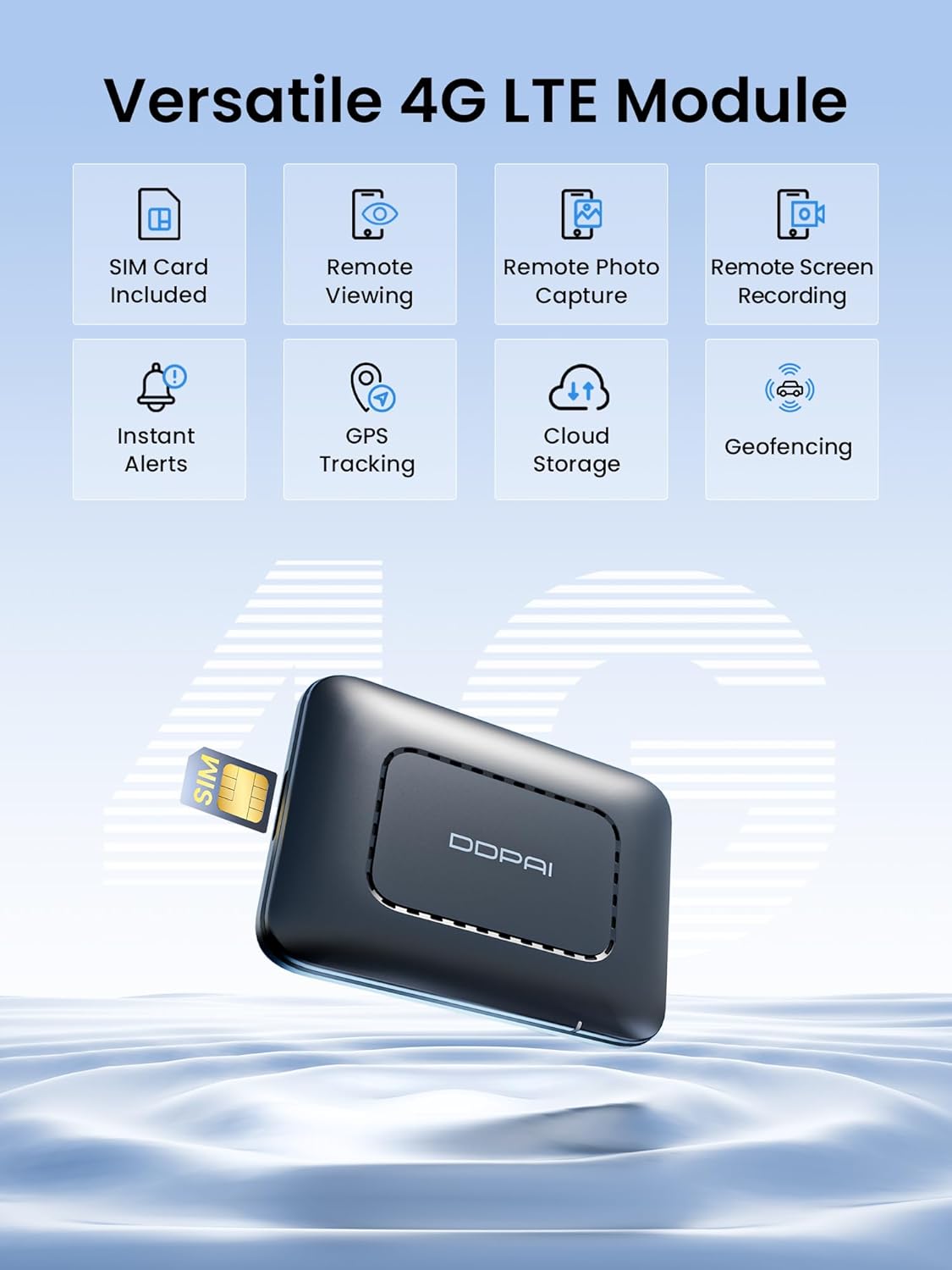
Image: The DDPAI 4G LTE Module with icons representing its core functionalities.
Kurulum ve Yükleme
1. SIM Card Activation & Data Plans
The included DDPAI SIM card provides 30GB of free data for your first 90 days. After the trial period, you can select from 6 data plans (including a 120GB plan for $6.25/month) directly through the DDPAI app to continue 4G connectivity.

Image: A close-up of the DDPAI 4G LTE Module with a SIM card being inserted.

Image: A graphic detailing the available data plans for the 4G LTE Module.
2. Connecting the 4G LTE Module to Z60 Pro Dash Cam
The 4G LTE module is designed for compatibility exclusively with the DDPAI Z60 Pro Dash Cam. Use the intelligent hardwire kit provided to connect the module to your vehicle's power system. Ensure proper routing of cables to avoid interference with vehicle operations.
Video: Official installation guide for the DDPAI 4G Cloud Box, demonstrating how to connect it to the dash cam and vehicle power.
Kullanım Talimatları
1. Remote Live View Ve Kontrol
Monitor real-time footage remotely via the DDPAI app. You can initiate remote screen recording, capture photos, and even wake up your dash cam from sleep mode.

Image: Remote live preview of dash cam footagAkıllı telefonda e.

Image: Visual guide to remote photo capture, GPS tracking, and remote wake-up functions.
2. Incident Alerts & GPS Tracking
The DDPAI app will send instant alerts to your phone if unusual events like collisions or vehicle entry/exit from geofenced areas occur. You can track your vehicle's real-time location via GPS.

Resim: Eski bir sevgiliample of an instant app alert for a parking collision.
3. Cloud Storage Management
Collision photos and 10-second video clips are automatically uploaded to your 2GB cloud storage. Manage your cloud album directly from the app to select, download, or delete media.

Image: The 4G LTE Module illustrating its smart cloud storage feature.
Bakım
- En iyi performansı sağlamak ve yeni özelliklere erişmek için DDPAI uygulamasındaki aygıt yazılımı güncellemelerini düzenli olarak kontrol edin.
- Ensure the intelligent hardwire kit is properly connected to prevent battery drain. The IPS low-voltage protection is designed to safeguard your vehicle's battery.
- Periyodik olarak yenidenview your cloud storage and local dash cam footage. Gereksiz olanları silin. files to manage storage space effectively.
- Keep the dash cam lenses clean for clear recording quality.
Sorun giderme
- No 4G Connectivity: Ensure the SIM card is correctly inserted and activated. Check your data plan status in the DDPAI app. Verify network coverage in your area.
- Dash Cam Not Waking Up Remotely: Confirm the 4G LTE module is properly connected and has an active data plan. Some features may rely on traffic detection (phone calling) for wake-up, depending on your SIM card type.
- Pil Boşaltma: The intelligent hardwire kit includes IPS low-voltage protection. If battery drain occurs, verify the hardwire kit installation and consult your vehicle's manual or a professional.
- App Alerts Not Received: Check your phone's notification settings for the DDPAI app. Ensure the app has necessary permissions and a stable internet connection.
Özellikler
| Ürün Boyutları | 1.97 x 1.97 x 1.97 inç |
| Ürün Ağırlığı | 1.98 ons |
| Bağlantı Teknolojisi | 4G LTE |
| Özel Özellikler | Cloud Storage, Cloud Album Management, Instant App Alerts, 4G Connectivity, Live GPS Tracking, Geofencing, App Control, Remote Live View, Remote Screen Recording, Remote Photo Capture, Remote Wake-up of Dashcam |
| Renk | Siyah |
| Üretici | ddpai |
| Model Adı | 4G Cloud Box |
| Video Yakalama Çözünürlüğü | 1080p, 2160p (Dash Cam dependent) |
| Montaj Tipi | Ön Cam Bağlantısı |
Garanti ve Destek
- Garanti: 18 Ay
- İade politikasi: 7 Gün
- Arızalı Ürünlerde İade: Evet
- Müşteri Desteği: QUICK 24/7 LIVE EMAIL SUPPORT at servicecenter@ddpai.com


