1. Ürün Bittiview
The SUPVAN T50M Pro is a portable thermal label maker designed for various labeling needs. It operates without ink or toner, utilizing thermal paper for printing. This manual provides instructions for setup, operation, and maintenance of your device.
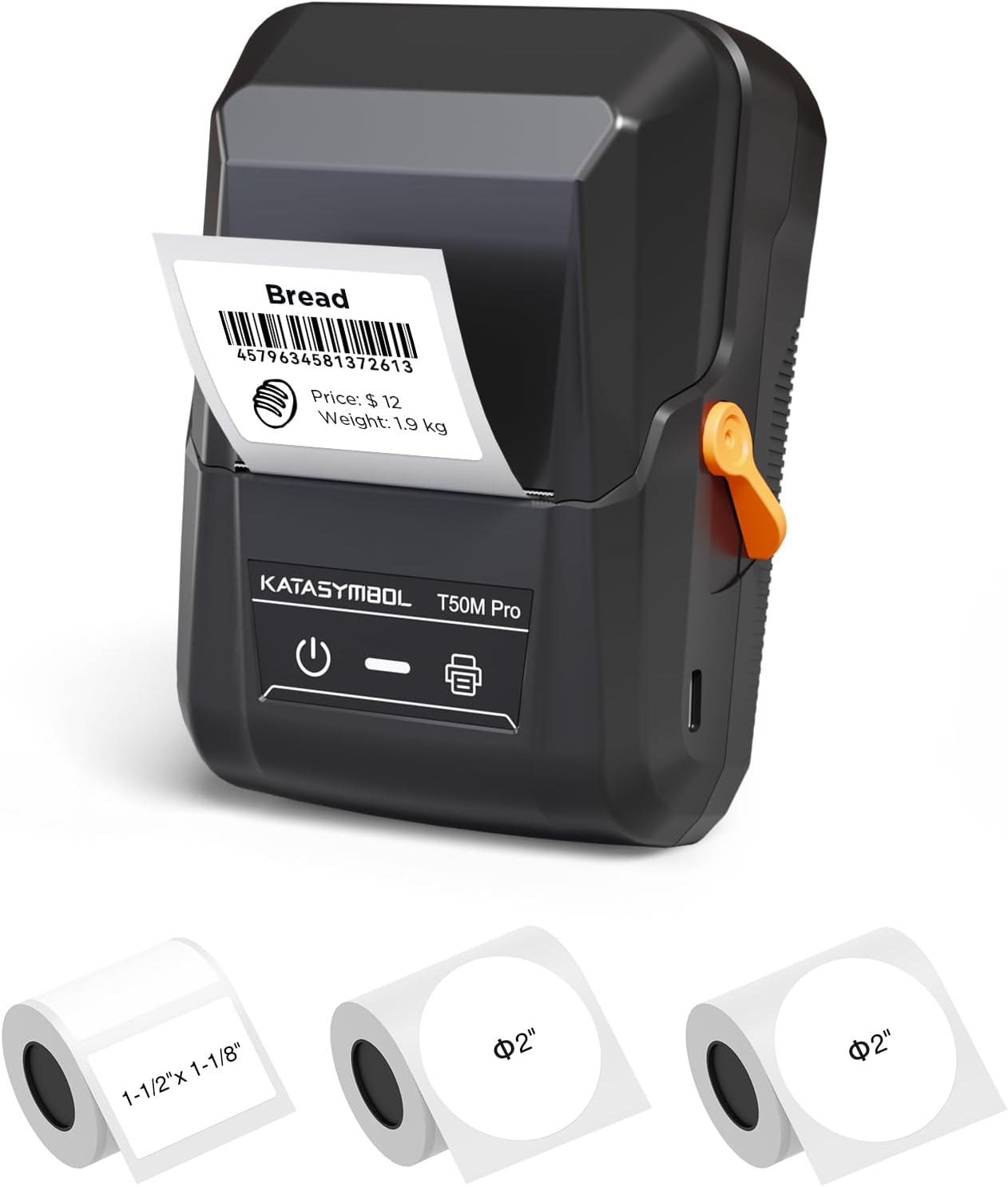
Image 1.1: The SUPVAN T50M Pro label maker shown with different label rolls and a printed label displaying "Bread" and a barcode (4579634581372613).
2. Paket İçeriği
Kutuyu açtıktan sonra tüm parçaların eksiksiz olduğundan emin olun:
- SUPVAN T50M Pro Label Maker
- 2 rolls of round white labels (Φ 2'', 140 labels/roll)
- 1 roll of rectangular white labels (1.57'' × 1.18'' / 40mm × 30mm, 250 labels/roll)
- USB Cable (for charging and connectivity)
- Kullanım Kılavuzu (bu belge)
3. Kurulum Kılavuzu
3.1 Cihazı Şarj Etme
Before first use, fully charge the label maker using the provided USB cable. Connect the cable to the device's USB port and a standard USB power adapter (not included). The device features a 1200 mAh built-in rechargeable battery.
3.2 Termal Kağıdın Yüklenmesi
- Etiket bölmesinin kapağını açın.
- Insert the thermal label roll with the printing surface facing upwards.
- Ensure the label roll is properly seated and the leading edge of the label extends slightly out of the printer slot.
- Close the compartment cover securely. The printer's smart RFID auto-detection will recognize the label size.

Image 3.2: Illustration of how to load thermal paper into the SUPVAN T50M Pro label maker. The image shows a roll of thermal paper being inserted into the transparent compartment of the device.
3.3 Uygulama Kurulumu
Download the official SUPVAN label editing application from your device's app store (iOS/Android). The app is free to use and does not require a subscription.
4. Kullanım Talimatları
4.1 Açma/Kapatma
- To power on: Press and hold the power button (marked with a universal power symbol) until the indicator light illuminates.
- Kapatmak için: Gösterge ışığı sönene kadar güç düğmesini basılı tutun.
4.2 Uygulamaya Bağlanma
Ensure Bluetooth is enabled on your smartphone or tablet. Open the SUPVAN app and follow the on-screen instructions to pair with your T50M Pro label maker. The device can also connect via USB.
4.3 Etiket Oluşturma ve Yazdırma
The SUPVAN app offers extensive features for label creation:
- Şablon Kütüphanesi: Access over 140 constantly updated templates for various uses (e.g., home, product, shipping, school).
- Özel Tasarım: Utilize 40+ fonts, embed images, pictures, icons, shapes, QR codes, and Excel data.
- Otomatik Etiket Boyutu Tanıma: The app automatically detects the loaded label size (e.g., 2" x 2", 3/4" x 3/8").
- Baskı: After designing, select "Preview & Print" within the app to send the label to the T50M Pro.

Image 4.3a: The SUPVAN app interface showing various editing functions, including font selection (40+ options), image/picture integration, and automatic label size recognition (e.g., 2" x 2").

Image 4.3b: The SUPVAN app displaying a selection of over 140 available templates, including designs for nutrition information, thank you notes, and product labels.

Image 4.3c: Examples of various label styles supported by the SUPVAN T50M Pro, including round "Thank you" labels, price tags, banking labels, Halloween designs, and address labels, demonstrating its ability to print 3/4 to 2-inch wide labels.
5. Bakım
5.1 Baskı Kafasının Temizlenmesi
To ensure optimal print quality, periodically clean the print head. Use a soft, lint-free cloth lightly dampİzopropil alkolle silin. Yazıcı kafası yüzeyini nazikçe silin. Kullanmadan önce cihazın kapalı ve tamamen kuru olduğundan emin olun.
5.2 Pil Bakımı
For long-term battery health, avoid fully discharging the device frequently. If storing for an extended period, charge the battery to approximately 50% and store in a cool, dry place.
5.3 Depolama
Store the label maker in a clean, dry environment away from direct sunlight and extreme temperatures. Remove any label rolls if storing for very long periods to prevent dust accumulation.
6. Sorun Giderme
If you encounter issues with your SUPVAN T50M Pro, consider the following:
- Güç Yok: Cihazın şarjının dolu olduğundan emin olun. Cihazı bir güç kaynağına bağlayın ve tekrar deneyin.
- Kötü Baskı Kalitesi: Check if the thermal paper is loaded correctly. Clean the print head as described in Section 5.1. Ensure you are using genuine SUPVAN thermal labels.
- Bağlantı Sorunları: Verify Bluetooth is enabled on your mobile device and the label maker is powered on. Restart both devices and try pairing again. For USB connection, ensure the cable is securely connected.
- Etiket Sıkışmaları: Open the label compartment and carefully remove any jammed labels. Ensure the label roll is inserted correctly and not too tight.
- Uygulama Yanıt Vermiyor: Close and reopen the app. If the issue persists, restart your mobile device.
For further assistance, refer to the in-app help section or contact SUPVAN customer support.
7. Özellikler
| Özellik | Detay |
|---|---|
| Model Adı | T50M Pro |
| Marka | SÜPVAN |
| Baskı Teknolojisi | Termal |
| Bağlantı Teknolojisi | USB |
| Yazıcı Çıktısı | Tek renkli |
| Özel Özellik | Taşınabilir |
| Pil | 1200 mAh built-in rechargeable |
| Desteklenen Medya Boyutları | Up to 50.8 mm (2 inches) wide, e.g., 50 x 30 mm |
| Ürün Model Numarası | T50M Pro |
| Donanım Arayüzü | USB |
| Renk | Siyah |
| BPA içermez | Yes (labels comply with BPA-free standard) |

Image 7.1: The SUPVAN T50M Pro label maker shown in a bag, highlighting its portability. Key specifications like size (5" x 3.7" x 2.3"), weight (0.6 lb), and 1200 mAh battery are displayed.

Resim 7.2: Örn.amples of the SUPVAN T50M Pro's versatility, showing labels used for home organization (jars), product labeling (cookies), shipping (address labels), and school supplies (notebooks).
8. Garanti Bilgileri
The SUPVAN T50M Pro Label Maker comes with a limited warranty. Please refer to the warranty card included in your package or contact SUPVAN customer support for specific terms and conditions.
9. Müşteri Desteği
For technical support, troubleshooting, or warranty inquiries, please visit the official SUPVAN website or contact their customer service department. Contact information can typically be found on the product packaging or the SUPVAN brand store on Amazon.
Note: Always ensure you have your product model number (T50M Pro) and purchase details ready when contacting support.


