1. Ürün Bittiview
The Xprinter XP-420B is a high-speed direct thermal label printer designed for various applications, including shipping labels. It offers a maximum print speed of 152 mm/s (6 inches/second) and a resolution of 203 DPI, ensuring clear and precise prints. Its robust double-walled clamshell design enhances durability, and the intelligent print head temperature control system ensures stable output. This printer is compatible with both Windows and Mac operating systems, making it a versatile solution for your labeling needs.
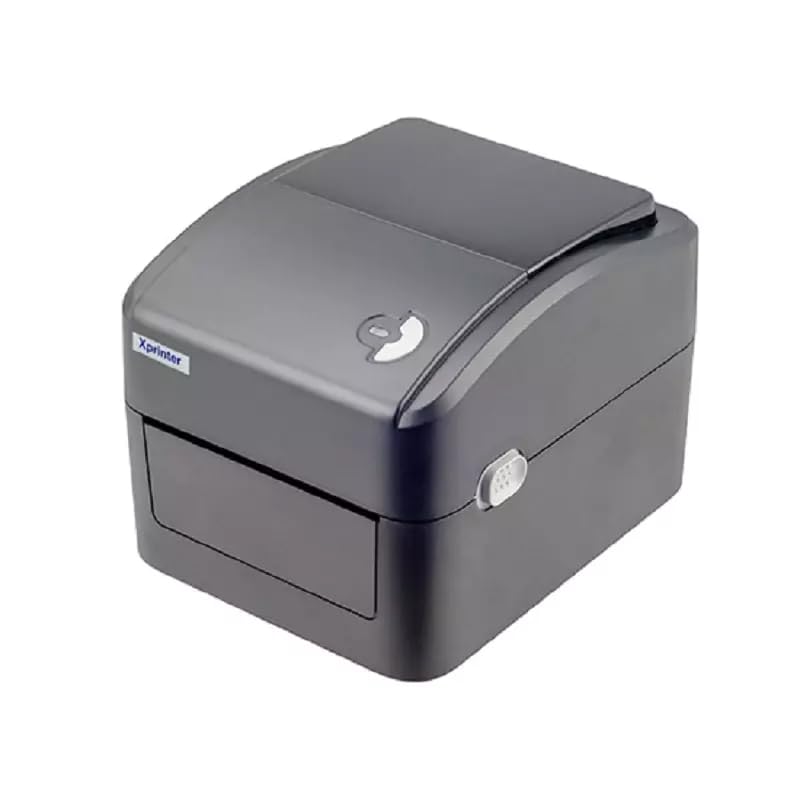
Şekil 1: Ön view of the Xprinter XP-420B thermal label printer.
2. Kurulum Kılavuzu
2.1 Paketin Açılması ve İlk Muayene
- Yazıcıyı ve tüm aksesuarlarını dikkatlice ambalajından çıkarın.
- Verify that all components are present: printer unit, power adapter, USB cable, and user manual.
- Inspect the printer for any visible damage that may have occurred during transit.
2.2 Yazıcıyı Bağlama
- Güç adaptörünü yazıcının güç portuna bağlayın ve ardından prize takın.
- Connect one end of the provided USB cable to the printer's USB port and the other end to an available USB port on your computer.
- Power on the printer using the power switch, usually located on the side or rear.

Figure 2: Xprinter XP-420B showing USB connectivity.
2.3 Etiketleri Yükleme
- Open the printer's top cover by pressing the release latches on both sides.
- Place the roll of thermal labels onto the label spindle, ensuring the labels feed from the bottom of the roll.
- Feed the leading edge of the labels through the label guide until it extends slightly past the print head.
- Adjust the movable label guides to fit the width of your labels snugly, without pinching them.
- Close the top cover firmly until it latches securely.
- The printer will automatically calibrate and detect the label size.
2.4 Sürücü Kurulumu
Before printing, you must install the appropriate printer drivers on your computer. Drivers are typically provided on a CD included with the printer or can be downloaded from the official Xprinter website. The XP-420B supports both Windows and Mac operating systems.
- Windows için: Run the setup executable from the driver CD or downloaded file ve ekrandaki talimatları izleyin.
- Mac için: Download the Mac driver from the Xprinter website and follow the installation prompts.
3. Kullanım Talimatları
3.1 Temel Baskı
- Yazıcının açık ve bilgisayarınıza bağlı olduğundan emin olun.
- Yazdırmak istediğiniz belgeyi veya uygulamayı açın (örneğin, kargo yazılımı, kelime işlemci).
- Uygulamanın menüsünden "Yazdır" seçeneğini seçin.
- Choose "Xprinter XP-420B" as your printer.
- In the printer settings or preferences, ensure the correct label size is selected. The printer supports adjustable label sizes.
- İşi yazıcıya göndermek için "Yazdır"a tıklayın.
3.2 Adjusting Label Size
The XP-420B allows for adjustable label sizes. This adjustment is primarily done through the printer driver settings on your computer and by physically adjusting the label guides within the printer.
- Yazılım Ayarlaması: In your printing application or printer driver settings, navigate to the "Page Setup" or "Paper Size" options. Select or define the custom dimensions for your labels (e.g., 4x6 inches for shipping labels).
- Physical Adjustment: As described in Section 2.3, ensure the internal label guides are set correctly to the width of your loaded labels.
4. Bakım
4.1 Baskı Kafasının Temizlenmesi
Regular cleaning of the print head is crucial for maintaining print quality and extending the printer's lifespan. It is recommended to clean the print head after every roll of labels or if print quality degrades.
- Yazıcıyı kapatın ve güç kablosunu çıkarın.
- Yazıcının üst kapağını açın.
- Yazıcı yakın zamanda kullanıldıysa, baskı kafasının soğuması için birkaç dakika bekleyin.
- Yazıcı kafasının yüzeyini alkollü bir pamuk veya tüy bırakmayan bir bezle hafifçe silin.ampİzopropil alkol ile yıkandı.
- Kapağı kapatıp gücü tekrar bağlamadan önce baskı kafasının tamamen kurumasını bekleyin.
4.2 Genel Temizlik
- Yazıcının dışını silmek için yumuşak ve kuru bir bez kullanın.
- Remove any dust or label debris from the inside of the printer using a soft brush or compressed air.
- Aşındırıcı temizleyiciler veya çözücüler kullanmayınız.
5. Sorun Giderme
| Sorun | Olası Neden | Çözüm |
|---|---|---|
| Yazıcı yanıt vermiyor | Power off; USB cable disconnected; Driver issue. | Ensure power is on and connected. Check USB cable. Reinstall printer driver. |
| Baskı kalitesi düşük (soluk, çizgiler) | Dirty print head; Incorrect label type; Low print density setting. | Clean the print head (Section 4.1). Ensure you are using direct thermal labels. Adjust print density in driver settings. |
| Etiketler doğru şekilde beslenmiyor | Labels improperly loaded; Label guides not adjusted; Sensor obstruction. | Reload labels correctly. Adjust label guides. Clean any dust or debris from sensors. |
| Printer prints blank labels | Labels loaded upside down; Not a direct thermal label. | Ensure labels are loaded with the printable side facing up. Verify labels are direct thermal. |
6. Ürün Özellikleri
| Özellik | Detay |
|---|---|
| Marka | X yazıcı |
| Model Adı | XP-420B |
| Bağlantı Teknolojisi | USB |
| Baskı Teknolojisi | Doğrudan Termal |
| Çözünürlük | 203 DPI |
| Maksimum Baskı Hızı | 152 mm/s (6 inches/second) |
| Hafıza | 8MB SDRAM, 8MB Flaş |
| Yazıcı Çıktısı | Tek renkli |
| Ürün Ağırlığı | 3 Kilogram |
| Ürün Boyutları | 20D x 6G x 10Y Santimetre |
| Uyumluluk | Windows, Mac |
7. Garanti ve Destek
7.1 Garanti Bilgileri
The Xprinter XP-420B comes with a 1 Yıllık Garanti Satın alma tarihinden itibaren geçerlidir. Bu garanti, üretim hatalarını ve normal kullanımdaki arızaları kapsar. Garanti talepleriniz için lütfen satın alma belgenizi saklayın.
7.2 Müşteri Desteği
For technical assistance, troubleshooting beyond this manual, or warranty service, please contact Xprinter customer support. Refer to the contact information provided with your product packaging or visit the official Xprinter webEn güncel destek detayları için siteyi ziyaret edin.


