1. Giriş
The Hama WM-450 Multi-Device Wireless Mouse is an optical mouse designed for versatile use across multiple devices. It features 7 buttons, a scroll wheel, and supports wireless connectivity via Bluetooth (two channels) and a 2.4 GHz radio frequency (one channel) using a USB-A receiver. This allows simultaneous connection to up to three devices, with quick switching between them. An integrated AI Assist button enhances productivity by activating an inter-program AI assistant. The mouse is designed for comfortable and silent operation.

Resim 1.1: Üzeriview of the Hama WM-450 mouse highlighting its key features: Bluetooth connectivity, 10-meter wireless range, USB-A receiver, and battery power.
2. Kurulum
2.1 Pil Kurulumu
- Farenin alt tarafındaki pil bölmesini bulun.
- Pil bölmesinin kapağını açın.
- Insert the two AAA batteries (included) according to the polarity markings (+/-) inside the compartment.
- Pil bölmesi kapağını sıkıca kapatın.
2.2 Açma/Kapatma
Slide the ON/OFF switch, located on the underside of the mouse, to the 'ON' position to power on the mouse. Slide it to 'OFF' when not in use to conserve battery life.
2.3 Connecting via USB-A Receiver (2.4 GHz Radio)
- Remove the USB-A receiver from its storage slot on the underside of the mouse.
- Plug the USB-A receiver into an available USB-A port on your computer, laptop, or compatible device.
- The mouse should be automatically recognized and ready for use. This connection uses the 2.4 GHz radio channel.
2.4 Bluetooth aracılığıyla bağlanma
The mouse supports two Bluetooth channels for connecting to different devices.
- Farenin açık olduğundan emin olun.
- Press the channel switch button (usually on the underside or top of the mouse) to select either Bluetooth Channel 1 or Bluetooth Channel 2. The corresponding indicator light will flash.
- On your device (PC, tablet, smartphone), go to Bluetooth settings and enable Bluetooth.
- Arama new devices. The mouse should appear as 'Hama WM-450' or similar.
- Eşleştirmek istediğiniz fareyi seçin. Ekranda beliren yönergeleri izleyin.
- Once paired, the indicator light will stop flashing and remain solid for a few seconds, indicating a successful connection.

Image 2.1: The underside of the Hama WM-450 mouse, illustrating the battery compartment, the ON/OFF switch, and the integrated storage for the USB-A receiver.
3. Çalıştırma
3.1 Temel Fonksiyonlar
- Sol tık: Birincil seçilim ve aktivasyon.
- Sağ tık: Bağlam menülerine erişim sağlar.
- Kaydırma tekerleği: Belgeler arasında gezinir ve web pages. The high-quality aluminum scroll wheel provides precise control.
- Sessiz Tıklama Düğmeleri: Sol ve sağ tıklama düğmeleri sessiz çalışacak şekilde tasarlanmıştır ve sessiz ortamlarda gürültüyü azaltır.
3.2 Çoklu Cihaz Geçişi
To switch between connected devices (USB-A, Bluetooth 1, Bluetooth 2), press the dedicated channel switch button on the mouse. The mouse will instantly connect to the selected device.
3.3 Side Navigation Buttons
The mouse features two practical side buttons. These buttons typically function as 'Back' and 'Forward' for easier navigation in web tarayıcılar, file explorers, and applications like Outlook.

Resim 3.1: Yakın çekim view of the two side navigation buttons on the Hama WM-450 mouse, used for 'Back' and 'Forward' functions.
3.4 DPI Ayarı
The mouse includes a DPI switch button, usually located near the scroll wheel. Press this button to cycle through different sensitivity settings: 800, 1200, and 1600 DPI (Dots Per Inch). Choose the DPI setting that best suits your preference and task.
3.5 AI Assist Button
The dedicated AI Assist button activates an inter-program AI assistant, designed to enhance productivity. Refer to your device's software documentation for specific functionalities enabled by this feature.
4. Bakım
4.1 Temizlik
To clean the mouse, use a soft, dry, lint-free cloth. For stubborn dirt, slightly dampen the cloth with water or a mild cleaning solution. Avoid using harsh chemicals, abrasive cleaners, or excessive moisture, as these can damage the mouse.
4.2 Pil Değişimi
When the mouse performance degrades or the indicator light signals low battery, replace the two AAA batteries. Always use fresh batteries of the same type.
4.3 USB Alıcı Depolama
When transporting the mouse or not using the 2.4 GHz radio connection, store the USB-A receiver in its dedicated slot on the underside of the mouse to prevent loss.
5. Sorun Giderme
- Fare yanıt vermiyor:
- Farenin açık olduğundan emin olun.
- Pil seviyelerini kontrol edin ve gerekiyorsa değiştirin.
- For USB-A connection, ensure the receiver is securely plugged into a working USB port. Try a different USB port.
- Bluetooth bağlantısı için, cihazınızda Bluetooth'un etkinleştirildiğinden ve farenin eşleştirildiğinden emin olun. Fareyi yeniden eşleştirmeyi deneyin.
- Ensure the correct channel (USB-A, BT1, BT2) is selected on the mouse.
- Aralıklı bağlantı:
- Move the mouse closer to the receiver/device. The effective range is up to 10 meters, but obstacles can reduce this.
- Parazite neden olabilecek diğer kablosuz cihazların yakınında fareyi kullanmaktan kaçının.
- İmleç hareketi düzensiz veya yavaş:
- Farenin alt tarafındaki optik sensörü temizleyin.
- Fareyi uygun bir yüzeyde kullandığınızdan emin olun. Çok yansıtıcı veya şeffaf yüzeyler performansı etkileyebilir.
- Adjust the DPI setting to a higher value if the cursor is too slow.
- Side buttons or AI Assist button not working:
- Ensure your operating system or application supports these functions.
- Check for any specific software or driver requirements for your device.
6. Özellikler
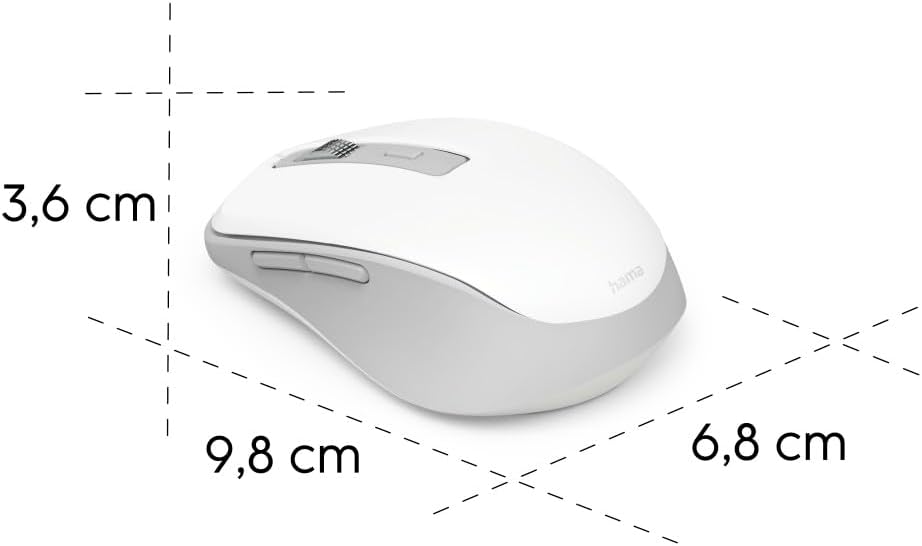
Image 6.1: Dimensional diagram of the Hama WM-450 mouse, indicating its length, width, and height.
| Marka | Hama |
| Model Adı | WM-450 |
| Model Numarası | 00173080 |
| Bağlantı Teknolojisi | Bluetooth, 2.4 GHz Radio (USB-A) |
| kablosuz Menzil | 10 metreye kadar |
| Sensör Teknolojisi | Optik |
| DPI Ayarları | 800, 1200, 1600 |
| Düğme Sayısı | 7 (including scroll wheel click) |
| Güç Kaynağı | 2 x AAA Pil (dahil) |
| Boyutlar (U x G x Y) | 9.8 x 6.8 x 3.6 cm (yaklaşık) |
| Ağırlık | 140 gram |
| Uyumlu Cihazlar | PC, Tablet, Laptop, Smartphone, iPad |
| Özel Özellikler | Multi-device connectivity (3 devices), AI Assist button, Silent click buttons, Side navigation buttons, Retractable USB receiver, Polymer-coated mouse feet, High-quality aluminum scroll wheel. |
| Malzeme Bileşimi | At least 20% recycled materials |
| Ambalajlama | 100% plastic-free |
7. Garanti ve Destek
Garanti bilgileri, teknik destek veya servis talepleri için lütfen ürününüzle birlikte verilen garanti kartına bakın veya resmi Hama web sitesini ziyaret edin. webMüşteri desteği için iletişim bilgileri genellikle üreticinin web sitesinde mevcuttur. webalan.


