giriiş
This manual provides detailed instructions for the assembly, operation, and maintenance of your FLEXISPOT One-Piece Standing Desk with Rattan Drawers. Please read this manual thoroughly before installation and use to ensure proper function and safety. Keep this manual for future reference.

Image: The FLEXISPOT One-Piece Standing Desk in black with rattan drawers, featuring a monitor shelf and an integrated control panel.
Önemli Güvenlik Bilgileri
Yaralanmaları veya ürüne zarar gelmesini önlemek için aşağıdaki güvenlik yönergelerine uyun:
- Montaj talimatlarını her zaman dikkatli bir şekilde takip edin.
- Çocukları ve evcil hayvanları toplanma alanından uzak tutun.
- Use appropriate tools and safety gear during assembly.
- Masayı çalıştırmadan önce tüm bağlantıların güvenli olduğundan emin olun.
- Masayı aşırı yüklemeyin. Maksimum taşıma kapasitesi 110 lbs'dir.
- Yükseklik ayarlaması sırasında ellerinizi ve nesneleri hareketli parçalardan uzak tutun.
Paket İçeriği
Verify that all components are present before beginning assembly. The desk ships in two separate packages.
- Desktop with integrated monitor shelf and rattan drawers
- Desk frame and legs
- Kontrol Paneli
- Güç adaptörü ve kablolar
- Montaj donanımı (vidalar, cıvatalar, aletler)
- Kullanıcı Kılavuzu

Image: A diagram illustrating the dimensions of the desk components and indicating that the product ships in two separate packages.
Montaj Talimatları
Assembly typically takes approximately one hour. Refer to the separate detailed assembly guide included in your package for step-by-step instructions and diagrams. Ensure all fasteners are correctly identified and used in their designated locations.
- Tüm bileşenleri paketinden çıkarın ve paket içeriği listesine göre doğrulayın.
- Attach the desk legs to the desktop frame using the provided hardware.
- Connect the control panel and motor cables as instructed.
- Secure any cable management components.
- Place the desk in its desired location.
Kurmak
After assembly, connect the desk to a power source.
- Plug the power adapter into the desk's control box.
- Güç kablosunu standart bir elektrik prizine takın.
- The desk is now ready for initial use.
Kullanım Talimatları
Yükseklik Ayarı
The desk features an electric motor system for smooth height transitions.
- Basın Yukarı ok masayı kaldırmak için düğmeye basın.
- Basın Aşağı ok masayı indirmek için düğmeye basın.
- The desk can adjust between 28.9 inches (minimum) and 46.5 inches (maximum).
- The motor operates quietly, typically below 50dB.

Image: The desk shown at its minimum (28.9") and maximum (46.5") adjustable heights.
Bellek Ön Ayarları
Program up to three preferred height settings for quick adjustments.
- Masayı istediğiniz yüksekliğe ayarlayın.
- Basın M düğmeye basın, ardından numaralı ön ayar düğmelerinden birine basın (1, 2, veya 3Mevcut yüksekliği kaydetmek için 3 saniye içinde işlemi tamamlayın.
- To recall a saved height, simply press the corresponding numbered preset button.

Resim: Yakın çekim view of the desk's control panel, highlighting the up/down arrows and memory preset buttons.
Monitör Rafı
The integrated monitor shelf is designed to elevate screens to an ergonomic eye level.
- Place your monitor(s) on the shelf to reduce neck and back strain.
- This helps maintain proper posture during extended work sessions.

Image: Visual comparison of poor posture versus ergonomic sitting and standing postures facilitated by the adjustable desk.
Rattan Drawers
The desk includes both sliding-door desktop compartments and an under-desk drawer for organized storage.
- Use the desktop compartments (47.2"x8.7"x5.5") for easy access to frequently used items.
- The under-desk drawer (23.6"x11.8"x3.9") provides discreet storage for documents or books.
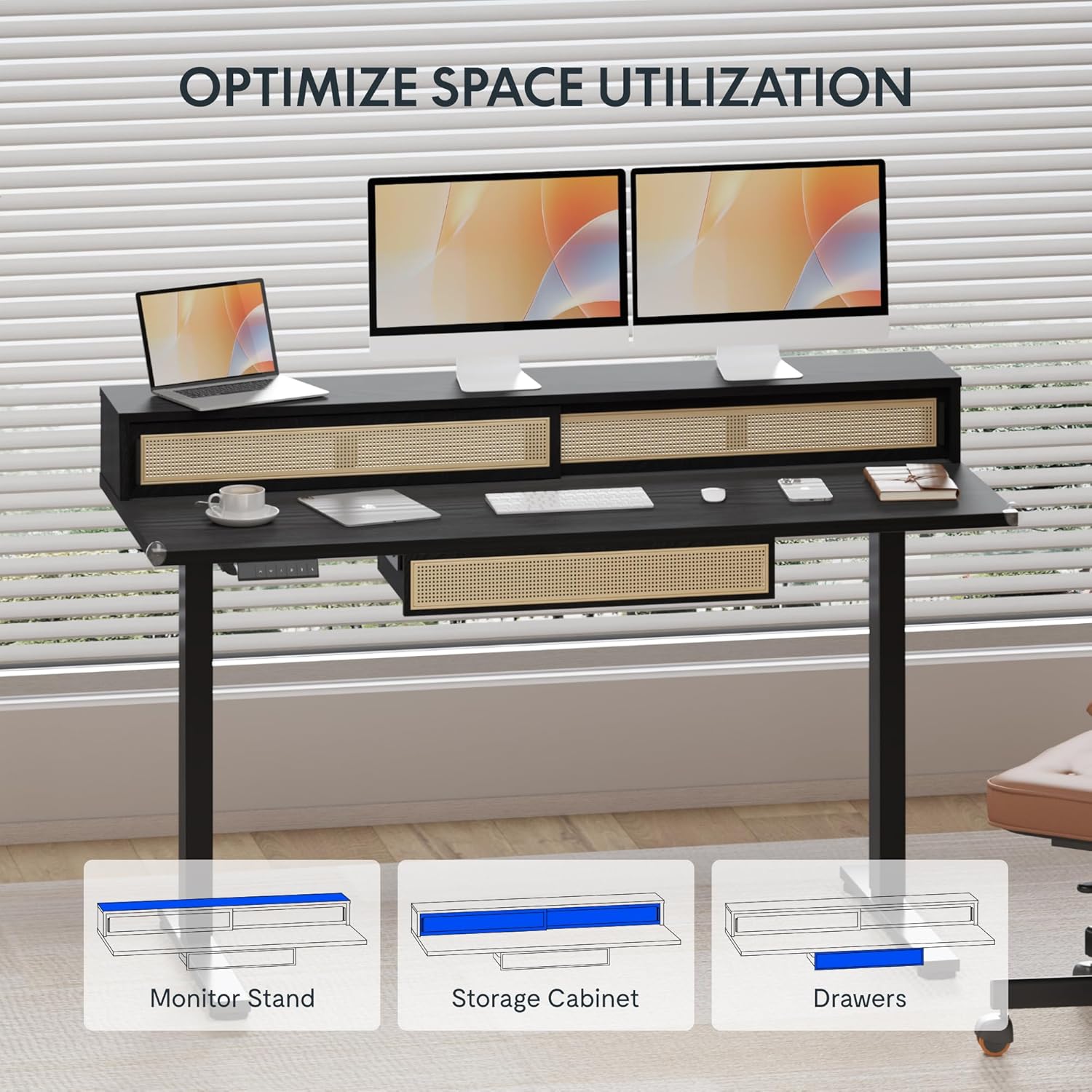
Image: An illustration demonstrating the various storage options, including the monitor stand, storage cabinet, and drawers, for optimal space utilization.
Bakım
Regular maintenance ensures the longevity and optimal performance of your desk.
- Temizlik: Masa yüzeylerini yumuşak bir bezle silin.amp bez. Kaplamaya zarar verebilecek aşındırıcı temizleyicilerden veya sert kimyasallardan kaçının.
- Denetleme: Tüm vida ve cıvataların sıkı olduğundan emin olmak için düzenli olarak kontrol edin. Gerekirse tekrar sıkın.
- Kablo yönetimi: Kabloların düzgün bir şekilde düzenlendiğinden ve masanın hareketini engellemediğinden emin olun.
Sorun giderme
Masaüstünüzle ilgili sorunlarla karşılaşırsanız, aşağıdaki yaygın çözümlere başvurabilirsiniz:
| Sorun | Olası Neden | Çözüm |
|---|---|---|
| Masa hareket etmiyor veya kontrollere yanıt vermiyor. | Power connection issue, cable disconnected, motor error. | Check power cord connection to outlet and desk. Ensure all motor cables are securely connected. Unplug and replug the power for 10 seconds to reset. |
| Masa dengesiz hareket ediyor veya alışılmadık sesler çıkarıyor. | Dengesiz yük, gevşek bağlantılar, engel. | Ensure weight is evenly distributed. Check for any obstructions under the desk. Verify all assembly screws are tight. |
| Hafıza ön ayarları çalışmıyor. | Ön ayarlar doğru şekilde kaydedilmedi. | Re-save the desired height settings by pressing 'M' then the preset number within 3 seconds. |
Özellikler
| Özellik | Detay |
|---|---|
| Marka | ESNEKLİK |
| Ürün Boyutları (D x G x Y) | 23.6"D x 47.2"W x 29"H (at lowest point) |
| Renk | Siyah |
| Taban Malzemesi | Alaşımlı Çelik |
| Üst Malzeme Türü | Odun |
| Minimum Yükseklik | 28.9 inç |
| Maksimum Yükseklik | 46.5 inç |
| Çekmece Sayısı | 1 (under-desk) |
| Enclosed Shelves | 2 (sliding-door desktop compartments) |
| Özel Özellik | Corded electric height adjustment, Memory Presets |
| Gerekli Montaj | Evet |
Garanti ve Destek
FLEXISPOT provides comprehensive warranty coverage for your standing desk:
- Şasi ve Motor: 5 yıllık garanti.
- Elektronik: 2 yıllık garanti.
This warranty ensures lasting security for your workspace investment. For customer support, technical assistance, or warranty claims, please refer to the contact information provided in your product packaging or visit the official FLEXISPOT webalan.


