1. Güvenlik Bilgileri
Please read all safety instructions carefully before using your iFFALCON TV. Retain this manual for future reference.
- Elektriksel Güvenlik: Do not expose the TV to rain or moisture. Ensure the power cord is securely plugged into a grounded outlet. Do not overload electrical outlets.
- Atama: Place the TV on a stable, level surface or mount it securely to a wall. Ensure adequate ventilation around the TV to prevent overheating. Do not block ventilation openings.
- Temizlik: Temizlemeden önce televizyonun fişini çekin. Yumuşak ve kuru bir bez kullanın. Sıvı veya aerosol temizleyiciler kullanmayın.
- Çocuklar: Çocukların televizyonun veya sehpanın üzerine tırmanmasını önlemek için onları gözetim altında tutun. Küçük parçalar boğulma tehlikesi oluşturabilir.
- Servis: Televizyonunuzu kendiniz tamir etmeye çalışmayın. Tüm servis işlemlerini yetkili servis personeline yaptırın.
2. Kutuda Neler Var?
Paketi açtığınızda tüm bileşenlerin mevcut olduğundan emin olun:
- iFFALCON 85 İnç U85 Serisi QD-Mini LED 4K UHD Google Akıllı TV
- Güç kablosu
- Uzaktan kumanda için 2 x AAA pil
- 6 x Stand vidaları
- Masa ayakları (2 adet)
- 5 x Kablo klipsi
- Hızlı Başlangıç Kılavuzu
- TV kumandası
3. Kurulum
3.1 Fiziksel Kurulum
Before powering on, ensure the TV is securely placed or mounted.
- Stand Kurulumu: If using the table stands, carefully attach them to the designated slots at the bottom of the TV using the provided stand screws. Ensure they are tightened securely.
- Duvara Montaj: If wall mounting, follow the instructions provided with your wall mount kit. Ensure the mount is compatible with VESA standards for the 85U85 model.
- Güç Bağlantısı: Güç kablosunu televizyonun güç girişine ve ardından duvar prizine bağlayın.
- Harici Cihazlar: Connect any external devices (e.g., cable box, gaming console, Blu-ray player) to the appropriate HDMI or other input ports on the TV.

Image: The iFFALCON 85-Inch U85 Series TV, showcasinİnce tasarımı ve canlı ekranıyla öne çıkıyor.
3.2 İlk Açılış ve Google TV Kurulumu
After connecting power, press the power button on the remote control or TV to turn it on.
- Uzaktan Kumanda Eşleştirme: If the remote does not respond, insert the AAA batteries and follow on-screen instructions to pair it via Bluetooth.
- Dil Seçimi: Tercih ettiğiniz dili seçin.
- Ağ bağlantısı: Select your Wi-Fi network and enter the password. A stable internet connection is required for Google TV features.
- Google Hesabı Oturum Açma: Sign in with your Google account to access Google TV features, personalized recommendations, and app downloads.
- Google Asistan Kurulumu: Follow prompts to set up Google Assistant for voice control.

Image: A user interacting with the iFFALCON TV using hands-free voice control, demonstrating the integrated Google TV interface.
4. TV'nizi Çalıştırma
4.1 Uzaktan Kumanda İşlevleri
The provided remote control allows full navigation and control of your iFFALCON TV.
- Güç Düğmesi: Televizyonu açar veya kapatır.
- Navigasyon Pedi: Menüler arasında gezinmek için yön tuşlarını, seçim yapmak için ise Tamam düğmesini kullanın.
- Hacim +/-: Ses seviyesini ayarlar.
- Kanal +/-: TV kanallarını değiştirir.
- Giriş: Selects the input source (HDMI 1, HDMI 2, etc.).
- Google Asistan Düğmesi: Activates voice control. Press and speak your command.
- Ana menü tuşu: Google TV ana ekranına geri döner.
- Uygulama Kısayol Düğmeleri: Popüler yayın platformlarına hızlı erişim.
4.2 Smart Features and Google TV
Your iFFALCON U85 Series TV runs on Google TV, offering a personalized and integrated smart experience.
- Google TV Home Screen: Provides access to movies, shows, and apps from all your subscriptions, organized for easy discovery.
- Ses Kontrolü: Use Google Assistant or Alexa (via compatible devices) to search for content, control smart home devices, and manage TV settings hands-free.
- Uygulama Kütüphanesi: Google Play Store'dan çok çeşitli uygulamaları indirip yükleyin.
- Chromecast Yerleşik: Uyumlu akıllı telefonunuzdan, tabletinizden veya bilgisayarınızdan içeriği doğrudan televizyona aktarın.
4.3 Görüntü ve Ses Ayarları
Özelleştirin viewTV'nizin ayarlar menüsü aracılığıyla dinleme ve dinleme deneyiminizi özelleştirin.
- Resim Modları: Çeşitli önceden ayarlanmış resim modlarından (örneğin, Standart, Canlı, Film, Oyun) birini seçin veya parlaklık, kontrast, renk ve keskinlik gibi ayarları özelleştirin.
- Mini LED Precision: The TV features 352 local dimming zones and 1000 nits peak brightness for enhanced contrast and detail.
- Dolby Vision IQ'su: Automatically adjusts HDR brightness based on the room's ambient light for optimal viewIng.
- Ses Modları: Choose from sound presets (e.g., Standard, Music, Movie, Speech) or adjust equalizer settings.
- Dolby Atmos & DTS Virtual X: Experience immersive spatial audio with the integrated 2.1-channel 50W sound system.

Image: Visual comparison illustrating the superior contrast and detail of Mini LED technology compared to conventional TVs.

Image: Depiction of the immersive audio experience with the TV's 2.1 speaker system and Dolby Atmos technology.
4.4 Oyun Özellikleri
The iFFALCON U85 Series TV is equipped with features designed for an enhanced gaming experience.
- 144Hz Game Mode Pro: Provides a high refresh rate for smooth, responsive gameplay.
- 288Hz DLG Hızlandırma: Rekabetçi oyunlarda hareket netliğini daha da artırır.
- FreeSync Premium Pro: Reduces screen tearing and stuttering for fluid visuals.
- Otomatik Düşük Gecikme Modu (ALLM): Automatically switches to a low-latency mode when a gaming console is detected.
- Oyun Çubuğu: Access and adjust key gaming settings quickly during gameplay.
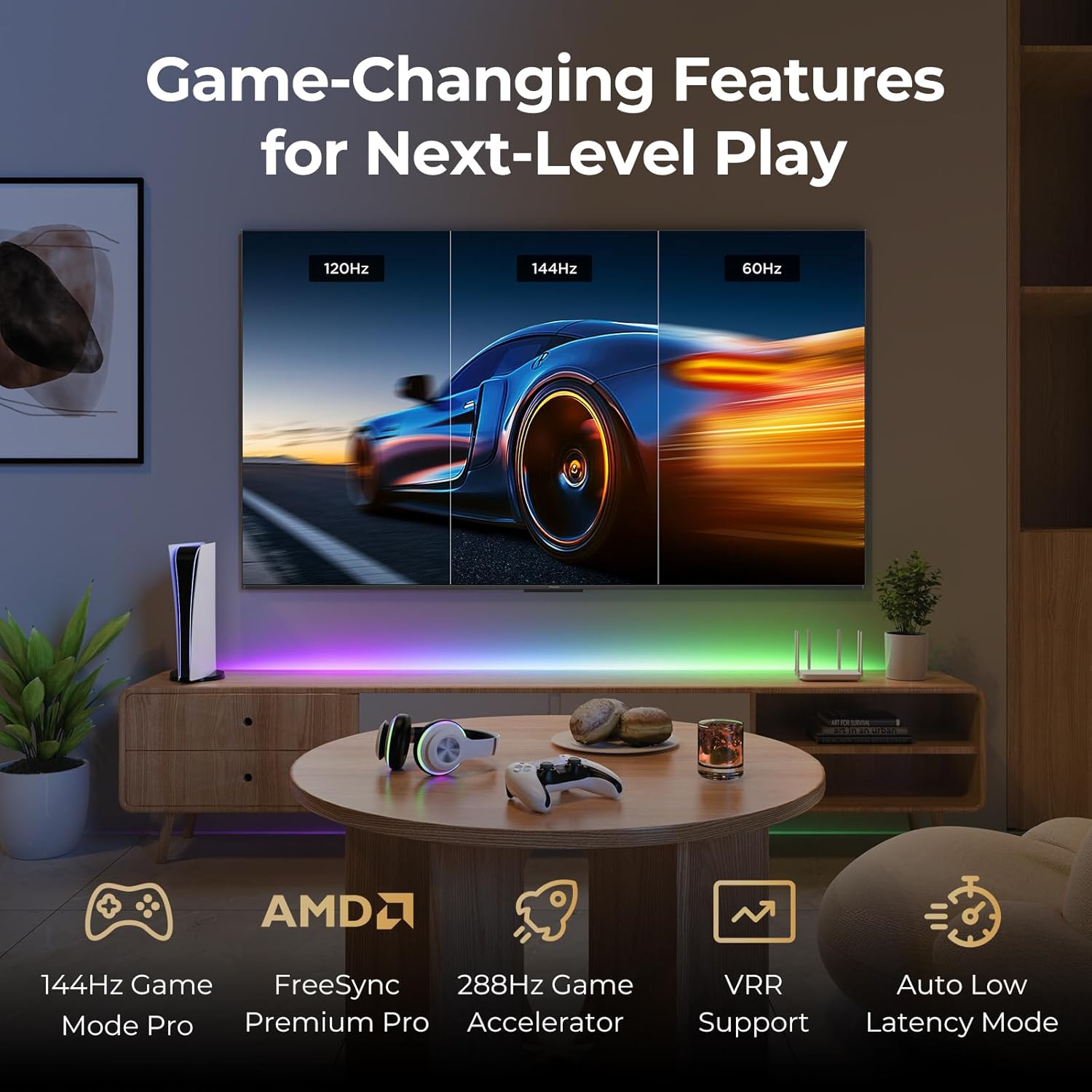
Image: A gaming setup featuring the iFFALCON TV, illustrating its high refresh rate and gaming-specific features for an optimized experience.
5. Bakım
5.1 TV'nin temizlenmesi
Regular cleaning helps maintain the TV's appearance and performance.
- Ekran: Ekranı yumuşak, tiftiksiz bir bezle nazikçe silin. İnatçı lekeler için hafifçe silin.ampBezi su veya ekrana özel bir temizleme solüsyonuyla yıkayın (ekrana doğrudan sıkmayın).
- Vücut: Use a soft, dry cloth to wipe the TV's frame and back panel. Avoid abrasive materials or harsh chemicals.
- Limanlar: Ensure ports are free of dust. Use compressed air if necessary, holding the can upright.
5.2 Yazılım Güncellemeleri
Your TV may receive automatic software updates to improve performance and add new features. Ensure your TV is connected to the internet for these updates.
- You can check for updates manually in the TV's settings menu under System > About > System update.
6. Sorun Giderme
If you encounter issues, try these common solutions before contacting support.
- Güç Yok: Ensure the power cable is securely plugged into both the TV and the wall outlet. Test the outlet with another device.
- Görüntü/Ses Yok: Check the selected input source. Ensure all cables to external devices are connected correctly. Restart the TV and connected devices.
- Uzaktan Çalışmıyor: Pilleri değiştirin. Uzaktan kumanda ile TV arasında herhangi bir engel olmadığından emin olun. Uzaktan kumanda Bluetooth kullanıyorsa, yeniden eşleştirin.
- Ağ Bağlantı Sorunları: Restart your Wi-Fi router. Check TV network settings to ensure correct Wi-Fi password and connection.
- Resim Kalitesi Sorunları: Resim ayarlarını (parlaklık, kontrast, renk) düzenleyin. İçerik kaynağının yüksek kalitede olduğundan emin olun.
- Fabrika ayarları: If problems persist, a factory reset can resolve many software-related issues. Navigate to Settings > System > About > Reset. Uyarı: This will erase all personal data and settings.
7. Özellikler
| Özellik | Tanım |
|---|---|
| Marka | iFFALCON |
| Model Numarası | 85U85 |
| Ekran Boyutu | 85 inç |
| Ekran Teknolojisi | QD-Mini LED |
| Çözünürlük | 4K UHD (3840x2160) |
| Yenileme Hızı | 144 Hz (Native), 288Hz DLG |
| Tepe Parlaklığı | 1000 nite kadar |
| Kontrast Oranı | 6500:1'e kadar |
| Yerel Karartma Bölgeleri | 352 |
| İşlemci | AiPQ Pro İşlemci |
| İşletim Sistemi | Google televizyon |
| Sesli asistan | Google Asistan, Alexa ile uyumlu |
| Ses Sistemi | 2.1-channel 50W, Dolby Atmos, DTS Virtual X |
| HDR Desteği | HDR10+, Dolby Vision IQ |
| Oyun Özellikleri | 144Hz VRR, FreeSync Premium Pro, ALLM, Game Bar |
| Bağlantı | Bluetooth, Wi-Fi |
| Ürün Boyutları (D x G x Y) | 15.2 x 74.4 x 45.5 inç |
| Ürün Ağırlığı | 76.7 Pound |
8. Garanti ve Destek
Your iFFALCON U85 Series TV is covered by a manufacturer's warranty. Please refer to the warranty card included with your product for specific terms and conditions.
For technical support, service inquiries, or additional information, please visit the official iFFALCON support website or contact their customer service. Keep your purchase receipt and product serial number handy for warranty claims.
Daha fazla bilgi ve destek kaynağına ulaşmak için şu adresi ziyaret edebilirsiniz: iFFALCON Store on Amazon.


