giriiş
This user manual provides comprehensive instructions for the setup, operation, maintenance, and troubleshooting of your Pisichen 21.5-Inch Touchscreen Monitor. Please read this manual thoroughly before using the product to ensure proper functionality and to prevent damage.
The Pisichen 21.5-inch touch monitor is designed to enhance your work efficiency and provide an interactive experience with its responsive 10-point capacitive touchscreen. It features a Full HD 1920x1080 resolution display, built-in speakers, and versatile connectivity options including HDMI, VGA, and USB for touch functionality.
Temel Özellikler
- Sensitive 10-Point Capacitive Touchscreen: Offers seamless and responsive interaction, allowing direct engagement with content and simultaneous multi-finger input.
- Stunning FHD 1080P Display: A 21.5-inch Full HD (1920x1080) resolution screen with a 1000:1 contrast ratio, 250cd/㎡ brightness, 170° viewing angle, and 60Hz refresh rate for clear and smooth visuals. Includes low-blue-light and eye-care technology.
- Geniş Cihaz Uyumluluğu: Equipped with USB2.0 (for touch), HDMI, VGA, and DC ports for easy connection to PCs, laptops, PS3/4, and gaming consoles.
- Çok Yönlü Ekran Modları: Supports duplicate, extend, and second-screen modes to enhance productivity and workspace.
- Built-in Speakers and VESA Mounting: Integrated speakers provide audio, and the 75x75mm VESA mount allows for flexible installation options.
Paket İçeriği
Kurulum işlemine geçmeden önce lütfen paketteki tüm öğelerin eksiksiz olduğundan emin olun.

The package includes the Pisichen 21.5-inch touchscreen monitor, a user manual, an HDMI cable, a USB cable, and a power adapter, ensuring it is ready for immediate use.
- Pisichen 21.5-Inch Touchscreen Monitor
- Güç Adaptörü
- HDMI Kablosu
- USB Cable (for touch function)
- Kullanıcı Kılavuzu
Kurulum Talimatları
1. Monitörün Bağlanması
The monitor offers various connection options to suit your needs. Ensure all connections are secure before powering on the device.

Ayrıntılı view of the monitor's input/output ports, including HDMI, VGA, headphone, DC power, and USB 2.0 touch ports.
- Güç Bağlantısı: Connect the provided power adapter to the DC power port on the monitor and then plug it into a wall outlet.
- Video Bağlantısı (HDMI): Use the HDMI cable to connect the monitor's HDMI port to the HDMI output port on your computer, laptop, or gaming console.
- Video Bağlantısı (VGA): Alternatively, use a VGA cable to connect the monitor's VGA port to the VGA output port on your computer or laptop.
- Dokunmatik Fonksiyon Bağlantısı: To enable the touch function, connect the included USB cable from the monitor's USB 2.0 touch port to an available USB port on your computer. This step is crucial for touch signal transmission.
- Ses Çıkışı (İsteğe bağlı): If you prefer external audio, you can connect headphones or external speakers to the headphone jack. The monitor also has built-in speakers.
2. Montaj Seçenekleri
The Pisichen monitor supports both desktop placement and VESA wall mounting for flexible setup.
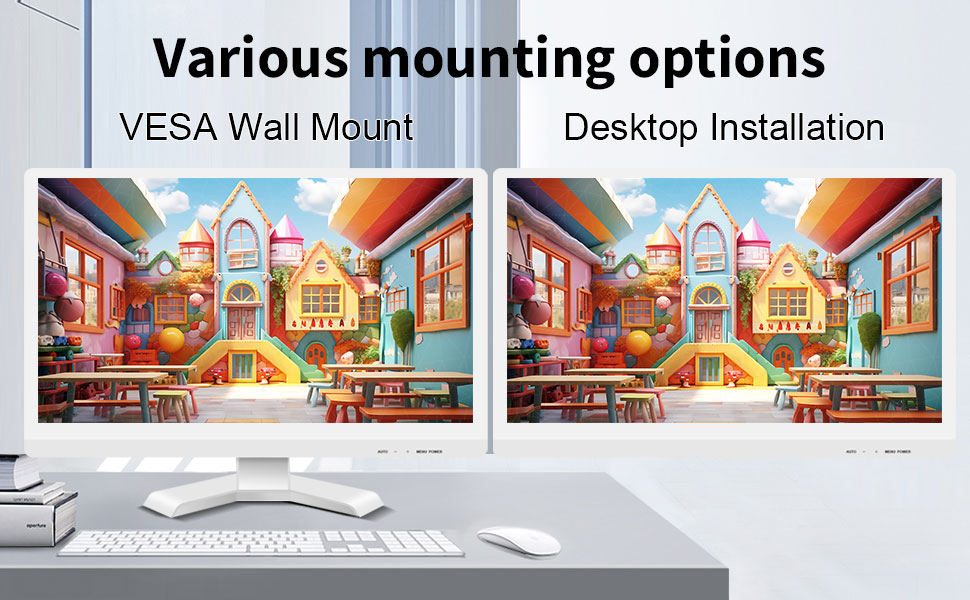
The monitor can be set up on a desktop stand or mounted on a wall using a VESA compatible bracket.
- Masaüstü Kurulumu: Attach the provided stand to the monitor base and place it on a stable, flat surface.
- VESA Duvar Montajı: The monitor features a 75x75mm VESA mounting pattern. Use a compatible VESA bracket (not included) to mount the monitor on a wall or an adjustable arm. Ensure the mount can support the monitor's weight (9.88 pounds).

Arka view of the monitor highlighting the VESA 75x75mm mounting pattern and overall dimensions.
Kullanım Talimatları
1. Açma/Kapama
Locate the power button on the monitor. Press it to turn the monitor on or off. The power indicator light will illuminate when the monitor is on.
2. Using the Touchscreen Function
Once the USB cable is connected to your computer, the 10-point capacitive touch function will be active. You can interact with the screen using your fingers or a passive capacitive stylus.

The monitor supports direct touch interaction for intuitive control.
- Tek Dokunuş: Bir fare tıklamasına eşdeğer.
- Bas ve basılı tut: Sağ tıklamaya eşdeğer.
- Sürüklemek: Move items by touching and dragging.
- Yakınlaştırmak için sıkıştırma: İçeriği yakınlaştırmak veya uzaklaştırmak için iki parmağınızı kullanın.
- Çoklu dokunuş: The monitor supports up to 10 simultaneous touch points, enabling collaborative work or complex gestures.

The 10-point multi-touch feature allows for multiple users or complex interactions simultaneously.
Önemli Not: The touch functionality is disabled on Mac OS, iPad OS, and iOS. This monitor only supports passive capacitive styluses.
3. Ekran Modları
Monitör, bilgisayara bağlandığında çeşitli görüntüleme modlarını destekler:
- Kopya Modu: Displays the same content on both your primary screen and the Pisichen monitor.
- Uzatma Modu: Masaüstünüzü her iki ekrana da yayarak daha fazla çalışma alanı sağlar.
- Sadece İkinci Ekran Modu: Displays content only on the Pisichen monitor, turning off your primary screen.
You can typically switch between these modes through your operating system's display settings (e.g., Windows Display Settings).
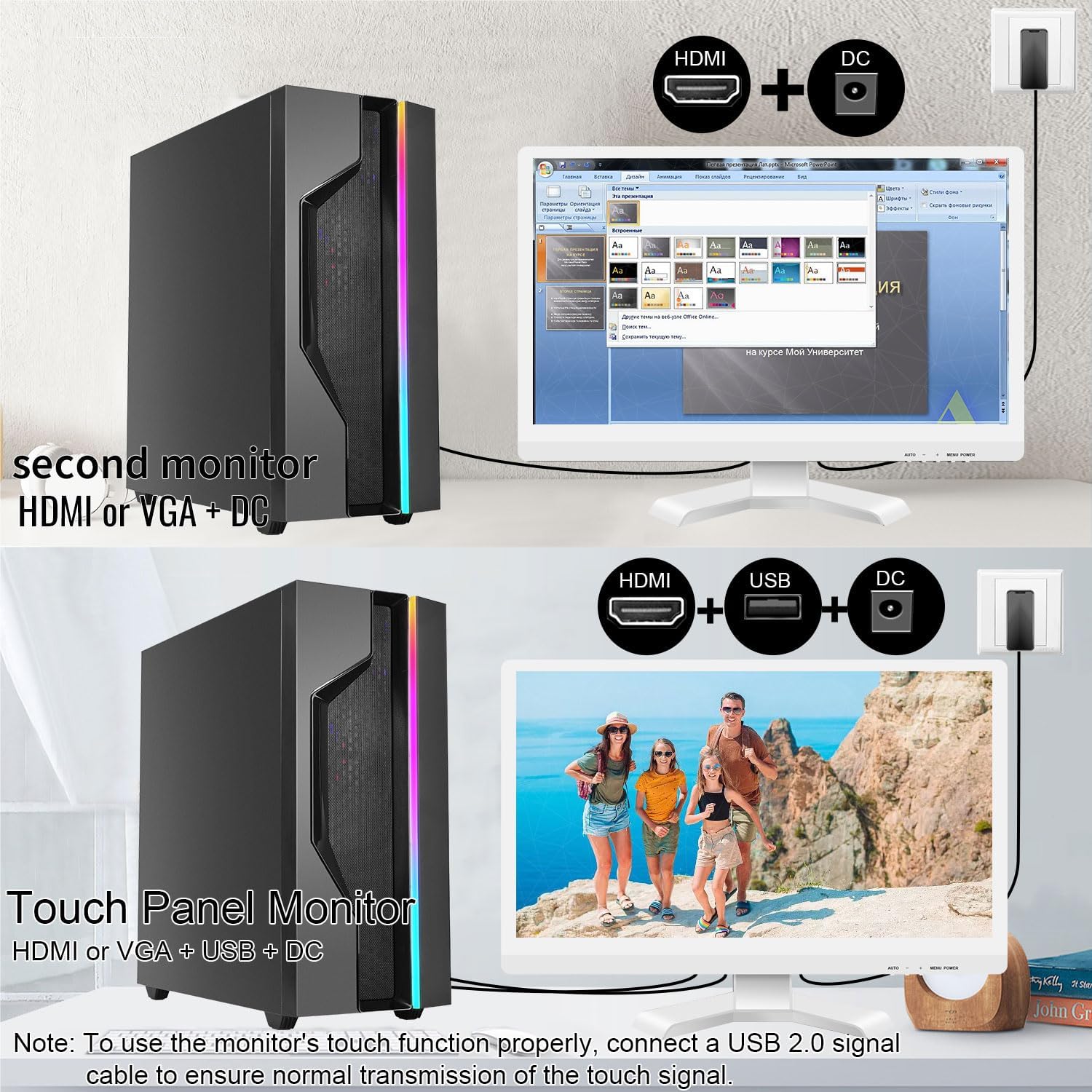
Illustrations of connecting the monitor as a secondary display or as a touch-enabled display.
4. Ekran Üstü Görüntüleme (OSD) Menüsü
The monitor features an OSD menu for adjusting display settings. Use the buttons located on the monitor's frame (usually on the bottom right) to navigate and select options.
- Menü Düğmesi: OSD menüsünü açar.
- Yukarı/Aşağı Düğmeleri: Menü seçenekleri arasında gezinin.
- Giriş/Seçme Düğmesi: Bir seçimi onaylar veya bir alt menüye girer.
- Çıkış Düğmesi: Mevcut menüden veya OSD'den çıkar.
Common OSD settings include brightness, contrast, color temperature, input source selection, and aspect ratio.
Bakım ve Özen
- Ekranın Temizlenmesi:
Always power off the monitor and unplug it before cleaning. Use a soft, lint-free cloth lightly dampened with water or a non-abrasive, monitor-specific cleaning solution. Do not spray liquid directly onto the screen. Avoid using alcohol, ammonia, or abrasive cleaners, as they can damage the screen surface.
- C'yi Temizlemeasing:
Monitörü silinasinYumuşak, kuru bir bezle silin. Gerekirse, hafifçe kuru bir bez kullanın.amp cloth can be used, but ensure no moisture enters the vents or ports.
- Depolamak:
When not in use for extended periods, store the monitor in a cool, dry place, away from direct sunlight and extreme temperatures. If possible, use the original packaging for protection.
- Havalandırma:
Ensure the monitor's ventilation openings are not blocked. Proper airflow is essential to prevent overheating.
- İşleme:
Handle the monitor with care. Avoid dropping it or subjecting it to strong impacts. Do not place heavy objects on top of the monitor.
Sorun giderme
| Sorun | Olası Neden | Çözüm |
|---|---|---|
| Ekranda görüntü yok |
|
|
| Dokunmatik ekran yanıt vermiyor |
|
|
| Görüntü bulanık veya bozuk |
|
|
| Dahili hoparlörlerden ses gelmiyor |
|
|
Özellikler
| Model Numarası | 21.5INTS-White-NEW |
| Ekran Boyutu | 21.5 inç |
| Çözünürlük | 1920 x 1080 Piksel (FHD 1080p) |
| En Boy Oranı | 16:9 |
| Parlaklık | 250 Candela (cd/㎡) |
| Kontrast Oranı | 1000:1 |
| ViewAçı | 170° |
| Yenileme Hızı | 60Hz |
| Dokunma Teknolojisi | 10 Noktalı Kapasitif Dokunmatik |
| Giriş Portları | HDMI, VGA, USB 2.0 (for touch), DC Power |
| Ses | Built-in Speakers, Headphone Jack |
| VESA Montaj Uyumluluğu | 75x75mm |
| Ürün Boyutları (U x G x Y) | 0.78 x 20.4 x 14.9 inç |
| Ürün Ağırlığı | 9.88 pound |
| Üretici | Shenzhen Konowa Elektronik A.Ş. |
| Menşei ülke | Çin |
Garanti ve Destek
For warranty information and technical support, please refer to the official Pisichen website or contact their customer service directly. Details are typically provided on the product packaging or the manufacturer's official support channels.
Ziyaret edebilirsiniz Pisichen Store on Amazon for more product information and potential support contacts.


