giriiş
Welcome to the HONOR 400 Lite 5G Smartphone user manual. This guide provides essential information for setting up, operating, maintaining, and troubleshooting your new device. Please read this manual thoroughly to ensure optimal performance and longevity of your smartphone.
Kutuda Neler Var?
Upon unboxing your HONOR 400 Lite, you should find the following items:
- HONOR 400 Lite 5G Akıllı Telefon
- USB kablosu
- SIM İtici Aracı
- Hızlı Başlangıç Kılavuzu
- Garanti Kartı
Note: The specific contents may vary by region.
Cihaz Bittiview
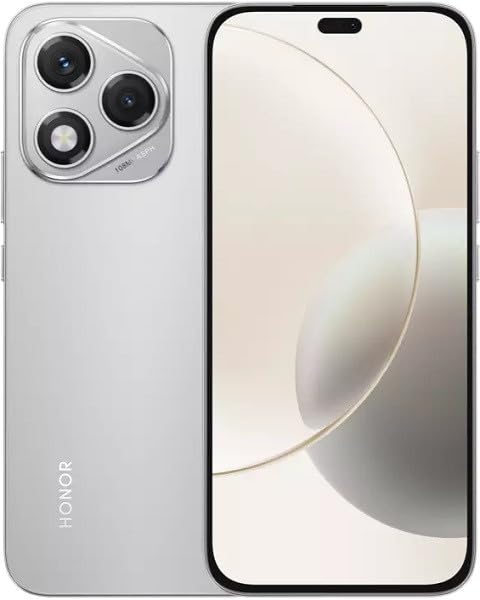
Image: The HONOR 400 Lite 5G Smartphone in Velvet Grey, showcasinŞık tasarımı ve arka tarafındaki kamera modülüyle dikkat çekiyor.
The HONOR 400 Lite features a 6.7-inch AMOLED display with a resolution of 1080 x 2412 pixels. The device is equipped with a powerful camera system, including a 108 MP main sensor. Its ergonomic design ensures a comfortable grip and easy access to all physical buttons and ports.
Kurmak
1. SIM Kart Kurulumu
- Cihazınızın yan tarafında bulunan SIM kart tepsisini bulun.
- SIM kart çıkarma aracını tepsinin yanındaki küçük deliğe yerleştirin ve tepsi dışarı çıkana kadar sıkıca bastırın.
- Place your Nano-SIM card(s) and/or eSIM (if applicable) into the tray with the gold contacts facing down, ensuring they are correctly aligned.
- Tepsiyi yerine oturana kadar dikkatlice cihazın içine doğru itin.
Önemli: This smartphone is designed for GSM networks only and is not compatible with CDMA networks (e.g., Verizon, Sprint, US Cellular in the USA). Please verify network compatibility with your service provider before use.
2. İlk Güç Açma
- HONOR logosu görünene kadar Güç düğmesini (genellikle sağ tarafta bulunur) basılı tutun.
- Dil seçimi, Wi-Fi bağlantısı ve Google hesabı kurulumu dahil olmak üzere ilk kurulumu tamamlamak için ekrandaki talimatları izleyin.
Cihazınızı Çalıştırma
Ekran Özellikleri
The 6.7-inch AMOLED display offers vibrant colors and deep blacks. Utilize gestures for navigation, access quick settings by swiping down from the top, and customize your home screen layout and widgets to personalize your experience.
Kamera Kullanımı
Your HONOR 400 Lite is equipped with a high-resolution 108 MP main camera. Open the Camera app to access various modes such as Photo, Video, Portrait, and more. Tap on the screen to focus and use the on-screen shutter button to capture images or start recording videos. Explore settings for advanced options like HDR and AI enhancements.
Pil ve Şarj
The device is powered by a 5230mAh non-removable battery. Use the provided USB cable to charge your device. Connect the USB-C end to your phone and the USB-A end to a compatible power adapter (not always included, check box contents) or computer USB port. For optimal charging speed, use a compatible fast charger.
Bakım
- Yazılım Güncellemeleri: Regularly check for and install system updates to ensure your device has the latest features, security patches, and performance improvements. Go to Settings > System & updates > Software update.
- Temizlik: Telefonunuzun ekranını ve gövdesini temizlemek için yumuşak, tüy bırakmayan bir bez kullanın. Sert kimyasallardan veya aşındırıcı malzemelerden kaçının.
- Depolama Yönetimi: Gereksiz olanları periyodik olarak temizleyin fileDepolama alanını boşaltmak ve optimum performansı korumak için uygulamalar ve yazılımlar.
Sorun giderme
If you encounter issues with your HONOR 400 Lite, try the following common troubleshooting steps:
- Cihaz Yanıt Vermiyor: Yeniden başlatmayı zorlamak için Güç düğmesini yaklaşık 10 saniye basılı tutun.
- Uygulama Çöküyor: Uygulamanın önbelleğini ve verilerini temizleyin (Ayarlar > Uygulamalar > [Uygulama Adı] > Depolama > Önbelleği temizle/Verileri temizle) veya uygulamayı yeniden yükleyin.
- Pil Boşaltma: Check battery usage in Settings to identify power-hungry apps. Reduce screen brightness and disable unnecessary features like GPS or Wi-Fi when not in use.
- Ağ Sorunları: Ensure your SIM card is correctly inserted. Try toggling Airplane Mode on and off. If issues persist, contact your network provider.
Özellikler
| Model Adı | Onur 400 Lite |
| Görüntülemek | 6.7 inç AMOLED, 1080 x 2412 piksel |
| İşlemci | Mediatek Dimensity 7025 Ultra (6 nm), Octa-core (2x2.5 GHz Cortex-A78 & 6x2.0 GHz Cortex-A55) |
| Veri deposu | 12 GB |
| Dahili Depolama | 256 GB (genişletilemez) |
| Arka Kamera | 108 MP, f/1.8, (wide), 1/1.67", PDAF; 16 MP, f/2.5, (wide) |
| İşletim Sistemi | Android 15 |
| Pil | 5230mAh, çıkarılamaz |
| Ağ Uyumluluğu | 2G, 3G, 4G, 5G (GSM Only) |
| Renk | Velvet Grey |
| Özel Özellikler | Çift SIM |
Garanti ve Destek
Your HONOR 400 Lite smartphone comes with a standard manufacturer's warranty. Please refer to the included Warranty Card for detailed terms and conditions, including coverage period and service procedures. For technical support or further assistance, please visit the official HONOR support websitesine gidin veya müşteri hizmetleriyle iletişime geçin.
Garanti talepleri için satın alma belgenizi saklayın.