1. Giriş
This manual provides essential information for setting up, operating, and maintaining your DOOGEE Tab A9 Pro Android 15 Tablet. Please read it thoroughly to ensure proper usage and to maximize your device's capabilities.
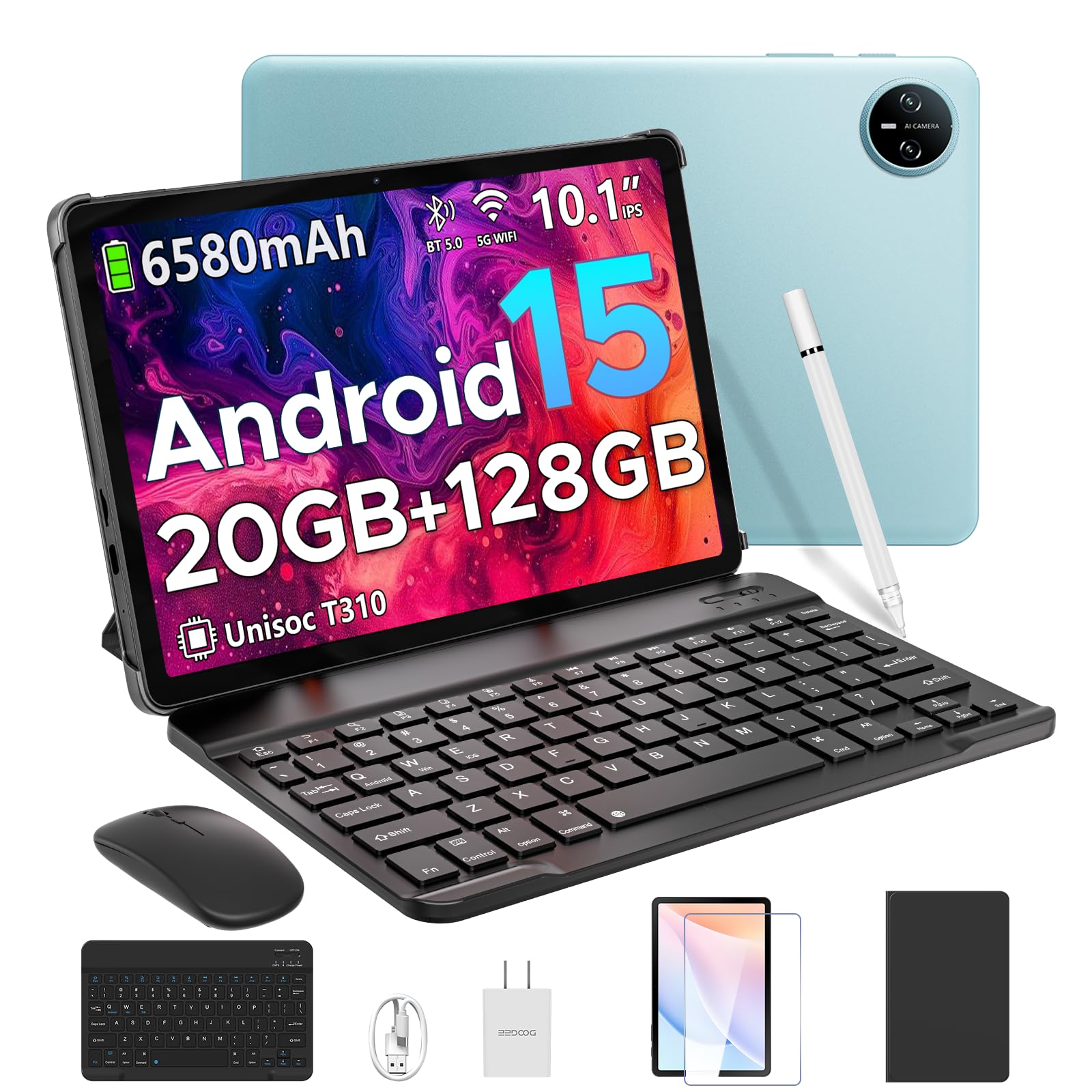
Image 1.1: The DOOGEE Tab A9 Pro Tablet.
2. Kutuda Neler Var?
Your DOOGEE Tab A9 Pro package includes the following items:
- DOOGEE Tab A9 Pro Tablet (x1)
- Type-C USB Kablosu (x1)
- Şarj cihazı (x1)
- Manuel (x1)
- Garanti Kartı (x1)
- Bluetooth Keyboard (VIP Edition)
- Bluetooth Mouse (VIP Edition)
- Stylus (VIP Edition)
- Leather Protective Cover (VIP Edition)
- Tempered Film (VIP Edition)

Image 2.1: All items included in the DOOGEE Tab A9 Pro package.
3. Ürün Bittiview
The DOOGEE Tab A9 Pro features a sleek design with essential components for user interaction and connectivity.
3.1 Fiziksel Özellikler
- Görüntülemek: 10.1-inch IPS HD Ultra-Clear Display.
- Kameralar: 8 MP ana kamera (arka) ve 5 MP ön kamera.
- Ses: High-Quality Dual Speakers and a 3.5mm Audio Jack.
- Limanlar: Type-C USB port for charging and data transfer.
- Düğmeler: Power button and volume controls located on the side.

Resim 3.1: Arka view of the DOOGEE Tab A9 Pro, highlighting the camera module.

Resim 3.2: Yan view of the tablet, illustrating the power button, volume controls, and ports.
Video 3.1: Kısa bir video gösterimiasing the ultra-thin body and design of the DOOGEE Tab A9 Pro.
4. Kurulum
4.1 İlk Şarj
Before first use, fully charge your tablet using the provided Type-C USB cable and charger. The battery indicator on the screen will show charging progress.
4.2 Güç Açma/Kapatma
- Açmak İçin: Press and hold the power button until the DOOGEE logo appears.
- Kapatmak İçin: Press and hold the power button, then select 'Power off' from the options that appear on the screen.
4.3 İlk Kurulum Sihirbazı
Upon first power-on, follow the on-screen instructions to complete the initial setup, including language selection, Wi-Fi connection, and Google account login.
5. İşletim Sistemi (Android 15)
The DOOGEE Tab A9 Pro runs on the Android 15 operating system, offering a smart, fluid, and secure user experience with enhanced privacy features.

Image 5.1: Visual representation of the Android 15 system interface.
Video 5.1: Bir overview of the DOOGEE Tab A9 Pro running Android 15.
6. Performans ve Depolama
The tablet is designed for smooth operation and ampdosya depolama kapasitesi.
6.1 İşlemci
Powered by the energy-efficient Unisoc T310 octa-core processor, the tablet ensures seamless performance for various tasks.

Image 6.1: Diagram illustrating the Unisoc T310 Quad-Core Processor.
6.2 RAM and Storage
The tablet features 20GB of RAM (4GB physical + 16GB virtual) and 128GB of internal storage. Storage can be expanded up to 2TB using a microSD card (sold separately).

Image 6.2: Visual representation of the tablet's RAM and ROM configuration.
7. Display & Audio
Experience vibrant visuals and clear sound with your tablet.
7.1 Ekran
The 10.1-inch IPS HD display offers wide viewing angles and a resolution of 1280x800 for an immersive visual experience.

Image 7.1: The 10.1-inch IPS HD display with key specifications.
7.2 Ses
Built-in dual speakers deliver clear and dynamic sound for movies, music, and video calls.

Image 7.2: Illustration of the tablet's dual speaker system.
8. Kameralar
Capture moments and conduct video calls with the integrated cameras.
8.1 Main Camera
The 8MP main camera allows you to take sharp photos.

Image 8.1: Close-up of the 8MP main camera on the tablet's rear.
8.2 Ön Kamera
The 5MP front camera is suitable for selfies and video calls.

Image 8.2: The 5MP front camera in use for a video call.
9. Bağlantı
Çeşitli kablosuz seçeneklerle bağlantıda kalın.
9.1 Wi-Fi
Supports 2.4G/5G dual-band Wi-Fi for smooth, high-speed internet access.

Image 9.1: Features of WiFi 5 connectivity on the tablet.
9.2 Bluetooth
Equipped with Bluetooth 5.0 for connecting wireless accessories.
9.3 GPS
Built-in GPS provides accurate navigation for travel and outdoor activities.
10. Aksesuarlar
The DOOGEE Tab A9 Pro comes with a suite of accessories to enhance its functionality.
10.1 Bluetooth Klavye
Connect the Bluetooth keyboard for a desktop-like typing experience, ideal for productivity tasks.

Image 10.1: The tablet connected to its Bluetooth keyboard for efficient typing.
10.2 Mouse and Stylus
The included mouse and stylus further enhance navigation and interaction, especially for note-taking and creative tasks.

Image 10.2: The tablet shown with its accompanying keyboard and mouse.

Image 10.3: The tablet being used with the stylus for precise input.
10.3 Koruyucu Kılıf
The protective case shields your tablet from drops and scratches and can also function as a stand.

Image 10.4: The tablet securely placed within its protective case.
11. Pil Yönetimi
The tablet is equipped with a high-capacity battery for extended use.
11.1 Pil Kapasitesi
Features a long-lasting 6580mAh battery, providing hours of power for various activities without frequent recharging.

Image 11.1: Diagram showing the 6580mAh battery inside the tablet.
Video 11.1: A video highlighting the large battery capacity of the DOOGEE Tab A9 Pro.
12. Güvenlik Özellikleri
Protect your device and data with built-in security options.
12.1 Yüz Tanıma Kilidi
Effortlessly unlock your tablet using facial recognition technology.

Image 12.1: Illustration of the facial recognition unlock feature.
12.2 Fortified Privacy Shield
Android 15 provides enhanced privacy controls, robust data encryption, timely security patches, and proactive app screening for unbreakable security.

Resim 12.2: Üzeriview of Android 15's privacy features.
13. Multitasking & Productivity
Optimize your workflow and entertainment with these features.
13.1 Bölünmüş Ekran Çoklu Görevlendirme
Run two applications simultaneously side-by-side for enhanced productivity.

Image 13.1: The tablet displaying two apps in split-screen mode.
13.2 Built-in WPS Office
The tablet comes with WPS Office pre-installed, providing PC-level productivity for documents, spreadsheets, and presentations (Note: WPS Office feature may be unavailable in certain regions).

Resim 13.2: Tablet gösterimiasing WPS Office applications.
Video 13.1: A video demonstrating the DOOGEE Tab A9 Pro's capabilities for learning and work.
14. Bakım
14.1 Temizlik
Tabletin ekranını ve gövdesini temizlemek için yumuşak, tiftiksiz bir bez kullanın. Sert kimyasallar veya aşındırıcı malzemeler kullanmaktan kaçının.
14.2 Yazılım Güncellemeleri
En iyi performansı, güvenliği ve yeni özelliklere erişimi sağlamak için sistem güncellemelerini düzenli olarak kontrol edin ve yükleyin. Ayarlar > Sistem > Sistem güncellemesi güncellemeleri kontrol etmek için.
15. Sorun Giderme
Bu bölümde tabletinizde karşılaşabileceğiniz yaygın sorunlar ele alınmaktadır.
15.1 Tablet Açılmıyor
- Tabletin yeterince şarj olduğundan emin olun. En az 30 dakika şarj cihazına bağlayın.
- Zorla yeniden başlatmayı gerçekleştirmek için güç düğmesini 10-15 saniye basılı tutun.
15.2 Yavaş Performans
- Gereksiz arka plan uygulamalarını kapatın.
- Sık kullanılan uygulamaların önbellek verilerini temizleyin.
- Ensure sufficient storage space is available. Delete old fileveya harici depolamaya aktarabilirsiniz.
- Tableti yeniden başlatın.
15.3 Wi-Fi Bağlantı Sorunları
- Wi-Fi yönlendiricinizi ve tabletinizi yeniden başlatın.
- Wi-Fi ağını unutun ve yeniden bağlanın.
- Wi-Fi sinyalinin kapsama alanında olduğunuzdan emin olun.
15.4 Accessories Not Connecting
- Ensure Bluetooth is enabled on the tablet and the accessory.
- Check if the accessory is charged and in pairing mode.
- Refer to the accessory's individual manual for specific pairing instructions.
16. Özellikler
| Özellik | Şartname |
|---|---|
| Marka | DOOGEE |
| Model Adı | TABA9PRO |
| Ürün Model Numarası | Tab A9 Pro |
| İşletim Sistemi | Android 15 |
| Ayakta Ekran Görüntüleme Boyutu | 10.1 inç |
| Ekran Çözünürlüğü | 1280*800 Yüksek Çözünürlük |
| Maksimum Ekran Çözünürlüğü | 1280*800 Piksel |
| İşlemci Markası | Unisoc |
| Grafik Eş İşlemcisi | Mali-G52 1-Çekirdek-2EE |
| Bellek Depolama Kapasitesi | 128 GB (microSD kart ile 2 TB'a kadar genişletilebilir) |
| Veri deposu | 20GB (4GB fiziksel + 16GB sanal) |
| Kablosuz Tip | 802.11ac, 802.11n (2.4G/5G Dual-band WiFi) |
| Bluetooth | 5.0 |
| Pil Kapasitesi | 6580mAh Lityum Polimer (dahil) |
| Ortalama Pil Ömrü | Up to 2 years (estimated lifespan) |
| Ürün Ağırlığı | 1.05 pound |
| Ürün Boyutları | 9.55 x 6.33 x 0.31 inç |
| Renk | Blue (other colors available) |
| İlk Mevcut Tarih | 23 Nisan 2025 |
17. Garanti ve Destek
17.1 Garanti Bilgileri
Your DOOGEE Tab A9 Pro comes with a 2-Year Limited Warranty. Please refer to the included Warranty Card for detailed terms and conditions.
17.2 Müşteri Desteği
For any questions or technical assistance, please contact our support team. We aim to respond within 24 hours.
- Çevrimiçi destek: 7/24 hizmetinizdeyiz.
- İade: 30-day money-back guarantee and free returns.


