1. Ürün Bittiview
The SPYPOINT Force 24 is a non-cellular trail camera designed for capturing high-quality images and videos of wildlife and for security monitoring in areas without cellular coverage. It records 2K video with sound and captures 24-megapixel still photos. The camera features a fast 0.5-second trigger speed, a 70-foot detection range, and low-glow infrared LEDs for clear day and night captures without disturbing subjects. Footage is saved directly to an SD card, eliminating the need for data plans or subscriptions.

Şekil 1: Ön view of the SPYPOINT Force 24 Trail Camera.
2. Paket İçeriği
Kuruluma devam etmeden önce tüm öğelerin mevcut olduğundan emin olun:
- SPYPOINT Force 24 Trail Camera
- Montaj Kayışı
- Kullanım Kılavuzu (bu belge)
3. Kurulum
3.1. Pil Kurulumu
The Force 24 camera requires 8 AA batteries. For optimal performance and extended battery life, lithium or high-quality alkaline batteries are recommended. Rechargeable batteries can also be used.
- Open the camera latch on the side to access the internal compartment.
- Pil bölmesini bulun.
- Bölmenin içinde gösterildiği gibi kutupların (+/-) doğru olmasına dikkat ederek 8 adet AA pil takın.
- Pil bölmesini sıkıca kapatın.
3.2. SD Kart Takılması
A MicroSD card (not included) is required to store photos and videos. The camera supports cards up to 32 GB.
- Kamerayı açın ve SD kart yuvasını bulun.
- Insert a formatted MicroSD card into the slot until it clicks into place. Ensure the card is inserted in the correct orientation.
- It is recommended to format the SD card using the camera's menu before first use.
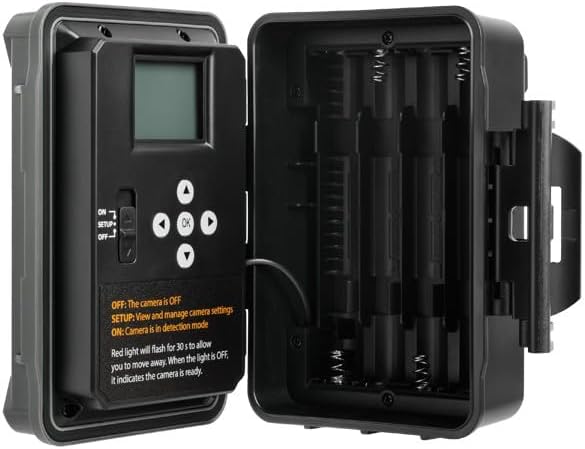
Şekil 2: Dahili view of the camera showing the control panel and battery compartment.
4. Çalışma Modları
The SPYPOINT Force 24 offers four versatile operating modes:
- Fotoğraf Modu: Hareketsiz görüntüler yakalar.
- Video Modu: Sesli video klipler kaydeder.
- Zaman Atlamalı Mod: Belirli aralıklarla belirli bir süre boyunca görüntü yakalar.
- Time-Lapse Plus Mode: Combines time-lapse photography with motion-triggered captures.
4.1. Bir Mod Seçme
Use the camera's internal control panel to navigate through the menu and select your desired operating mode. Refer to the on-screen instructions for specific settings within each mode.
4.2. Motion Detection and Trigger Speed
The camera features a 0.5-second trigger speed and a 70-foot detection range to ensure quick capture of moving subjects. The low-glow infrared LEDs provide discreet illumination for night captures.
5. Camera Interface and Controls
The camera's internal display and buttons allow for easy configuration and review yakalanan medyanın.
- ON/SETUP/OFF Switch: Controls the camera's power and enters setup mode.
- Yön tuşları: Used to move through menu options and review resimler/videolar.
- Tamam Düğmesi: Seçimleri onaylar.
- Menü Düğmesi: Ana ayarlar menüsüne erişim sağlar.
When in SETUP mode, the red light will flash for 30 seconds, allowing you time to move away before the camera enters detection mode. When the light is OFF, the camera is ready.
6. Bakım
- Pil Değişimi: Replace batteries when the low battery indicator appears on the screen or in the app.
- SD Kart Yönetimi: Regularly check the SD card capacity. Transfer important files to a computer and format the card periodically to maintain optimal performance.
- Temizlik: Keep the camera lens, PIR sensor, and infrared LEDs clean from dirt, dust, and debris using a soft, dry cloth.
- Çevre Koruma: Ensure the camera is securely mounted and latches are closed to protect against weather elements.
7. Sorun Giderme
- Kamera Açılmıyor: Pillerin montajını kontrol edin ve pillerin yeni olduğundan emin olun.
- Fotoğraf/Video Çekilmedi: Verify the SD card is inserted correctly and has sufficient space. Check motion detection settings and ensure the camera is in ON mode.
- Kötü Görüntü Kalitesi: Clean the camera lens and ensure there are no obstructions. Check the camera's position relative to the subject and lighting conditions.
- Kısa Pil Ömrü: Ensure high-quality batteries are used. Adjust camera settings such as detection delay and video length to conserve power.
8. Özellikler
- Modeli: KUVVET-24
- Fotoğraf Çözünürlüğü: 24 Megapiksel
- Video Çözünürlüğü: 2K with Sound
- Tetikleme Hızı: 0.5 saniye
- Algılama Aralığı: 70 feet
- Flaş Menzili: 70 feet (Low Glow IR)
- Güç Kaynağı: 8 AA Pil (dahil değildir)
- Depolamak: MicroSD Card (up to 32 GB, not included)
- Boyutlar: 8 x 4 x 3 inç
- Ürün Ağırlığı: 1 pound
9. Garanti ve Destek
The SPYPOINT Force 24 trail camera comes with a two-year warranty, ensuring reliable performance. For technical assistance, troubleshooting, or warranty claims, please refer to the official SPYPOINT support channels or visit their webalan.
Ek bilgi ve kaynaklar için şu adresi ziyaret edin: SPYPOINT Store.


