giriiş
Discover a new way to listen with Truefree EarFit DS1 earbuds, the next generation of open-ear Bluetooth headphones designed for comfort, sound quality, and freedom. Featuring an innovative ear hook structure made from a titanium alloy, the DS1 ensures a soft and stable fit that won't fall out - even during intense workouts. Its lightweight design (only 8.9 grams per earbud) makes it barely noticeable, yet completely secure.
With Bluetooth 6.0, dual-device pairing, and an ultra-low 66ms latency, the DS1 provides stable and fast connections for both music lovers and gamers. The 12x17mm peak drivers, paired with Truefree's custom sound equalization algorithm, deliver rich bass and clear high frequencies, while silicone sound channels reduce sound leakage by 96.9%. Stay powered throughout your day with 40 hours of total playtime, fast charging support, and a digital LED battery display on the case. Whether you're hitting the gym, on a call, or commuting, the IPX5 water resistance, 4 ENC microphones, and custom EQ settings via the Truefree app make the DS1 your reliable daily audio companion.
Temel Özellikler:
- Open-Ear Design & Ear Hooks for All-Day Comfort: Ergonomically designed with soft TPU ear hooks and a titanium alloy, these open-ear headphones ensure a secure, pressure-free fit. Weighing only 8.9g per earbud - perfect for workouts, glasses wearers, and extended use.
- Upgraded Bluetooth 6.0 for Seamless Connection: Enjoy ultra-stable, interference-resistant wireless performance with Bluetooth 6.0. Supports instant auto-pairing, dual-device connection, and a 66ms low-latency gaming mode for a lag-free experience.
- LED Power Display & Fast Charging Case: Stay informed with a digital LED display showing both earbud and case battery levels. Charge for 10 minutes, enjoy 2 hours of playtime - 40 hours total battery life eliminates power anxiety. 5 times larger charging area for 99.9% more stable charging - reduces charging failure and disconnection.
- Powerful Bass & Enhanced Sound Clarity: Equipped with dual 12x17mm peak drivers and a dynamic sound equalizer, Truefree DS1 delivers immersive, full-range audio. Silicone sound channels reduce sound leakage by 96.9%, allowing you to listen louder without disturbing others.
- 4 ENC Microphones for Clear Calls Anywhere: A 4-mic dual-ear array with wind noise cancellation (up to 98%) ensures clear call quality, even in windy or noisy outdoor environments.
- IPX5 Water Resistance for Active Use: IPX5 water resistance to withstand sweat and splashes - ideal for gym sessions, running, cycling, and outdoor adventures. Designed for a secure, drop-proof fit even during intense movement.
- Custom Controls & App with 9 EQ Modes: Easily manage calls, music, volume, and game mode with touch controls. Use the Truefree app to personalize EQ settings (bass boost, treble enhancement, etc.) and adjust sound to your preference.
Neler Dahil?
Your Truefree DS1 package includes the following items:
- Truefree DS1 Wireless Earbuds (Left and Right)
- LED Ekranlı Şarj Kutusu
- Kullanıcı Kılavuzu
- Şarj Kablosu (Tip-C)
- Optional Anti-Loss Lanyard (Silicone)
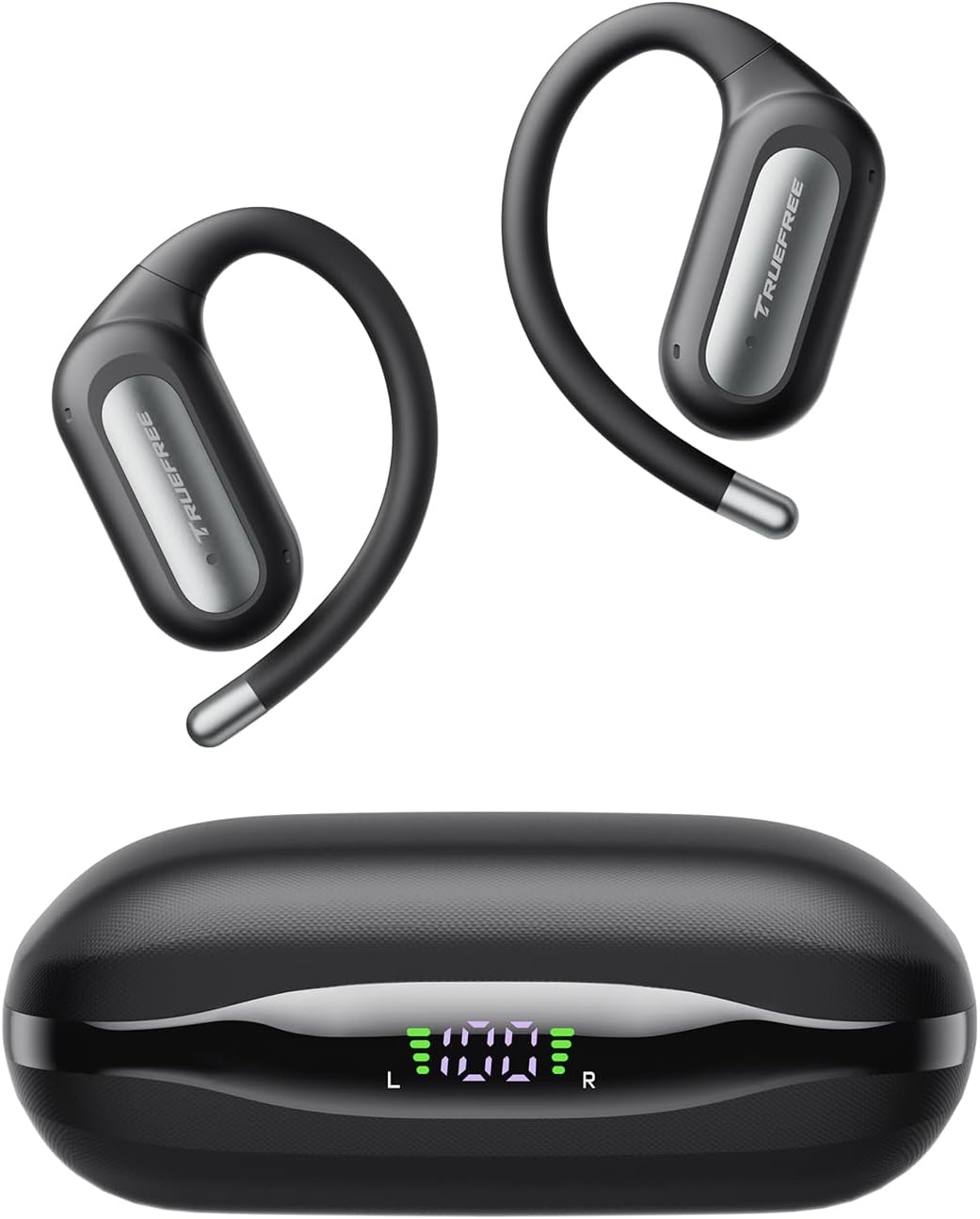
Image: The Truefree DS1 Wireless Earbuds and their charging case, showcasing the sleek design and LED battery indicator.
Kurulum Kılavuzu
1. İlk Ücret
Before first use, fully charge the earbuds and the charging case. Place the earbuds into the charging case. Connect the charging case to a power source using the provided USB Type-C cable. The LED display on the case will show the charging progress.

Image: The charging case with earbuds, displaying the digital LED battery indicator for both the case and individual earbuds.
2. Cihazınızla Eşleştirme
- Kulaklıkların şarjlı olduğundan ve şarj kutusunun içinde olduğundan emin olun.
- Şarj kutusunu açın. Kulaklıklar otomatik olarak eşleştirme moduna geçecektir.
- Akıllı telefonunuzda, tabletinizde veya dizüstü bilgisayarınızda Bluetooth'u etkinleştirin.
- Arama "TRUEFREE DS1" in the list of available Bluetooth devices.
- Select "TRUEFREE DS1" to connect. Once connected, you will hear an audible confirmation.
The DS1 supports dual-device connectivity, allowing seamless switching between two paired devices without needing to disconnect and reconnect manually.

Image: A close-up of the earbud, illustrating its advanced Bluetooth 6.0 technology for stable and fast connections.

Image: The Truefree DS1 earbuds and case shown connected to both a smartphone and a laptop, demonstrating the multipoint connection feature.
Kullanım Talimatları
Kulaklık Takma
Gently place the earbud over your ear, ensuring the ear hook wraps securely around the back of your ear. Adjust for a comfortable and stable fit. The lightweight design (8.9g per earbud) ensures comfort even during extended wear.

Image: A model wearing the Truefree DS1 earbuds, emphasizing their comfortable and stable open-ear design, ideal for prolonged use.
Dokunmatik Kontroller
The Truefree DS1 earbuds feature intuitive touch controls for easy management of audio and calls. Specific functions can be customized via the Truefree app.
| Aksiyon | İşlev |
|---|---|
| Tek Musluk (Sol/Sağ) | Müzik Çal/Duraklat, Çağrıyı Cevapla/Sonlandır |
| Çift Dokunuş (L) | Önceki Parça |
| Çift Dokunuş (R) | Sonraki Parça |
| Üçlü Musluk (Sol/Sağ) | Sesli Asistanı Etkinleştir |
| Uzun Basma (Sol/Sağ) | Çağrıyı Reddet |
| Long Press (L/R) during music | Volume Up/Down (configurable) |
Audio Quality and EQ Settings
The DS1 features 12x17mm dual-magnetic drivers for powerful bass and clear highs. For a personalized listening experience, download the Truefree app to access 9 preset EQ modes and custom equalizer settings.

Resim: Patlamış bir view diagram illustrating the internal components of the earbud, focusing on the 12x17mm dual-magnetic drivers responsible for powerful and immersive sound.

Image: Screenshots of the Truefree mobile application, demonstrating the various sound effect presets and the custom equalizer interface for personalized audio tuning.
Çağrı Yapmak
The DS1 is equipped with 4 ENC (Environmental Noise Cancellation) microphones to ensure clear call quality, even in noisy environments. Use the touch controls to answer or end calls.

Resim: Ayrıntılı view of the earbud's internal microphone placement, illustrating the dual-mic array for enhanced call clarity and wind noise cancellation.
Bakım ve Özen
Suya Dayanıklılık (IPX5)
The Truefree DS1 earbuds are IPX5 water-resistant, meaning they can withstand sweat and light splashes. They are suitable for workouts and outdoor activities. However, they are not designed for submersion in water or use during swimming.

Image: A man engaged in physical activity, wearing the Truefree DS1 earbuds, highlighting their IPX5 water resistance against sweat and splashes.
Temizlik
To maintain optimal performance and hygiene, regularly clean your earbuds and charging case. Use a soft, dry, lint-free cloth to wipe down the surfaces. Do not use abrasive cleaners or immerse the devices in liquid.
Depolamak
When not in use, store the earbuds in their charging case to protect them and ensure they remain charged for your next use. Store in a cool, dry place away from extreme temperatures.
Sorun giderme
If you encounter any issues with your Truefree DS1 earbuds, please refer to the following common solutions:
| Sorun | Olası Çözüm |
|---|---|
| Kulaklıklar eşleşmiyor | Kulaklıkların şarjının dolu olduğundan emin olun. Kulaklıkları kutusuna geri koyun, kapatın ve tekrar açarak eşleştirme moduna yeniden girin. Cihazınızın Bluetooth ayarlarını kontrol edin ve yeniden bağlanmayı deneyin. |
| Bir kulaklıktan ses gelmiyor | Her iki kulaklığın da şarjının dolu olduğundan emin olun. Her ikisini de kutusuna geri koyup tekrar çıkarmayı deneyin. Cihazınızla yeniden eşleştirin. |
| Düşük ses seviyesi veya zayıf ses kalitesi | Adjust the volume on both your device and the earbuds. Ensure earbuds are clean and properly seated in your ears. Check EQ settings in the Truefree app. |
| Şarj sorunları | Şarj kablosunun hem kutuya hem de güç kaynağına güvenli bir şekilde bağlı olduğundan emin olun. Farklı bir şarj kablosu veya güç adaptörü deneyin. Kulaklıkların ve kutunun içindeki şarj temas noktalarını temizleyin. |
| Dokunmatik kontroller yanıt vermiyor | Ensure your fingers are clean and dry. Restart the earbuds by placing them in the case and taking them out. Check the Truefree app for any disabled touch controls. |
If the issue persists, please refer to the official Truefree support channels for further assistance.
Özellikler
| Özellik | Detay |
|---|---|
| Model Adı | DS1 |
| Marka | Truefree |
| Kulak Yerleşimi | Açık Kulak |
| Bağlantı Teknolojisi | Kablosuz |
| Kablosuz İletişim Teknolojisi | Bluetooth 6.0 |
| Dahil Bileşenler | Headphones, Charging Case, User Manual |
| Malzeme | Thermoplastic Polyurethane (TPU), Titanium Alloy |
| Ürünün Belirli Kullanımları | Spor |
| Uyumlu Cihazlar | Mobile Phones, Tablets, Laptops |
| Kulaklık Ağırlığı | 8.9 gram (her biri) |
| Toplam Oynanma Süresi | 40 saate kadar (şarj kutusu ile) |
| Suya Dayanıklılık Derecesi | IPX5 |
| Mikrofonlar | 4 ENC Mikrofonu |
| Sürücüler | 12x17mm Dual-Magnetic Drivers |
| Düşük Gecikme Modu | 66ms (Oyun Modu) |
Garanti ve Destek
Truefree products typically come with a manufacturer's warranty. Please refer to the warranty card included in your product packaging or visit the official Truefree webAyrıntılı garanti bilgisi ve şartları için siteyi ziyaret edin.
For technical support, product inquiries, or assistance with troubleshooting beyond this manual, please contact Truefree customer service. Contact details can usually be found on the official Truefree websitede veya ürün ambalajında yer almamaktadır.
Ayrıca ziyaret edebilirsiniz Truefree Store on Amazon Daha fazla bilgi ve destek kaynakları için.


