1. Giriş
Satın aldığınız için teşekkür ederizasing the iFFALCON 40S55T 40-inch Full HD Google TV. This manual provides essential information for the safe and efficient use of your television. Please read it thoroughly before operating the device and retain it for future reference.
The iFFALCON 40S55T is a tunerless smart TV designed for streaming content, offering a Full HD display, Google TV operating system, Chromecast built-in, and Dolby Audio for an immersive entertainment experience.
2. Güvenlik Bilgileri
Yangın, elektrik çarpması ve yaralanma riskini azaltmak için bu televizyonu kullanırken her zaman temel güvenlik önlemlerine uyun.
- TV'yi yağmura veya neme maruz bırakmayın.
- Televizyonun kapağını açmayınasing; tüm servis işlemlerini kalifiye personele yaptırın.
- TV'nin etrafında uygun havalandırma olduğundan emin olun.
- Televizyonunuzu doğrudan güneş ışığından, ısı kaynaklarından ve güçlü manyetik alanlardan uzak tutun.
- Use only the power cord and accessories supplied by the manufacturer.
- Yıldırımlı havalarda veya uzun süre kullanılmayacaksa televizyonun fişini çekin.
3. Paket İçeriği
Kutunun içindeki tüm öğelerin eksiksiz olduğundan emin olun:
- iFFALCON 40S55T 40-inch Full HD Google TV
- Uzaktan kumanda
- TV Sehpası (2 adet)
- TV Sehpası Vidaları
- Güç kablosu
- Garanti Kartı
- Kullanım Kılavuzu (bu belge)
4. Kurulum
4.1 TV Sehpasının Takılması
- Ekranın hasar görmesini önlemek için televizyonu dikkatlice yumuşak ve düz bir yüzeye, yüzü aşağı bakacak şekilde yerleştirin.
- Her bir stand parçasını televizyonun alt kısmındaki ilgili yuvalara hizalayın.
- Verilen vidaları kullanarak standları sabitleyin. Vidaların iyice sıkıldığından emin olun.
4.2 Gücün Bağlanması
Connect the power cable to the TV's power input and then plug it into a wall outlet. The TV will enter standby mode.
4.3 Initial Setup (Google TV & Network)
Televizyon ilk açıldığında, Google TV için ilk kurulum sürecinde size yol gösterecektir. Bu süreç şunları içerir:
- Dil seçimi.
- Bir Wi-Fi ağına bağlanma.
- Signing in with your Google account to access personalized content and apps.
- Şartları ve koşulları kabul ediyorum.
4.4 Bağlantı
The iFFALCON 40S55T offers various connection options for external devices.

Resim: Üzeriview of the TV's connectivity options, including HDMI, USB, Bluetooth, and Wi-Fi.
- HDMI Bağlantı Noktaları: Connect external devices like gaming consoles, Blu-ray players, or set-top boxes.
- USB Bağlantı Noktası: Medya oynatmak için USB depolama aygıtlarını bağlamak için files.
- Wifi: For wireless internet connection to access streaming services and online features.
- Bluetooth: For connecting wireless headphones, speakers, or other Bluetooth-enabled accessories.
4.5 Tunerless Operation
This TV is designed as a tunerless model, meaning it does not have a built-in tuner for terrestrial (over-the-air) broadcasts. To watch terrestrial, BS, or CS broadcasts, an external tuner is required and must be purchased separately.

Image: The iFFALCON 40S55T TV showcasing its smart features, highlighting its tunerless design and ability to enjoy internet video content without an antenna connection.
5. TV'nin çalıştırılması
5.1 Uzaktan Kumandaview
The remote control provides access to all TV functions, including power, volume, channel navigation, and smart TV features. It also supports voice search via 'Hey Google'.

Image: The TV remote control, featuring quick access buttons for popular streaming services and a dedicated microphone button for voice commands.
- Güç Düğmesi: Televizyonu açar veya kapatır.
- Yön tuşları: Menülerde gezinmek için yön tuşlarını ve Tamam düğmesini kullanın.
- Ses Seviyesi/Kanal Düğmeleri: Adjust volume and change channels (if an external tuner is connected).
- Uygulama Kısayol Düğmeleri: Direct access to popular streaming services like Netflix, YouTube, etc.
- Mikrofon Düğmesi: Press and hold to activate 'Hey Google' voice search.
5.2 Google TV Özellikleri
Your iFFALCON TV runs on Google TV, providing a personalized and integrated entertainment experience.
- İçerik Toplama: Google TV organizes movies, shows, and live TV from all your apps and subscriptions into one place.
- Kişiselleştirilmiş Öneriler: Sizin temelinize göre viewing history and preferences, Google AI suggests content you might enjoy.
- Sesli Arama: Use the 'Hey Google' feature on your remote to quickly find content, get information, or control smart home devices.
- Chromecast Yerleşik: Easily cast content from your smartphone, tablet, or computer directly to your TV screen.

Image: A smartphone screen mirroring content to the iFFALCON TV, demonstrating the Chromecast built-in feature for enjoying mobile content on a larger display.
5.3 Resim Ayarları
The TV incorporates advanced image processing technologies to deliver a superior viewDeneyim.
- AI PQ Processor: TCL's proprietary AiPQ Processor intelligently adjusts image quality at the pixel level, enhancing clarity, color, and contrast for a vivid and realistic picture.
- Full HD (FHD): Experience sharp and detailed images with Full High Definition resolution, offering 200% more detail than standard HD screens.

Image: A visual comparison illustrating the enhanced detail and clarity provided by Full HD resolution compared to standard HD.
- HDR10/HLG Support: Enjoy a wider range of colors and contrast with HDR10 and HLG compatibility, revealing stunning detail in both bright and dark scenes.

Resim: Televizyon ekranında gösterilenasing the vibrant and detailed picture quality achieved with HDR10/HLG technology.
- Mikro Karartma: This technology analyzes the image in hundreds of separate zones to adjust brightness and darkness independently, enhancing contrast and picture quality.

Image: A visual representation of Micro Dimming technology, illustrating how it enhances contrast and picture depth by adjusting brightness in specific areas of the screen.
5.4 Sound Settings (Dolby Audio)
The TV features Dolby Audio for clear, rich, and immersive sound.
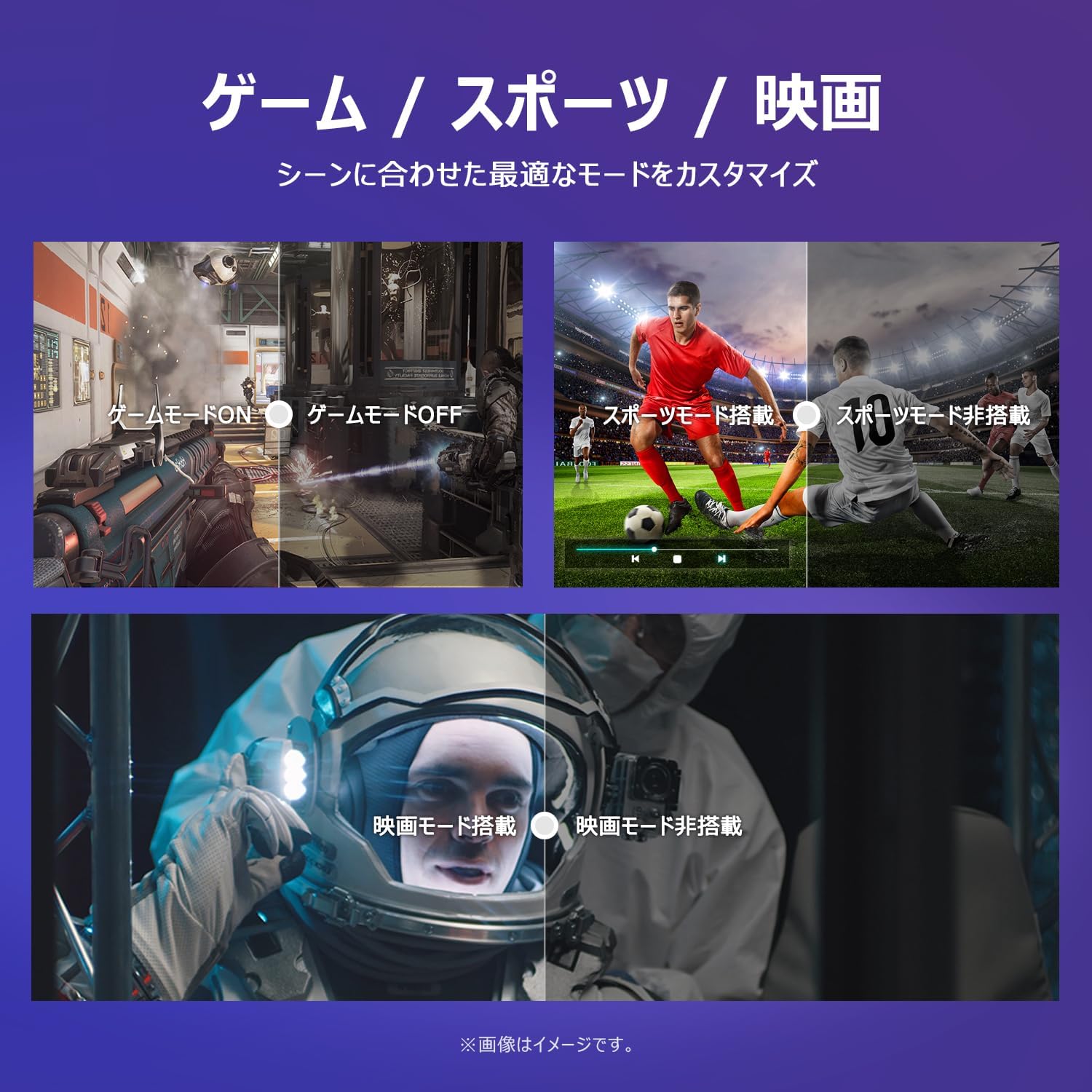
Image: The TV screen with a visual representation of sound, highlighting the immersive audio experience provided by Dolby Audio.
Access the sound settings menu to adjust modes like Standard, Music, Movie, or Custom to suit your preferences.
5.5 Oyun Modu
Activate Game Mode for an optimized gaming experience with reduced input lag.
Image: Visual comparisons demonstrating the optimized settings for Game Mode, Sports Mode, and Movie Mode, adapting the TV's performance to different content types.
The TV also offers dedicated Sports Mode and Movie Mode to enhance viewing for specific content types.
5.6 Sistem Ayarları
The quick settings menu allows you to customize frequently used system settings and rearrange their order for intuitive and convenient access.

Resim: A view of the TV's quick system settings interface, illustrating how users can easily access and customize various functions like brightness, picture mode, and network settings.
6. Bakım
Uygun bakım ve onarım, televizyonunuzun ömrünü uzatacaktır.
- Ekranın Temizlenmesi: Ekranı yumuşak, tüy bırakmayan bir bezle nazikçe silin. İnatçı lekeler için, doğrudan ekrana değil, beze uygulanan, TV'ler için özel olarak tasarlanmış bir ekran temizleyici kullanın.
- C'yi Temizlemeasing: Televizyonu silmek için yumuşak, kuru bir bez kullanın.asing. Aşındırıcı temizleyiciler veya çözücüler kullanmayın.
- Havalandırma: Televizyonunuzun arkasındaki havalandırma deliklerinin aşırı ısınmayı önlemek için kapatılmadığından emin olun.
- Güç Kablosu: Güç kablosunu düzenli olarak hasar açısından kontrol edin. Hasarlıysa, değiştirilmesi için müşteri desteğiyle iletişime geçin.
7. Sorun Giderme
Televizyonunuzla ilgili sorunlarla karşılaşırsanız, aşağıdaki yaygın sorunlar ve çözümlerine bakın. Sorun devam ederse, müşteri desteğiyle iletişime geçin.
| Sorun | Olası Neden | Çözüm |
|---|---|---|
| Güç yok | Güç kablosu bağlı değil; Elektrik prizi çalışmıyor. | Ensure power cable is securely plugged in; Test outlet with another device |
| Görüntü yok, ancak ses mevcut | Incorrect input source; External device issue | Uzaktan kumandadaki 'Giriş' düğmesine basarak doğru kaynağı seçin; Harici cihaz bağlantılarını kontrol edin. |
| Ses yok ama görüntü var | Ses kısık veya çok düşük; Harici ses sistemi sorunu | Unmute or increase volume; Check audio cable connections to external sound system |
| Uzaktan kumanda çalışmıyor | Piller bitmiş; kumanda ile televizyon arasında engel var. | Replace batteries; Remove any obstructions; Ensure remote is pointed at the TV's IR sensor |
| Wi-Fi'ye bağlanılamıyor | Yanlış şifre; Yönlendirici sorunu; TV yönlendiriciden çok uzakta | Verify Wi-Fi password; Restart router; Move TV closer to router or use a Wi-Fi extender |
8. Özellikler
Detailed technical specifications for the iFFALCON 40S55T TV:

Image: Dimensional drawing of the iFFALCON 40S55T TV, indicating its physical measurements.
| Özellik | Şartname |
|---|---|
| Ekran Boyutu | 40 inç |
| Görüntü Türü | VA Liquid Crystal |
| Çözünürlük | Tam HD (1920x1080) |
| Yenileme Hızı | 60 Hz |
| En Boy Oranı | 16:9 |
| Kontrast Oranı | 1000:1 |
| İşletim Sistemi | Google televizyon |
| Ses Çıkışı | 20 Watts (2.1 channels) |
| HDMI Bağlantı Noktaları | 2 |
| USB Bağlantı Noktaları | 1 |
| Kablosuz Bağlantı | Wi-Fi, Bluetooth |
| Ürün Boyutları (G x Y x D) | 89.2 x 55.8 x 18.4 cm (standlı) |
| Ürün Ağırlığı | 4.63 kilo |
| Wall Mount Compatible | Evet |
| Dahil Aksesuarlar | Stand, Remote Control, Warranty Card, Power Cable |
9. Garanti ve Destek
Your iFFALCON 40S55T TV comes with a manufacturer's warranty. Please refer to the included warranty card for specific terms, conditions, and duration of coverage.
For technical support, troubleshooting assistance beyond this manual, or warranty claims, please contact iFFALCON customer service. Contact information can typically be found on the warranty card or the official iFFALCON webalan.
Please have your model number (40S55T) and purchase date ready when contacting support.


