giriiş
Satın aldığınız için teşekkür ederizasing the QFX RETRO-1937 Vintage Bluetooth Rechargeable Radio. This device combines classic aesthetics with modern functionality, offering AM/FM/SW radio reception, Bluetooth wireless streaming, and media playback from USB drives and TF/microSD cards. It also features a built-in LED flashlight and a convenient rechargeable battery for portability. This manual provides essential information for the safe and efficient operation of your radio.
Paket İçeriği
Lütfen paketi aşağıdaki öğeler açısından kontrol edin:
- QFX RETRO-1937 Radio
- USB Şarj Kablosu
- Kullanım Kılavuzu (bu belge)
Ürün Bittiview
Familiarize yourself with the various parts and controls of your QFX RETRO-1937 radio.

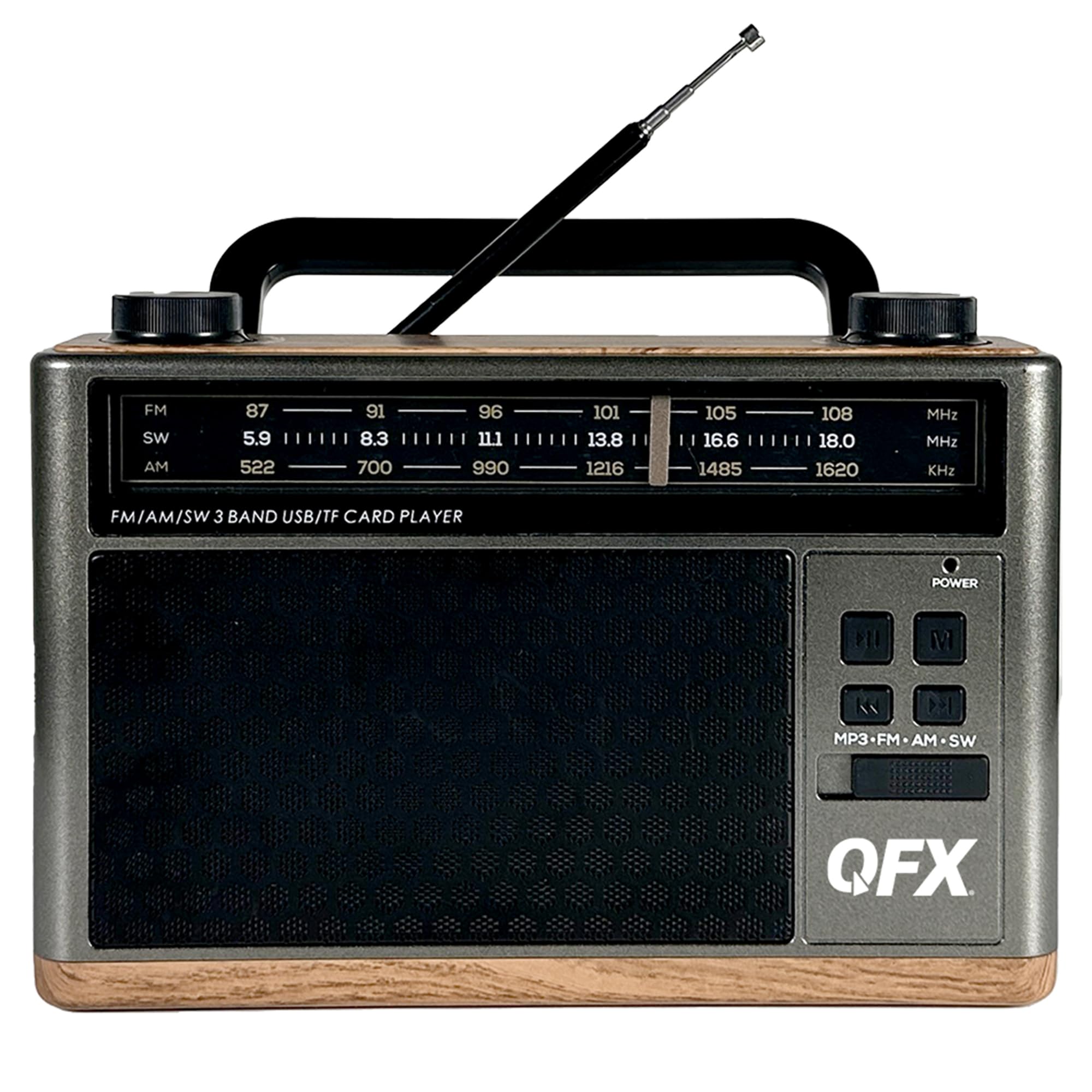
Şekil 1: Ön View with Antenna Extended
This image shows the front of the radio, highlighting the speaker grille, frequency display, control buttons, and the fully extended telescoping antenna for optimal reception.

Figure 2: Top Controls
The top panel features the Volume knob on the left and the Tuning knob on the right, both designed for easy adjustment.

Şekil 3: Yan Panel Bağlantıları
This side of the radio includes the AUX input, USB port, TF/microSD card slot, DC 5V charging port, and the main Power ON/OFF switch.

Şekil 4: Dahili LED El Feneri
The opposite side of the radio features a powerful LED flashlight for illumination.

Şekil 5: Ön View with Antenna Retracted
A general front view of the radio with the telescoping antenna in its retracted position.

Şekil 6: Açılı Taraf View
Bu görüntü açılı bir görüntü sağlar view, showing both the front controls and the side panel connections.
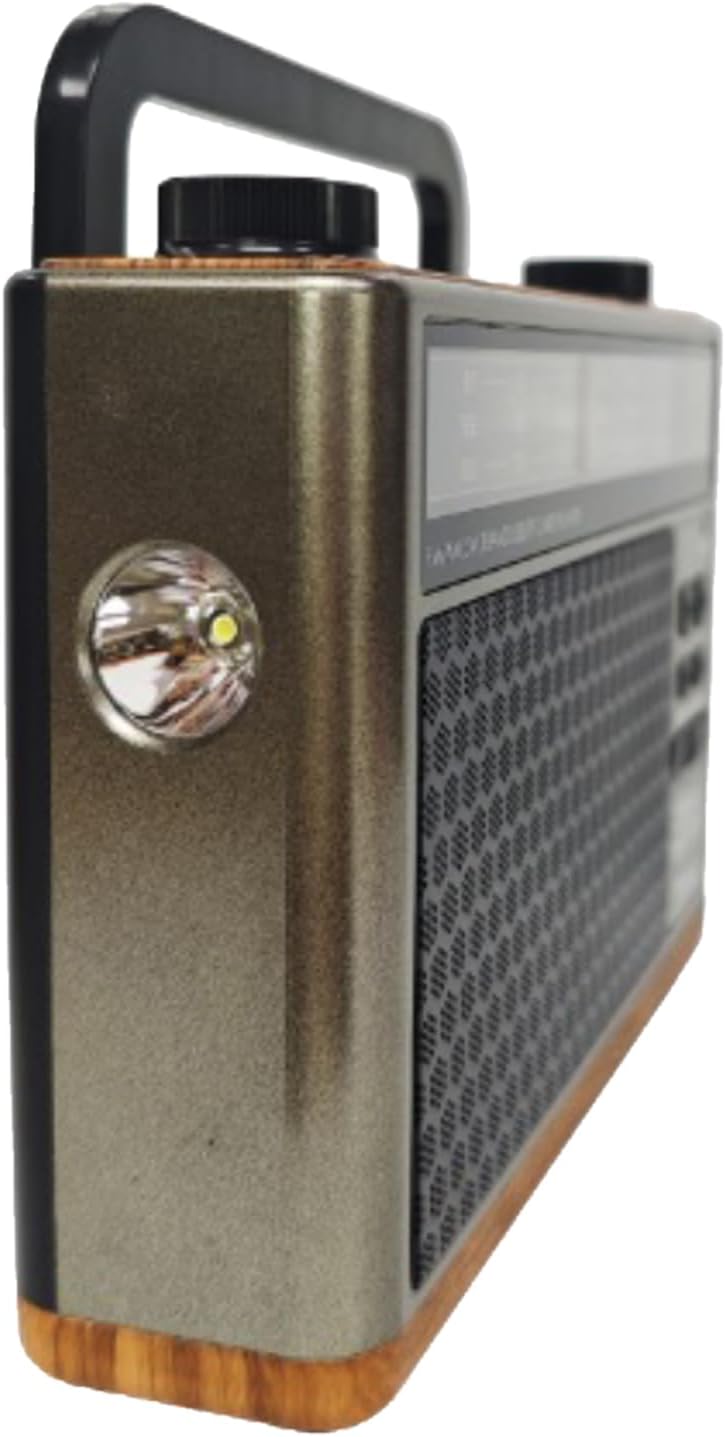
Şekil 7: Açısal View El feneri ile
Açısal bir view highlighting the built-in LED flashlight on the side of the unit.
Şekil 8: Arka View
The rear panel shows the battery compartment cover and the base of the telescoping antenna.
Kontroller ve Bağlantı Noktaları:
- Güç düğmesi: Located on the side, slides to turn the unit ON or OFF.
- Ses Düğmesi: Rotates to adjust the audio output level.
- Ayar Düğmesi: Rotates to select radio frequencies.
- Mode Button (MP3-FM-AM-SW): Cycles through different operating modes (MP3/Bluetooth, FM, AM, SW).
- Oynat/Duraklat Düğmesi: Controls playback for MP3/Bluetooth modes.
- Önceki/Sonraki Düğmeleri: Skips tracks in MP3/Bluetooth modes.
- USB Bağlantı Noktası: MP3 çalmak için USB flash sürücüleri bağlamak amacıyla kullanılır.
- TF/microSD Card Slot: For inserting TF/microSD cards for MP3 playback.
- AUX Girişi: Harici ses cihazlarını bağlamak için 3.5 mm jak.
- DC 5V Şarj Bağlantı Noktası: Dahili pili şarj etmek için mikro USB bağlantı noktası.
- Telescoping Antenna: Daha iyi radyo alımı için uzatılabilir.
- LED El Feneri: Integrated light on the side of the unit.
- Pil Bölmesi: Located on the rear for the removable rechargeable battery.
Kurmak
Pil Kurulumu ve Şarj Edilmesi
- Başlangıç ücreti: Before first use, ensure the radio's internal rechargeable battery is fully charged. Connect the supplied USB charging cable to the DC 5V port on the side of the radio and the other end to a standard USB power adapter (not included) or a computer's USB port.
- The charging indicator light (if present) will illuminate during charging and turn off or change color when fully charged. A full charge typically takes approximately 8 hours.
- Pilin Değiştirilmesi (varsa): If replacing the battery, open the battery compartment on the rear of the unit. Insert the new nonstandard rechargeable battery, ensuring correct polarity. Close the compartment securely.
Açma/Kapatma
- To turn the radio ON, slide the Power switch on the side of the unit to the 'ON' position.
- To turn the radio OFF, slide the Power switch to the 'OFF' position.
Kullanım Talimatları
Radyo Kullanımı (AM/FM/SW)
- Slide the Power switch to 'ON'.
- Press the Mode button repeatedly until you reach the desired radio band (FM, AM, or SW).
- For FM and SW reception, extend the telescoping antenna fully and adjust its position for the best signal. For AM reception, the internal antenna is generally sufficient, but rotating the unit may improve reception.
- Rotate the Tuning knob to scan for radio stations.
- Ses seviyesi düğmesini tercih ettiğiniz dinleme seviyesine ayarlayın.
Bluetooth İşlemi
- Slide the Power switch to 'ON'.
- Press the Mode button repeatedly until the unit enters Bluetooth mode. You will hear an audible prompt indicating it is ready for pairing.
- Mobil cihazınızda (akıllı telefon, tablet vb.) Bluetooth'u etkinleştirin ve kullanılabilir cihazları arayın.
- Select "QFX RETRO-1937" (or similar name) from the list of found devices to pair.
- Once paired, you will hear a confirmation tone. You can now stream audio wirelessly from your device to the radio.
- Use the Play/Pause and Previous/Next buttons on the radio or your connected device to control playback.
USB/TF Kart Oynatma
- Slide the Power switch to 'ON'.
- Insert a USB flash drive into the USB port or a TF/microSD card into the TF card slot. Ensure the card is inserted correctly.
- The radio should automatically switch to MP3 playback mode and begin playing audio files. If not, press the Mode button to select MP3 mode.
- Use the Play/Pause and Previous/Next buttons to control playback.
AUX Giriş İşlemi
- Slide the Power switch to 'ON'.
- Connect one end of a 3.5mm audio cable (not included) to the AUX input port on the radio and the other end to the headphone jack or audio output of your external audio device (e.g., MP3 player, CD player).
- AUX modunu seçmek için Mod düğmesine basın.
- Control playback and volume from your external audio device. Adjust the radio's volume as needed.
El Feneri Operasyonu
- The LED flashlight is typically activated by a separate switch or button, often located near the flashlight itself. Refer to the physical unit for the exact control.
- Ensure the radio is powered on for the flashlight to function.
Bakım
- Temizlik: Radyonun dış yüzeyini temizlemek için yumuşak, kuru bir bez kullanın. Aşındırıcı temizleyiciler, cilalar veya çözücüler kullanmayın.
- Depolamak: Uzun süre kullanılmadığı zamanlarda radyoyu serin, kuru ve doğrudan güneş ışığından ve aşırı sıcaklıklardan uzak bir yerde saklayın.
- Pil Bakım: To prolong battery life, avoid fully discharging the battery frequently. Recharge the battery regularly, even if the unit is not in active use.
- Anten: Handle the telescoping antenna carefully to prevent bending or breakage. Retract it when not in use.
Sorun giderme
| Sorun | Olası Neden | Çözüm |
|---|---|---|
| Cihaz çalışmıyor/Elektrik yok. | Battery is discharged. Power switch is OFF. | Charge the battery using the USB cable. Ensure the Power switch is in the 'ON' position. |
| Zayıf radyo alımı. | Anten uzatılmamış. Zayıf sinyal alanı. Girişim. | Extend the telescoping antenna fully and adjust its direction. Try moving the radio to a different location. Avoid sources of electronic interference. |
| Bluetooth cihazı eşleştirilemiyor. | Radio not in Bluetooth mode. Device too far. Bluetooth not enabled on device. | Ensure the radio is in Bluetooth mode. Keep devices within 30 feet (10 meters). Enable Bluetooth on your mobile device and rescan. |
| USB/TF kartı çalışmıyor. | Incorrect mode selected. Incompatible file format. Corrupted media. | Press the Mode button to select MP3 mode. Ensure files are in MP3 format. Try a different USB drive or TF card. |
| AUX girişinden ses gelmiyor. | Incorrect mode selected. Cable not fully inserted. Volume too low. | Select AUX mode. Ensure the 3.5mm cable is securely connected. Increase volume on both the radio and the external device. |
Özellikler
- Modeli: RETRO-1937
- Ürün Ölçüleri: 8 x 2.28 x 5.43 inç (20.32 x 5.79 x 13.79 cm)
- Ürün Ağırlığı: 1.12 pound (0.51 kg)
- Radyo Bantları: AM, FM, SW (Kısa Dalga)
- Bağlantı: Bluetooth, USB, TF/microSD, AUX Input
- Güç Kaynağı: Rechargeable Battery (included), DC 5V via USB cable
- Özel Özellikler: Built-in LED Flashlight, Folding Carry Handle, Telescoping Antenna
- Pil Tipi: 1 Standart Dışı Pil (dahil)
- Şarj Süresi: Yaklaşık 8 saat
Garanti ve Destek
QFX products are designed for reliability and performance. For specific warranty information, please refer to the warranty card included with your purchase or visit the official QFX website. If you encounter any issues or require technical assistance, please contact QFX customer support through their official channels.
Çevrimiçi destek: www.qfxusa.com


