1. Giriş
This manual provides detailed instructions for the setup, operation, maintenance, and troubleshooting of your BOSGAME P3 Mini PC. Please read this manual thoroughly before using the device to ensure optimal performance and longevity.
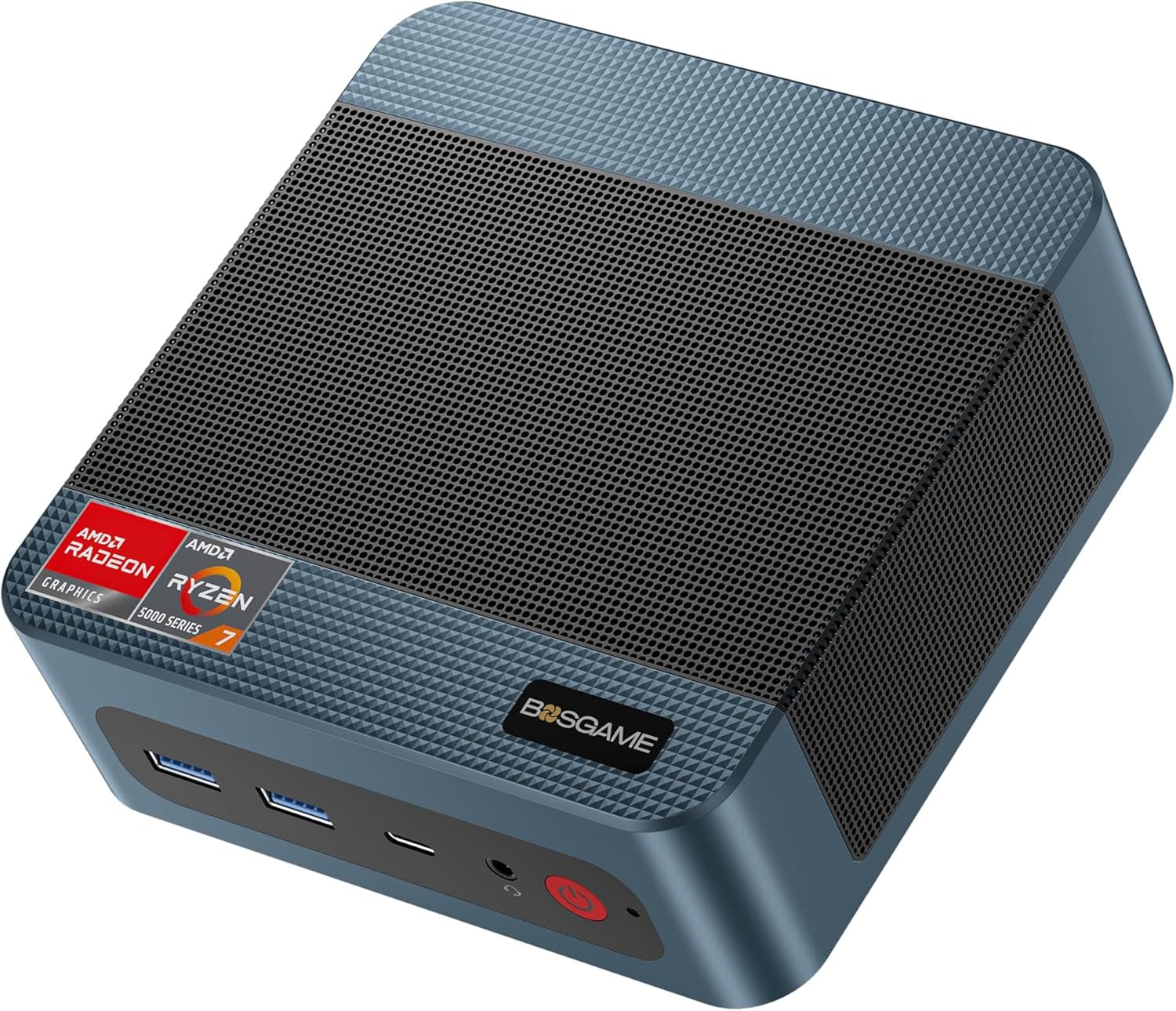
Image 1.1: The BOSGAME P3 Mini PC, a compact desktop computer.
2. Kutuda Neler Var?
Paketin içinde tüm öğelerin mevcut olduğundan emin olun:
- 1 × BOSGAME P3 Mini PC
- 1 × HDMI Kablosu
- 1 × Güç Adaptörü
- 1 × VESA Mount & Screws
- 1 × Kullanım Kılavuzu (bu belge)

Image 2.1: Contents of the BOSGAME P3 Mini PC package, including the mini PC, HDMI cable, power adapter, VESA mount, and user manual.
3. Ürün Bittiview
3.1. Temel Özellikler
- İşlemci: AMD Ryzen 7 6800H (8 Cores, 16 Threads, up to 4.7GHz)
- Grafikler: AMD Radeon 680M GPU (1900MHz)
- Hafıza: 32GB (16GB x2) Dual-channel DDR5 4800MHz RAM (expandable to 64GB)
- Depolamak: 1TB M.2 2280 PCIe 4.0 SSD (expandable to 4TB)
- Görüntü Çıktısı: Triple display support via 1x HDMI 2.0, 1x DisplayPort, and 1x USB4 (8K@60Hz)
- Ağ: Dual 2.5G LAN, WiFi 6E
- Kablosuz: Bluetooth 5.2
- USB Bağlantı Noktaları: USB4 port with PD 3.0 (up to 100W), USB 3.2 Gen2 10Gbps, USB 2.0 480Mbps

Resim 3.1: Ön view of the BOSGAME P3 Mini PC highlighting its compact size and key specifications like AMD Ryzen 7 6800H, DDR5 RAM, NVMe SSD, triple screen support, Radeon Graphics, Wi-Fi 6E, Bluetooth 5.2, and 2.5G RJ45 LAN.
3.2. Bağlantı Noktaları ve Arayüzler
The BOSGAME P3 Mini PC features a variety of ports for connectivity:
- Ön Panel: Power button, Audio Jack, USB4 (Full-featured, PD 3.0), 2x USB 3.2 Gen2 10Gbps
- Arka panel: DC power input, 2x RJ45 2.5G LAN, HDMI 2.0, DisplayPort, 2x USB 2.0

Resim 3.2: Ayrıntılı view of the front and rear interfaces of the BOSGAME P3 Mini PC, showing USB ports, audio jack, power button, DC input, LAN ports, HDMI, and DisplayPort.
3.3. İç Bileşenler
The Mini PC is equipped with high-performance components for efficient operation:
- Hafıza: Two SODIMM slots for DDR5 4800MHz RAM.
- Depolamak: One M.2 2280 NVMe PCIe 4.0 SSD slot.

Resim 3.3: Dahili view showing the SODIMM DDR5 4800MHz memory modules and the M.2 2280 NVMe PCIe 4.0 SSD slot.
3.4. Heat Dissipation and Noise
The BOSGAME P3 Mini PC incorporates an efficient cooling system to maintain optimal operating temperatures and minimize noise.

Image 3.4: Diagram illustrating the highly efficient heat dissipation system with a cooling fan and heat conduits.
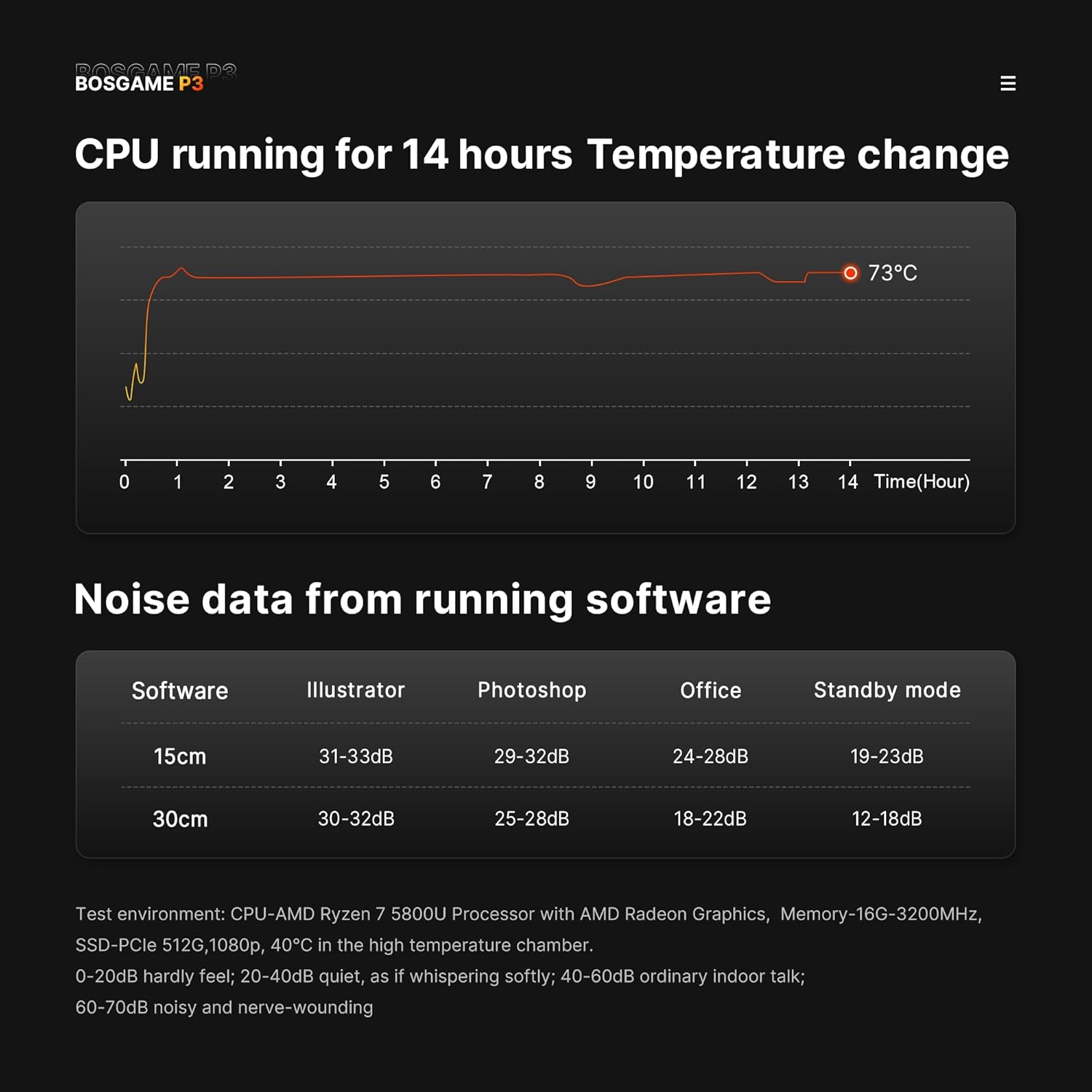
Image 3.5: Graphs showing CPU temperature change over 14 hours and noise levels (dB) during various software operations, indicating quiet performance.
4. Kurulum Kılavuzu
4.1. Çevre Birimlerini Bağlama
- Ekranı Bağla: Connect your monitor(s) to the HDMI, DisplayPort, or USB4 port using appropriate cables. The device supports up to three displays simultaneously.
- Klavye ve Fareyi Bağlayın: Plug your USB keyboard and mouse into the available USB ports.
- Ağ Bağlantısı (İsteğe bağlı): For a wired internet connection, connect an Ethernet cable from your router or modem to one of the 2.5G LAN ports.
- Gücü bağlayın: Plug the power adapter into the DC input port on the rear of the Mini PC, then plug the adapter into a power outlet. Alternatively, use a compatible USB-C PD 3.0 power source (up to 100W) with the front USB4 port for power.
4.2. İlk Güç Açma
- Press the power button on the front panel of the Mini PC. The power indicator light will illuminate.
- Follow the on-screen instructions to complete the operating system setup (e.g., Windows 11 Pro).
Video 4.1: Bir overview of the BOSGAME P3 Mini PC, demonstrating its compact size, internal components, connectivity options, and multi-display capabilities. This video provides a visual guide to the product's features and potential uses.
5. Kullanım Talimatları
5.1. Güç Açma/Kapatma
- Açmak İçin: Güç düğmesine bir kez basın.
- Kapatmak için: Click the Start menu in your operating system and select 'Power' > 'Shut down'.
- To Force Shut Down: Cihaz kapanana kadar güç düğmesini yaklaşık 5-7 saniye basılı tutun. Bunu yalnızca sistem yanıt vermediğinde kullanın.
5.2. Ekran Yapılandırması
The Mini PC supports triple display output. To configure multiple displays:
- Connect all desired monitors to the available HDMI, DisplayPort, and USB4 ports.
- In Windows, right-click on the desktop and select 'Display settings'.
- Arrange your displays, set resolutions, and choose display modes (e.g., Extend, Duplicate) as needed.
5.3. Ağ Bağlantısı
- Kablolu Bağlantı: Ensure an Ethernet cable is connected to a 2.5G LAN port. The system should automatically detect the connection.
- Wireless Connection (Wi-Fi 6E): In Windows, click the network icon in the taskbar, select your Wi-Fi network, enter the password, and connect.
- Bluetooth 5.2: Bluetooth cihazlarını eşleştirmek için Windows Ayarları > Cihazlar > Bluetooth ve diğer cihazlar bölümüne gidin ve yeni bir cihaz eklemek için talimatları izleyin.
6. Bakım
6.1. Temizlik
- Mini PC'nizin dışını düzenli olarak yumuşak ve kuru bir bezle temizleyin.
- Use compressed air to gently clear dust from the ventilation grilles to ensure proper airflow and heat dissipation. Do not insert objects into the vents.
6.2. Yazılım Güncellemeleri
Keep your operating system and drivers updated to ensure optimal performance and security. Check for updates regularly through your operating system's settings.
6.3. Depolama Yönetimi
Periodically check your SSD storage usage and delete unnecessary files to maintain system speed. Consider external storage solutions for large data archives.
7. Sorun Giderme
7.1. Güç yok
- Güç adaptörünün hem Mini PC'ye hem de çalışan bir elektrik prizine güvenli bir şekilde bağlandığından emin olun.
- Prizin çalışır durumda olduğunu doğrulamak için başka bir cihazla test edin.
- If using a USB-C PD power source, ensure it meets the 100W requirement and is connected to the correct USB4 port.
7.2. Ekranda Görüntü Çıktısı Yok
- Verify that the monitor is powered on and set to the correct input source (HDMI, DisplayPort, or USB-C).
- Check that the display cables are securely connected to both the Mini PC and the monitor.
- Try connecting to a different display port or using a different cable to rule out faulty components.
7.3. Ağ Bağlantı Sorunları
- Kablolu: Ensure the Ethernet cable is properly connected and your router/modem is working. Check network adapter settings in the operating system.
- Kablosuz: Verify Wi-Fi is enabled and you are connecting to the correct network with the correct password. Restart your router/modem.
7.4. Sistem Performans Sorunları
- Arka planda çalışan gereksiz uygulamaları kapatın.
- Ensure the system has adequate ventilation and is not overheating.
- Run a disk cleanup and defragmentation (if applicable) or check SSD health.
- Sürücüleri ve işletim sistemini güncelleyin.
8. Özellikler
| Özellik | Şartname |
|---|---|
| İşlemci | AMD Ryzen 7 6800H (8 Cores, 16 Threads, up to 4.7GHz) |
| Grafikler | AMD Radeon 680M (Entegre Grafik Kartı) |
| Veri deposu | 32GB DDR5 4800MHz (2x16GB, expandable to 64GB) |
| Depolamak | 1TB M.2 2280 PCIe 4.0 SSD (expandable to 4TB) |
| İşletim Sistemi | Windows 11 Pro |
| Görüntü Çıktısı | 1x HDMI 2.0 (4K@60Hz), 1x DisplayPort (4K@60Hz), 1x USB4 (8K@60Hz) |
| Ağ | Dual 2.5G RJ45 LAN, WiFi 6E |
| Kablosuz | Bluetooth 5.2 |
| USB Bağlantı Noktaları | 1x USB4 (Full-featured, PD 3.0), 2x USB 3.2 Gen2 10Gbps, 2x USB 2.0 |
| Ürün Ağırlığı | 2.6 pound |
| Paket Boyutları | 6.5 x 4.92 x 4.17 inç |
9. Garanti ve Destek
BOSGAME provides a 1-year professional factory support warranty for this product. Additionally, free and reliable lifetime after-sales service is available, along with 24/7 online customer service.
For technical assistance, warranty claims, or any inquiries, please contact BOSGAME customer support through the official channels provided at the time of purchase or visit the BOSGAME Store on Amazon.
All products have FCC, ROHS, and CE certifications.


