1. Giriş
Thank you for choosing the Infiniity DM56 Sport Smartwatch. This device is designed to enhance your active lifestyle with advanced fitness tracking, health monitoring, and smart connectivity features. Equipped with a vibrant 1.43-inch AMOLED display, built-in GPS, and comprehensive health sensors, the DM56 is your reliable companion for both daily wear and intense workouts.
This manual provides detailed instructions on how to set up, operate, maintain, and troubleshoot your smartwatch to ensure optimal performance and longevity.

Resim 1.1: Ön view of the Infiniity DM56 Sport Smartwatch, showcasing its round AMOLED display and rugged design.
2. Kutuda Neler Var?
Upon opening your Infiniity DM56 Sport Smartwatch package, please ensure all the following items are present:
- Infiniity DM56 Sport Smartwatch
- Şarj kablosu
- Kullanım Kılavuzu (bu belge)
3. Kurulum
3.1 Akıllı Saati Şarj Etme
Before first use, fully charge your DM56 smartwatch. A full charge typically takes approximately 2 hours.
- Manyetik şarj kablosunu akıllı saatin arkasındaki şarj temas noktalarına bağlayın. Pinlerin doğru şekilde hizalandığından emin olun.
- Şarj kablosunun USB ucunu standart bir USB güç adaptörüne (5V/1A önerilir) veya bilgisayarın USB portuna takın.
- The watch display will show a charging indicator. Once fully charged, the indicator will change or disappear.
3.2 Akıllı Telefonunuzla Eşleştirme
To unlock the full potential of your DM56 smartwatch, you need to pair it with your smartphone via Bluetooth using the dedicated companion application. The DM56 is compatible with Android 5.0+ and iOS 11 and above.
- Uygulamayı indirin: Arama the official Infiniity companion app (refer to the packaging or quick start guide for the exact app name) on the Google Play Store (for Android) or Apple App Store (for iOS) and install it.
- Bluetooth'u etkinleştir: Akıllı telefonunuzda Bluetooth'un etkinleştirildiğinden emin olun.
- Uygulamayı açın: Launch the companion app on your smartphone and follow the on-screen instructions to create an account or log in.
- Cihaz Ekle: Within the app, navigate to the 'Add Device' or 'Pair Device' section. The app will search for available smartwatches.
- Select DM56: Select 'DM56' from the list of found devices. A pairing request may appear on both your phone and the watch. Confirm the pairing on both devices.
- Kurulumu Tamamla: Once paired, the app will guide you through initial settings, such as profile information, notification permissions, and data synchronization.
4. Akıllı Saatin Çalıştırılması
4.1 Temel Gezinme
The DM56 features a responsive touchscreen and physical buttons for intuitive control.
- Dokunmatik ekran: Menüler ve bildirimler arasında gezinmek için yukarı, aşağı, sola veya sağa kaydırın. Öğeleri seçmek için dokunun.
- Fiziksel Düğmeler: The watch has multiple buttons, typically labeled 'SPORT', 'SEL', 'BACK', and a dedicated 'GPS' button. Their functions may vary depending on the current screen or mode.
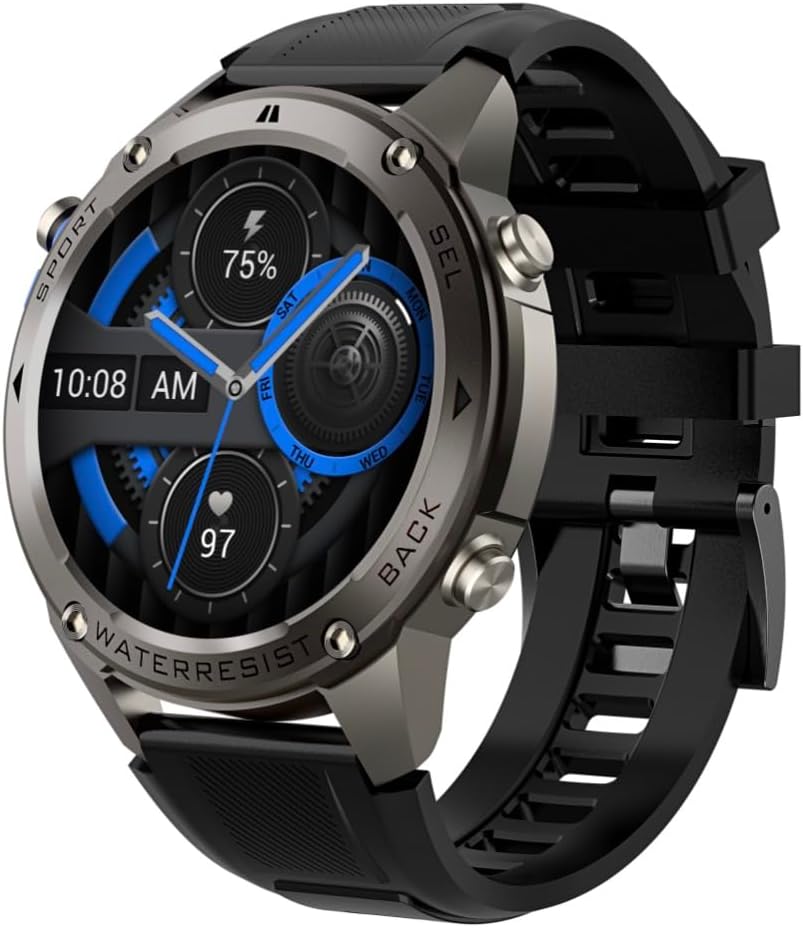
Resim 4.1: Yan view of the Infiniity DM56 Sport Smartwatch, highlighting the physical control buttons.
4.2 Ekran Özellikleri
The 1.43-inch AMOLED display offers vibrant colors and deep blacks with a resolution of 466x466 pixels.
- Her Zaman Açık Ekran: The DM56 supports Always-On Display functionality, allowing you to see the time and essential information at a glance without needing to raise your wrist or press a button. This feature can be configured in the watch settings.

Image 4.2: The Infiniity DM56 Sport Smartwatch display, showcasing a typical watch face with various data points.
4.3 Built-in GPS & Compass
The DM56 features dual-frequency GPS (L1+L5) and supports multiple satellite systems (GPS, GLONASS, BDS, Galileo, NAVIC, QZSS) for precise outdoor tracking. A built-in compass further aids navigation.
- GPS takibi: When starting an outdoor activity (e.g., running, cycling), the watch will automatically attempt to acquire a GPS signal. Ensure you are in an open area for faster signal acquisition. Your route, distance, and pace will be recorded.
- Pusula: Access the compass feature from the watch's menu to get real-time directional information.

Image 4.3: The Infiniity DM56 Sport Smartwatch from an angle, highlighting the dedicated GPS button on the side.

Resim 4.4: Yakın çekim view of the GPS button on the Infiniity DM56 Sport Smartwatch, indicating its function.
4.4 Gün Boyu Sağlık Takibi
The DM56 is equipped with the VC30F sensor for continuous health monitoring.
- Nabız İzleme: Track your heart rate in real-time throughout the day. View your current heart rate on the watch face or in the dedicated heart rate app.
- Kan Oksijen (SpO2) İzlemesi: Kanınızdaki oksijen satürasyon seviyelerini ölçün.
- Uyku Takibi: The watch automatically monitors your sleep patterns, including deep sleep, light sleep, and awake times. View Yardımcı uygulamada ayrıntılı uyku analizi.
- Stres Takibi: Gün boyunca stres seviyenizi takip edin.
- Pedometre: Counts your daily steps, distance, and estimated calories burned.
Note: The Infiniity DM56 Smartwatch is NOT A MEDICAL DEVICE. All health monitoring data is for reference only and should not be used for medical diagnosis or treatment.
4.5 Spor Modu
The DM56 offers over 170 customizable sports modes, with 14 built-in modes such as outdoor running, cycling, and swimming. You can add up to 10 additional modes manually via the companion app.
- Bir Etkinliğin Başlatılması: Navigate to the 'Workout' or 'Sports' menu on the watch, select your desired activity, and tap to start.
- Etkinlik Sırasında: The watch will display real-time metrics such as duration, distance, heart rate, and calories burned.
- Ending Activity: Swipe or press the designated button to pause or end the activity. Your workout data will be saved and synchronized with the app.
4.6 Smart Notifications & Calls
Once paired with your smartphone, the DM56 can receive notifications and handle calls directly on your wrist.
- Bildirimler: Receive alerts for incoming calls, SMS messages, and app notifications (e.g., social media, email). Configure which app notifications you want to receive in the companion app.
- Make/Answer Call: The DM56 allows you to make and answer calls directly from the watch, utilizing its built-in microphone and speaker. Ensure the watch is connected to your phone via Bluetooth.
5. Bakım
5.1 Su Geçirmezlik Derecesi
The DM56 has a 5ATM waterproof rating, meaning it can withstand water pressures equivalent to a depth of 50 meters. This makes it suitable for swimming, showering, and other water-based activities. However, it is not recommended for diving or high-pressure water activities.
- Avoid exposing the watch to hot water, steam, or strong detergents.
- Tuzlu suya maruz kaldıktan sonra saati tatlı suyla durulayın ve iyice kurulayın.
5.2 Temizlik ve Bakım
Akıllı saatinizin görünümünü ve işlevselliğini korumak için:
- Saatin gövdesini ve kayışını düzenli olarak yumuşak bir bezle temizleyin.amp Kumaş.
- Şarj işlemine başlamadan önce saatin arkasındaki şarj temas noktalarının temiz ve kuru olduğundan emin olun.
- Aşındırıcı temizleyiciler veya solventler kullanmaktan kaçının.
5.3 Pil Ömrü Optimizasyonu
The DM56 is powered by a 500mAh high-voltage battery, offering extended usage. To maximize battery life:
- Adjust screen brightness to a lower level.
- Limit the use of Always-On Display if not essential.
- Gereksiz bildirimleri kapatın.
- 24 saat kesintisiz kalp atışı izleme gerekmediğinde bu özelliği devre dışı bırakın.
6. Sorun Giderme
If you encounter issues with your Infiniity DM56 smartwatch, try the following common solutions:
- Saat açılmıyor: Saatin tamamen şarj olduğundan emin olun. Şarj cihazına bağlayın ve tekrar açmayı denemeden önce birkaç dakika bekleyin.
- Telefonla eşleştirilemiyor:
- Telefonunuzda ve saatinizde Bluetooth'un etkin olduğundan emin olun.
- Saatin telefonunuzun Bluetooth menzili içinde olduğundan emin olun.
- Hem saati hem de telefonunuzu yeniden başlatın.
- Telefonunuzdaki (Android) Bluetooth önbelleğini temizleyin veya cihazı unutup yeniden eşleştirin.
- Eşlik eden uygulamanın en son sürüme güncellendiğinden emin olun.
- Yanlış sağlık verileri:
- Saatin bileğinize tam oturduğundan, çok sıkı veya çok gevşek olmadığından emin olun.
- Saatin arkasındaki sensörü temizleyin.
- Note that environmental factors and individual physiology can affect readings. Remember, it is not a medical device.
- Alınmayan bildirimler:
- Eşlik eden uygulamada bildirim ayarlarını kontrol edin.
- Ensure the app has necessary permissions on your phone (e.g., notification access).
- Verify that the watch is connected to your phone.
- Kısa pil ömrü: Pil optimizasyonu ipuçları için Bölüm 5.3'e bakın.
Bu adımları denedikten sonra sorun devam ederse, daha fazla yardım için lütfen müşteri desteğiyle iletişime geçin.
7. Özellikler
| Özellik | Şartname |
|---|---|
| Model Numarası | DM56 |
| Görüntülemek | 1.43 inç AMOLED, 466x466 piksel |
| Sensörler | Heart Rate (VC30F), Accelerometer (STK8321), Magnetometer (Compass), Barometer+Altitude (SPL07-03) |
| Bağlantı | Bluetooth 5.3 |
| Pil Kapasitesi | 500mAh |
| Su geçirmezlik seviyesi | 5 ATM |
| Uyumluluk | Android 5.0+ and iOS 11 and above |
| Ürün Ağırlığı | 3 ons |
| Paket Boyutları | 4.25 x 4.25 x 2.8 inç |
| İşletim Sistemi | Android Wear 2.7 (Note: This refers to the underlying OS, not necessarily full Android Wear functionality) |
| Küresel Konumlama Sistemi | Built-in GPS (L1+L5 dual-frequency) |
| Şekil | Yuvarlak |
| Pil Türü | Nonstandard Battery, Lithium Ion |
8. Garanti ve Destek
The Infiniity DM56 Sport Smartwatch comes with a standard manufacturer's warranty. Please refer to the warranty card included in your product packaging for specific terms and conditions, including warranty duration and coverage details.
For technical support, troubleshooting assistance beyond what is covered in this manual, or warranty claims, please contact Infiniity customer service through the contact information provided on the product packaging or the official Infiniity webalan.
Lütfen garanti amaçlı satın alma belgenizi saklayın.