1. Giriş
Thank you for choosing the EWEADN S9 Pro Wireless Gaming Mouse. This manual provides essential information for setting up, operating, and maintaining your new gaming mouse. The S9 Pro features triple connection modes, a high-precision PAW3395 optical sensor, customizable DPI settings, and a lightweight ergonomic design for optimal performance.
2. Paket İçeriği
Lütfen paketinizde tüm öğelerin mevcut olduğundan emin olun:
- EWEADN S9 Pro Wireless Gaming Mouse
- Kullanım Kılavuzu (bu belge)
- 8K Custom Receiver (USB dongle)
- 1.5M Parachute Cord (USB-C to USB-A cable)
- PE Bag Foot Pad
- Anti-slip Protection Sticker

Image: All items included in the EWEADN S9 Pro Wireless Gaming Mouse package, including the mouse, USB-C cable, receiver, and accessories.
3. Ürün Bittiview
Familiarize yourself with the buttons and ports of your EWEADN S9 Pro mouse:
Image: A detailed diagram illustrating the various buttons and ports on the EWEADN S9 Pro mouse, including Left Button, Right Button, Middle Button (scroll wheel), DPI Switch, Forward Button, Backward Button, Type-C Port, and the 2.4G-OFF-BT mode switch on the underside.
- Sol Tuş: Standart sol tıklama fonksiyonu.
- Sağ Buton: Standart sağ tıklama fonksiyonu.
- Orta Düğme (Kaydırma Tekerleği): Yukarı/aşağı kaydırın, orta fare tuşuna tıklayın.
- DPI Anahtarı: Önceden ayarlanmış DPI seviyeleri arasında geçiş yapar.
- İleri Düğmesi: İleriye doğru gezinir web Tarayıcılar veya uygulamalar.
- Geri Düğmesi: Geriye doğru gezinir web Tarayıcılar veya uygulamalar.
- C Tipi Bağlantı Noktası: Kablolu bağlantı ve şarj için.
- 2.4G-OFF-BT Switch: Located on the underside, used to select connection mode or power off.
4. Kurulum
4.1. Fareyi Şarj Etme
Before first use, it is recommended to fully charge the mouse. Connect the supplied USB-C cable to the mouse's Type-C port and the other end to a USB power source (e.g., computer USB port, USB wall adapter).

Image: The EWEADN S9 Pro mouse connected via its USB-C port to a charging cable, indicating the charging process.
4.2. Bağlantı Modları
The S9 Pro mouse supports three connection modes: 2.4G Wireless, Bluetooth 5.0, and USB-C Wired. Use the switch on the underside of the mouse to select your desired mode.
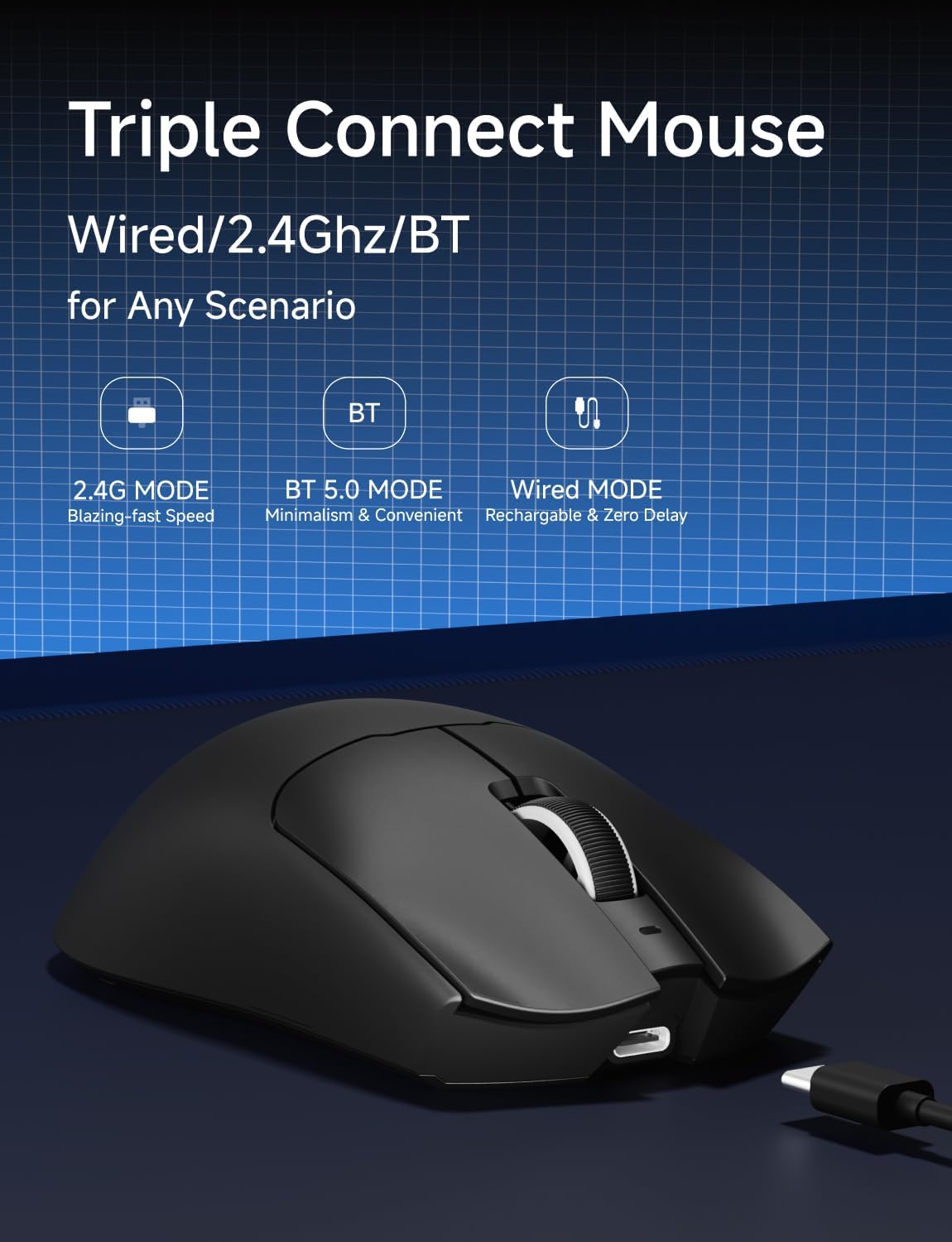
Image: An illustration highlighting the three connection modes: 2.4G Wireless for blazing-fast speed, Bluetooth 5.0 for convenience, and USB-C Wired for zero delay and recharging.
2.4G Kablosuz Bağlantı
- Locate the 8K Custom Receiver (USB dongle) in the package.
- USB alıcısını bilgisayarınızdaki uygun bir USB bağlantı noktasına takın.
- Slide the mode switch on the underside of the mouse to the "2.4G" position.
- Fare otomatik olarak bilgisayarınıza bağlanmalıdır.
Bluetooth 5.0 Bağlantısı
- Slide the mode switch on the underside of the mouse to the "BT" position.
- Bilgisayarınızda veya cihazınızda Bluetooth ayarlarını açın ve yeni cihazları arayın.
- Select "EWEADN S9 Pro" from the list of available devices to pair.
USB-C Kablolu Bağlantı
- Connect the supplied USB-C cable to the mouse's Type-C port.
- Kablonun USB-A ucunu bilgisayarınızdaki uygun bir USB portuna takın.
- Fare, kablolu modda çalışacak ve aynı anda şarj olacaktır.
5. Kullanım Talimatları
5.1. DPI Ayarlaması
The EWEADN S9 Pro mouse features customizable DPI settings. You can cycle through preset DPI levels using the dedicated DPI switch button on the top of the mouse. For fine-tuning and additional customization, please use the official EWEADN software.

Image: The EWEADN S9 Pro mouse with an overlay indicating 6 customizable DPI settings, ranging from 800 to 26000 DPI.
5.2. Oylama Oranı
The mouse supports an 8K polling rate in wireless mode (with the 8K receiver) and 1K in wired mode. The polling rate can be configured through the EWEADN software to match your preferences and system capabilities.
5.3. Programlanabilir Düğmeler
The S9 Pro mouse is equipped with programmable buttons. To customize button functions, DPI/IPS settings, lift-off distance, and create macros, download and install the official EWEADN software from the manufacturer's website. This software allows for advanced personalization of your mouse settings.
5.4. Ergonomik Tasarım
The mouse is designed for right-handed users with medium to large hands, weighing only 59 grams. Its ergonomic shape aims to reduce fatigue during extended use. It supports various grip styles including palm, claw, and fingertip grips.

Image: An illustration demonstrating the EWEADN S9 Pro mouse's compatibility with palm grip, claw grip, and fingertip grip styles, designed for medium-large handed players.
6. Bakım
6.1. Temizlik
To clean your mouse, use a soft, dry, lint-free cloth. Avoid using harsh chemicals, solvents, or abrasive materials, as these can damage the surface and internal components. For stubborn dirt, a slightly damp Bez kullanılarak fareye nem girmesi önlenebilir.
6.2. Pil Bakımı
The S9 Pro features a 500mAh rechargeable battery. To maximize battery life:
- Fareyi aşırı sıcaklıklara maruz bırakmaktan kaçının.
- Charge the mouse regularly, especially when the battery indicator shows low power.
- If storing the mouse for an extended period, charge it to approximately 50% before storage.
7. Sorun Giderme
7.1. Fare Yanıt Vermiyor
- Pili Kontrol Edin: Ensure the mouse is charged. Connect the USB-C cable to charge.
- Bağlantı Modunu Kontrol Edin: Verify the mode switch on the underside is set correctly (2.4G, BT, or OFF).
- 2.4G Kablosuz: USB alıcısının çalışan bir USB portuna güvenli bir şekilde takıldığından emin olun. Farklı bir USB portu deneyin.
- Bluetooth: Re-pair the mouse with your device in Bluetooth settings. Ensure your device's Bluetooth is enabled.
- Kablolu: Ensure the USB-C cable is firmly connected to both the mouse and the computer.
7.2. DPI Değişmiyor
- Doğru DPI değiştirme düğmesine bastığınızdan emin olun.
- If using custom DPI settings, check the EWEADN software to ensure settings are applied correctly.
7.3. Lag or Stuttering
- Kablosuz Girişim: Move the mouse closer to the receiver or your Bluetooth device. Avoid placing the receiver near other wireless devices or large metal objects.
- Anket Oranı: While 8K polling rate offers high performance, some systems may experience issues. Try reducing the polling rate via the EWEADN software if you encounter instability.
- Pil Seviyesi: Low battery can sometimes affect wireless performance. Charge the mouse fully.
8. Özellikler
| Özellik | Detay |
|---|---|
| Marka | EWEADN |
| Model Numarası | S9 Pro |
| Bağlantı Teknolojisi | 2.4Ghz Wireless, Bluetooth 5.0, USB-C Wired |
| Hareket Algılama Teknolojisi | Optik (PAW3395 Sensörü) |
| DPI Aralığı | 26000 DPI'a kadar |
| IPS Tracking | 650 IPS |
| Anket Oranı | 8K Wireless, 1K Wired |
| Anahtarlar | Kailh Micro Switch (100 Million Clicks) |
| Pil Kapasitesi | 500mAh |
| Pil Ömrü | 250 saate kadar |
| Ağırlık | 59 gram (yaklaşık 2.08 ons) |
| Uyumluluk | Windows 7/8/10/XP/Vista, Mac OS, Linux, Android |
| Kablo Uzunluğu | 1.5M Parachute Cord |
| Paket Boyutları | 7.32 x 5.75 x 2.32 inç |
9. Garanti ve Destek
EWEADN provides manufacturer support for its products. If you encounter any issues or have questions regarding your S9 Pro Wireless Gaming Mouse, please contact EWEADN customer support. The manufacturer aims to provide a response within 24 hours and offers 360 days of brand support.

Image: An illustration indicating EWEADN's commitment to customer support, including 24-hour reply times and 360 days of manufacturer brand support.
For the most up-to-date support information and software downloads, please visit the official EWEADN webalan.


