1. Giriş
This manual provides essential information for setting up, operating, and maintaining your Element 43-inch Frameless 4K UHD HDR XUMO TV. Please read it thoroughly before using your television to ensure proper functionality and safety.
The Element XUMO TV offers a breathtaking viewing experience with its 4K Ultra HD resolution, delivering clear and detailed images. Enhanced color and contrast are provided by Dolby Vision and HDR technology, ensuring an immersive experience even in dark scenes. Dolby Audio contributes to superior sound quality for movies and games. A 120Hz effective refresh rate ensures smooth motion during fast-paced content.

Resim 1.1: Ön view of the Element 43" XUMO TV.
2. Kutuda Neler Var?
Lütfen paketinizin içeriğini kontrol ederek tüm öğelerin mevcut olduğundan emin olun:
- 1 Element Xumo TV 43"
- 1 Xumo TV remote control (batteries included)
- 1 Hızlı Başlangıç Kılavuzu
- 1 TV stand + hardware
3. Kurulum
3.1 Paketin açılması
- Carefully remove the TV from its packaging. It is recommended to have two people for this step due to the size and weight of the television.
- Çizilmeleri önlemek için televizyonu ekranı aşağı bakacak şekilde yumuşak ve düz bir yüzeye yerleştirin.
- Tüm koruyucu filmleri ve ambalaj malzemelerini çıkarın.
3.2 Standın Takılması
TV standını takmak için:
- Sol ve sağ destek ayaklarını belirleyin.
- Her bir ayak parçasını televizyonun altındaki ilgili vida delikleriyle hizalayın.
- Secure the stand legs using the provided hardware (screws). Do not overtighten.
- Televizyonu dikkatlice kaldırıp düz ve sağlam bir yüzeye dik konumda yerleştirin.
3.3 Çevre Birimlerini Bağlama
Connect your external devices (e.g., cable box, gaming console, Blu-ray player) to the appropriate ports on the back of the TV. Refer to the Quick Start Guide for port locations.
3.4 İlk Güç Açma
- Güç kablosunu televizyona ve ardından duvardaki prize takın.
- Uzaktan kumandadaki veya televizyonun üzerindeki Güç düğmesine basın.
- Follow the on-screen instructions to complete the initial setup, including network connection and channel scanning.
4. Kullanım Talimatları
4.1 Uzaktan Kumanda İşlevleri
The included XUMO TV remote control allows you to navigate the TV's features. It includes an advanced voice remote function for easy content search.
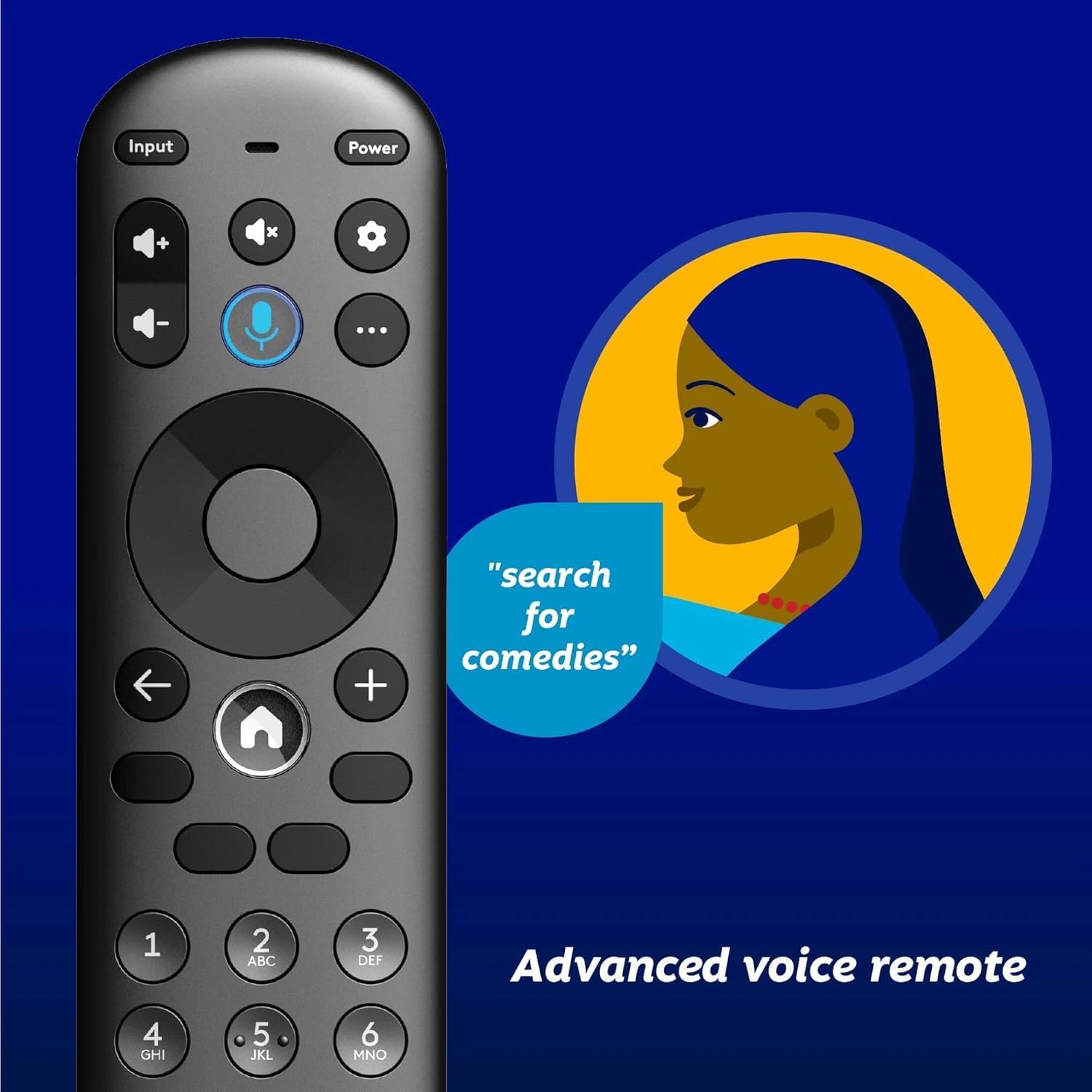
Image 4.1: Element XUMO TV advanced voice remote control.
- Güç: Televizyonu açar veya kapatır.
- Giriş: Giriş kaynağını (HDMI, AV, vb.) seçer.
- Ses Düğmesi: Activates voice commands for searching content or controlling the TV.
- Navigasyon Pedi: Menüler arasında gezinmek ve seçenekleri seçmek için kullanılır.
- Ana menü tuşu: Returns to the XUMO TV home screen.
- Hacim +/-: Ses seviyesini ayarlar.
- Kanal +/-: TV kanallarını değiştirir.
4.2 Smart TV Features (XUMO)
Your Element TV features a built-in XUMO TV experience, providing access to over 250 pre-loaded apps and streaming services.

Image 4.2: XUMO TV smart interface with streaming applications.
- Yayın Akışı Uygulamaları: Access thousands of movies, TV shows, and music from platforms like Netflix, YouTube, Disney+, Prime Video, Peacock, and more.
- Canlı Kanallar: Explore over 750 free live channels, including news, sports, and kids' programming, from Xumo Play, Tubi, Pluto TV, and others.
- Kişiselleştirilmiş İçerik: The XUMO interface is designed to help you stream easily, bringing together content in one simple view.
4.3 Bağlantı
- Wifi: İnternet erişimi ve yayın akışı için evinizin kablosuz ağına bağlanın.
- Bluetooth: Easily pair your TV with compatible Bluetooth devices such as speakers, headphones, or game controllers.
- Apple AirPlay & Home: Mirror your smartphone, iPad, or Mac screen to the TV, stream media, and control your TV directly from Apple devices.
5. Bakım
5.1 Ekranı Temizleme
- TV'yi kapatın ve fişini prizden çekin.
- Ekranı yumuşak, kuru ve tüy bırakmayan bir bezle nazikçe silin.
- İnatçı izler için hafifçe silinampBezi su veya özel bir ekran temizleyicisi ile silin (doğrudan ekrana sıkmayın).
- Sert kimyasallar, aşındırıcı maddeler veya alkol bazlı temizleyiciler kullanmaktan kaçının.
5.2 Genel Bakım
- Televizyonu doğrudan güneş ışığından, ısı kaynaklarından ve aşırı tozdan uzak tutun.
- Aşırı ısınmayı önlemek için TV'nin çevresinde uygun havalandırma olduğundan emin olun.
- Televizyonunuzun üzerine ağır cisimler koymayın.
6. Sorun Giderme
Televizyonunuzda sorunlarla karşılaşırsanız, aşağıdaki yaygın sorunlara ve çözümlere bakın:
- Güç Yok:
- Güç kablosunun hem televizyona hem de çalışan bir elektrik prizine güvenli bir şekilde takılı olduğundan emin olun.
- Başka bir cihaz takarak prizin çalışır durumda olup olmadığını kontrol edin.
- Sadece uzaktan kumandayı değil, televizyonun üzerindeki güç düğmesine de basmayı deneyin.
- No Picture, But Has Sound:
- Doğru giriş kaynağının seçildiğinden emin olun (örneğin, HDMI 1, AV).
- Televizyon ile harici cihazlar arasındaki tüm kablo bağlantılarını kontrol edin.
- Televizyonu ve ona bağlı tüm cihazları yeniden başlatın.
- No Sound, But Has Picture:
- Ses seviyesini kontrol edin ve televizyonun sesinin kısılmadığından emin olun.
- Harici hoparlör kullanıyorsanız, bunların doğru şekilde bağlı ve açık olduğundan emin olun.
- Televizyon menüsünden ses çıkışı ayarlarını kontrol edin.
- Uzaktan Kumanda Çalışmıyor:
- Uzaktan kumandanın pillerini değiştirin.
- Uzaktan kumanda ile televizyonun kızılötesi sensörü arasında herhangi bir engel olmadığından emin olun.
- Re-pair the remote if it's a Bluetooth remote (refer to the Quick Start Guide for pairing instructions).
- Ağ Bağlantı Sorunları:
- Wi-Fi yönlendiricinizi ve modeminizi yeniden başlatın.
- Check the Wi-Fi settings on the TV to ensure it's connected to the correct network.
- If possible, try connecting the TV to the internet via an Ethernet cable.
7. Özellikler
Key technical specifications for the Element 43" Frameless 4K UHD HDR XUMO TV:
| Özellik | Tanım |
|---|---|
| Marka Adı | Öğe |
| Model Adı | Öğe 2023 |
| Ekran Boyutu | 43 İnç (110 cm) |
| Ekran Teknolojisi | NEDEN OLMUŞ |
| Çözünürlük | 4K Ultra HD |
| Özel Özellikler | 4K High Definition, HDR (High Dynamic Range), Vibrant Colors, 60 Hz, Dolby Vision, HDR10+ |
| Etkili Yenileme Hızı | 120Hz |
| Ses Teknolojisi | Dolby Ses |
| Desteklenen İnternet Hizmetleri | Netflix, Prime Video, Max, Disney Plus, YouTube TV, Paramount+, Apple TV+, Crunchyroll, Xumo Play, Tubi, Pluto TV |
| Bağlantı Teknolojisi | Wired, Wireless (Wi-Fi, Bluetooth, Apple AirPlay) |
| En Boy Oranı | 16:9 |
| Ürün Ağırlığı | 22 pound |
| Ürün Boyutları | 3.3 x 37 x 225 inç |
7.1 Görüntü Kalitesi Özellikleri

Image 7.1: Dolby Vision technology enhances highlights and darks for superior contrast.

Image 7.2: 120Hz Effective Refresh Rate for smooth motion.

Image 7.3: 4K resolution delivers vivid colors and remarkable detail.
8. Garanti ve Destek
This product is an Amazon Renewed item. Amazon Renewed products are backed by the Amazon Renewed Guarantee. This means your purchase is eligible for a replacement or refund within 90 days of receipt if it does not work as expected.
For specific warranty details or support inquiries, please refer to the documentation provided with your Amazon Renewed purchase or visit the Amazon Renewed support page.


