giriiş
This manual provides detailed instructions for the setup, operation, and maintenance of your MASTER & DYNAMIC MH40 Over-Ear Wireless Headphones Gen II. Please read this manual thoroughly to ensure optimal performance and longevity of your device.

Image: MASTER & DYNAMIC MH40 Wireless Over-Ear Headphones banner, showcasing the product name and design.
Ürün Bittiview
The MH40 Wireless Over-Ear Headphones Gen II are designed for superior audio quality and comfort. Key features include:
- Custom Titanium Drivers: Enhanced, precise sound with deep bass and clear treble.
- Uzun Pil Ömrü: Tek bir şarjla 30 saate kadar oynatma süresi.
- Hızlı Şarj Özelliği: 6 hours of listening after just 15 minutes of charging.
- Bluetooth 5.2: Reliable wireless connectivity up to 30 meters (100 ft).
- Optional USB-C Audio: Digital audio support up to 24-bit/96kHz via USB-C to USB-C cable.
- Çift Mikrofon Dizisi: Features proprietary wind noise reduction technology for clear calls.
- Birinci Sınıf Malzemeler: Constructed with lightweight anodized aluminum, coated canvas, and soft lambskin-leather for durability and comfort.
- Removable Magnetic Ear Pads: Offers superior noise isolation and ease of maintenance.

Resim: Ön view of the MH40 Gen II headphones in Silver Metal / Tan Leather.

Resim: Yakın çekim view of the MH40 earcups and headband, highlighting the material and design.

Image: MH40 headphones shown in a folded position, demonstrating their portability.
Kurmak
1. Kulaklıkları Şarj Etme
Before initial use, fully charge your MH40 Gen II headphones. Connect the provided USB-C charging cable to the headphone's charging port and to a power source (e.g., computer USB port or USB wall adapter).
- Tam şarjla 30 saate kadar dinleme süresi sağlar.
- For quick charging, 15 minutes of charge time yields approximately 6 hours of listening.

Image: MH40 headphones illustrating the "Boundless Battery" feature, emphasizing long battery life.

Image: Close-up of the power buttons on the MH40 headphones, showing the LED indicator.
2. Bluetooth Eşleştirme
- Kulaklığın şarjlı ve kapalı olduğundan emin olun.
- Eşleştirme modunu gösteren gösterge ışığı yanıp sönene kadar güç düğmesini basılı tutun.
- Cihazınızda (akıllı telefon, tablet, bilgisayar) Bluetooth ayarlarına gidin.
- Select "MH40 Gen II" from the list of available devices.
- Once connected, the indicator light on the headphones will change to a steady color or turn off, depending on the model.
The MH40 Gen II uses Bluetooth 5.2 for a stable connection up to 30 meters (100 ft).
Kullanım Talimatları
Kontroller
The MH40 Gen II headphones feature intuitive controls for managing audio playback and calls. Specific control functions may vary slightly but generally include:
- Güç Düğmesi: On/Off, Pairing mode.
- Ses Kontrolleri: Ses çıkış seviyesini ayarlayın.
- Çok Fonksiyonlu Düğme: Play/Pause, Skip tracks, Answer/End calls.
- Sessiz tuşu: Located on the right side for quick microphone muting during calls.
For detailed control mapping, refer to the companion mobile application (if available) or the quick start guide included with your product.

Resim: Yakın çekim view of the controls on the MH40 headphones, showing buttons and ports.
Çağrı Yapma ve Alma
The dual microphone array with wind noise reduction ensures clear communication.
- Çağrıyı Cevapla/Sonlandır: Çok fonksiyonlu düğmeye basın.
- Çağrıyı Reddet: Çok fonksiyonlu düğmeye basılı tutun.
- Mikrofonun Sesini Kapat: Use the dedicated mute button during a call.
Kablolu bağlantı
For digital audio up to 24-bit/96kHz, connect the headphones to your device using a USB-C to USB-C cable. This bypasses Bluetooth and can be useful for high-fidelity audio or when battery is low.
Bakım
Proper care will extend the life and maintain the performance of your MH40 Gen II headphones.
- Temizlik: Use a soft, dry cloth to clean the exterior surfaces. For leather parts, use a specialized leather cleaner if necessary. Avoid harsh chemicals or abrasive materials.
- Kulak Pedleri: The magnetic ear pads are removable for easy cleaning or replacement. Gently detach them and clean as needed. Ensure they are securely reattached.
- Depolamak: When not in use, store the headphones in a cool, dry place, away from direct sunlight and extreme temperatures. Use the provided carrying pouch to protect them from dust and scratches.
- Nemden Kaçının: Kulaklıkları suya veya aşırı neme maruz bırakmayın.

Image: MH40 headphones with one ear pad removed, demonstrating the magnetic attachment for easy maintenance.
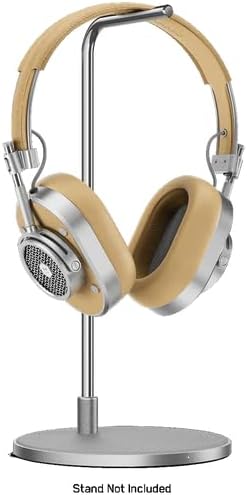
Image: MH40 headphones displayed on a stand, illustrating proper storage.
Sorun giderme
If you encounter issues with your MH40 Gen II headphones, refer to the following common solutions:
| Sorun | Çözüm |
|---|---|
| Kulaklık açılmıyor. | Kulaklığın tamamen şarj olduğundan emin olun. Bir güç kaynağına bağlayın ve şarj göstergesini kontrol edin. |
| Bluetooth üzerinden eşleştirme yapılamıyor. |
|
| Ses yok veya ses kalitesi düşük. |
|
| Görüşmeler sırasında mikrofon çalışmıyor. |
|
Özellikler
| Özellik | Detay |
|---|---|
| Model Adı | MH40 |
| Bağlantı Teknolojisi | Kablosuz (Bluetooth), Kablolu (USB-C) |
| Kablosuz İletişim Teknolojisi | Bluetooth 5.2 |
| Bluetooth Menzili | 30 Metre (100 ft) |
| Dahil Bileşenler | Headphones, USB-C Charging Cable, USB-C to USB-C Audio Cable (specific cables may vary by package) |
| Malzeme | Aluminum, Leather, Canvas |
| Kontrol Yöntemi | App, On-ear controls |
| Pil Ömrü | 30 Saate Kadar |
| Kulaklık Şekli | Kulak Üstü |
| Gürültü Kontrolü | Ses Yalıtımı |
| Ürün Ağırlığı | 2.38 pound |
| Üretici | MASTER & DYNAMIC |
| UPC | 850060736537 |
Garanti ve Destek
MASTER & DYNAMIC products are engineered to last and are covered by a limited warranty. For specific warranty terms and conditions, please refer to the warranty card included with your product or visit the official MASTER & DYNAMIC webalan.
For technical support, product inquiries, or warranty claims, please contact MASTER & DYNAMIC customer service through their official channels. You can often find support information on the manufacturer's website or by referring to the contact details provided in your product packaging.
Üretici: MASTER & DYNAMIC
Daha fazla yardım için şu adresi ziyaret edin: MASTER & DYNAMIC Store on Amazon.


