giriiş
This user manual provides important information for the safe and efficient operation of your Technaxx TX-315 10000mAh 3-in-1 Wireless Fast Charging Power Bank. Please read this manual thoroughly before using the device and keep it for future reference.
Güvenlik Talimatları
- Powerbank'i aşırı sıcaklıklara, doğrudan güneş ışığına veya ateşe maruz bırakmayın.
- Cihazı kendiniz sökmeyin, tamir etmeyin veya üzerinde değişiklik yapmayın. Tüm servis işlemlerini yetkili personele yaptırın.
- Güç bankasını su ve diğer sıvılardan uzak tutun.
- Cihazı düşürmeyin, çarpmayın veya şiddetli darbelere maruz bırakmayın.
- Şarj veya deşarj sırasında yeterli havalandırmayı sağlayın.
- Çocukların erişemeyeceği yerde saklayınız.
- Taşınabilir güç bankasını, elektronik atıklarla ilgili yerel yönetmeliklere uygun olarak imha edin.
Ürün Bittiview
Familiarize yourself with the components of your Technaxx TX-315 power bank:
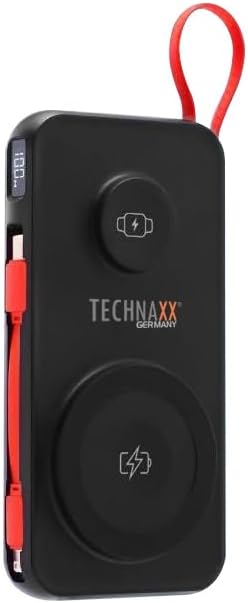
Image: The Technaxx TX-315 power bank, a black rectangular device with a red lanyard. It features a digital display on the side, a USB-C port, a USB-A port, a built-in red USB-C cable, a magnetic wireless charging pad for smartphones, and a smaller wireless charging pad for smartwatches. The Technaxx logo is visible on the front.
- Dijital gösterge: Pil yüzdesini gösterirtage.
- Magnetic Wireless Charging Pad (15W): Uyumlu akıllı telefonlar için.
- Smartwatch Wireless Charging Pad (3W): For compatible smartwatches.
- USB-A Output Port (22.5W): For wired charging of various devices.
- USB-C Input/Output Port (20W PD): For charging the power bank or wired charging of devices.
- Dahili USB-C Kablosu: Cihazları şarj etmek için kullanışlıdır.
- Güç Düğmesi: Activates the display and charging functions.
Kurmak
Power Bank'ı Şarj Etme
- Connect the power bank to a USB wall charger (not included) using the built-in USB-C cable or a separate USB-C to USB-C cable via the USB-C port.
- Dijital ekran, pil yüzdesini belirterek şarj ilerlemesini gösterecektir.tage.
- Ekranda "100%" göründüğünde taşınabilir şarj cihazı tamamen şarj olmuş demektir.
İşletim
Charging Smartphones Wirelessly (15W)
- Güç bankasını etkinleştirmek için güç düğmesine basın.
- Place your MagSafe-compatible or Qi-enabled smartphone onto the larger magnetic wireless charging pad. Ensure proper alignment for optimal charging.
- The phone's charging indicator will confirm charging has begun.
Charging Smartwatches Wirelessly (3W)
- Güç bankasını etkinleştirmek için güç düğmesine basın.
- Place your compatible smartwatch onto the smaller wireless charging pad.
- The smartwatch's display will indicate that it is charging.
Wired Charging via USB-A or USB-C Ports
- Güç bankasını etkinleştirmek için güç düğmesine basın.
- Connect your device to the USB-A port or the USB-C port using an appropriate charging cable.
- Powerbank cihazınızı otomatik olarak şarj etmeye başlayacaktır.
- The built-in USB-C cable can also be used for convenient wired charging.
Dijital Ekranı Anlamak
The digital display shows the current battery percentage of the power bank. This allows you to monitor the remaining power and know when to recharge the unit.
Bakım
- Power bank'i yumuşak, kuru bir bezle temizleyin. Aşındırıcı temizleyiciler veya çözücüler kullanmayın.
- Powerbank cihazınızı serin, kuru ve doğrudan güneş ışığından ve aşırı sıcaklıklardan uzak bir yerde saklayın.
- Uzun süre kullanılmadığı durumlarda, pil ömrünü korumak için power bank'i en az üç ayda bir şarj edin.
Sorun giderme
| Sorun | Olası Neden | Çözüm |
|---|---|---|
| Powerbank şarj olmuyor. | Cable not connected properly; charger not working; power bank battery depleted. | Check cable connections; try a different charger; allow power bank to charge for a few minutes. |
| Cihaz, power bank'ten şarj olmuyor. | Power bank not activated; device not compatible; cable faulty; power bank battery low. | Press power button; ensure device supports wireless/wired charging; try a different cable; recharge power bank. |
| Kablosuz şarj yavaş veya kesintili oluyor. | Misalignment of device; thick phone case; foreign objects between device and pad. | Realign device on charging pad; remove thick phone case; remove any metal objects or cards. |
| Dijital ekran çalışmıyor. | Power bank battery depleted; internal fault. | Recharge power bank; if issue persists, contact support. |
Özellikler
- Model Adı: TX-315
- Pil Kapasitesi: 10000mAh
- Pil Hücresi Kompozisyonu: Lityum Polimer
- Wireless Charging (Smartphone): 15 W (Manyetik)
- Wireless Charging (Smartwatch): 3W
- USB-A Çıkışı: 22.5W
- USB-C Giriş/Çıkış: 20W Güç Dağıtımı (PD)
- Ürün Ölçüleri: 144 x 73 x 16 mm (approx. 7.2L x 2W x 14Th centimetres)
- Ürün Ağırlığı: 250g (approx. 0.56 Pounds)
- Üretici: Teknolojik
- Menşei ülke: Çin
Garanti ve Destek
Your Technaxx TX-315 Power Bank comes with a standard manufacturer's warranty. For detailed warranty information, please refer to the warranty card included in the product packaging or visit the official Technaxx website. If you encounter any issues or require technical assistance, please contact Technaxx customer support or your retailer.
The product package includes the Powerbank 10000mAh TX-315 and this user manual.


