giriiş
This manual provides essential instructions for setting up, operating, maintaining, and troubleshooting your AT&T 6723D Cingular Flex 2 unlocked phone. Please read this guide thoroughly to ensure optimal performance and longevity of your device.
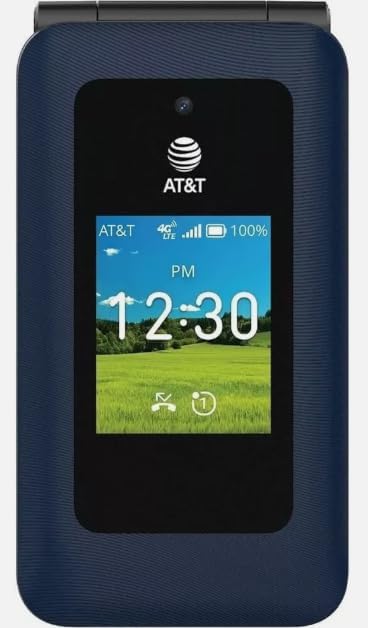
Resim: Ön view of the AT&T 6723D Cingular Flex 2 phone in Classic Navy, showing the external display with time and network status.
Kurmak
1. Kutudan Çıkarma ve İlk İnceleme
Carefully remove all items from the packaging. Verify that the phone and the included power adapter are present and undamaged.
2. SIM Kart Kurulumu
- SIM kart yuvasını bulun; genellikle yan tarafta veya pil kapağının altında bulunur.
- Insert your activated Nano-SIM card into the designated slot with the gold contacts facing down. Ensure it clicks into place.
3. Pil doldurma
- Connect the power adapter to the USB Type C port on your phone.
- Güç adaptörünü duvar prizine takın.
- İlk kullanımdan önce telefonunuzun tamamen şarj olmasını bekleyin. Ekrandaki pil göstergesi şarj durumunu gösterecektir.
4. Güç Açma ve İlk Yapılandırma
- Ekran aydınlanana kadar Güç düğmesini basılı tutun.
- Dilinizi, bölgenizi seçmek ve bir Wi-Fi ağına bağlanmak için ekrandaki talimatları izleyin.
- Complete any necessary KaiOS account setup or updates.
Kullanım Talimatları
1. Temel Gezinme
- Yön Tuşu: Use the up, down, left, and right keys to navigate through menus and options.
- Merkez Tuşu: Selects highlighted items.
- Yazılım Tuşları: The keys directly below the screen perform functions indicated by the on-screen labels.
- Geri/Temizle Tuşu: Önceki ekrana döner veya karakterleri siler.
2. Arama Yapma ve Alma
- Telefon çağrısı yapmak: Open the phone application, dial the number using the keypad, and press the Call key (green button).
- Bir Aramayı Cevaplamak için: Telefon çaldığında, Arama tuşuna basın.
- Aramayı Bitirmek İçin: Press the End Call key (red button).
3. Mesaj Gönderme ve Alma
- Navigate to the Messages application.
- Select 'New Message' or 'Compose'.
- Alıcının numarasını girin veya kişilerden seçin.
- Tuş takımını kullanarak mesajınızı yazın.
- 'Gönder'e basın.
4. Ağlara Bağlanma
- Wifi: Go to Settings > Network & Connectivity > Wi-Fi. Turn Wi-Fi on, select your desired network, and enter the password if required.
- Mobil Veri (4G/LTE): Ensure your SIM card is active and has a data plan. Go to Settings > Network & Connectivity > Cellular & Data to enable mobile data.
5. Kamera Kullanımı
- Open the Camera application from the main menu.
- Ekranı bir çerçeve olarak kullanarak çekiminizi kadrajlayın. viewbulucu.
- Press the Center key to capture a photo.

Resim: Arka view of the AT&T 6723D Cingular Flex 2 phone, showing the textured Classic Navy finish and speaker grille.
Bakım
1. Cihazın Temizlenmesi
Telefonun ekranını ve gövdesini yumuşak, tüy bırakmayan bir bezle nazikçe silin. Sert kimyasallar veya aşındırıcı malzemeler kullanmaktan kaçının.
2. Pil Bakımı
- Telefonunuzu aşırı sıcaklıklara maruz bırakmaktan kaçının.
- Telefon tamamen şarj olduktan sonra uzun süre şarjda bırakmayın.
- Use only the original or certified compatible power adapter.
3. Yazılım Güncellemeleri
Regularly check for and install software updates to ensure your phone has the latest features and security enhancements. Go to Settings > Device > Software Update.
4. Depolama Yönetimi
With 64 GB of internal storage, regularly review ve gereksiz olanları silin files, photos, and applications to maintain optimal performance. You can check storage usage in Settings > Storage.
Sorun giderme
1. Telefon Açılmıyor
- Pilinin dolu olduğundan emin olun. Telefonu en az 15 dakika şarj cihazına bağlayın.
- Güç tuşuna 10-15 saniye basılı tutun.
2. Ağ Bağlantısı Yok
- SIM kartın düzgün takılıp takılmadığını kontrol edin.
- Verify that mobile data is enabled in Settings.
- Telefonu yeniden başlatın.
- Contact your service provider to confirm your SIM card and plan are active.
3. Şarj Sorunları
- Ensure the power adapter and cable are securely connected to both the phone and the power outlet.
- Farklı, uyumlu bir şarj cihazı ve kablo kullanmayı deneyin.
- Şarj portunda herhangi bir kalıntı olup olmadığını kontrol edin.
4. Phone Freezing or Unresponsive
- Yeniden başlatmayı zorlamak için Güç düğmesini yaklaşık 10 saniye basılı tutun.
- Sorun devam ederse, fabrika ayarlarına sıfırlama işlemini yapmayı düşünün (Uyarı: This will erase all data on your phone. Back up important information first).
Özellikler
| Özellik | Detay |
|---|---|
| Model Adı | Cingular Flex 2 |
| Ürün Model Numarası | 6723D |
| Marka | AT&T |
| İşletim Sistemi | KaiOS |
| Kablosuz Taşıyıcı | Kilidi Açıldı |
| Hücresel Teknoloji | 4G, LTE |
| Ekran Çözünürlüğü | 720x1280 |
| Bellek Depolama Kapasitesi | 64 GB |
| Pil Kapasitesi | 1400 Miliamp Saat |
| Ses Jakı | USB Tip C |
| Renk | Classic Navy |
| Kutunun içinde ne var? | Güç Adaptörü |
Garanti Bilgileri
For specific warranty details, please refer to the documentation provided with your purchase or contact the seller directly. Standard manufacturer warranties typically cover defects in materials and workmanship under normal use.
Destek
If you encounter issues not covered in this manual or require further assistance, please contact your point of purchase or the AT&T customer support for your region. Have your device model number (6723D) and purchase information ready.


