1. Giriş
Welcome to the user manual for your new FLEXISPOT 63x28 Inch Dual Motor Electric Standing Desk. This manual provides essential information for the safe assembly, operation, maintenance, and troubleshooting of your desk. Please read it thoroughly before use and retain it for future reference.
2. Güvenlik Talimatları
- Montaja başlamadan önce tüm parçaların eksiksiz ve hasarsız olduğundan emin olun. Herhangi bir parça eksik veya hasarlıysa kullanmayın.
- Yaralanmaları önlemek için çalışma sırasında çocukları ve evcil hayvanları masadan uzak tutun.
- Do not place hands or other body parts near moving parts of the desk during height adjustment.
- Devrilmeyi önlemek için masanın düz bir yüzeye yerleştirildiğinden emin olun.
- Masayı aşırı yüklemeyin. Maksimum ağırlık kapasitesi için teknik özelliklere bakın.
- Keep all electrical cords organized and away from moving parts to prevent damage or entanglement.
- Temizlik veya herhangi bir bakım işlemine başlamadan önce masayı elektrik prizinden çıkarın.
- Masayı yalnızca amacına uygun olarak, yani çalışma masası olarak kullanın.
3. Paket İçeriği
Aşağıda listelenen tüm öğelerin paketinizde bulunduğunu doğrulayın:
- Desktop Surface (Black)
- Desk Frame (Black, including dual motors and lifting columns)
- Control Panel with Memory Controller
- Güç Adaptörü ve Kablosu
- Montaj Donanımı (vidalar, aletler, vb.)
- Kullanım Kılavuzu

Resim: Üzeriview of the FLEXISPOT 63x28 Inch Dual Motor Electric Standing Desk, showing the desktop, frame, and control panel.
4. Kurulum Talimatları
4.1 Paketin açılması
Carefully remove all components from the packaging. Place them on a soft, clean surface to prevent scratches or damage during assembly. Keep all packaging materials until assembly is complete and you are satisfied with the product.
4.2 Çerçevenin Montajı
Follow the detailed diagrams provided in the separate assembly guide to connect the lifting columns to the crossbar and attach the footings. Ensure all screws are tightened securely.
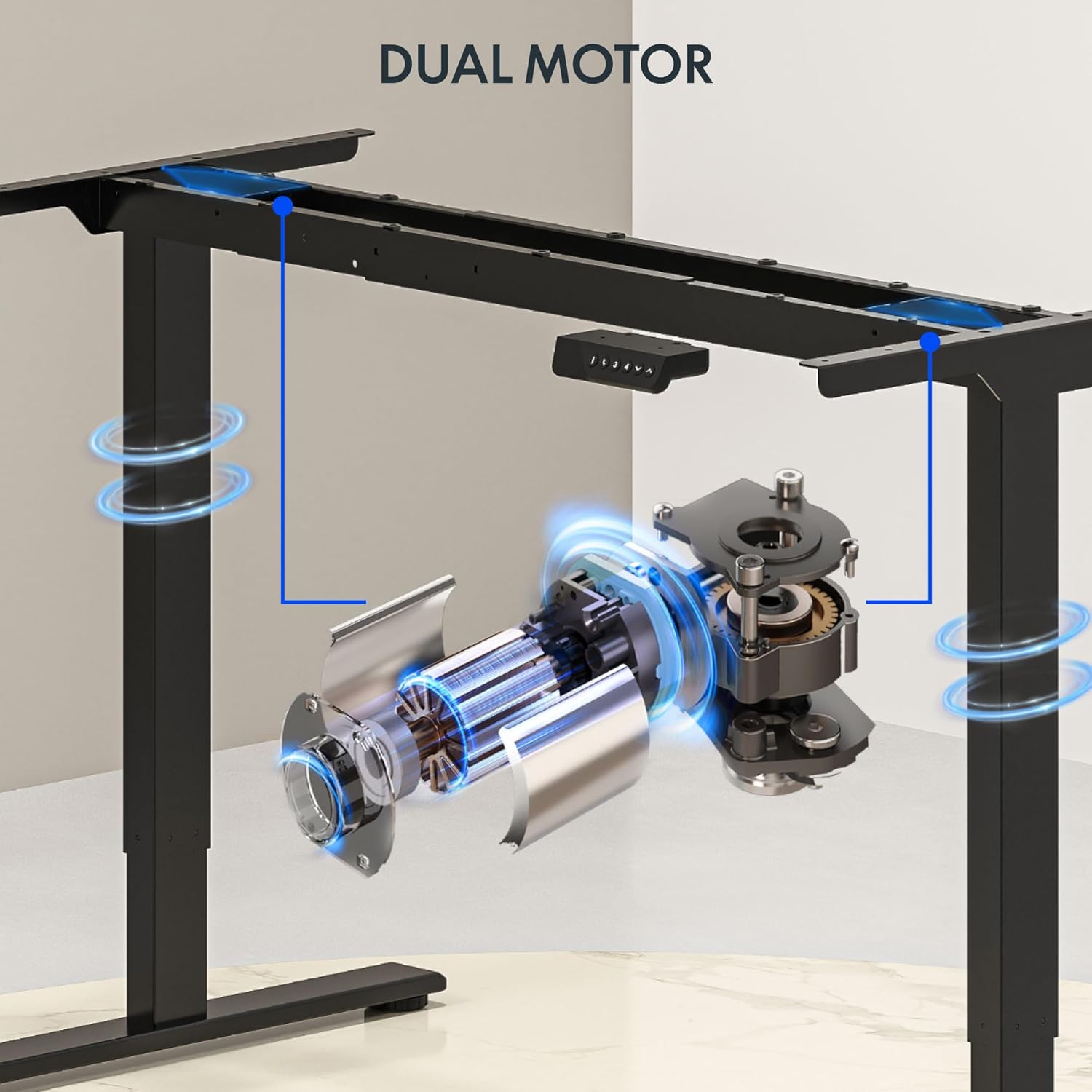
Resim: Ayrıntılı view of the dual motor desk frame, illustrating the motor placement and structural components.
4.3 Masaüstünü Bağlama
Carefully place the desktop upside down on a soft surface. Align the assembled frame with the pre-drilled holes on the desktop. Secure the desktop to the frame using the provided screws. Once secured, carefully flip the desk upright with assistance.
4.4 Connecting the Control Panel and Power
Connect the control panel cable to the control box, and then connect the power adapter to the control box. Plug the power cable into a standard electrical outlet. The desk is now ready for initial operation.

Image: Close-up of the desk's control panel, showing the LED display and buttons for height adjustment and memory presets.
Video: Demonstrates the dual-motor strength and smooth operation of the FLEXISPOT standing desk, highlighting its robust design and functionality.
5. Kullanım Talimatları
5.1 Yüksekliğin Ayarlanması
- Basın Yukarı (∧) masayı kaldırmak için düğmeye basın.
- Basın Aşağı (∨) masayı indirmek için düğmeye basın.
- İstediğiniz yüksekliğe ulaştığınızda düğmeyi bırakın. LED ekran mevcut yüksekliği gösterecektir.
5.2 Using Memory Presets
The control panel features four memory presets (1, 2, 3, 4) to save and recall your preferred sitting and standing heights.
- Yukarı/Aşağı tuşlarını kullanarak masayı istediğiniz yüksekliğe ayarlayın.
- Basın "M" button (or similar memory set button, indicated by 'i' on some models) once. The display will flash.
- Immediately press one of the number buttons (1, 2, 3, or 4) to save the current height to that preset.
- To recall a saved height, simply press the corresponding number button (1, 2, 3, or 4). The desk will automatically move to the saved position.

Image: Close-up of the memory controller, highlighting the numbered preset buttons and the up/down controls for precise height adjustments.
5.3 Çarpışma Önleme Sistemi
The desk is equipped with an anti-collision system. If the desk encounters an obstacle during height adjustment, it will automatically stop and reverse slightly to prevent damage. This feature enhances safety during operation.
6. Bakım
- Temizlik: Masanın yüzeyini ve çerçevesini yumuşak bir bezle silin.amp Kumaşı aşındırmayın. Cilaya zarar verebilecek aşındırıcı temizleyicilerden veya sert kimyasallardan kaçının.
- Denetleme: Regularly check all screws and connections to ensure they are tight. Re-tighten if necessary.
- Kablo yönetimi: Özellikle yükseklik ayarlamaları sırasında tüm kabloların düzgün bir şekilde düzenlendiğinden ve sıkışmadığından veya birbirine dolanmadığından emin olun.
- Güç Kablosu: Güç kablosunda herhangi bir hasar belirtisi olup olmadığını kontrol edin. Hasarlıysa, kullanmayı bırakın ve müşteri desteğiyle iletişime geçin.
7. Sorun Giderme
| Sorun | Olası Neden | Çözüm |
|---|---|---|
| Masa hareket etmiyor. | Power cable disconnected; motor cable loose; overload. | Check power connection; ensure all cables are securely plugged in; reduce weight on desk. |
| Masa dengesiz hareket ediyor veya alışılmadık sesler çıkarıyor. | Dengesiz yük; gevşek bağlantılar; tıkanıklık. | Distribute weight evenly; check and tighten all screws; remove any obstructions. |
| Yükseklik ön ayarları çalışmıyor. | Presets not properly set. | Re-program the memory presets following section 5.2. |
| Çarpışma önleme sistemi sık sık devreye giriyor. | Obstacles in the path of movement; sensitivity setting too high. | Clear the area around the desk; consult the full manual for adjusting anti-collision sensitivity if available. |
If you encounter issues not listed here or if the solutions do not resolve the problem, please contact FLEXISPOT customer support.
8. Özellikler
| Özellik | Detay |
|---|---|
| Marka | ESNEKLİK |
| Örnek | 63x28 Inch Dual Motor Electric Standing Desk |
| Masaüstü Boyutları | 63"G x 28"D |
| Yükseklik Aralığı | 28.3" ila 47.6" |
| Maksimum Ağırlık Kapasitesi | 198 kilo |
| Motor Tipi | Çift Motor |
| Kontrol Paneli | Memory Controller with 4 Presets |
| Masaüstü Malzemesi | Engineered Wood (Black Top) |
| Çerçeve Malzemesi | Alloy Steel (Black Frame) |
| Özel Özellikler | Dual Motor, 198 lbs Heavy-Duty Capacity, Memory Controller, 63"x28" Large Desktop |

Image: Diagram illustrating the dimensions of the FLEXISPOT 63x28 Inch Electric Standing Desk, including height range, width, and depth.
9. Garanti ve Destek
9.1 Sınırlı Garanti
This FLEXISPOT product comes with a limited warranty against defects in materials and workmanship. The specific terms and duration of the warranty may vary. Please refer to the warranty card included in your package or visit the official FLEXISPOT webayrıntılı garanti bilgileri için site.
The warranty typically covers the desk frame, motors, and control panel under normal use conditions. Damage resulting from misuse, accidents, unauthorized modifications, or improper assembly is not covered.
9.2 Müşteri Desteği
For technical assistance, warranty claims, or any questions regarding your FLEXISPOT standing desk, please contact our customer support team:
- Webalan: www.flexispot.com
- E-posta: support@flexispot.com
- Telefon: (Refer to your product packaging or web(Bölgesel iletişim numaraları için site)
Please have your model number (B0F29ZD4DN) and purchase date ready when contacting support.


