ONNAIS Biyometrik Tabanca Kasası (Model GL-04) Kullanım Kılavuzu
Secure and Rapid Access Handgun Storage
1. Giriş
Thank you for choosing the ONNAIS Biometric Pistol Gun Safe. This manual provides essential information for the safe and effective use of your new gun safe. Please read all instructions carefully before installation and operation. Proper use ensures the security of your firearm and prevents unauthorized access.
Image 1.1: ONNAIS Biometric Pistol Gun Safe with handgun and spare magazines.
2. Önemli Güvenlik Bilgileri
Always store firearms unloaded with the safety engaged.
Kullanılmadığı zamanlarda kasayı her zaman kilitli tutun.
Store mechanical keys in a secure location away from the safe and out of reach of children.
Do not store a chambered firearm in the safe.
Ensure firearms with weapon-mounted lights or lasers are removed before storing, as they may not fit.
This safe is not compatible with revolvers.
Pil seviyesini düzenli olarak kontrol edin ve gerektiğinde yeniden şarj edin.
3. Paket İçeriği
Tüm öğelerin mevcut olduğunu doğrulayın:
ONNAIS Biometric Pistol Gun Safe (Model GL-04)
Mounting screws (8 pieces)
Şarj kablosu (USB-C)
Mechanical keys (2 pieces)
Kullanım Kılavuzu (bu belge)
4. Ürün Özellikleri
Hızlı Erişim: Biometric fingerprint sensor for rapid unlocking (under 0.5 seconds).
Çoklu Erişim Yöntemleri: Fingerprint, 4-digit keypad, and mechanical key backup.
Secure Trigger Lock: Internal mechanism blocks trigger access when locked.
Dayanıklı Yapı: Made from alloy steel for enhanced security.
Şarj Edilebilir Pil: Built-in Lithium Polymer battery with up to 1 year of use per charge, 2-hour recharge time via USB-C.
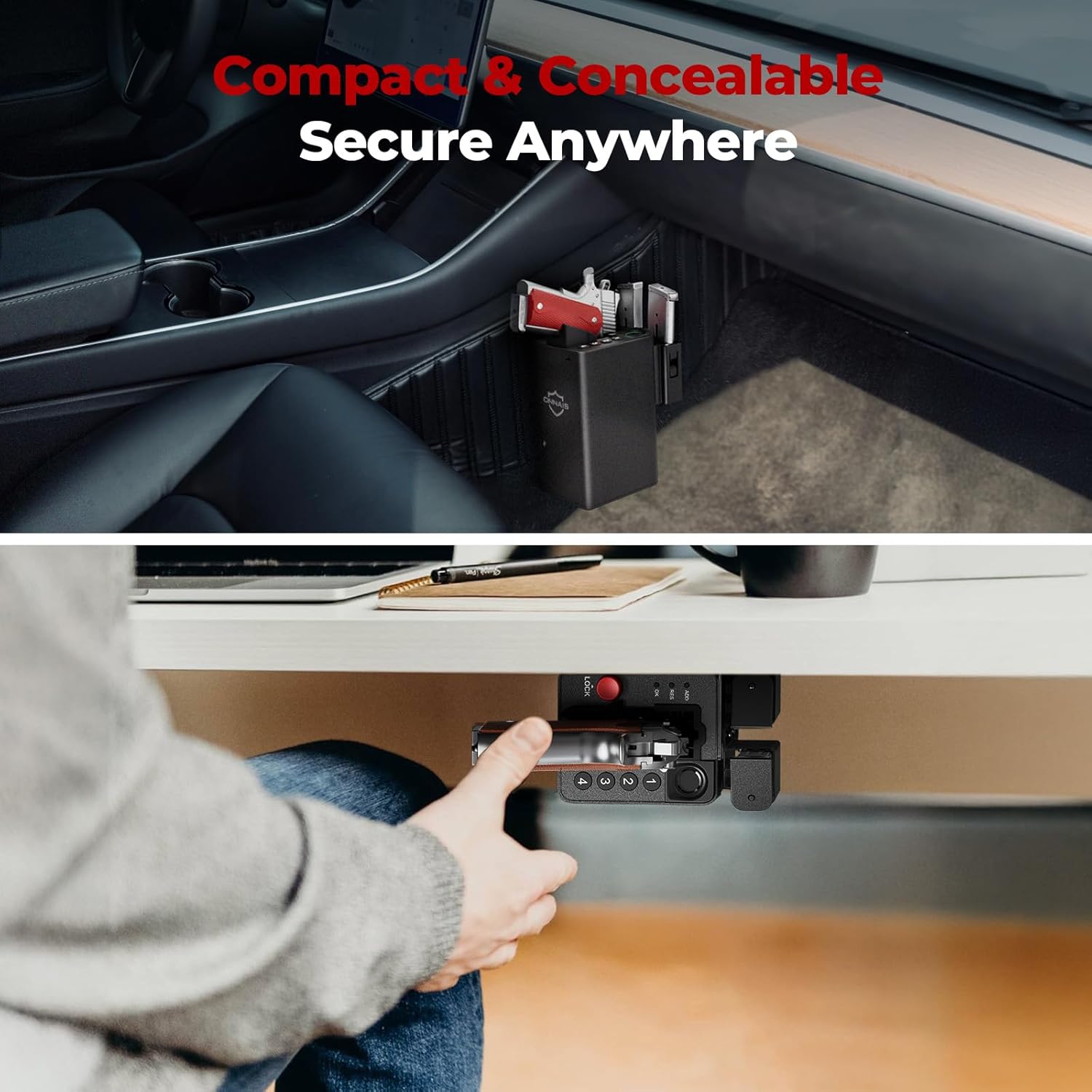
Çok Yönlü Montaj: Includes pre-drilled holes and screws for wall, desk, under-counter, or vehicle console installation.
Çok Yönlü Tasarım: Mounting bracket can be reversed for left or right-handed access.
Magazine Storage: Integrated slots for two spare magazines.
Video 4.1: Bir overview of the ONNAIS Defender Pro Gun Safe's features, including quick access, secure trigger protection, and easy installation.
5. Kurulum
5.1 İlk Şarj
Before first use, fully charge the safe's internal battery using the provided USB-C cable. The charging port is located on the bottom of the unit. A full charge takes approximately 2 hours.
Image 5.1: The safe's USB-C charging port for convenient recharging.
5.2 Kasanın Montajı
The safe can be mounted in various locations using the included bracket and screws. The mounting bracket is ambidextrous and can be reversed to suit left or right-handed access.
Konumu Belirle: Choose a secure and discreet location such as a nightstand, desk, cabinet, or vehicle console.
Pozisyon Parantez İçinde: Place the mounting bracket against the desired surface and mark the screw holes.
Pilot Delikleri Delin: Gerekirse, montaj yüzeyinize uygun kılavuz delikler açın.
Güvenli Braket: Attach the bracket firmly using the provided screws.
Attach Safe: Slide the safe onto the mounted bracket until it clicks securely into place.
Resim 5.2: Örn.amples of the safe mounted under a desk and within a vehicle console.
5.3 Parmak İzi Kaydı
The safe supports up to 80 fingerprints for multiple users or different finger orientations.
Lift and place your finger multiple times, slightly adjusting the position each time, until the indicator confirms successful registration.
5.4 Parola Kurulumu
Set a personal 5-10 digit passcode for backup access.
Press the 'ADD' button on the bottom of the safe.
Enter your desired 5-10 digit code using the keypad (buttons 1-4).
Onaylamak için 'Tamam'a basın.
Re-enter the same code and press 'OK' again to verify.
6. Kullanım Talimatları
6.1 Storing a Firearm
Ensure the firearm is unloaded and the safety is engaged before storing.
With the safe unlocked, gently slide the firearm into the designated slot, ensuring the trigger guard is clear.
Press the red 'LOCK' button to engage the trigger lock mechanism. The safe is now secured.
Image 6.1: Proper insertion of a handgun into the safe. Note: Firearms with weapon-mounted lights or lasers are too large to fit. Remove attachments before storing.
6.2 Parmak İzi ile Kilit Açma
For rapid access:
Place a registered finger firmly on the biometric sensor.
The safe will unlock in approximately 0.5 seconds, releasing the trigger lock.
Grasp the firearm's handle and draw it out.
Image 6.2: Quick draw access from the safe, highlighting the exposed grip for immediate retrieval.
6.3 Parola ile Kilidi Açma
As an alternative access method:
Enter your registered 5-10 digit passcode using the keypad.
Press 'OK' to confirm. The safe will unlock.
Grasp the firearm's handle and draw it out.
Image 6.3: Close-up of the 4-button keypad for passcode entry.
6.4 Mekanik Anahtarla Kilidi Açma
For emergency or battery-depleted situations:
Locate the keyhole on the side of the safe.
Insert one of the provided mechanical keys and turn to unlock.
Grasp the firearm's handle and draw it out.
Image 6.4: The mechanical key and keyhole for emergency access.
7. Bakım
7.1 Akü Bakımı
Pil seviyesi düşük göstergesi göründüğünde pili şarj edin.
Pil ömrünü uzatmak için pilin tamamen boşalmasından kaçının.
7.2 Temizlik
Kasanın dışını yumuşak bir bezle silin.amp Kumaş.
Sert kimyasallar veya aşındırıcı temizleyiciler kullanmayın.
En iyi performansı elde etmek için parmak izi sensörünü temiz ve kuru tutun.
8. Sorun Giderme
Sorun
Olası Neden
Çözüm
Parmak izi tanınmadı
Parmak kirli, ıslak veya yanlış yerleştirilmiş; parmak izi kaydedilmedi.
Clean and dry finger; ensure proper placement; re-register fingerprint if needed.
Tuş takımı yanıt vermiyor
Incorrect passcode; low battery.
Enter correct passcode; recharge battery.
Safe does not unlock
Low battery; electronic malfunction.
Recharge battery; use mechanical key for emergency access.
Firearm does not fit
Firearm is too large or has attachments; revolver.
Remove lights/lasers; confirm firearm dimensions (6.5"D x 3.5"W x 7.9"H); safe is not compatible with revolvers.
The ONNAIS Biometric Pistol Gun Safe comes with a Ömür Boyu Garanti. For any questions, troubleshooting assistance, or warranty claims, please contact ONNAIS customer support.
Contact information for support is typically found on the product packaging or the official ONNAIS webalan.
ONNAIS Iron PRO Biyometrik Parmak İzi Silah Kasası Hızlı Başlangıç Kılavuzu This guide provides quick start instructions for the ONNAIS Iron PRO Biometric Fingerprint Gun Safe. Learn how to set up your safe, install batteries, program digital passwords and fingerprints, and find answers to common questions.
Onnais HX-009 Hızlı Başlangıç Kılavuzu: Kurulum, Şifreler ve Kullanım Bu Hızlı Başlangıç Kılavuzu, Onnais HX-009 kasasının kurulumu ve kullanımı için gerekli bilgileri sağlar; bunlar arasında parola ve parmak izi yapılandırması, pil takılması, anahtar kullanımı ve sorun giderme yer almaktadır.
ONNAIS TES2 Ateşli Silah Kilidi Hızlı Başlangıç Kılavuzu ONNAIS TES2 ateşli silah kilidi için kurulum, çalıştırma, kayıt, kilit açma, montaj ve sorun giderme adımlarını ayrıntılı olarak açıklayan kapsamlı hızlı başlangıç kılavuzu.