1. Giriş
Thank you for choosing the KZ Sora True Wireless Earbuds. These earbuds are designed to provide a superior audio experience with HiFi deep bass stereo sound, advanced Bluetooth 5.4 connectivity, and a comfortable, sweat-resistant design. This manual will guide you through the setup, operation, and maintenance of your new earbuds to ensure optimal performance and longevity.

Image: KZ Sora True Wireless Earbuds resting in their open charging case, showcasinşık tasarımlarıyla dikkat çekiyor.
2. Kutuda Neler Var?
Lütfen paket içeriğini kontrol ederek tüm öğelerin mevcut olduğundan emin olun:
- KZ Sora True Wireless Earbuds (Left and Right)
- Şarj istasyonu
- Kulak Yastıkları (S/M/L bedenleri)
- Kullanım Kılavuzu (bu belge)
- USB-A to USB-C Charging Cable (not explicitly listed in 'whats_in_the_box' but implied by 'fast-charging USB A to USB C cable' in feature bullets)
3. Ürün Bittiview
The KZ Sora earbuds feature a compact and ergonomic design for comfortable wear. The charging case not only protects your earbuds but also provides extended battery life.

Image: The KZ Sora earbuds displayed within their charging case, highlighting their HiFi audio capabilities and professional design.
3.1 Temel Bileşen
- Kulaklık: Left and Right earbuds with touch control surfaces.
- Şarj Kutusu: USB-C şarj bağlantı noktası ve LED göstergesi bulunan bu kutu, kulaklıkları barındırır ve şarj eder.
- Kulak İpuçları: Silicone ear tips in various sizes (S, M, L) for a secure and comfortable fit.
3.2 Super Linear Internal Magnetic Driver
The KZ Sora incorporates a super-linear wide-band internal magnetic dynamic driver. This advanced technology ensures exceptional depth, accuracy, and resolution across low, mid, and high frequencies, delivering a truly immersive audio experience.

Resim: Patlamış bir view diagram illustrating the components of the Super Linear Wideband Internal Magnetic Driver within the KZ Sora earbuds.
4. Kurulum
4.1 Kulaklıkları ve Kutuyu Şarj Etme
İlk kullanımdan önce kulaklıklarınızı ve şarj kutusunu tamamen şarj edin.
- Kulaklıkları şarj kutusuna yerleştirin ve doğru şekilde yerleştirildiğinden emin olun.
- USB-C şarj kablosunu kılıfın üzerindeki şarj portuna, diğer ucunu ise bir USB güç kaynağına bağlayın.
- Kılıf üzerindeki LED gösterge şarj durumunu gösterecektir. Kılıfın tamamen şarj olması yaklaşık 1.5 saat sürer.
The earbuds offer over 5 hours of playtime on a single charge, with a total of 25 hours using the charging case.

Image: The KZ Sora earbuds in their charging case, illustrating the fast charging capability and extended battery life of 25 hours total playtime.
4.2 Cihazınızla Eşleştirme
The KZ Sora earbuds feature one-step pairing for convenience.
- Şarj kutusunu açın ve her iki kulaklığı da çıkarın. Kulaklıklar otomatik olarak açılacak ve birbirine bağlanacaktır.
- Enable Bluetooth on your mobile phone or audio device.
- Arama "KZ Sora" in the list of available Bluetooth devices and select it to pair.
- Eşleştirme işlemi tamamlandıktan sonra kulaklıklar kullanıma hazırdır.
5. Çalıştırma
5.1 Dokunmatik Kontroller
The KZ Sora earbuds utilize intuitive touch controls for various functions:
| Aksiyon | İşlev |
|---|---|
| Tap once (either earbud) | Müziği oynat/durdur, Çağrıyı cevapla/sonlandır |
| Sağ kulaklığa 2 saniye boyunca uzun süre basın | Siri / Voice Assistant'ı etkinleştirin |
| Sol kulaklığa iki kez dokunun | Önceki Şarkı |
| Sağ kulaklığa iki kez dokunun | Sonraki Şarkı |
| Long press either earbud for 2 seconds during incoming call | Gelen çağrıyı reddet |
| Touch either earphone for three seconds | Switch between High-Performance Mode and Standard Mode |
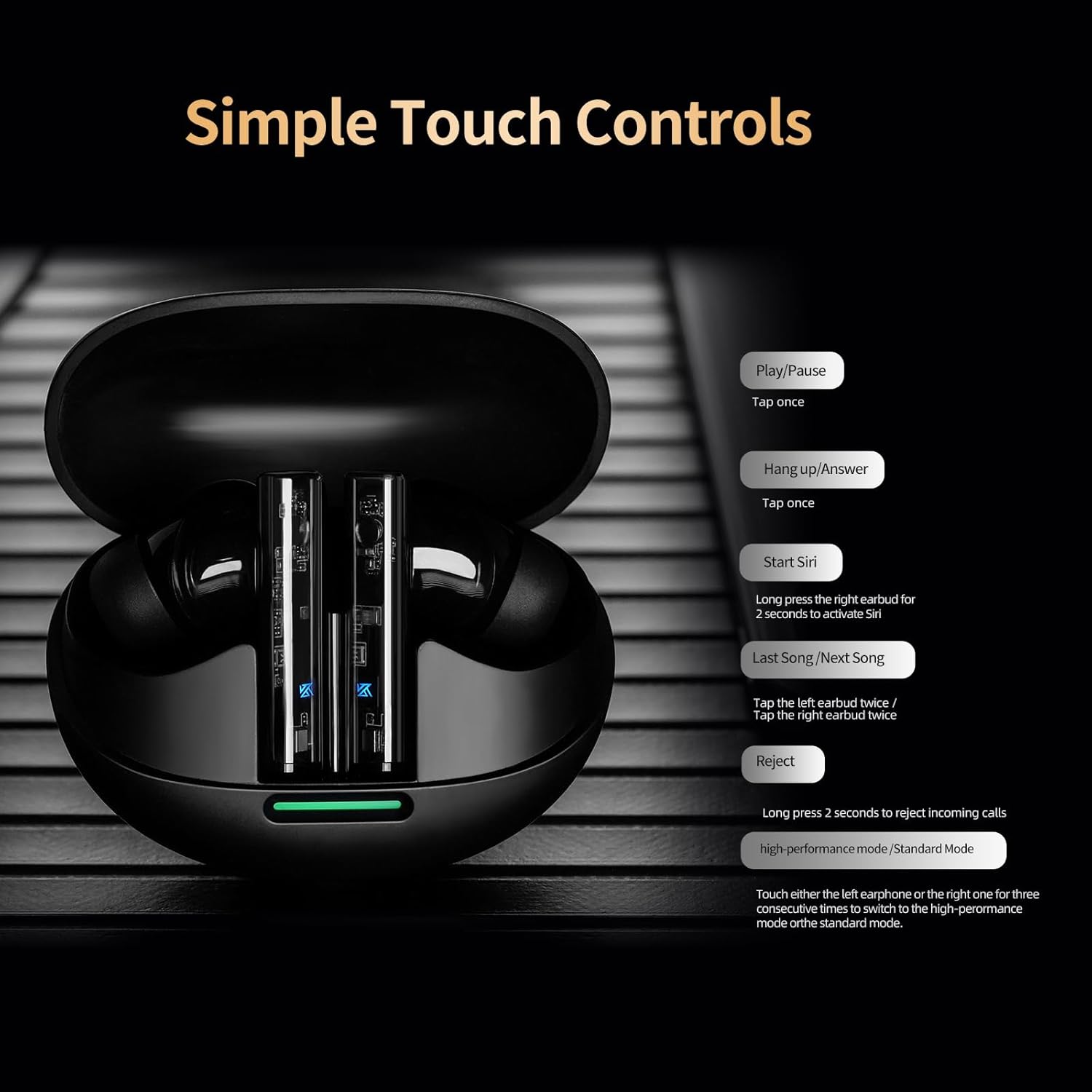
Image: A visual guide to the simple touch controls on the KZ Sora earbuds, detailing actions for music playback, calls, and voice assistant activation.
5.2 Standard and High-Performance Modes
The KZ Sora supports both SBC and AAC transmission protocols, allowing you to switch between standard and high-performance modes.
- Standart Mod: Ideal for music listening, delivering powerful resolution, a grand soundstage ve dengeli frekanslar.
- Yüksek Performans Modu: Reduces latency to as low as 55ms, perfect for gaming to pinpoint sounds and enhance the experience.

Image: Comparison illustrating the KZ Sora's Standard Mode for music listening and High-Performance Mode for gaming, highlighting the low latency.
5.3 Kulaklıkların Takılması
Choose the ear tips that provide the most comfortable and secure fit. A proper seal is crucial for optimal sound quality and bass response. Insert the earbuds gently into your ear canal and twist slightly to secure them.
6. Bakım
Proper maintenance ensures the longevity and performance of your KZ Sora earbuds.
- Temizlik: Kulaklıklarınızı, özellikle de kulak uçlarını ve şarj kontaklarını düzenli olarak yumuşak, kuru ve tiftiksiz bir bezle temizleyin. Sert kimyasallar veya aşındırıcı malzemeler kullanmayın.
- Depolamak: Kullanılmadığı zamanlarda, kulaklıkları tozdan, kirden ve fiziksel hasardan korumak için daima şarj kutusunda saklayın.
- Suya Dayanıklılık: The earbuds are sweat-resistant and water-resistant. However, they are not waterproof. Avoid submerging them in water or exposing them to heavy rain. Dry them thoroughly if they get wet.
- Pil Bakım: Pil ömrünü korumak için kulaklıklarınızı ve kutunuzu sık sık tamamen boşaltmaktan kaçının. Sürekli kullanımda olmasalar bile düzenli olarak şarj edin.
7. Sorun Giderme
If you encounter any issues with your KZ Sora earbuds, refer to the following common solutions:
- Kulaklıklar birbirleriyle eşleşmiyor: Place both earbuds back into the charging case, close the lid, wait a few seconds, then open the lid and take them out again. They should automatically connect.
- Kulaklıklar cihaza bağlanmıyor: Ensure Bluetooth is enabled on your device and the earbuds are in pairing mode. Forget "KZ Sora" from your device's Bluetooth list and try pairing again.
- Bir kulaklıktan ses gelmiyor: Check if both earbuds are charged. Try resetting them by placing them in the case and then taking them out.
- Şarj sorunları: Ensure the charging cable is securely connected and the charging contacts on both the earbuds and case are clean and free of debris. Try a different USB power source or cable.
- Düşük ses seviyesi veya zayıf ses kalitesi: Ensure ear tips are properly sealed in your ear canal. Clean any earwax or debris from the earbud nozzles.
If the issue persists, please contact KZ customer support for further assistance.
8. Özellikler
Detailed technical specifications for the KZ Sora True Wireless Earbuds:
| Özellik | Şartname |
|---|---|
| Model Adı | KZ Sora |
| Bağlantı Teknolojisi | Kablosuz (Bluetooth 5.4) |
| Bluetooth Menzili | 50 Ayak |
| Ses Sürücüsü Türü | Dinamik Sürücü |
| Ses Sürücüsü Boyutu | 10 Milimetre |
| Frekans Tepkisi | 20 Hz - 20 KHz |
| Hassasiyet | 105 dB |
| Empedans | 22 Ohm |
| Gürültü Kontrolü | Ses Yalıtımı |
| Kontrol Yöntemi | Dokunmak |
| Taşıma Çantası Pil Kapasitesi | 300 Miliamp Saat |
| Taşıma Çantası Pil Ortalama Ömrü | 25 Saat (kılıfıyla birlikte) |
| Taşıma Çantası Pil Şarj Süresi | 1.5 Saat |
| Ses Gecikmesi | 55 Milliseconds (High-Performance Mode) |
| Su Direnç Seviyesi | Water Resistant (Sweat Resistant) |
| Malzeme | Akrilonitril Bütadien Stiren (ABS) |
| Ürün Ağırlığı | 3.52 ons |

Image: A graph illustrating the excellent acoustic curve of the KZ Sora earbuds, demonstrating their sound performance across frequencies.
9. Garanti ve Destek
KZ products are manufactured to high-quality standards. For warranty information and customer support, please refer to the warranty card included in your product packaging or visit the official KZ webSite. Satın alma belgenizi herhangi bir garanti talebi için saklayın.
For technical assistance or inquiries, please contact KZ customer service through their official channels.