1. Giriş
Thank you for choosing the Acogedor 4K Action Camera. This manual provides essential information for the safe and efficient operation of your device. Please read it thoroughly before use and retain it for future reference.
This camera is designed to capture high-quality video and photos of your adventures, featuring 4K video recording, 16MP photos, a 170-degree wide-angle lens, and a 2.0-inch HD screen.
2. Güvenlik Bilgileri
- Kamerayı uzun süre aşırı sıcaklıklara veya doğrudan güneş ışığına maruz bırakmayın.
- Keep the camera away from strong magnetic fields to prevent data loss or malfunction.
- Ensure all ports are securely closed if using the camera in or near water (if applicable with a waterproof case, not explicitly stated for the camera itself).
- Use only the specified charging cable and battery to avoid damage or fire hazards.
- Kamerayı kendiniz sökmeye veya onarmaya çalışmayın. Yardım için müşteri desteğiyle iletişime geçin.
3. Paket İçeriği
Aşağıda listelenen tüm öğelerin paketinizde bulunduğunu doğrulayın:
- 4K Camera x 1
- Şarj Kablosu x 1
- Extension Frame Components x 5
- Handlebar Components x 4
- Kayış x 1
- Hook and Loop Fastener x 1
- Kullanıcı Kılavuzu x 1

Image: All included accessories for the Acogedor 4K Action Camera.
4. Ürün Bittiview
Familiarize yourself with the main components and features of your Acogedor 4K Action Camera.

Resim: Ön view of the camera, highlighting the lens and Wi-Fi indicator.

Resim: Yan view of the camera, displaying the control buttons and Micro USB port.

Resim: Arka view of the camera, featuring the 2.0-inch HD display.
Temel Özellikler:
- 4K Video ve 16MP Fotoğraflar: Yüksek çözünürlüklü yiyecek yakalayıntage and images.
- 170-Degree Wide-Angle Lens: Geniş bir yelpazede hizmet sunmaktadır. view for immersive shots.
- 2.0 inç HD Ekran: For easy framing and playback.
- Multi-Axis Anti-Shake Technology: Minimizes motion blur for stable footage.
- Wi-Fi Bağlantısı: Seamlessly sync with the GoPlus CamPro app for remote control and file Aktar.
5. Kurulum
5.1. Hafıza Kartını Takın
The camera supports a memory card up to 64GB (not included). Locate the memory card slot on the side of the camera. Insert the memory card with the contacts facing the correct direction until it clicks into place.
5.2. Pilin Şarj Edilmesi
The camera comes with a 1050mAh Polymer Lithium Ion battery. Connect the camera to a power source using the provided Micro USB charging cable. The charging indicator will illuminate during charging and turn off when fully charged.
5.3. Aksesuarların Takılması
Utilize the various included accessories, such as the handlebar components and extension frames, to mount your camera for different activities. Refer to the accessory diagrams for proper attachment.
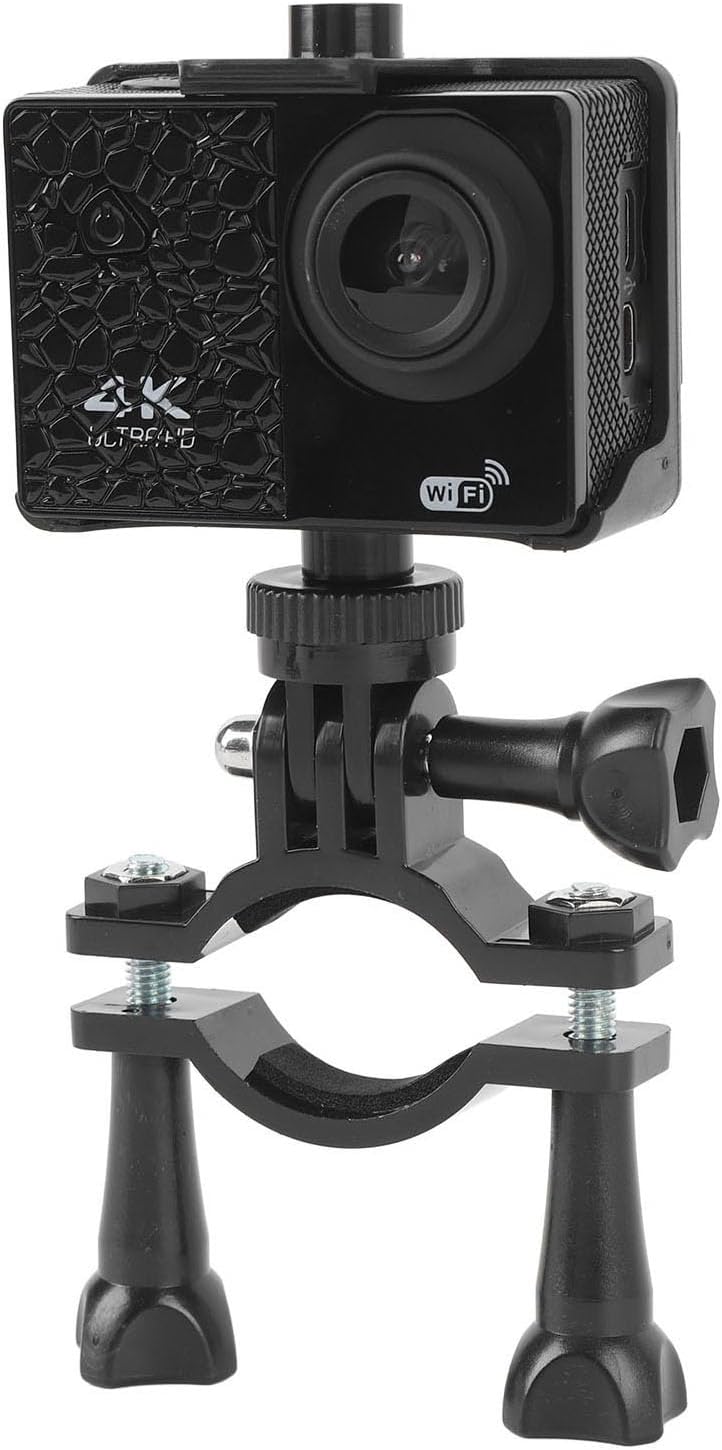
Image: Camera mounted on a handlebar, demonstrating accessory use.
6. Kullanım Talimatları
6.1. Güç Açma/Kapatma
To power on the camera, press and hold the power key. To power off, press and hold the power key again.
6.2. Mod Değiştirme
Briefly press the 'Up' key to switch between different modes (e.g., Video, Photo, Playback). The current mode will be displayed on the 2.0-inch screen.

Image: Camera screen showing recorded footage.
6.3. Photo Functions
The camera supports various photo modes:
- Tek atış: Captures one photo per press.
- Timed Shot: Sets a delay before capturing a photo.
- Sürekli Çekim: Ard arda çok sayıda fotoğraf çeker.
6.4. Wi-Fi Connection (GoPlus CamPro App)
To enable wireless functionality, briefly press the 'Up' key to activate Wi-Fi. Download the 'GoPlus CamPro' app on your smartphone. Connect your phone to the camera's Wi-Fi network. This allows for seamless photo and video transfer directly to your device for sharing.

Image: Wireless synchronization with the GoPlus CamPro app on a smartphone.
7. Bakım
7.1. Temizlik
- Kamera gövdesini temizlemek için yumuşak, tiftiksiz bir bez kullanın.
- For the lens and screen, use a specialized lens cleaning cloth and solution to avoid scratches.
- Sert kimyasallar veya aşındırıcı malzemeler kullanmayın.
7.2. Pil Bakımı
- İlk kullanımdan önce pili tam olarak şarj edin.
- Pil ömrünü uzatmak için pili düzenli olarak tamamen boşaltmaktan kaçının.
- Kullanılmadığı zamanlarda fotoğraf makinesini ve pili serin ve kuru bir yerde saklayın.
8. Sorun Giderme
Kameranızla ilgili sorunlarla karşılaşırsanız aşağıdaki yaygın çözümlere bakın:
- Kamera açılmıyor: Ensure the battery is charged and properly inserted. Try charging the camera for at least 30 minutes.
- Hafıza kartı hatası: Format the memory card (this will erase all data) or try a different, compatible memory card. Ensure the card is inserted correctly.
- Kötü görüntü/video kalitesi: Check the lens for smudges or dirt. Ensure you are in adequate lighting conditions. Verify resolution settings.
- Wi-Fi bağlantı sorunları: Restart both the camera and your smartphone. Ensure the GoPlus CamPro app is updated to the latest version.
Sorun devam ederse lütfen daha fazla yardım için müşteri desteğiyle iletişime geçin.
9. Özellikler
| Özellik | Şartname |
|---|---|
| Öğe Türü | 4K Kamera |
| Malzeme | ABS |
| Video Çözünürlüğü | 4K 30fps (Max) |
| Fotoğraf Çözünürlüğü | 16MP (Maks.) |
| Depolamak | Max 64GB Memory Card (Card not included) |
| Ekran Görüntüsü | 2.0 inç HD Ekran |
| Mercek | 170-degree Wide Angle 6-Glass Lens |
| Pil Türü | Polymer Lithium Ion Battery, 1050mAh (Included) |
| Şarj Arayüzü | Mikro USB |
| Fotoğraf İşlevleri | Single Shot, Timed Shot, Continuous Shot, etc. |
| Dil Desteği | Çoklu dil desteği |
| Uygulama Adı | For GoPlus CamPro |
| Marka | Acogedor |
| Model Adı | Acoge4fb8ne61dr |
| Ürün Ağırlığı | 311 gr |
| Paket Boyutu | 15x11x10 cm |
10. Garanti ve Destek
For warranty information or technical support, please refer to the contact details provided with your purchase or visit the official Acogedor webSite. Satın alma belgenizi garanti talepleriniz için saklayın.