giriiş
This manual provides detailed instructions for the safe and efficient operation of your HAYEAR 8MP Digital Microscope Camera, Model HY-6700. This high-performance camera is equipped with an 8MP sensor, capable of capturing images and videos in 4K Ultra HD and 1080P resolutions. It supports simultaneous USB and HDMI output, making it suitable for various applications including industrial inspection, laboratory research, quality control, and detailed observation with image and video recording capabilities. Please read this manual thoroughly before use and retain it for future reference.
Ürün Bittiview
Temel Özellikler
- Yüksek Çözünürlük: 8MP sensor for 4K Ultra HD and 1080P image and video capture.
- Çift çıkış: Simultaneous USB and HDMI output for connection to PCs, monitors, or TVs.
- Çok Yönlü Uygulamalar: Ideal for industrial inspection, laboratory observation, quality control, and educational purposes.
- Image & Video Recording: Features still image capture and video recording functions for detailed documentation.
- Sistem Uyumluluğu: USB connection compatible with Windows, Mac OS, and Linux systems.
Paket İçeriği
Aşağıda listelenen tüm öğelerin paketinizde bulunduğunu doğrulayın:
- 1 x HAYEAR Digital Microscope Camera (Model HY-6700)
- 1 x HDMI Kablosu
- 1 x USB Kablosu
- 1 x Kullanım Kılavuzu

Şekil 1: Package contents including the camera, HDMI cable, USB cable, and instruction manual.
Kurmak
Camera Interface and Buttons
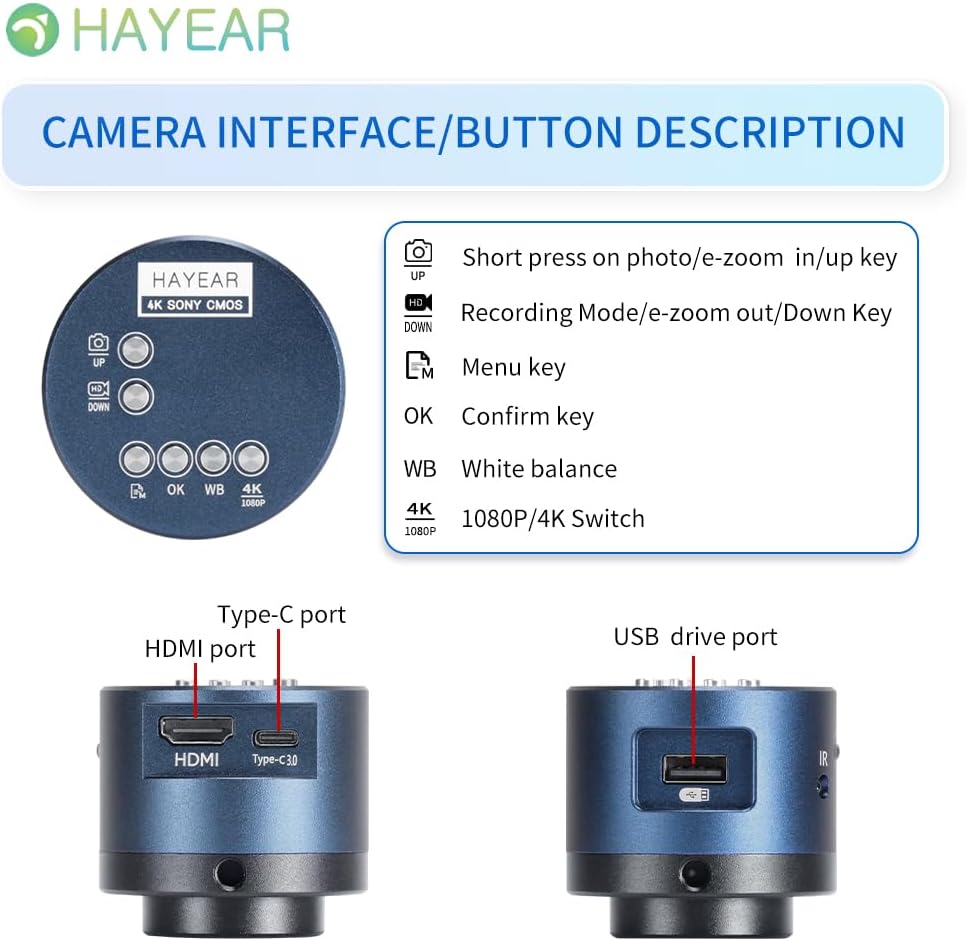
Şekil 2: Üzerindeview of the camera's control buttons and ports.
- Photo/E-Zoom In/Up Key: Short press to take a photo or zoom in. Use for navigation (Up).
- Recording Mode/E-Zoom Out/Down Key: Short press to switch to recording mode or zoom out. Use for navigation (Down).
- Menü anahtarı: Access the camera's settings menu.
- Tamam Tuşu: Seçimleri veya eylemleri onaylayın.
- WB (White Balance) Key: Adjust white balance settings.
- 4K/1080P Switch: Toggle between 4K and 1080P resolution output.
- HDMI Bağlantı Noktası: Connect to an HDMI display (monitor, TV).
- C Tipi Bağlantı Noktası: Power input and data transfer.
- USB Drive Port: Connect to a computer for data transfer or use as a webkam.
Bir Ekrana Bağlanma
The camera supports simultaneous HDMI and USB output. Choose the connection method suitable for your application.
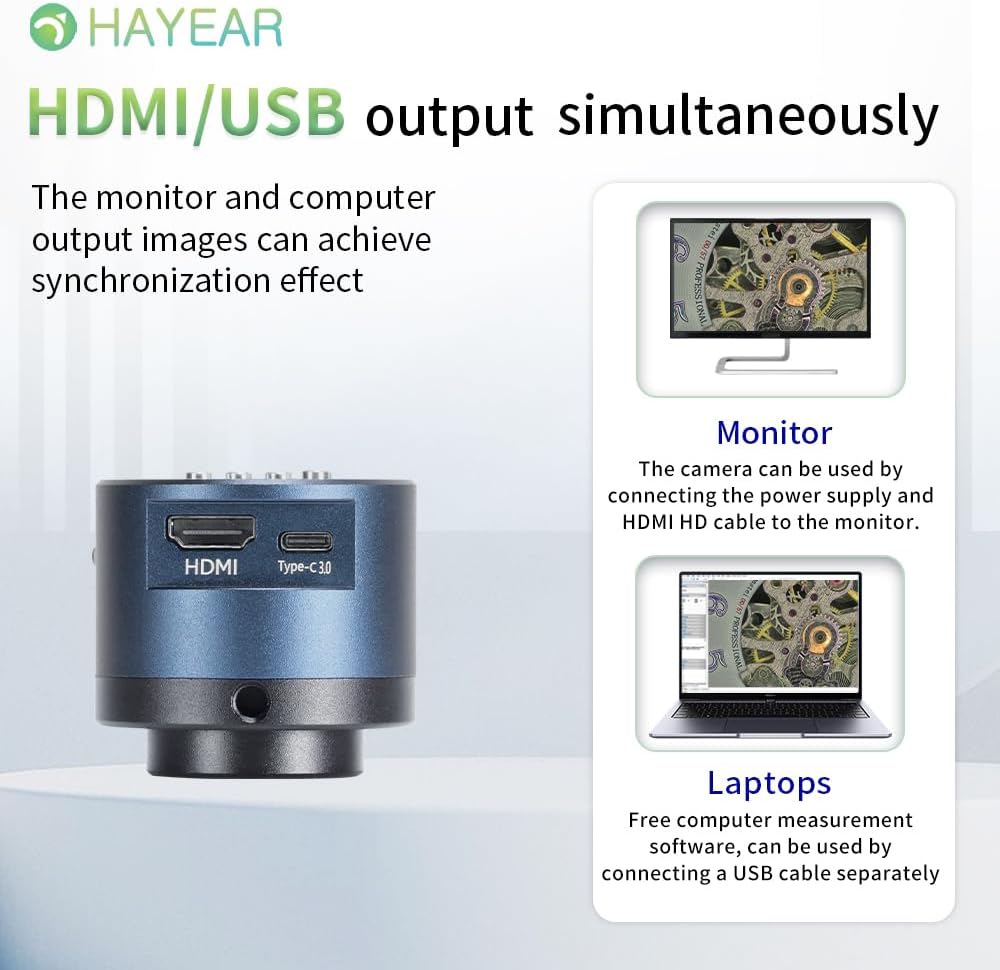
Şekil 3: Illustrates simultaneous HDMI and USB output capabilities.
- HDMI Bağlantısı: Connect the camera to an HDMI monitor or TV using the provided HDMI cable. Ensure the camera is powered via the Type-C port. This allows for direct display of the microscope's output.
- USB Bağlantısı: Connect the camera to a computer (Windows, Mac, or Linux) using the provided USB cable. The camera can function as a webcam or be used with dedicated measurement software.
Açma/Kapatma
The product powers on automatically when connected to a power source via the Type-C port. To turn off the device, disconnect the power plug from the camera or the power outlet.
Kullanım Talimatları
Temel İşlemler
- Fotoğraf çekmek: Short press the "Photo/E-Zoom In/Up" key to capture a still image.
- Videoları Kaydetme: Short press the "Recording Mode/E-Zoom Out/Down" key to switch to video recording mode, then press again to start/stop recording.
- Yakınlaştırma İşlevi: Use the "Photo/E-Zoom In/Up" key to zoom in and the "Recording Mode/E-Zoom Out/Down" key to zoom out.
- Resolution Switch: Press the "4K/1080P" key to toggle between 4K and 1080P output resolutions.
Beyaz Dengesi Ayarı
To achieve accurate color representation, adjust the white balance using the WB key. For one-touch white balance adjustment:
- If the image appears with a blue tint, open the camera's one-touch white balance function.
- Place a white paper under the light source.
- Adjust the light source from its darkest setting gradually to its brightest.
- The camera will automatically adjust the blue tint to a normal white balance state.
Menüde Gezinme
Press the "Menu" key to access the camera's settings. Use the "Up" and "Down" keys to navigate through options and the "OK" key to select or confirm.
Bakım
- Temizlik: Fotoğraf makinesinin gövdesini temizlemek için yumuşak, kuru bir bez kullanın. Objektif için ise özel objektif temizleme bezi ve solüsyonu kullanın. Aşındırıcı malzemelerden veya sert kimyasallardan kaçının.
- Depolamak: Store the camera in a dry, dust-free environment when not in use. Protect it from extreme temperatures and humidity.
- İşleme: Handle the camera with care to prevent physical damage. Avoid dropping or subjecting it to strong impacts.
Sorun giderme
Sorunlarla karşılaşırsanız aşağıdaki yaygın sorunlara ve çözümlere bakın:
- Görüntü yok:
- Kameranın düzgün şekilde açık olduğundan ve güç kablosunun güvenli bir şekilde bağlı olduğundan emin olun.
- Check the HDMI or USB cable connection to both the camera and the display/computer.
- Verify that the display input source is correctly selected (e.g., HDMI 1, USB).
- Image Appears Blue/Incorrect Colors:
- Perform a one-touch white balance adjustment as described in the "Operating Instructions" section.
- Ensure the lighting conditions are stable and appropriate for observation.
- Cannot Record Images/Videos:
- Ensure a compatible TF memory card (up to 128GB) is inserted correctly into the camera.
- Hafıza kartında yeterli boş alan olup olmadığını kontrol edin.
- Verify that you are in the correct recording mode.
- Camera Not Recognized by PC (USB):
- USB kablosunun güvenli bir şekilde bağlandığından emin olun.
- Bilgisayarınızdaki farklı bir USB bağlantı noktasına bağlanmayı deneyin.
- Restart your computer and the camera.
- Ensure your operating system (Windows/Mac/Linux) has the necessary drivers installed (usually plug-and-play).
Daha fazla yardım için lütfen teknik destek ekibiyle iletişime geçin.
Özellikler
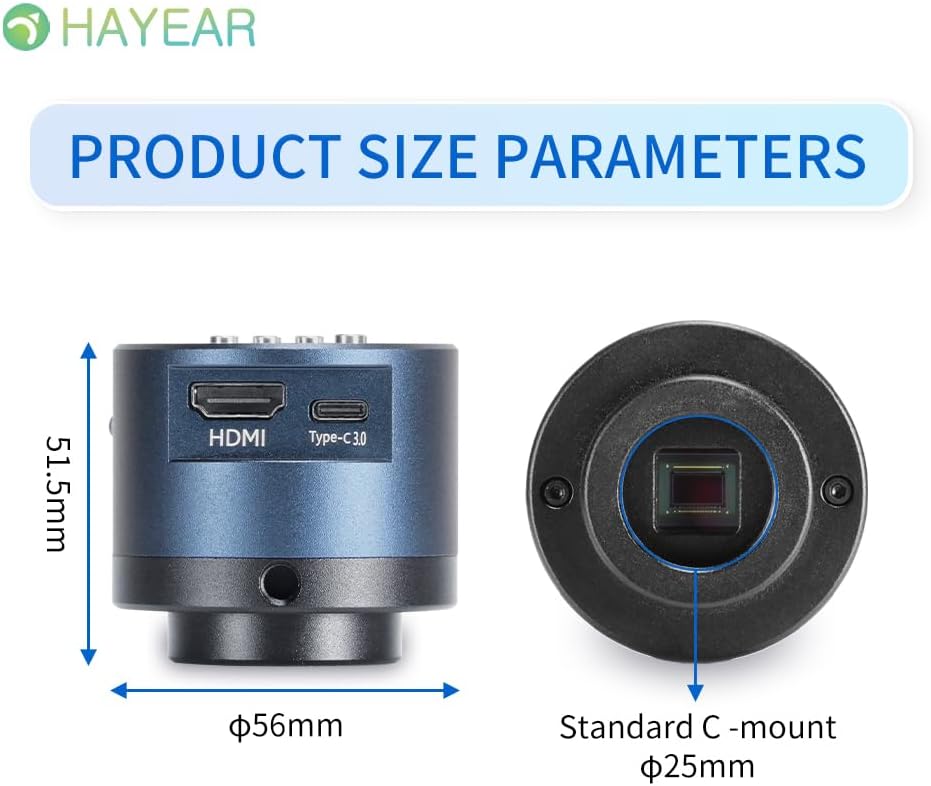
Şekil 4: Dimensions of the HAYEAR Digital Microscope Camera.
| Özellik | Şartname |
|---|---|
| Örnek | HE-6700 |
| Sensör | 8 Megapiksel |
| Video Çıkışı | 4K/2K/1080P (HDMI Output) |
| Sensör Boyutu | 1/2.8 inç |
| Piksel Boyutu | 2.0 x 2.0 µm |
| Çözünürlük | 3840x2160@30FPS (4K); 1920x1080P@30FPS |
| Video Kaydı | Supports 4K video recording |
| USB Çıkışı | 1920x1080P@30FPS; 1280x720P@30FPS |
| Dalga boyu | 400nm ~ 1000nm |
| Çıkış Arayüzü | HDMI / USB (Simultaneous Support) |
| Beyaz Dengesi | One-touch / Auto / Manual |
| Lens Türü | Standard C/CS Interface |
| Depolamak | TF Memory Card, up to 128GB |
| PC Desteği | Windows / Mac / Linux Systems |
| Görüntü Yakınlaştırma | 7x Optical Zoom / Digital Zoom |
| Boyutlar | 15 x 15 x 8 cm (Product Size) |
| Ağırlık | 500 gr |
| Güç Girişi | 5 Volt |
Garanti ve Destek
Garanti Bilgileri
- All products undergo a thorough inspection before shipment to ensure quality.
- Customers are advised to inspect the package upon receipt.
- A one-year free warranty is provided for all machines. This warranty does not cover damage caused by human error or misuse.
Teknik Destek
Free technical support is always available. If you encounter any issues not covered in this manual or require further assistance, please contact HAYEAR customer service. Refer to the product packaging or official webiletişim bilgileri için site.


