1. Ürün Bittiview
The ShanWan Q38 is a versatile wireless Bluetooth controller designed for a wide range of gaming platforms. It features advanced controls such as Hall Effect joysticks and micro-switch buttons for enhanced precision and responsiveness.

Resim 1.1: Yukarıdan aşağıya view of the ShanWan Q38 Wireless Bluetooth Controller, showcasinkompakt tasarımı ve düğme düzeniyle.
2. Paket İçeriği
Lütfen pakette tüm öğelerin mevcut olduğundan emin olun:
- ShanWan Q38 Wireless Bluetooth Controller
- USB Şarj Kablosu
- Kullanım Kılavuzu (bu belge)
- 1 adet AAA pil (önceden takılı veya ayrı olarak dahil)
3. Kurulum ve Bağlantı
3.1 Kontrol Ünitesinin Şarj Edilmesi
Before initial use, ensure the controller is sufficiently charged. Connect the provided USB charging cable to the controller's charging port and to a USB power source (e.g., computer, USB wall adapter). The LED indicator will show charging status.
3.2 Uyumluluk
The ShanWan Q38 controller is compatible with the following platforms:
- Nintendo Switch / Switch 2 (firmware upgrade may be required for Switch 2)
- Buharlı Güverte
- bilgisayar (Windows)
- Android devices (phones, tablets)
- iPhone
- iPad
- macOS cihazları
- PS4 (as indicated by mode switch, specific compatibility may vary)

Image 3.1: The ShanWan Q38 controller demonstrating compatibility with multiple gaming platforms.
3.3 Bluetooth aracılığıyla bağlanma
Kontrol cihazını cihazınıza bağlamak için:
- Güç Açık: Press and hold the Home button on the controller until the indicator lights begin to flash.
- Mod seç: Use the mode switch located on the top edge of the controller to select the appropriate mode for your device:
- X Mode: For Mobile & Computer (Android, PC, macOS, iOS).
- S Modu: Nintendo Switch için.
- P Modu: For PS4 (if compatible).
- Eşleştirme: On your device, navigate to the Bluetooth settings and search for available devices. Select "ShanWan Q38" (or similar) from the list to pair.
- Onay: Once successfully paired, the indicator light on the controller will become solid.
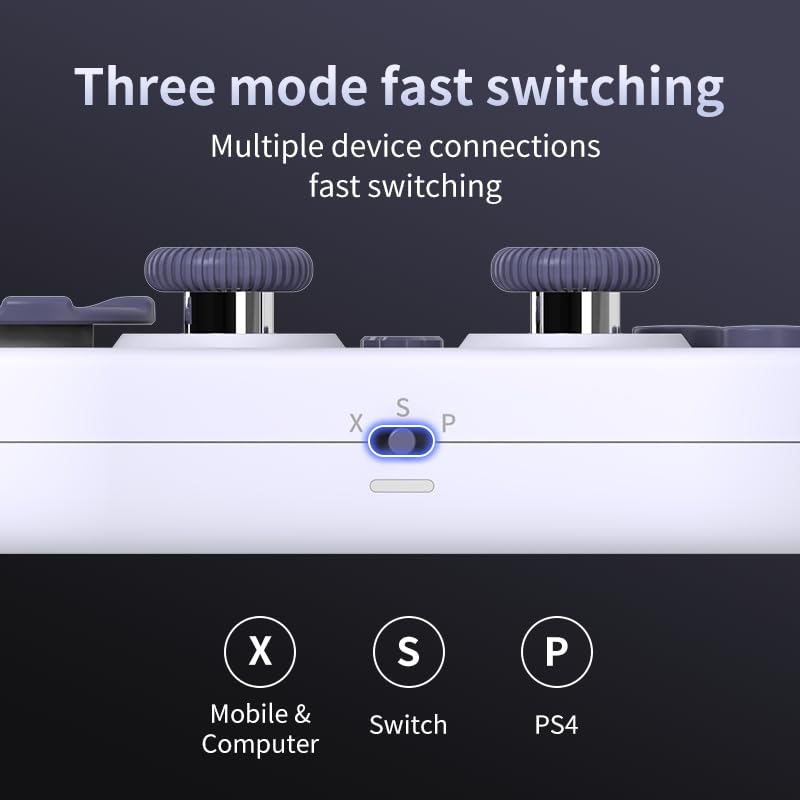
Image 3.2: Detail of the three-mode fast switching selector on the controller.
3.4 Customization and Calibration
For advanced customization, including button remapping and macro functions, download the official "gamepad space" application. This application also allows for controller calibration to ensure optimal performance.
4. Kontrol Cihazının Çalıştırılması
4.1 Temel Özellikler
- Hall Etkili Joystickler: Provides high precision and sensitivity. The joystick height is adjustable between 5mm and 8mm for personalized comfort.
- Composite Micro-Switch Buttons: These buttons offer a tactile response similar to mechanical keyboards, providing quick and precise input.
- Mechanical Triggers: Designed for fast response times.
- Dual Micro Motors: Provides dual vibration feedback for an immersive gaming experience.
- Somatosensory Gyroscope: Equipped with a 6-axis gyroscope for motion control in supported games.

Image 4.1: Detail of the adjustable Hall Effect joysticks.

Image 4.2: Close-up of the composite micro-switch action buttons.

Image 4.3: Diagram illustrating the internal components of the composite micro-keypad.

Image 4.4: Visual representation of the controller's gyroscope functionality.
4.2 Oyun Deneyimi
The compact design allows for portability, making it suitable for gaming on the go with devices like the Nintendo Switch or smartphones.

Image 4.5: Controller in use with a Nintendo Switch.

Image 4.6: Controller paired with a smartphone for mobile gaming.
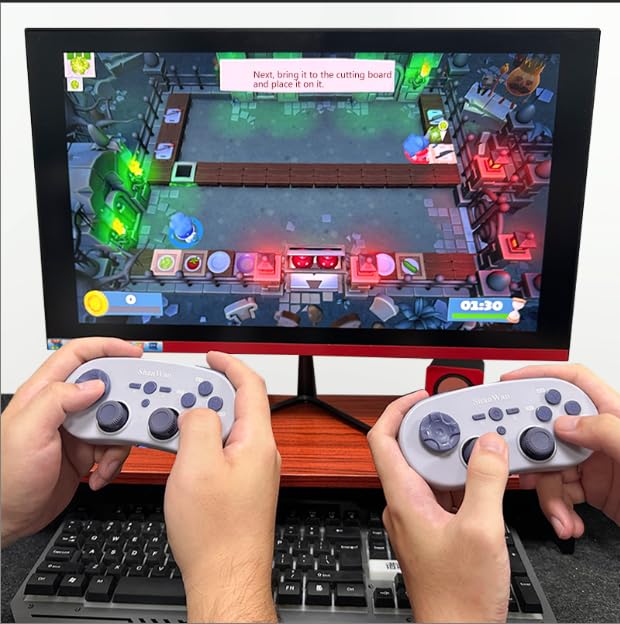
Image 4.7: Two controllers in use for multiplayer gaming on a PC.
5. Bakım
To ensure the longevity and optimal performance of your ShanWan Q38 controller, follow these maintenance guidelines:
- Temizlik: Use a soft, dry cloth to wipe the controller. For stubborn dirt, a slightly damp Bez kullanılabilir, ancak cihazın içine nem girmemesine dikkat edin. Sert kimyasallardan veya aşındırıcı temizleyicilerden kaçının.
- Depolamak: Kontrol cihazını serin, kuru ve doğrudan güneş ışığından ve aşırı sıcaklıklardan uzak bir yerde saklayın.
- Pil Bakım: If using replaceable AAA batteries, remove them if the controller will not be used for an extended period to prevent leakage.
- Damlalardan Kaçının: Protect the controller from physical impact and drops, which can damage internal components.
6. Sorun Giderme
If you encounter issues with your ShanWan Q38 controller, refer to the following common problems and solutions:
- Controller Does Not Power On:
- Ensure the battery is correctly inserted and has sufficient charge. Replace AAA batteries if necessary.
- Connect the controller to a power source using the USB cable to confirm if it charges.
- Bluetooth üzerinden bağlantı kurmada zorluk:
- Ensure the controller is in the correct mode (X, S, or P) for your device.
- Cihazınızın Bluetooth özelliğini kapatıp açın.
- Bluetooth ayarlarınızdan cihazı unutun ve yeniden eşleştirmeyi deneyin.
- Ensure the controller is within the effective range of your device.
- Buttons or Joysticks Not Responding Correctly:
- Calibrate the controller using the "gamepad space" application.
- Düğmelerin veya kumanda kollarının çevresinde herhangi bir fiziksel engel veya kalıntı olup olmadığını kontrol edin.
- Ensure the controller's firmware is up to date, especially for Switch 2 compatibility.
- Random Disconnections:
- Yakınlarda güçlü kablosuz parazit sinyallerinin olmadığından emin olun.
- Keep the controller close to the connected device.
- Re-pair the controller if disconnections are frequent.
7. Özellikler
| Özellik | Detay |
|---|---|
| Model Numarası | Q38 |
| Üretici | ŞanWan |
| Bağlantı | Bluetooth Kablosuz |
| Uyumluluk | Switch/Switch 2, Steam Deck, PC, Android, iPhone, iPad, macOS, PS4 |
| Joystick Tipi | Hall Effect, Adjustable Height (5mm-8mm) |
| Düğme Türü | Composite Micro-Switch |
| Titreşim | Dual Micro Motors |
| Hareket Kontrolü | 6 eksenli Jiroskop |
| Paket Boyutları | 5.63 x 4.53 x 1.54 inç |
| Ürün Ağırlığı | 4.6 ons |
| Piller | 1 adet AAA pil gereklidir (dahil) |

Image 7.1: Physical dimensions of the ShanWan Q38 controller.
8. Garanti ve Destek
For warranty information and customer support, please refer to the official ShanWan webÜrünü satın aldığınız perakendeciyle iletişime geçin veya web sitesini ziyaret edin. Garanti talepleri için satın alma belgenizi saklayın.


