INEAUTO AX3000 WiFi 6 Genişletici Kullanım Kılavuzu
Model: AX3001 | Brand: INEAUTO
1. Giriş
This manual provides detailed instructions for the installation, operation, and maintenance of your INEAUTO AX3000 WiFi 6 Extender. This device is designed to extend wireless network coverage in outdoor environments, offering high-speed and stable connectivity. Please read this manual thoroughly before use to ensure proper setup and optimal performance.
2. Güvenlik Bilgileri
Cihaza zarar gelmesini veya kendinize ya da başkalarına zarar gelmesini önlemek için lütfen aşağıdaki güvenlik önlemlerine uyun:
- Ensure the power source matches the device's requirements.
- Cihazı açmayın veya onarmaya çalışmayın. Tüm servis işlemlerini yetkili personele yaptırın.
- Keep the device away from excessive heat, humidity, and direct sunlight.
- The PoE converter is not waterproof and must be installed indoors.
- Ensure proper grounding and lightning protection during outdoor installation.
3. Paket İçeriği
Paketinizde tüm öğelerin mevcut olduğundan emin olun:
- 1 x AX3000 WiFi 6 Extender
- 1 x PoE Güç Adaptörü
- 1 x Ethernet Kablosu
- Mounting Accessories (Cable ties, metal strap, screws, wall plugs)
- Hızlı Kullanıcı Kılavuzu

Image: Contents included in the product package, showing the extender, PoE adapter, Ethernet cable, and mounting hardware.
4. Ürün Bittiview
4.1. Cihaz Özellikleri
- Ultra-Fast WiFi 6 Technology: Dual-band support (5GHz/2400Mbps & 2.4GHz/600Mbps) for smooth HD streaming, gaming, and browsing.
- Gigabit Ethernet Bağlantı Noktaları: Two Gigabit Ethernet ports, one supporting up to 2.5Gbps for faster wired connections.
- Her Hava Koşuluna Dayanıklılık: IP67 waterproof housing and lightning protection for reliable performance in extreme outdoor conditions.
- Güçlü Kapsam: Equipped with 6 high gain 8dBi antennas and dual PA/LNA amplifiers for extended signal coverage up to 300 meters.
- Flexible Passive PoE Installation: Power and data via a single Ethernet cable, ideal for hard-to-reach outdoor areas. (Note: PoE converter is not waterproof).
- Çok Yönlü Modlar: Supports AP, router, and repeater modes to adapt to various network scenarios.
- Gelişmiş Güvenlik: WPA/WPA3 and WPA-PSK/WPA3-PSK protocols for network security.

Image: The INEAUTO AX3000 WiFi 6 Extender mounted on a pole in an outdoor backyard setting.
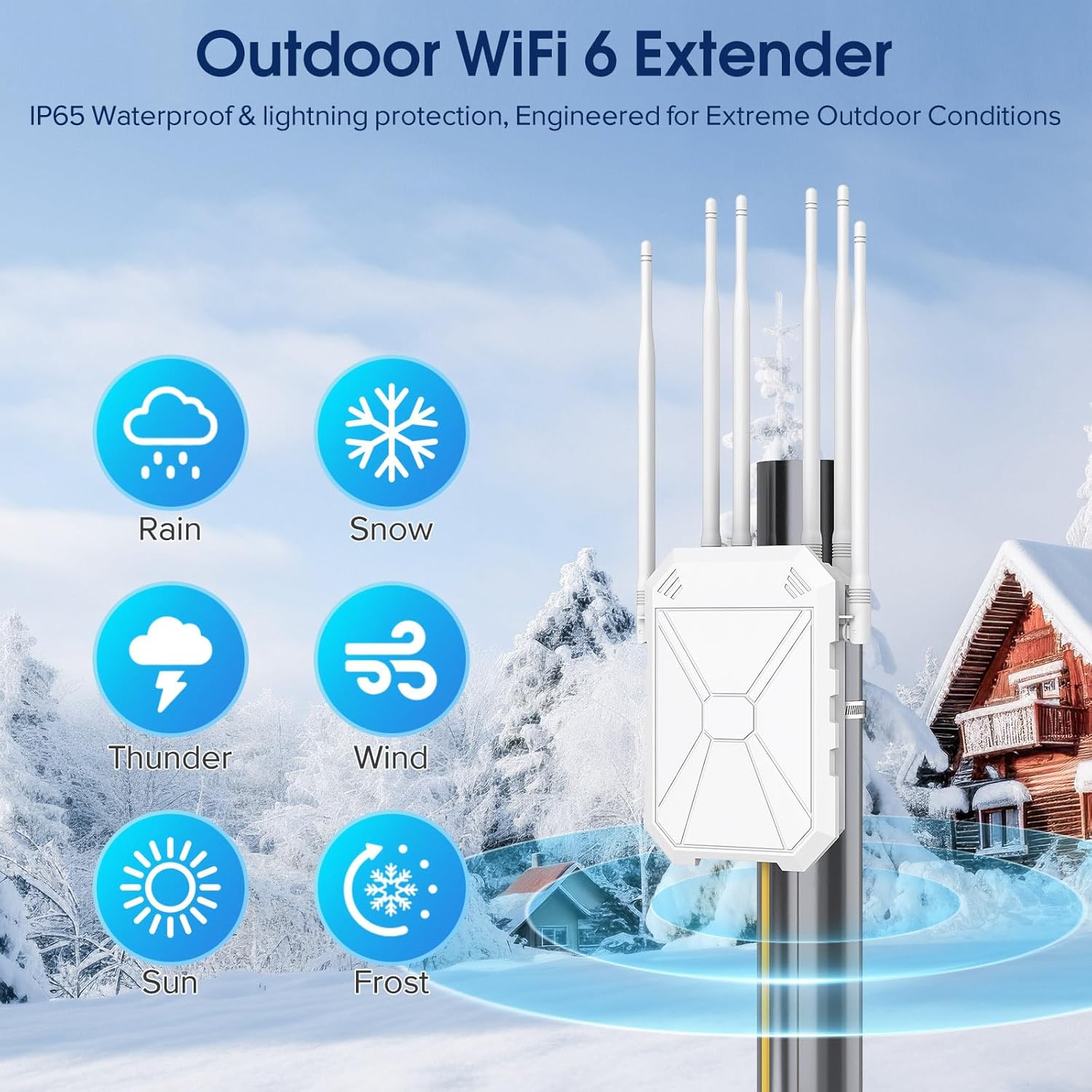
Image: Depiction of the outdoor WiFi 6 extender's IP67 weatherproof and lightning protection, showing its resilience to rain, snow, thunder, wind, sun, and frost.
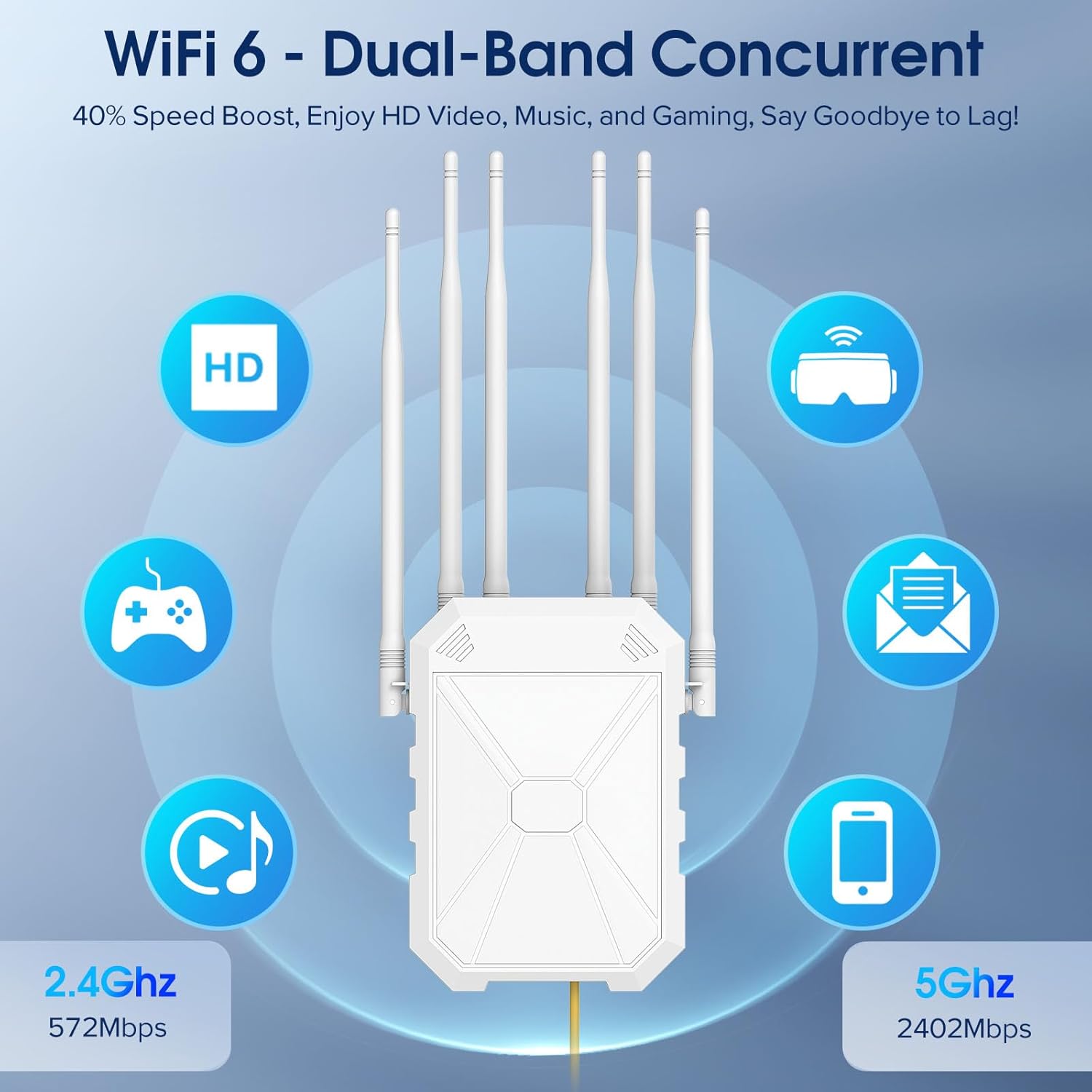
Image: Illustration of the WiFi 6 dual-band concurrent feature, highlighting 2.4GHz (572Mbps) and 5GHz (2402Mbps) speeds for HD video, music, and gaming.

Image: The extender shown with its six 8dBi high-gain antennas, illustrating its 300-meter signal coverage for large outdoor spaces.
4.2. Cihaz Boyutları

Image: Detailed dimensions of the AX3000 WiFi 6 Extender (20cm/7.9in x 14cm/5.5in x 6.7cm/2.6in), its antennas (25.8cm/10.2in), Ethernet cable (100cm/39.4in), and PoE adapter (8.4cm/3.3in x 4.7cm/1.9in x 3.7cm/1.5in).
5. Kurulum
5.1. İlk Kurulum Adımları
- Genişleticiyi Açın: Plug the WiFi extender into a power outlet near your router. Wait until the LED indicator turns solid. Note: The cable must be connected to the PoE port.
- Connect to Repeater WiFi: Connect to the WiFi "Repeater_XXX" on your smartphone. Note: If you can't find the SSID name of the Repeater WiFi, turn on Airplane Mode, then turn it off to refresh available networks.
- Kurulum Sayfasına Erişim: Once connected, your phone will automatically jump to the extender's login page.
- Choose Setup Mode: Select your preferred connection mode (Repeater, AP, or Router), then tap "NEXT" to proceed.
- Yönlendiricinize bağlanın: Select your router's 5GHz WiFi network from the list, enter the correct password, then tap "NEXT". Note: Under repeater mode, the password of the extender remains the same as your router's.
- Kurulumu Tamamla: Click the "Finish" button to complete the settings. Setup is complete, reconnect to the network after 30 seconds. Please check the signal indicator status of the extender when using it.
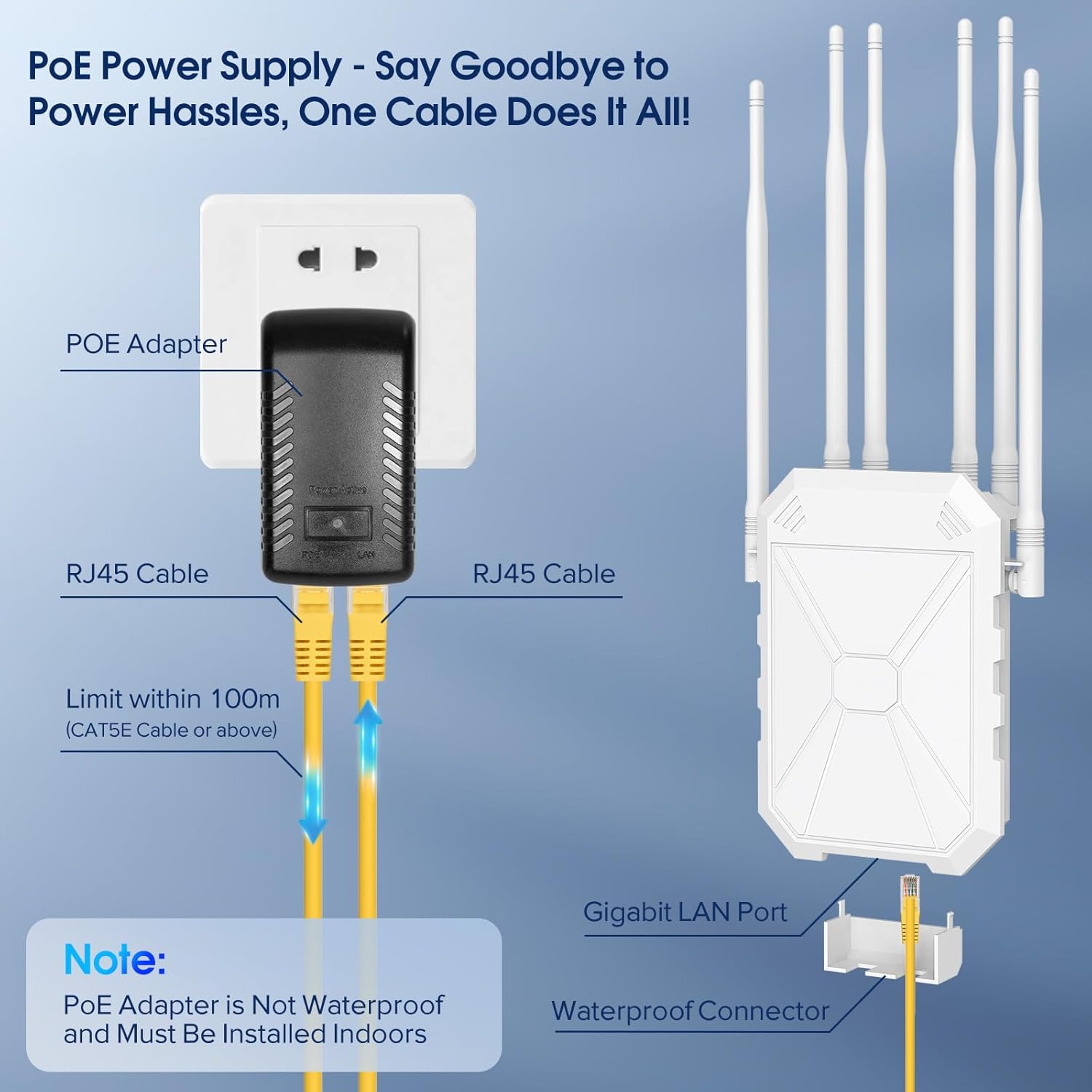
Image: Diagram showing the PoE adapter connecting to a power outlet, then via RJ45 cables to the Gigabit LAN port of the extender. A note indicates the PoE adapter is not waterproof and must be indoors.
5.2. Antenna Orientation
Proper antenna orientation is crucial for optimal signal strength and coverage. Follow these steps:
- Place the device as shown. Lift the two side antennas by 45°, and the four center antennas by 45° as well.
- Flip the two side antennas upward 180°. Then rotate each of the four center antennas 180° clockwise or counterclockwise as indicated.
- Pull all antennas straight upward and snap them into the slots securely.
- Tamamlamak.
Video: A step-by-step guide on setting up the INEAUTO AX3000 WiFi 6 Extender, including power connection, connecting to the repeater WiFi, accessing the setup page, choosing the setup mode, connecting to your router, and completing the setup. This video also demonstrates how to properly locate and adjust the antennas for optimal performance.
6. Çalışma Modları
The INEAUTO AX3000 WiFi 6 Extender supports multiple operating modes to suit various networking needs:
- AP (Erişim Noktası) Modu: Converts a wired network connection into a wireless one, ideal for creating a new WiFi hotspot.
- Yönlendirici Modu: Ana yönlendirici görevi görerek bağlı cihazlara internet erişimi sağlar.
- Tekrarlayıcı Modu: Extends the range of an existing wireless network, eliminating dead zones.
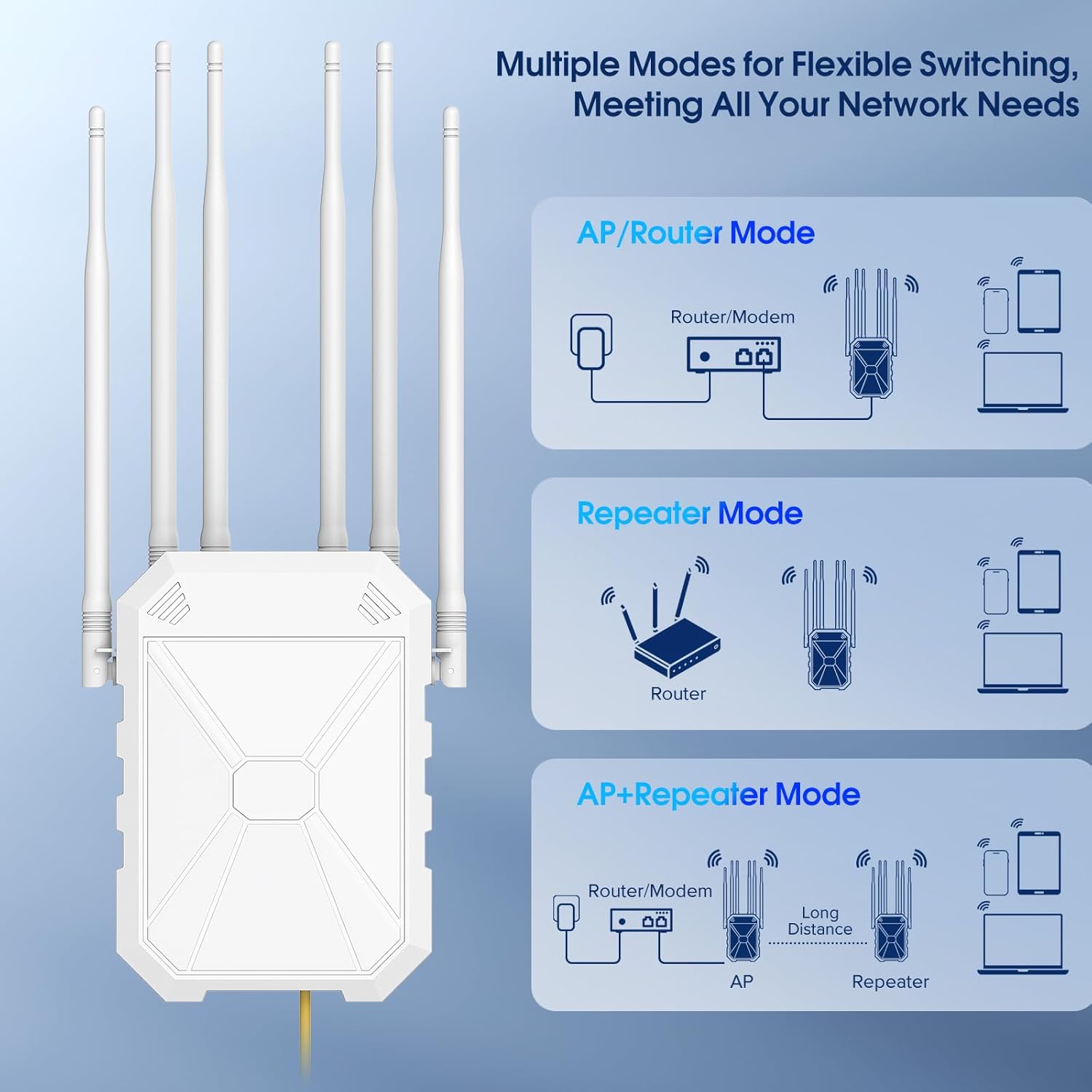
Image: Visual representation of the different operating modes: AP/Router Mode, Repeater Mode, and AP+Repeater Mode, illustrating how the extender integrates into various network setups.
7. Bakım
Regular maintenance helps ensure the longevity and optimal performance of your extender:
- Temizlik: Cihazı periyodik olarak yumuşak, kuru bir bezle silin. Sıvı temizleyiciler veya aerosoller kullanmayın.
- Donanım Yazılımı Güncellemeleri: Üreticinin kontrol edin website for the latest firmware updates to ensure security and performance improvements.
- Çevresel Koşullar: Ensure the device is installed in an environment within its specified operating temperature range (-30°C to 70°C).
- Kablo Denetimi: Regularly inspect Ethernet cables for any signs of wear or damage, especially those exposed to outdoor elements.
8. Sorun Giderme
If you encounter issues with your INEAUTO AX3000 WiFi 6 Extender, refer to the following common problems and solutions:
| Sorun | Olası Neden | Çözüm |
|---|---|---|
| Güç yok/LED'ler kapalı | Güç adaptörü bağlı değil veya arızalı. | Ensure the power adapter is securely plugged into the extender and a working power outlet. Check the power outlet with another device. |
| Cannot find Repeater_XXX SSID | Network list not refreshed. | Turn on Airplane Mode on your smartphone, then turn it off to refresh available networks. |
| Poor signal strength after setup | Improper antenna orientation or placement. | Adjust the antennas as described in Section 5.2. Relocate the extender to a more central position or higher elevation for better line-of-sight. |
| Yavaş internet hızı | Interference, network congestion, or incorrect mode. | Ensure the extender is not too far from the main router. Check for sources of interference. Verify the extender is in the correct operating mode for your needs. |
| Kurulum sayfasına erişilemiyor | Not properly connected to the extender's WiFi. | Ensure your device is connected to the Repeater_XXX network. Try clearing your browser cache or using a different browser. |
8.1. How to Reset Your Extender
If the extender is not functioning correctly or you wish to revert to factory settings, you can perform a hard reset:
- Plug the extender into a power outlet and wait for about 30 seconds until it fully boots.
- With the extender powered on, use a paperclip or a thin object to press and hold the Reset Button for 10 seconds. The LED indicator will flash rapidly.
- Düğmeyi bırakın. Uzatıcı fabrika varsayılan ayarlarına sıfırlanarak yeniden başlatılacaktır.
9. Özellikler
| Özellik | Detay |
|---|---|
| Marka | OTOMOBİL OLMAYAN |
| Model Numarası | AX3001 |
| Kablosuz İletişim Standardı | 5 GHz Radyo Frekansı, 802.11a/b/g/n/ac, 802.11ax, 2.4 GHz Radyo Frekansı |
| Veri Aktarım Hızı | Saniyede 3000 Megabayt |
| Frekans Bant Sınıfı | Çift Bant |
| Özel Özellikler | Weatherproof, Access Point Mode, MU-MIMO, Power Over Internet, Directional Antenna |
| Ürün Ağırlığı | 2.27 pound |
| Paket Boyutları | 14.17 x 9.02 x 3.58 inç |
10. Garanti ve Destek
For warranty information and technical support, please refer to the official INEAUTO webSite üzerinden satın alabilir veya doğrudan müşteri hizmetleriyle iletişime geçebilirsiniz. Garanti talepleriniz için satın alma fişinizi saklayın.
Çevrimiçi Kaynaklar:
- Official INEAUTO Webalan: Visit INEAUTO Store
- Kullanım Kılavuzu (PDF): PDF indir Manuel


