giriiş
This manual provides essential information for the proper use and maintenance of your Maxcom MM835 4G VoLTE Flip Phone. Please read these instructions carefully before using your device to ensure optimal performance and longevity. This phone is designed for ease of use, featuring large displays and a simplified interface.
Ürün Bittiview
The Maxcom MM835 is a 4G VoLTE flip phone designed for clear communication and user convenience. It features a dual-screen design, large backlit keys, and essential functions like an SOS button and HAC (Hearing Aid Compatibility).
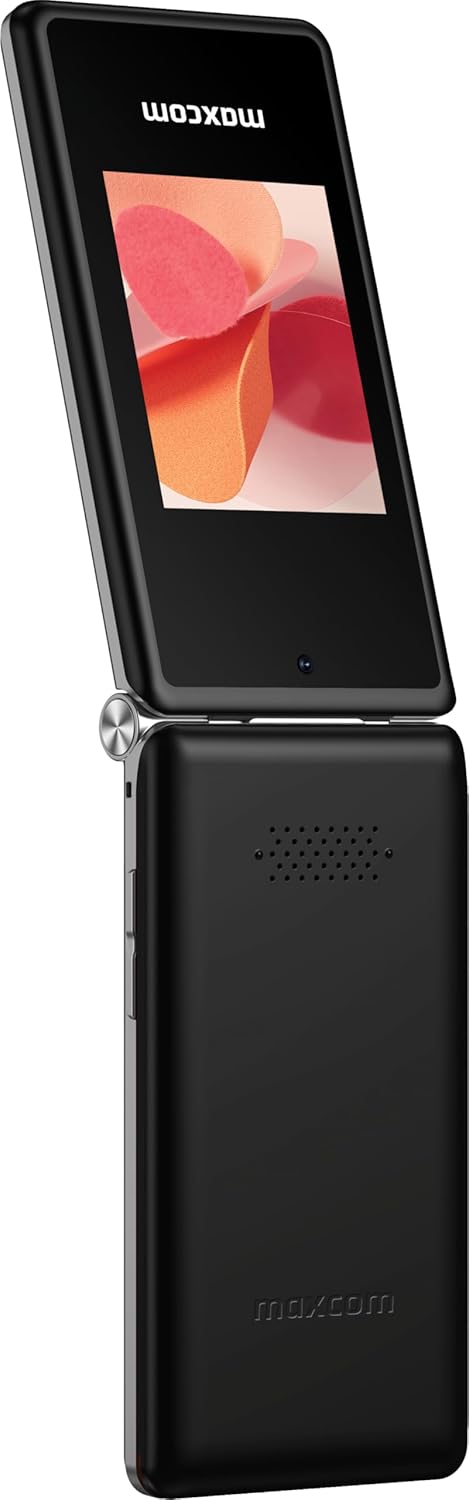
Şekil 1: Maxcom MM835 Flip Phone (Closed View). The external 2.4-inch screen displays time, date, battery status, and missed calls without opening the phone.
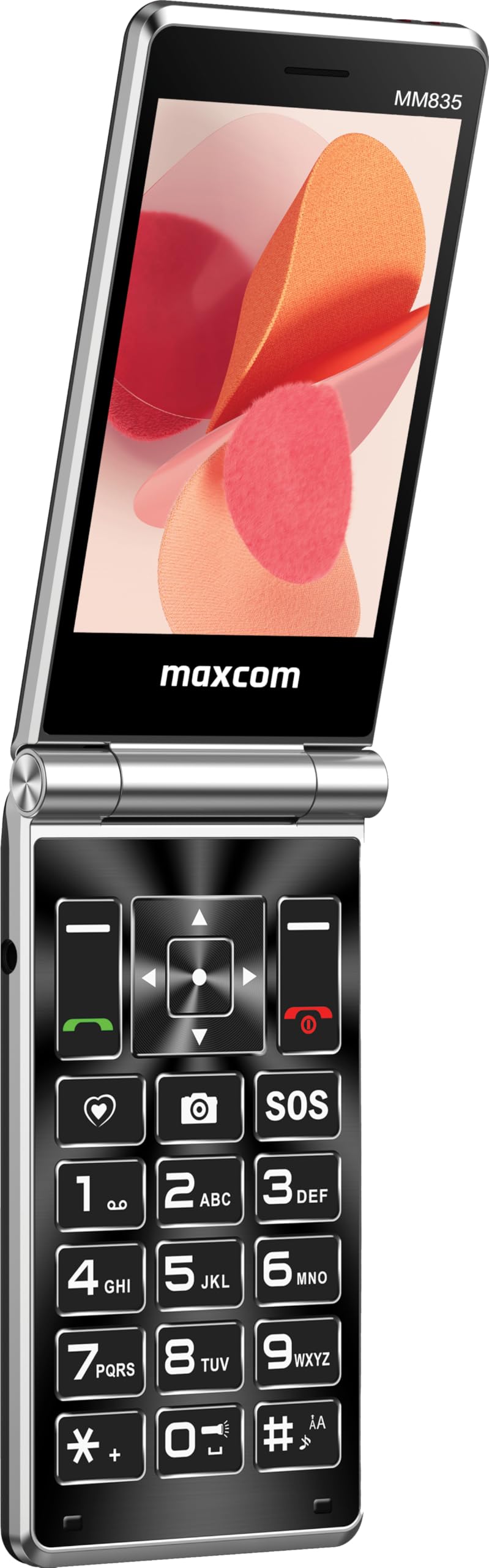
Şekil 2: Maxcom MM835 Flip Phone (Open View). The internal 3.5-inch screen provides a clear interface for contacts and messages, complemented by large, comfortable keys.

Şekil 3: Taraf view of the Maxcom MM835, illustrating the volume control buttons for easy audio adjustment.

Şekil 4: Alt view of the Maxcom MM835, highlighting the USB-C charging port for convenient power connection.

Şekil 5: Detail of the Maxcom MM835 keyboard, featuring the prominent SOS button for emergency contacts.

Şekil 6: The Maxcom MM835 is Hearing Aid Compatible (HAC), ensuring clear audio for users with hearing aids.
Kurmak
1. Pilin Takılması ve Şarj Edilmesi
- Arka kapağı açın: Telefonun arka kapağını yavaşça çıkarın.
- Pili takın: Place the included Lithium-ion battery into its compartment, ensuring the contacts align correctly.
- Arka kapağı değiştirin: Arka kapağı güvenli bir şekilde takın.
- Telefonu şarj edin: Connect the provided USB-C cable to the phone's charging port (Figure 4) and to a compatible USB power adapter (not included). Allow the phone to charge fully before first use. The external screen will indicate charging status.
2. SIM Kart Kurulumu
The Maxcom MM835 supports dual SIM cards.
- Remove the back cover and battery: Follow the steps above to access the SIM card slots.
- SIM kartları takın: Carefully slide your SIM card(s) into the designated slot(s). Ensure the gold contacts face downwards and the notched corner aligns with the slot.
- Reinstall battery and cover: Pili ve arka kapağı değiştirin.
3. Açma/Kapama
- Açmak İçin: Ekran ışığı yanana kadar Güç/Çağrı Sonlandırma düğmesini (kırmızı düğme) basılı tutun.
- Kapatmak İçin: Güç/Çağrı Sonlandırma düğmesini, kapatma seçenekleri görünene kadar basılı tutun, ardından "Kapat" seçeneğini seçin.
Kullanım Talimatları
1. Temel Gezinme
- Dahili Ekran: The 3.5-inch internal screen is your primary interface for menus and content.
- Harici Ekran: The 2.4-inch external screen shows essential information like time, date, battery, and caller ID when the phone is closed.
- Gezinme Tuşları: Use the directional keys (up, down, left, right) and the central OK button to navigate through menus.
- Yazılım Tuşları: The keys directly below the screen perform functions indicated on the display (e.g., "Menu", "Back").
- Arama Tuşları: The green button initiates calls, and the red button ends calls or powers the phone on/off.
2. Arama Yapma ve Alma
- Telefon çağrısı yapmak:
- Telefonu açın.
- Tuş takımını kullanarak numarayı çevirin.
- Aramayı başlatmak için yeşil Arama düğmesine basın.
- Bir Aramayı Cevaplamak için:
- Telefon çaldığında kapağı açın veya yeşil Arama düğmesine basın.
- Aramayı Bitirmek İçin: Kırmızı Aramayı Bitir düğmesine basın.
3. Mesaj Gönderme ve Alma
- "Mesajlar" menüsüne gidin.
- Mesaj yazmak için "Yeni Mesaj"ı seçin.
- Alıcının numarasını girin veya kişilerden seçin.
- Tuş takımını kullanarak mesajınızı yazın.
- "Gönder"e basın.
4. SOS Button Functionality
The SOS button (Figure 5) is located on the main keypad and is designed for emergency situations.
- Kurmak: Before use, configure emergency contacts in the phone's settings. Refer to the "SOS Settings" section in the phone's menu.
- Etkinleştirme: In an emergency, press and hold the SOS button. The phone will automatically send pre-defined notifications to your emergency contacts and may initiate calls to them.
5. Kamera
The phone includes a basic camera for capturing photos.
- Ana menüden kameraya erişin.
- Dahili ekranı kullanarak fotoğrafınızı kadrajlayın.
- Press the central OK button to take a picture.
6. FM Radyo
Enjoy listening to FM radio stations on your device.
- Navigate to the "FM Radio" application in the menu.
- Connect headphones (not included) to act as an antenna for optimal reception.
- İstasyonları taramak veya manuel olarak ayarlamak için navigasyon tuşlarını kullanın.
Bakım
- Temizlik: Use a soft, dry cloth to clean the phone's exterior. Avoid liquid cleaners or abrasive materials.
- Pil Bakım: Pil ömrünü uzatmak için aşırı sıcaklıklardan kaçının. Telefonu düzenli olarak şarj edin, ancak uzun süre tamamen boşalmış halde bırakmayın.
- Depolamak: Store the phone in a cool, dry place away from direct sunlight and moisture when not in use.
- Yazılım: While software updates are not explicitly guaranteed, ensure your phone's settings are optimized for performance.
Sorun giderme
If you encounter issues with your Maxcom MM835, refer to the following common solutions:
| Sorun | Olası Çözüm |
|---|---|
| Telefon açılmıyor | Pilinin doğru takıldığından ve tamamen şarj olduğundan emin olun. Şarj cihazını bağlayın ve tekrar deneyin. |
| Arama yapılamıyor veya alınamıyor. | Check if the SIM card is properly inserted. Verify that you have network signal. Contact your service provider if the issue persists. |
| Zayıf pil ömrü | Ensure the phone is fully charged. Reduce screen brightness or close unused applications. Battery performance can degrade over time. |
| "Emergency Call Only" message | This indicates a lack of network signal or an issue with your SIM card/service. Try moving to an area with better reception or reinserting your SIM card. |
| Tuşlar yanıt vermiyor | Restart the phone. If the issue continues, ensure no debris is obstructing the keys. |
Özellikler
| Özellik | Detay |
|---|---|
| Marka | Maxcom |
| Model Adı | MM835 |
| Ürün Türü | Kapaklı Telefon |
| Renk | Siyah |
| İşletim Sistemi | Maxcom OS |
| Internal Screen Size | 3.5 inç |
| Harici Ekran Boyutu | 2.4 inç |
| Bağlantı | 4G, VoLTE |
| Özel Özellikler | Dual SIM, SOS Button, HAC (Hearing Aid Compatible), Large Keys |
| Pil Bileşimi | Lityum iyon |
| Pil Kapasitesi | 1400 mAh |
| Şarj Portu | USB Tip C |
| Bellek Depolama Kapasitesi | 32 GB |
| CPU Modeli | ARMv7 |
| Ekran Çözünürlüğü | 640x360 |
| Kablosuz Taşıyıcı | All carriers (Unlocked) |
Garanti ve Destek
For warranty information and customer support, please refer to the documentation provided with your purchase or contact the seller directly. Maxcom strives to provide reliable products, and support is available for any manufacturing defects or operational queries.
- Üretici: Maxcom
- Satıcı: You Get - Innovation & Technology
- İade politikasi: Typically 30 days for refund/replacement (check with seller for specifics).


