1. Ürün Bittiview
The CHOETECH B695 is a versatile 10000mAh magnetic power bank designed for convenient charging of multiple devices. It features both wireless charging capabilities and multiple wired output options, including built-in USB-C and Lightning cables. Its compact design and integrated safety features make it an ideal portable power solution.

Resim: Ön ve arka view of the CHOETECH B695 Magnetic Power Bank, showcasinkompakt tasarımı ve çeşitli bağlantı noktaları sayesinde.
Temel Özellikler:
- 10000mAh Kapasite: Sağlar ampBirden fazla şarj için güç.
- 2'ü 1 arada Şarj: Supports both magnetic wireless charging and wired charging.
- Dahili Kablolar: Integrated USB-C and Lightning cables for direct device connection.
- Çoklu Çıktılar: Includes USB-A, Type-C (input/output), and dedicated wireless charging for phones and watches.
- Manyetik Hizalama: Ensures secure and efficient wireless charging for compatible devices.
- LED Dijital Ekran: Clearly indicates remaining battery percentage.
- Kapsamlı Güvenlik Koruması: Built-in safeguards against overcharge, overdischarge, overcurrent, overvoltage, temperature, short circuit, overpower, recovery, and electromagnetic field issues.
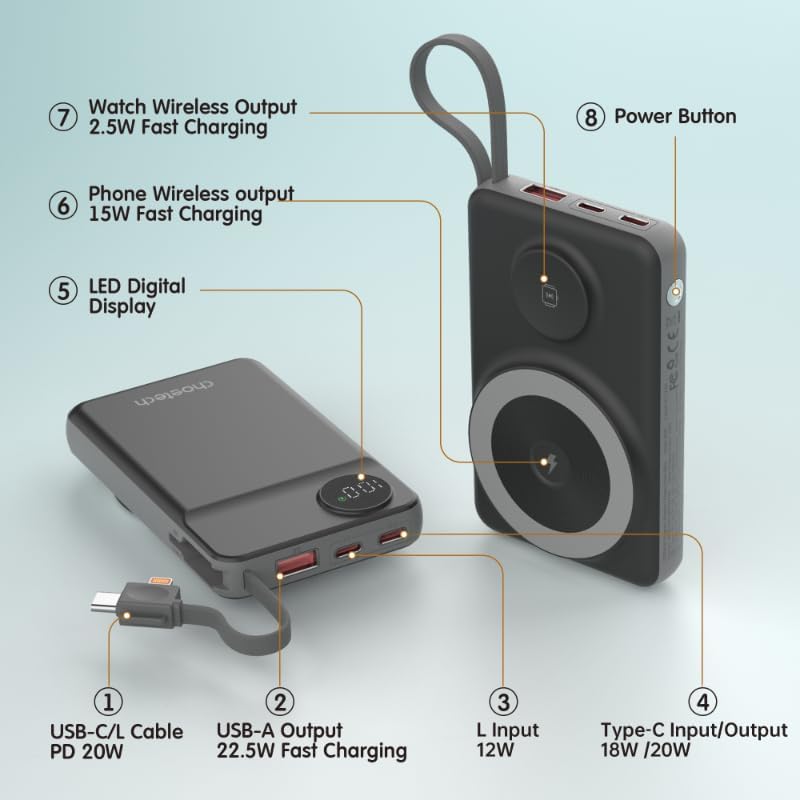
Image: Detailed diagram labeling the ports and features of the CHOETECH B695, including USB-C/L cable, USB-A output, L input, Type-C input/output, LED display, phone wireless output, watch wireless output, and power button.
2. Başlarken: Kurulum
2.1 Power Bank'ı Şarj Etme
Before initial use, fully charge your CHOETECH B695 power bank. This ensures optimal performance and battery longevity.
- Connect a compatible USB-C charging cable (not included) to the Type-C Input/Output port (4) on the power bank.
- Connect the other end of the cable to a USB wall adapter (not included).
- The LED Digital Display (5) will show the charging progress. It will display "100" when fully charged.
- Alternatively, you can use the built-in Lightning input (3) to charge the power bank with a Lightning cable and adapter.
Not: For fastest charging of the power bank, use a PD (Power Delivery) compatible wall adapter with the Type-C port.
3. Kullanım Talimatları
3.1 Pil Seviyesini Kontrol Etme
Press the Power Button (8) once to activate the LED Digital Display (5), which will show the current battery percentage.
3.2 Kablolu Şarj
The CHOETECH B695 offers multiple wired charging options:
- Using Built-in USB-C/L Cable (1):
- Pull out the integrated USB-C or Lightning cable from its storage slot.
- Connect the appropriate cable end to your device's charging port.
- Şarj işlemi otomatik olarak başlayacaktır.
- Using USB-A Output (2):
- Connect your device's USB charging cable to the USB-A Output port (2).
- Kablonun diğer ucunu cihazınıza bağlayın.
- Charging will commence.
- Using Type-C Input/Output (4):
- Connect your device's USB-C charging cable to the Type-C Input/Output port (4).
- Kablonun diğer ucunu cihazınıza bağlayın.
- Charging will commence.

Image: The CHOETECH B695 power bank connected to a smartphone via its built-in USB-C cable, demonstrating wired charging.
3.3 Wireless Charging (Phone)
The power bank supports magnetic wireless charging for compatible smartphones (e.g., iPhone 12 series and newer, or Android phones with magnetic cases).
- Powerbank'in yeterli şarja sahip olduğundan emin olun.
- Align your compatible smartphone with the larger magnetic charging pad (6) on the power bank.
- The phone should snap into place magnetically, and wireless charging will begin.

Image: A smartphone magnetically attached to the larger wireless charging pad and a smartwatch on the smaller pad of the CHOETECH B695, illustrating simultaneous wireless charging.
3.4 Wireless Charging (Watch)
The power bank includes a dedicated smaller magnetic charging pad for smartwatches.
- Powerbank'in yeterli şarja sahip olduğundan emin olun.
- Place your compatible smartwatch onto the smaller magnetic charging pad (7).
- The watch should align magnetically, and wireless charging will begin.
3.5 Eşzamanlı Şarj
The CHOETECH B695 can charge multiple devices simultaneously using a combination of its wired and wireless outputs.

Image: The CHOETECH B695 power bank connected to and wirelessly charging multiple devices, including smartphones and a smartwatch, demonstrating its multi-output capability.
4. Güvenlik Bilgileri ve Koruma Özellikleri
The CHOETECH B695 is equipped with multiple safety mechanisms to protect your devices and the power bank itself.
- Aşırı Şarj Koruması: Pil kapasitesinin ötesinde şarj edilmesini önler.
- Aşırı Deşarj Koruması: Protects the battery from being fully depleted, extending its lifespan.
- Aşırı Akım Koruması: Aşırı akım akışına karşı koruma önlemleri.
- aşırı sestage Koruma: Volkanlara karşı koruma sağlar.tage dalgalanmalar.
- Sıcaklık Koruması: Aşırı ısınmayı önlemek için iç sıcaklığı izler ve düzenler.
- Kısa Devre Koruması: Kısa devre durumunda otomatik olarak kapanır.
- Aşırı Güç Koruması: Prevents power output beyond safe limits.
- Kurtarma Koruması: Allows the device to recover from protection states.
- Elektromanyetik Alan Koruması: Shields against harmful electromagnetic interference.

Image: An infographic detailing the nine safety protection features integrated into the CHOETECH B695 power bank, including overcharge, overdischarge, overcurrent, overvoltage, temperature, short circuit, overpower, recovery, and electromagnetic field protection.
Önemli: Do not expose the power bank to extreme temperatures, direct sunlight, or water. Do not disassemble or attempt to repair the device. Keep out of reach of children.
5. Bakım
- Temizlik: Use a soft, dry cloth to clean the power bank. Avoid liquid cleaners.
- Depolamak: Powerbank cihazınızı serin, kuru ve doğrudan güneş ışığından ve aşırı sıcaklıklardan uzak bir yerde saklayın.
- Pil Sağlığı: To maintain battery health, fully charge and discharge the power bank at least once every three months if not in regular use.
- Kablo Bakımı: Handle the built-in cables gently. Avoid excessive bending or pulling to prevent damage.
6. Sorun Giderme
6.1 Power Bank Şarj Olmuyor
- Ensure the charging cable is securely connected to both the power bank's input port and the wall adapter.
- Duvar adaptörünün doğru çalıştığından ve çalışan bir elektrik prizine takılı olduğundan emin olun.
- Try a different USB-C or Lightning charging cable and wall adapter.
6.2 Cihaz Power Bank'ten Şarj Olmuyor
- Kablolu Şarj:
- Check if the power bank has sufficient charge (refer to the LED display).
- Ensure the charging cable is securely connected to both the power bank's output port and your device.
- Farklı bir şarj kablosu veya power bank üzerindeki farklı bir çıkış portunu deneyin.
- Press the power button once to activate output if necessary.
- Kablosuz Şarj:
- Ensure your device is compatible with magnetic wireless charging.
- Remove any thick cases or metallic objects from your device that might interfere with wireless charging.
- Ensure your device is correctly aligned with the magnetic charging pad on the power bank.
- Güç bankasının yeterli şarjı olup olmadığını kontrol edin.
6.3 Yavaş Şarj
- Hem power bank'inizi hem de cihazlarınızı şarj ederken hızlı şarj uyumlu bir kablo ve adaptör kullandığınızdan emin olun.
- Some devices may limit charging speed when multiple devices are connected simultaneously.
- Environmental factors (e.g., high temperature) can affect charging efficiency.
6.4 LED Display Not Working
- Güç düğmesine sıkıca basın.
- Eğer taşınabilir şarj cihazı tamamen boşalmışsa, şarj olana kadar ekran yanmayabilir.
7. Özellikler
| Örnek | B695 |
| Pil Kapasitesi | 10000mAh |
| Dahili Kablo Çıkışı | USB-C/L Cable PD 20W |
| USB-A Çıkışı | 22.5W Hızlı Şarj |
| Tip-C Giriş/Çıkış | 18W / 20W |
| Lightning Girişi | 12W |
| Telefon Kablosuz Çıkışı | 15W Hızlı Şarj |
| Kablosuz Çıkışı İzle | 2.5W Hızlı Şarj |
| Dimensions (L x W x Thickness) | 7.7 cm uzunluk x 9.7 cm genişlik x 16.2 cm kalınlık |
| Ürün Ağırlığı | 0.05 Kilogram (50g) |
| Renk | Siyah |
8. Garanti ve Destek
CHOETECH products are designed and manufactured to the highest quality standards. For warranty information and customer support, please refer to the warranty card included with your purchase or visit the official CHOETECH webalan.
If you encounter any issues or have questions regarding your CHOETECH B695 power bank, please contact CHOETECH customer service for assistance.


