1. Giriş
This manual provides detailed instructions for the GoveeLife Bluetooth Freezer Thermometer (Model H5108) and the GoveeLife Wireless Meat Thermometer (Model H5192). Please read this manual thoroughly before using the devices to ensure proper operation and to maximize their lifespan.
The bundle includes:
- 2 x GoveeLife Bluetooth Freezer Thermometers (H5108)
- 1 x GoveeLife Wireless Meat Thermometer (H5192) with 2 probes
- 1 x USB-C Charging Cable (for H5192)

Image 1: GoveeLife Bluetooth Freezer Thermometer H5108 (2 units) and Wireless Meat Thermometer H5192 bundle. The image shows two white square freezer thermometers with digital displays and a black rectangular meat thermometer base with two probes.
2. Güvenlik Bilgileri
- Do not expose the devices to extreme temperatures outside their operating range.
- Keep devices away from water unless specified as waterproof (H5192 probes are waterproof).
- Cihazları kendiniz sökmeye veya onarmaya çalışmayın. Yardım için müşteri destek ekibiyle iletişime geçin.
- Çocukların erişemeyeceği yerde saklayınız.
3. Kurulum
3.1 GoveeLife Bluetooth Freezer Thermometer (H5108)
- Pil Montajı: Open the battery compartment on the back of the thermometer and insert the required batteries (not included).
- Atama: Place the thermometer inside your freezer or refrigerator. Ensure the display is visible for easy reading.
- Uygulama Bağlantısı:
- Download the Govee Home App from the App Store or Google Play.
- Akıllı telefonunuzda Bluetooth’u etkinleştirin.
- Open the Govee Home App, tap the '+' icon, and search for H5108.
- Follow the in-app instructions to pair the device.

Image 2: GoveeLife Bluetooth Freezer Thermometer H5108 placed inside a refrigerator, displaying temperature. The image also shows a smartphone screen with the Govee Home App displaying temperature data.
3.2 GoveeLife Wireless Meat Thermometer (H5192)
- Charging the Probes: Insert the probes into the charging base. Connect the USB-C cable to the base and a power source to charge. A 25-minute charge provides up to 48 hours of operation.
- Uygulama Bağlantısı:
- Ensure the Govee Home App is installed and Bluetooth/Wi-Fi are enabled on your smartphone.
- Open the Govee Home App, tap the '+' icon, and search for H5192.
- Follow the in-app instructions to pair the device via Bluetooth and connect to Wi-Fi for extended range.
- Prob Yerleştirme: Insert the meat probes into the thickest part of the food, avoiding bone or gristle.

Image 3: GoveeLife Wireless Meat Thermometer H5192 charging base with probes inserted, connected via USB-C cable. The image highlights the 3000mAh battery and 48-hour operation after a 25-minute charge.

Image 4: GoveeLife Wireless Meat Thermometer H5192 probe inserted into a cut of meat, showing internal and ambient temperature monitoring. The image indicates internal sensor range of 32°F to 212°F and ambient sensor range of 32°F to 572°F.
4. Kullanım Talimatları
4.1 GoveeLife Bluetooth Freezer Thermometer (H5108)
- Sıcaklık Göstergesi: The LCD screen displays the current temperature. The refresh frequency is approximately 2 seconds with an accuracy of ±0.9°F.
- Uygulama İzleme: Use the Govee Home App to monitor temperature remotely, set alerts for temperature fluctuations, and view historical data for up to 2 years.
- Uyarılar: Configure temperature range alerts within the app to receive notifications if the temperature goes above or below your set thresholds.

Image 5: Close-up of the GoveeLife Bluetooth Freezer Thermometer H5108 digital display, showing temperature and battery indicators. The image highlights the ±0.9°F accuracy and 2-second refresh frequency.

Image 6: Smartphone screen displaying the Govee Home App interface for the GoveeLife Freezer Thermometer, showing temperature history and data export options. The app can record data for up to 2 years.
4.2 GoveeLife Wireless Meat Thermometer (H5192)
- LCD Ekran: The base unit features a 10-function LCD display showing internal and ambient temperatures, alert temperature, probe number, probe battery, base battery, and current temperature.
- Smart Guided Cooking: Use the Govee Home App to select from 28 USDA-preset temperature recommendations for various meats (beef, lamb, chicken, pork, turkey, etc.). The app provides real-time alerts.
- Sıcaklık İzleme: Monitor internal and ambient temperatures with an accuracy of ±1.8°F and updates every 3 seconds.
- Bağlantı: The thermometer supports both Bluetooth (up to 328ft in open space) and Wi-Fi for stable and extended range monitoring via the Govee Home App.
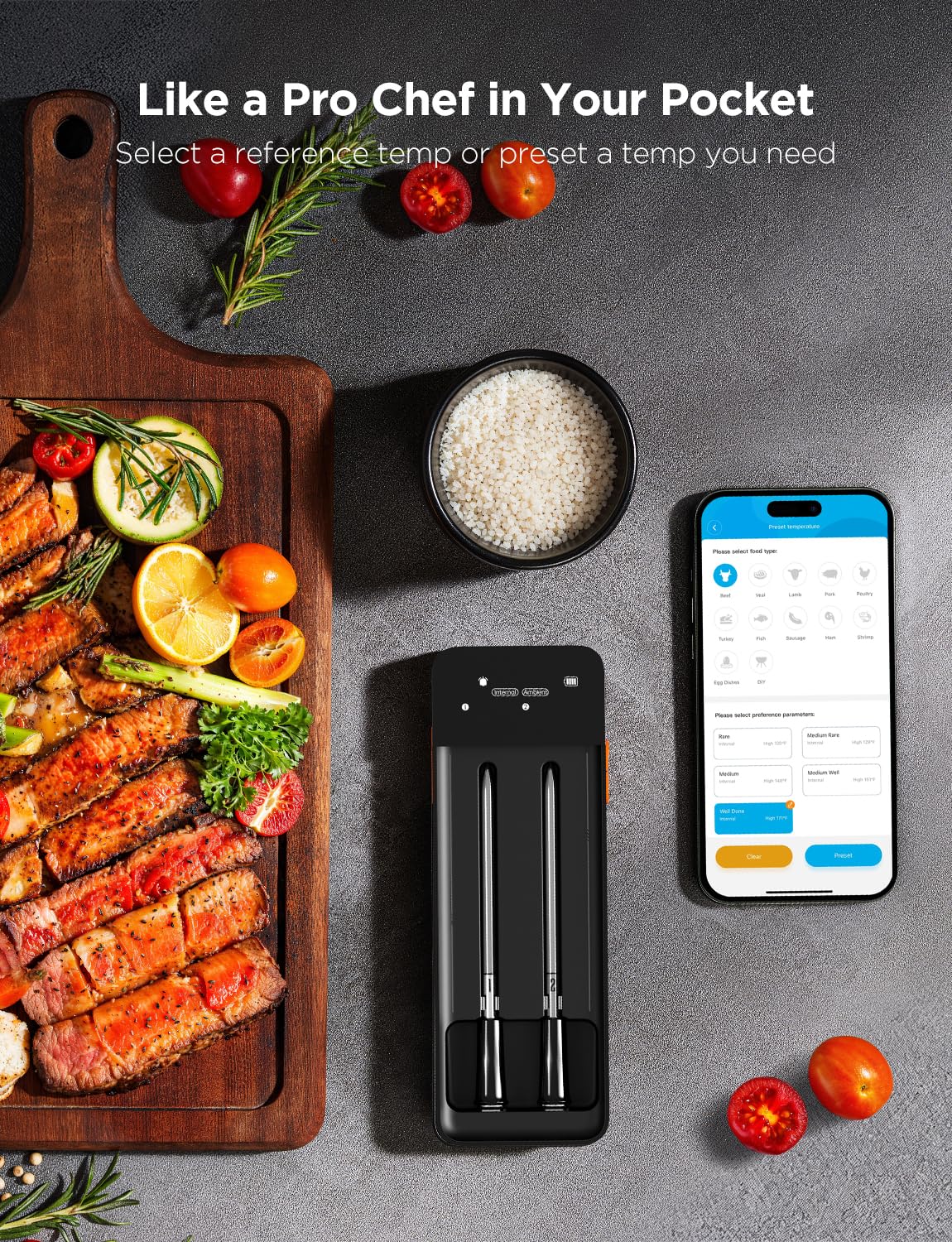
Image 7: Smartphone screen displaying the Govee Home App interface for the GoveeLife Wireless Meat Thermometer, showing options to select food type and preferred doneness (e.g., Rare, Medium Rare).

Image 8: Close-up of the GoveeLife Wireless Meat Thermometer H5192 LCD display, detailing various indicators such as Wi-Fi signal, alarm mute, Bluetooth, preset temperature, probe base battery, internal/ambient temperature, probe number, probe battery, current temperature, and temperature unit.

Image 9: Diagram illustrating the connectivity options for the GoveeLife Wireless Meat Thermometer H5192, showing Bluetooth range up to 328ft and unlimited Wi-Fi range via the Govee Home App.
5. Bakım
- Temizlik:
- H5108 Freezer Thermometer: Yumuşak bir bezle silin.amp bezle silin. Suya batırmayın.
- H5192 Meat Thermometer Probes: The probes are waterproof. Clean with soap and water after each use. Ensure they are dry before storing.
- H5192 Meat Thermometer Base: Yumuşak bir bezle silin.amp bezle silin. Suya batırmayın.
- Battery Replacement (H5108): Ekranda düşük pil göstergesi belirdiğinde pilleri değiştirin.
- Charging (H5192): Recharge the probes and base unit as needed.
- Depolamak: Store devices in a cool, dry place when not in use.
6. Sorun Giderme
| Sorun | Olası Neden | Çözüm |
|---|---|---|
| Cihaz uygulamaya bağlanmıyor. | Bluetooth/Wi-Fi off; device out of range; low battery; App issue. | Ensure Bluetooth/Wi-Fi is on. Move device closer to phone/router. Charge/replace batteries. Restart App/device. |
| Yanlış sıcaklık okumaları | Improper probe placement (H5192); sensor obstruction; device malfunction. | Ensure H5192 probes are inserted correctly, avoiding bone. Clean sensors. Contact support if issue persists. |
| H5192 probes not charging | Loose connection; faulty cable/charger; dirty contacts. | Ensure probes are seated correctly. Try a different USB-C cable/charger. Clean charging contacts on probes and base. |
7. Özellikler
7.1 GoveeLife Bluetooth Freezer Thermometer (H5108)
- Modeli: H5108
- Bağlantı: Bluetooth
- Sıcaklık Doğruluğu: ±0.9°F
- Yenileme Sıklığı: 2 saniye
- Çalışma Sıcaklığı: -40°F ila 158°F
- Veri Depolama: Up to 2 years via Govee Home App
7.2 GoveeLife Wireless Meat Thermometer (H5192)
- Modeli: H5192
- Bağlantı: Wi-Fi, Bluetooth
- Internal Sensor Range: 32°F ila 212°F (0°C ila 100°C)
- Ambient Sensor Range: 32°F ila 572°F (0°C ila 300°C)
- Sıcaklık Doğruluğu: ±1.8°F
- Güncelleme Sıklığı: Her 3 saniyede bir
- Probe Battery Life: 48 hours (after 25 min charge)
- Base Battery Capacity: 3000mAh
- Özel Özellikler: High Accuracy, Smart Guided Cooking, Magnetic Base, LCD Screen
- Dış Malzeme: Plastik/Silikon
8. Garanti ve Destek
For warranty information and technical support, please visit the official GoveeLife website or contact their customer service directly. Details can typically be found on the product packaging or within the Govee Home App.
GoveeLife Store: Visit GoveeLife Store on Amazon


