giriiş
The Motorola DLR1060 is a 6-channel digital business radio designed for reliable and private communication in various professional environments. Operating in the digital 900 MHz ISM license-free band, this radio offers enhanced clarity and security compared to analog systems. Its compact and lightweight design, combined with robust features, makes it an essential tool for efficient team coordination.
Neler Dahil?
The Motorola DLR1060 package typically includes the following items:
- Motorola DLR1060 2-Way Digital Business Radio (quantity as per pack size)
- Şarj Edilebilir Lityum İyon Pil
- Şarj Tepsisi ve Güç Adaptörü
- Döner Kemer Kılıfı
- User Guide and Safety Leaflet

Image: A typical 6-pack of Motorola DLR1060 digital business radios, showcasing the compact design of each unit.
Temel Özellikler
- Digital 900 MHz ISM License-Free Band: Ensures private and reliable communication.
- Genişletilmiş Menzil: Covers up to 300,000 square feet or 20 floors.
- 6 Kanal: Provides multiple communication lines for different teams or purposes.
- Sesli Komutlar: User-friendly voice prompts for channel navigation, battery status, and feature customization.
- Radyo Profile İD: Unique 4-digit ID for enhanced privacy and direct communication.
- Computer Programming Software (CPS): Allows for personalized setups, including Private Groups, custom channel names, and radio settings.
- Dayanıklı Yapı: Complies with Military Standards 810 C, D, E, F, and G for resistance against shock, vibration, extreme temperatures, and dust.
- Uzun Pil Ömrü: Internal rechargeable battery provides up to 14 hours of continuous operation.
- Instant Mute: Quickly silence the radio when needed.
- Customizable Top Button: Assign frequently used functions for quick access.
Kurmak
1. Pilin Şarj Edilmesi
- Insert the rechargeable Lithium-Ion battery into the radio, ensuring it clicks securely into place.
- Place the radio into the charging tray.
- Connect the power adapter to the charging tray and plug it into a standard electrical outlet.
- The charging indicator light on the tray will illuminate to show charging status. A full charge typically takes several hours.

Image: The Motorola DLR1060 radio securely seated in its charging cradle, ready for power connection.
2. Attaching the Belt Holster
- Align the radio with the swivel belt holster.
- Slide the radio into the holster until it locks into position.
- Attach the holster to your belt or clothing for convenient carrying.
Kullanım Talimatları
1. Güç Açma/Kapatma
- Açmak için, düğmesine basın ve basılı tutun. Güç/Menü button (usually located on the top or side) until you hear a tone or voice prompt.
- Kapatmak için tuşunu basılı tutun. Güç/Menü button again until the radio shuts down.

Resim: Yan view of the DLR1060 radio, highlighting the power button and volume controls for easy access.
2. Sesi Ayarlama
- Kullanın Sesi Aç (+) Ve Sesi kıs (-) Radyonun yan tarafındaki düğmeler, dinleme ses seviyesini ayarlamak için kullanılır.
3. Kanal Seçme
- Döndür Kanal Seçme Düğmesi (typically on the top) to choose one of the 6 available channels.
- Radyo, seçilen kanal numarasını sesli olarak bildirecektir.
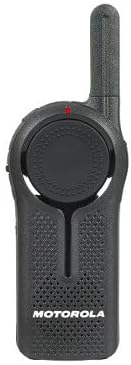
Resim: Ön view of the DLR1060 radio, featuring the prominent channel selector knob and integrated speaker.
4. İletim ve Alma
- İletmek için, tuşuna basın ve basılı tutun Bas Konuş (PTT) Telsizin yan tarafındaki düğmeye basın. Mikrofona net bir şekilde konuşun.
- Yanıtı dinlemek için PTT düğmesini bırakın.
- İletişim kurmak istediğiniz kişiyle aynı kanalda olduğunuzdan emin olun.
5. Private Communication (Radio Profile İD)
- The DLR1060 uses a unique 4-digit Radio Profile ID for private communication. This ID must be programmed into all radios intended for a private group.
- Refer to the Computer Programming Software (CPS) manual for detailed instructions on setting up and managing Radio Profile IDs and Private Groups.
Bakım
Radyo Temizliği
- Radyo dışını yumuşak bir bezle silin.amp Kumaş.
- Radyonun devrelerine zarar verebileceğinden, sert kimyasallar, temizleme çözücüleri veya güçlü deterjanlar kullanmayın.asing ve iç bileşenler.
- Ensure the radio is powered off and disconnected from any charging accessories before cleaning.
Pil Bakımı
- Always use genuine Motorola batteries and charging accessories.
- Pili aşırı sıcaklıklara maruz bırakmaktan kaçının.
- If the radio will not be used for an extended period, store the battery separately in a cool, dry place.
Sorun giderme
| Sorun | Olası Çözüm |
|---|---|
| Radyo açılmıyor. | Pilin tam şarjlı olduğundan ve doğru şekilde takıldığından emin olun. |
| İletim veya alım yapılamıyor. | Verify that all radios are on the same channel and have the correct Radio Profile ID. Check if the battery is low. |
| Ses kalitesi kötü veya statik. | Move closer to the other radio or to an open area. Check for obstructions. Ensure the antenna is clear. |
| Pil ömrü beklenenden daha kısa. | Ensure the battery is fully charged before use. Battery performance can degrade over time; consider replacing older batteries. |
Özellikler
| Özellik | Detay |
|---|---|
| Frekans Bandı | 900 MHz ISM (License-Free) |
| Kanallar | 6 |
| Menzil | Up to 300,000 sq ft / 20 Floors |
| Pil Ömrü | 14 saate kadar (tipik kullanım) |
| Dayanıklılık Standartları | Military Standards 810 C, D, E, F, G |
| Konut Malzemesi | Polikarbonat |
| FCC Kimliği | AZ489FT5870 |
| Uyumlu Cihazlar | Speaker, Headphone, Laptop (for CPS) |
| Renk | Siyah |
Garanti ve Destek
For detailed warranty information and technical support, please refer to the documentation provided with your product or visit the official Motorola Solutions webSite. Satın alma fişinizi, garanti talepleriniz için satın alma belgeniz olarak saklayın.


