1. Giriş
Thank you for choosing the EvoFox Deathray V2 Gaming Keyboard and Mouse Combo. This manual will guide you through the setup, operation, and maintenance of your new gaming peripherals. Designed for precision and comfort, this combo enhances your gaming and productivity experience.

Image: The EvoFox Deathray V2 Gaming Keyboard and Mouse Combo, showcasing both devices connected via their braided cables.
2. Paket İçeriği
- EvoFox Deathray V2 Gaming Keyboard
- EvoFox Deathray V2 Gaming Mouse
- Kullanım Kılavuzu (bu belge)
3. Kurulum Talimatları
- Klavyeyi Bağlayın: Plug the USB connector of the EvoFox Deathray V2 Keyboard into an available USB port on your computer.
- Fareyi Bağlayın: Plug the USB connector of the EvoFox Deathray V2 Mouse into another available USB port on your computer.
- Sürücü Kurulumu: İşletim sisteminiz gerekli sürücüleri otomatik olarak algılayıp yüklemelidir. Temel işlevler için genellikle ek yazılım kurulumu gerekmez.
- Atama: Place the keyboard and mouse on a flat, stable surface for optimal performance.
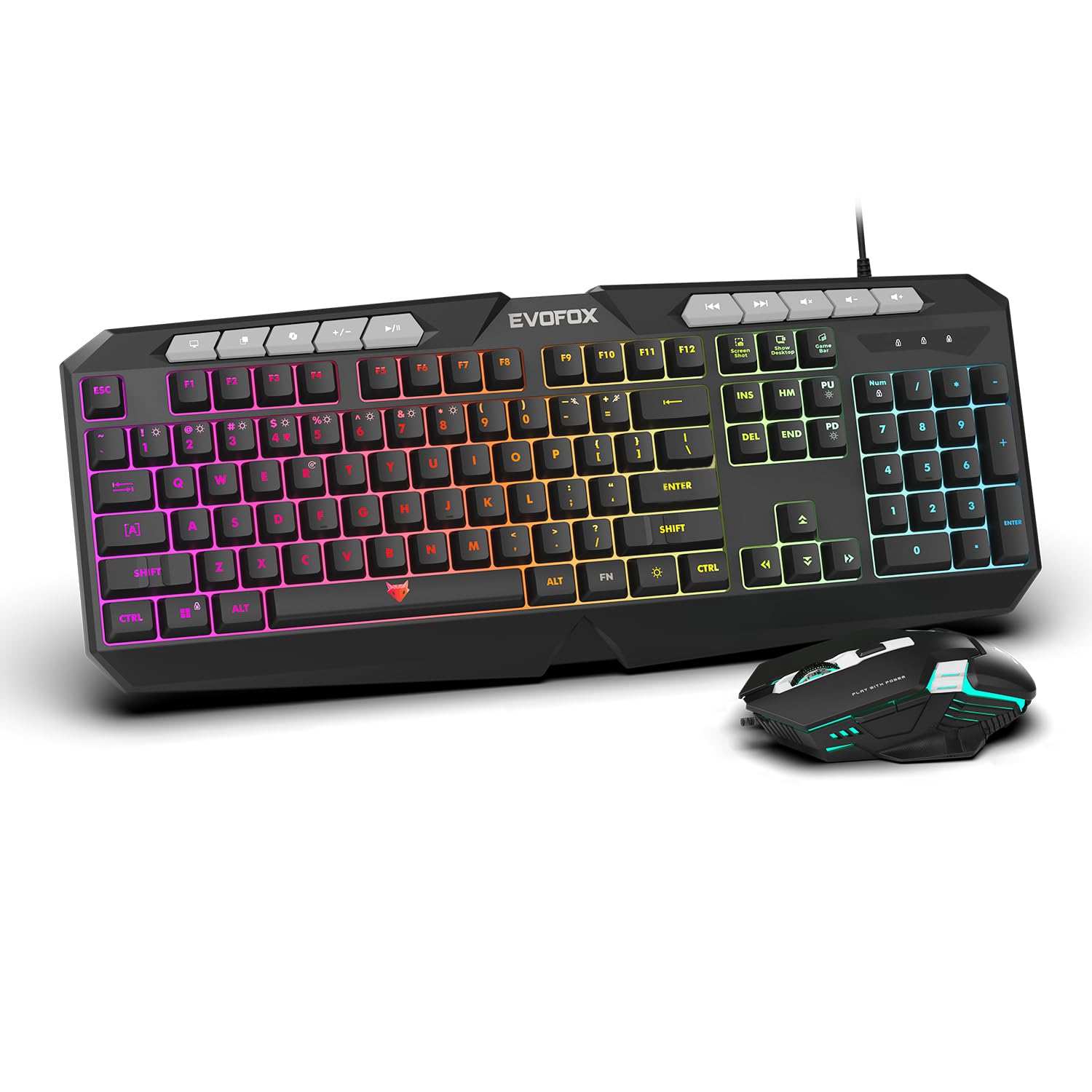
Resim: Yakın çekim view of the EvoFox Deathray V2 Keyboard and Mouse, illustrating their wired connection readiness.
4. Klavyenin Kullanımı
4.1. Temel İşlevler
The EvoFox Deathray V2 Keyboard features a full-size layout with standard QWERTY keys, a numeric keypad, and function keys (F1-F12).
4.2. Multimedya Tuşları
Dedicated multimedia keys are located above the function keys for quick access to media controls:
- Sesi Açma/Kapatma/Sessizleştirme: Ses seviyelerini kontrol edin.
- Play/Pause, Previous/Next Track: Medya oynatımını yönetin.
4.3. Özel Fonksiyon Tuşları
The keyboard includes special shortcut keys for enhanced productivity and gaming:
- Ekran Görüntüsü: Captures a screenshot of your display.
- Masaüstünü göster: Minimizes all open windows to show the desktop.
- Xbox Game Bar: Opens the Xbox Game Bar for gaming features.
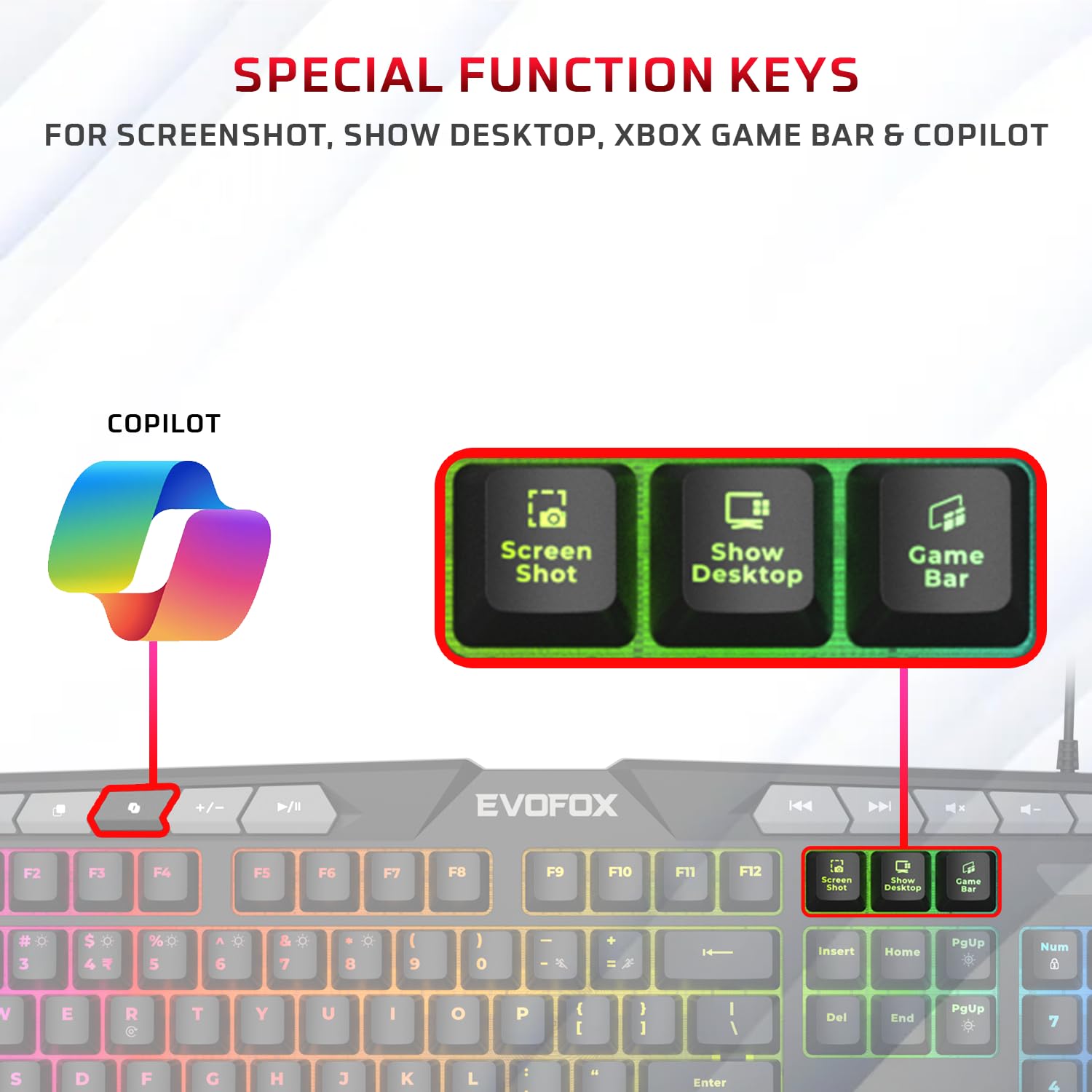
Resim: Ayrıntılı view of the EvoFox Deathray V2 Keyboard highlighting the dedicated Screenshot, Show Desktop, and Game Bar keys.
4.4. Hayalet Tuş Engelleme
The keyboard features 19 anti-ghosting keys, ensuring that multiple simultaneous key presses are registered accurately, which is crucial for gaming.

Image: The EvoFox Deathray V2 Keyboard, visually indicating the 19 anti-ghosting key zones for precise input.
5. Fareyi Çalıştırma
5.1. Düğmeler ve İşlevler
The EvoFox Deathray V2 Mouse features 6 buttons for versatile control:
- Sol Tıklama
- Sağ Tık
- Kaydırma Tekerleği (Tıklanabilir)
- DPI Ayar Düğmesi
- İleri Düğmesi
- Geri Düğmesi
5.2. DPI Ayarlaması
The mouse offers adjustable DPI (Dots Per Inch) settings to change cursor sensitivity. Press the DPI button located behind the scroll wheel to cycle through the available DPI levels:
- 1200 DPI
- 1800 DPI
- 2400 DPI
- 3600 DPI
Each DPI level may be indicated by a specific LED light pattern or color change on the mouse.

Image: The EvoFox Deathray V2 Mouse, illustrating its ergonomic design and the DPI adjustment button.

Image: A close-up of the EvoFox Deathray V2 Mouse, highlighting its 6-button design, rugged braided cable, and magnetic ring for data transmission.
6. Lighting Customization
6.1. Klavye RGB Arka Aydınlatması
The EvoFox Deathray V2 Keyboard features 6-zone RGB backlighting with multiple lighting modes. Use the dedicated lighting control keys (often marked with a light bulb icon or specific function key combinations) to cycle through different effects and adjust brightness.
- 8 Aydınlatma Modu: Cycle through various preset lighting effects.
- Özel Aydınlatma: Some modes may allow for custom color assignments or patterns.

Image: The EvoFox Deathray V2 Keyboard displaying its vibrant 6-zone customizable RGB backlighting.
6.2. Mouse LED Lighting
The EvoFox Deathray V2 Mouse features 7-color LED lighting, often with a breathing effect, which changes automatically. There are typically no user-adjustable settings for the mouse lighting beyond its default cycling pattern.

Image: The EvoFox Deathray V2 Mouse illuminated with its 7-color rainbow LED lighting, featuring a breathing effect.
7. Bakım
Proper maintenance ensures the longevity and optimal performance of your EvoFox Deathray V2 combo.
- Temizlik: Klavyeyi ve fareyi silmek için yumuşak, kuru bir bez kullanın. İnatçı kirler için, biraz daha yumuşak bir bez yeterli olacaktır.amp Cihazlara sıvı girmemesini sağlamak için bez kullanılabilir. Sert kimyasallardan veya aşındırıcı malzemelerden kaçının.
- Toz Giderimi: Klavye tuşlarının arasında ve fare sensörünün çevresinde biriken toz ve kalıntıları temizlemek için basınçlı hava kullanın.
- Kablo Bakımı: Avoid sharp bends or excessive pulling on the braided cables to prevent damage.
- Depolamak: Uzun süre kullanılmadığı zamanlarda cihazları temiz, kuru bir ortamda, doğrudan güneş ışığından ve aşırı sıcaklıklardan uzakta saklayın.

Image: A close-up of the EvoFox Deathray V2 Keyboard, highlighting its durable design with a 1.8m braided cable and soft membrane keys.
8. Sorun Giderme
| Sorun | Olası Neden | Çözüm |
|---|---|---|
| Klavye/Fare yanıt vermiyor | Gevşek USB bağlantısı, arızalı USB portu, sürücü sorunu. |
|
| Anahtarlar kayıt olmuyor veya hayalet oluyor | Software conflict, physical obstruction, hardware issue. |
|
| Fare imleci düzensiz veya hareket etmiyor | Dirty sensor, unsuitable surface, faulty sensor. |
|
| RGB aydınlatma çalışmıyor | Lighting mode off, brightness too low, software issue. |
|
9. Özellikler
| Özellik | Detay |
|---|---|
| Ürün Modeli | V2 - 2 in 1 |
| Bağlantı | Kablolu USB |
| Klavye Türü | Membran, Tam Boy |
| Klavye Arka Aydınlatma | 6-Zone RGB with 8 modes |
| Anti-Ghosting | 19 Anahtarlar |
| Fare Düğmeleri | 6 Buttons (Left, Right, Scroll Click, DPI, Forward, Backward) |
| Fare DPI Ayarları | 1200 / 1800 / 2400 / 3600 Çözünürlük |
| Fare Aydınlatması | 7-Color LED Lighting (Breathing Effect) |
| Kablo Tipi | Braided Cable (1.8m for keyboard) |
| Fare Anahtarları | Huano switches, rated for 10 million clicks |
| Ürün Boyutları (Klavye) | 50x18x4 cm |
| Ürün Ağırlığı | 800 gr |
| Menşei ülke | Çin |
10. Garanti ve Destek
EvoFox products are designed for durability and performance. For warranty information, technical support, or service inquiries, please refer to the official EvoFox websiteye gidin veya doğrudan müşteri destekleriyle iletişime geçin.
Üretici: Allied Electronics & Magnetics Özel Limited Şirketi
Adres: C-64/4, Okhla Phase - 2, New Delhi - 110020, India
Garanti talepleri için lütfen satın alma belgenizi saklayın.
11. Güvenlik Bilgileri
- Do not expose the devices to liquid or excessive moisture.
- Aşırı sıcaklıklardan kaçının.
- Do not attempt to disassemble or repair the devices yourself. This will void the warranty.
- Çocukların erişemeyeceği yerde saklayınız.


