1. Giriş ve Üzeriview
The Moxa NPort 5230-T is a 2-port industrial device server designed to connect serial devices to an Ethernet network. It features one RS-232 port and one RS-422/485 port, enabling seamless integration of legacy serial equipment into modern IP-based systems. This device server is built for harsh industrial environments, supporting an operating temperature range of -40 to 75°C. It provides reliable and robust serial-to-Ethernet connectivity for various applications.
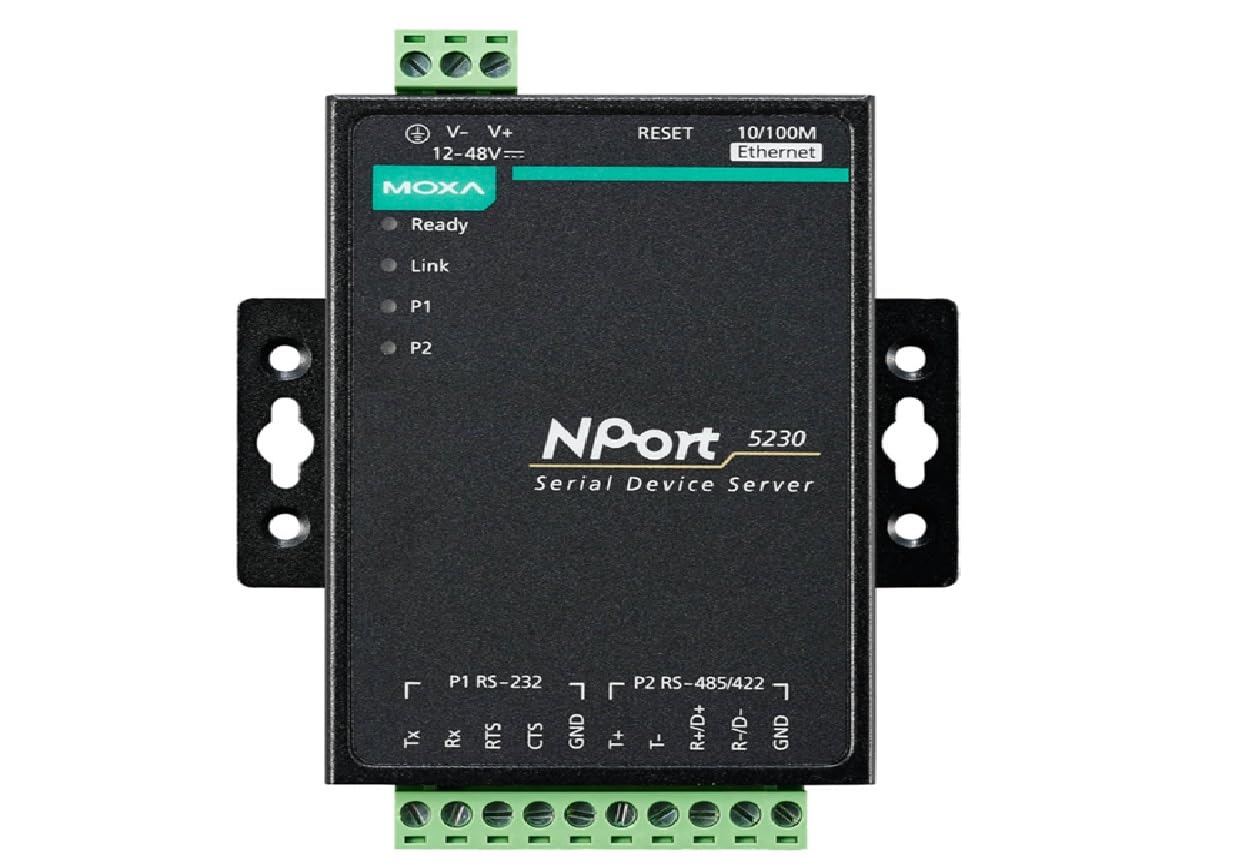
Figure 1: Moxa NPort 5230-T Device Server. This image displays the compact design of the NPort 5230-T, highlighting its serial and Ethernet connectivity options.
2. Temel Özellikler
- Geniş Çalışma Sıcaklığı: Designed for industrial use with a temperature range of -40 to 75°C.
- Kompakt Tasarım: Facilitates easy installation in space-constrained environments.
- Versatile Socket Modes: Supports TCP server, TCP client, and UDP modes for flexible network communication.
- Easy Configuration: Utilizes an intuitive Windows utility for straightforward setup of multiple device servers.
- Automatic Data Direction Control (ADDC): Ensures reliable data transmission for 2-wire and 4-wire RS-485 connections.
- Ağ Yönetimi: Includes SNMP MIB-II support for efficient network monitoring and management.
- Çift Seri Portlar: One RS-232 port and one configurable RS-422/485 port.
3. Paket İçeriği
Lütfen paketinizin aşağıdaki öğeleri içerdiğinden emin olun:
- Moxa NPort 5230-T Device Server Unit
- Hızlı Kurulum Kılavuzu
- Garanti Kartı
Not: The power supply (e.g., PWR-12150-USJP-SA-T) is not included and must be purchased separately.
4. Kurulum ve Kurulum
- Montaj: Securely mount the NPort 5230-T in your desired location, ensuring adequate ventilation and access to ports. The compact design allows for DIN-rail or panel mounting (mounting kits sold separately if not included).
- Gücü bağlayın: Connect a compatible 12-48 VDC power adapter (not included) to the device server's power input terminal. Ensure the power source meets the device's specifications.
- Ethernet'i bağlayın: Connect an Ethernet cable from your network switch or router to the NPort 5230-T's Ethernet port.
- Seri Cihazları Bağlayın:
- For RS-232 devices, connect to the RS-232 port using an appropriate serial cable.
- For RS-422/485 devices, connect to the configurable RS-422/485 port. Ensure correct wiring for 2-wire or 4-wire configurations.
- Başlangıç konfigürasyonu:
- Install the Moxa NPort Windows utility on a computer connected to the same network.
- Use the utility to discover the NPort 5230-T on the network.
- Configure network settings (IP address, subnet mask, gateway) and serial port parameters (baud rate, data bits, parity, stop bits, flow control) according to your application requirements.
- Set the desired socket mode (TCP Server, TCP Client, UDP) for each serial port.
5. Kullanım Talimatları
Once configured, the NPort 5230-T operates by transparently converting serial data to Ethernet packets and vice-versa. The operational mode depends on the socket mode configured for each serial port:
- TCP Sunucu Modu: The NPort 5230-T listens for incoming TCP connections from host computers. Once a connection is established, serial data is transmitted over the TCP connection.
- TCP İstemci Modu: The NPort 5230-T initiates a TCP connection to a specified host IP address and port. This is useful for connecting to a central server or another device server.
- UDP Modu: Data is transmitted as UDP packets, which is connectionless. This mode is suitable for applications where speed is critical and some data loss is acceptable, or for broadcast/multicast scenarios.
- Real COM Mode: (Configured via the Windows utility) This mode allows Windows applications to access the serial ports of the NPort 5230-T as if they were local COM ports on the PC.
For RS-485 communication, the Automatic Data Direction Control (ADDC) feature automatically handles the data flow direction, eliminating the need for software control and simplifying integration.
6. Bakım
To ensure optimal performance and longevity of your NPort 5230-T, follow these maintenance guidelines:
- Temizlik: Periodically clean the exterior of the device with a soft, dry cloth. Do not use liquid or aerosol cleaners.
- Donanım Yazılımı Güncellemeleri: Moxa'yı kontrol edin website regularly for firmware updates. Keeping the firmware up-to-date can improve performance, add features, and address security vulnerabilities.
- Çevresel Koşullar: Ensure the device operates within its specified temperature and humidity ranges (-40 to 75°C). Avoid exposing it to excessive dust, moisture, or direct sunlight.
- Kablo Bütünlüğü: Periodically inspect all connected cables (power, Ethernet, serial) for damage or loose connections.
7. Sorun Giderme
| Sorun | Olası Neden | Çözüm |
|---|---|---|
| Cihaz açılmıyor. | No power, incorrect power supply, or faulty power connection. | Verify power source, ensure correct voltage (12-48 VDC), and check power cable connections. Confirm power supply is compatible and functional. |
| Device not found by Windows utility. | Network connectivity issue, incorrect IP settings, or firewall blocking. | Check Ethernet cable connection. Ensure the PC and NPort are on the same subnet. Temporarily disable firewall on PC for testing. Reset NPort to factory defaults if necessary. |
| Serial device not communicating. | Incorrect serial port settings, wrong cable, or device incompatibility. | Verify baud rate, data bits, parity, stop bits, and flow control settings match the serial device. Check serial cable wiring (straight-through vs. null modem). Ensure ADDC is correctly configured for RS-485. |
| Intermittent network connection. | Faulty Ethernet cable, network congestion, or environmental interference. | Replace Ethernet cable. Check network load. Ensure device is not near strong electromagnetic interference sources. |
8. Özellikler
| Parametre | Detay |
|---|---|
| Örnek | Kuzey Limanı 5230-T |
| Seri Portlar | 2 (1 x RS-232, 1 x RS-422/485) |
| Ethernet Bağlantı Noktaları | 1 x 10/100BaseT(X) auto-sensing |
| Çalışma Sıcaklığı | -40 ila 75°C (-40 ila 167°F) |
| Giriş Voltage | 12 to 48 VDC (Power supply not included) |
| Socket Modes | TCP Sunucusu, TCP İstemcisi, UDP |
| Yönetmek | Windows Utility, Web Console, Telnet Console, SNMP MIB-II |
| Automatic Data Direction Control | Yes, for 2-wire and 4-wire RS-485 |
| Boyutlar | Compact design (specific dimensions not provided in source, general statement) |
9. Garanti ve Destek
Moxa products are designed for high reliability and performance. For detailed warranty information, please refer to the warranty card included in your package or visit the official Moxa website. Technical support is available through Moxa's global support channels, including online resources, FAQs, and direct contact options. Please have your product model and serial number ready when contacting support.
For the latest drivers, utilities, and documentation, please visit the official Moxa support webalan: www.moxa.com/support


