giriiş
This manual provides essential instructions for the safe and efficient use of your ZEBRONICS EnergiTank 10R1 10000 mAh Power Bank. Please read this manual thoroughly before operating the device and retain it for future reference.

Image: ZEBRONICS EnergiTank 10R1 10000 mAh Power Bank in black, held in a hand, showcasing its compact size and integrated cables.
Paket İçeriği
Paketin içinde tüm öğelerin mevcut olduğundan emin olun:
- ZEBRONICS EnergiTank 10R1 Power Bank - 1 unit
- Charging Cable (for power bank) - 1 unit
- QR Code Guide - 1 unit

Image: The ZEBRONICS EnergiTank 10R1 power bank with its integrated Type-C and Lightning cables.
Ürün Özellikleri
- 10,000mAh Kapasite: Provides efficient power for multiple device charges.
- 22.5W Rapid Charging: Supports fast charging for compatible smartphones and tablets.
- Dahili Kablolar: Includes integrated Type-C and Lightning output cables for convenience.
- Çoklu Çıktılar: Features a Type-C port (DC 5V/3A, 9V/2.2A, 10V/2.25A, 12V/1.67A), Type-C cable (DC 5V/3A, 9V/2.2A, 12V/1.67A), and Lightning cable (DC 5V/2A).
- Tip-C Girişi: Recharges the power bank via a Type-C port (DC 5V/3A, 9V/2A, 12V/1.5A).
- LED Yüzdesitage Gösterge: Displays real-time battery status.
- Kompakt Tasarım: Features a sleek metallic finish and a convenient carry loop.
- Güvenlik Koruması: Incorporates overcharge, overload, and short-circuit protection.

Image: Highlighting the 10000 mAh capacity and 22.5W fast charging output.

Image: Close-up of the power bank showing the Type-C input and output port.
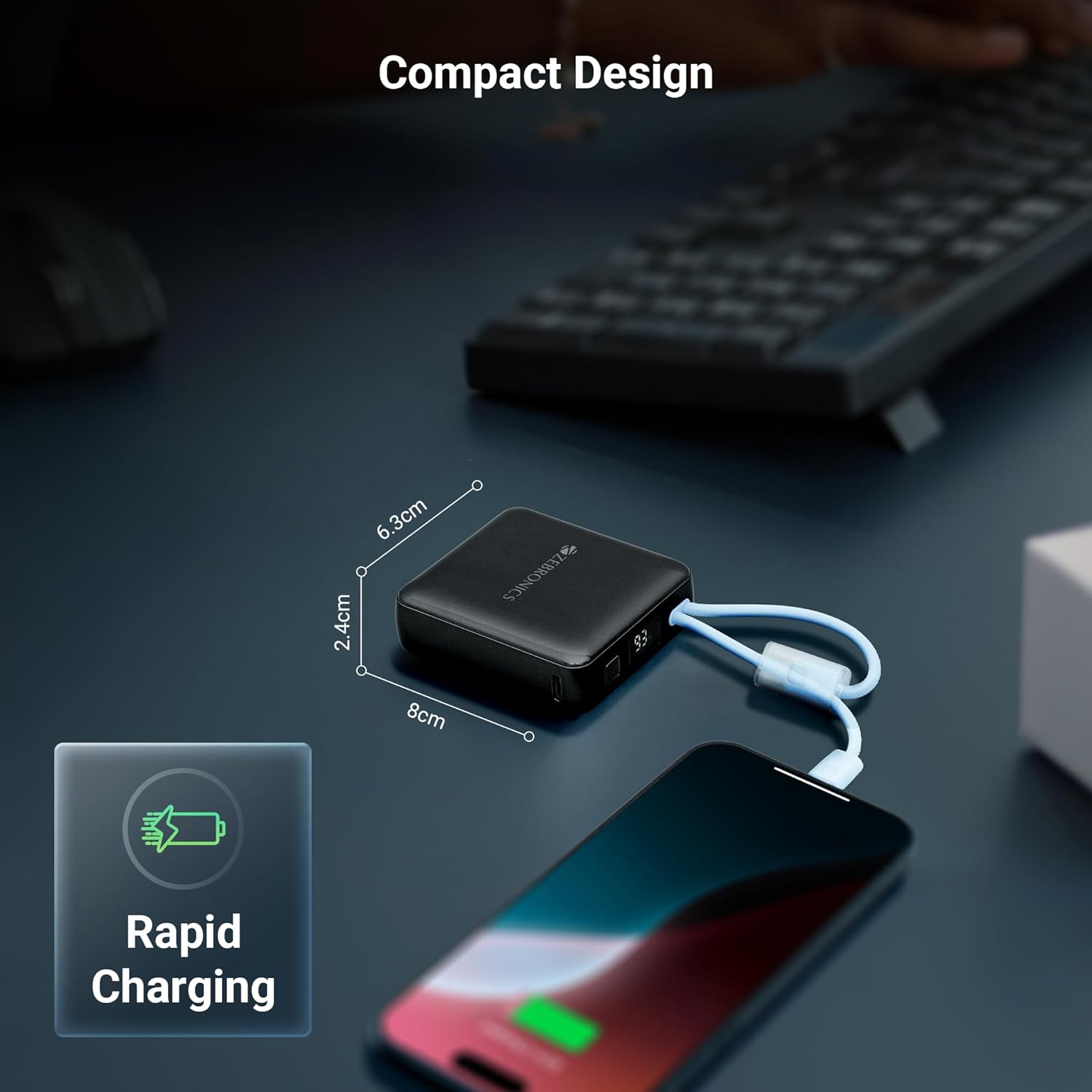
Image: Collage showing attached cables, LED display, and carry loop design.
İlk Kurulum
- Paketi aç: Powerbank'i ve tüm aksesuarlarını ambalajından dikkatlice çıkarın.
- İlk Kullanım: It is recommended to fully charge the power bank before its first use. Connect the power bank to a suitable USB power adapter (not included) using the provided Type-C charging cable.
- Pil Seviyesini Kontrol Edin: The LED percentage indicator will show the current battery level during charging and discharge.
Kullanım Talimatları
Cihazlarınızı Şarj Etme
- Dahili Kabloların Kullanımı: Select the appropriate built-in cable (Type-C or Lightning) for your device. Connect the cable directly to your smartphone, tablet, or other compatible device.
- Type-C bağlantı noktası kullanılarak: For devices requiring a separate cable or if the built-in cables are in use, connect your device's charging cable to the Type-C output port on the power bank.
- Şarjı Başlatın: Power bank, cihazınızı otomatik olarak şarj etmeye başlayacaktır. LED ekran, kalan pil yüzdesini gösterecektir.tage.
Güç Bankasını Şarj Etme
- Connect Input Cable: Use the provided Type-C charging cable to connect the power bank's Type-C input port to a USB wall adapter or a computer's USB port.
- Monitör Şarjı: The LED display will show the charging progress. When the display shows 100%, the power bank is fully charged.
- Bağlantıyı kes: Tamamen şarj olduktan sonra, güç bankasını güç kaynağından ayırın.

Image: The compact design of the power bank charging a smartphone, with dimensions indicated.
Bakım
Bakım ve Depolama
- Keep the power bank away from water, moisture, and liquids.
- Cihazı aşırı sıcaklıklara (sıcak veya soğuk) maruz bırakmaktan kaçının.
- Do not attempt to disassemble, repair, or modify the power bank.
- Cihazı yumuşak ve kuru bir bezle temizleyin. Sert kimyasallar veya aşındırıcı malzemeler kullanmayın.
- Kullanılmadığı zaman güç bankasını serin ve kuru bir yerde saklayın.
- For optimal battery health, fully charge the power bank at least once every three months if stored for extended periods.
Sorun giderme
Yaygın Sorunlar ve Çözümleri
- Power bank cihazları şarj etmiyor:
- Ensure the power bank has sufficient charge. Check the LED display.
- Verify that the charging cable (built-in or external) is securely connected to both the power bank and the device.
- Try a different charging cable or port on the power bank. - Taşınabilir şarj cihazı şarj olmuyor:
- Ensure the Type-C input cable is securely connected to the power bank and the power source.
- Try a different USB wall adapter or power source.
- Check if the charging cable itself is functional. - Yavaş şarj oluyor:
- Ensure your device supports fast charging and that the power bank is providing the appropriate output.
- Using a high-quality wall adapter for recharging the power bank can improve its charging speed.
- Environmental factors can affect charging speed.

Image: Illustrative image depicting the short circuit, overcharge, and overload protection features.
Teknik Özellikler
| Ürün Model Numarası | ZEB-PB 9 |
| Pil Kapasitesi | 10000 mAh |
| Çıkış Gücü | Maksimum 22.5W |
| Type-C Çıkış Bağlantı Noktası | DC 5V/3A, 9V/2.2A, 10V/2.25A, 12V/1.67A |
| Dahili Type-C Kablo Çıkışı | DC 5V/3A, 9V/2.2A, 12V/1.67A |
| Dahili Lightning Kablo Çıkışı | DC 5V/2A |
| Type-C Giriş Bağlantı Noktası | DC 5V/3A, 9V/2A, 12V/1.5A |
| Ebatlar (Paket) | 17.6x8.9x4.4 cm |
| Ürün Ağırlığı | 180 gr |
| Renk | Siyah |
| Bağlayıcı Türü | USB Tip C |
| Güç Kaynağı | Pil |
Önemli Güvenlik Önlemleri
- Do not drop, puncture, or disassemble the power bank.
- Çocukların erişemeyeceği yerde saklayınız.
- Avoid placing the power bank near heat sources, direct sunlight, or in high humidity environments.
- Do not use the power bank if it has been damaged or submerged in water.
- Güç bankasını yerel yönetmeliklere uygun şekilde sorumlu bir şekilde atın.
Garanti ve Destek
Garanti Bilgileri
Your ZEBRONICS EnergiTank 10R1 Power Bank comes with a standard manufacturer's warranty. Please refer to the warranty card included in your package or visit the official ZEBRONICS website for detailed warranty terms and conditions. An optional 1-year extended warranty may be available for purchase.
Müşteri Desteği
For any product-related queries, technical assistance, or warranty claims, please contact ZEBRONICS customer support. Contact details can typically be found on the official ZEBRONICS webSitede veya ürün ambalajında.


