1. Giriş
The Tzone HTD701 is a digital temperature and humidity data logger designed for precise environmental monitoring. It simultaneously measures and records ambient temperature, dew point, wet bulb temperature, and relative humidity. Featuring a USB interface for automatic report generation and an intuitive display, it is suitable for various applications including laboratories, HVAC systems, greenhouses, and freezers.
2. Paket İçeriği

Paketin içinde tüm öğelerin mevcut olduğundan emin olun:
- 1 x Tzone HTD701 Temperature and Humidity Data Logger
- 1 x Temperature and Humidity Probe
- 1 x USB Type-C Kablosu
- 1 x Kullanım Kılavuzu
- 1 x Kalibrasyon Sertifikası
- 1 x Taşınabilir Saklama Kutusu
This image displays the complete contents of the Tzone HTD701 package, including the main data logger unit, the external temperature and humidity probe, a USB-C cable for data transfer, the user manual, a calibration certificate, and a protective portable box.
3. Ürün Bittiview

The HTD701 features an intuitive design with clearly labeled components for ease of use:
- LCD Ekran Görüntüsü: Shows current readings, settings, and data trends.
- ON/OFF/Backlight Key: Powers the device on/off and controls screen backlight.
- Geri Tuşu: Navigates back through menus.
- Çok Fonksiyonlu Tuş: Used for various menu selections and confirmations.
- Veri tutma: Freezes the current display readings.
- Max/Min/Avg Value: Displays maximum, minimum, and average recorded values.
- Temp Unit Switch: Toggles between °C, °F, and K temperature units.
- Pil kutusu: Houses the 3 AA batteries.
- Temp & RH Probe: External sensor for temperature and relative humidity measurements.
- USB Bağlantı Noktası: For data transfer and power supply.
Bu görüntü ayrıntılı bir bilgi sağlar view of the Tzone HTD701 data logger, highlighting its various buttons, the LCD screen, the external temperature and humidity probe, and other key features. Dimensions are also indicated.
4. Özellikler
- Simultaneous Measurement: Records ambient temperature (-40°C to 125°C), dew point (-40°C to 80°C), wet bulb temperature (-40°C to 80°C), and relative humidity (0 to 100% RH).
- Automatic Report Generation: Connect via USB to automatically generate TXT/CSV/XLS/PDF data reports without requiring special software.
- Büyük Veri Kapasitesi: 49,920 adede kadar veri grubunu saklayabilir.
- Ayarlanabilir Parametreler: Easily set temperature and humidity alarm ranges, auto-off mode, backlight time, and logging intervals.
- Sesli Alarmlar: Audible alerts when temperature or humidity exceeds set limits.
- Arka Işık Ekranı: Düşük ışık koşullarında bile net okunabilirlik sağlar.
- İnsancıl Tasarım: Anti-slip and anti-collision casing, foldable stand, and hanging design for versatile placement.
- Sıcaklık Birimi Anahtarlaması: Supports °C, °F, and K units.

This image illustrates the multi-functional aspects of the data logger, including data hold, auto-off, low power consumption, LCD display, and backlight.

This image highlights the user-friendly design elements such as replaceable batteries, USB power option, a flexible stand, and a hanging feature.
5. Kurulum ve Kurulum
- Pil Montajı: Cihazın arkasındaki pil bölmesini açın ve doğru kutuplara dikkat ederek 3 adet AA pil takın.
- Prob Bağlantısı: Connect the temperature and humidity probe to the designated port on the top of the data logger. Ensure a secure connection.
- Güç Açık: Press the ON/OFF button to power on the device. The LCD screen will illuminate.
- İlk Yerleştirme: Place the data logger in the desired monitoring location. Utilize the foldable stand for desktop use or the hanging design for elevated placement.
- Prob Yerleştirme: Carefully place the temperature and humidity probe within the area where measurements are to be taken. Ensure the probe is not obstructed and has adequate air circulation.
This video demonstrates the unboxing and initial setup of the Tzone HTD701 data logger, showing how to connect the probe and power on the device.
This video provides a visual guide on connecting the external probe and placing it in a measurement environment, such as a freezer, for data recording.
6. Operasyon
- Viewing Current Data: Upon powering on, the LCD will display current temperature, humidity, and a graph of recent data.
- Ekran Modlarını Değiştirme: Use the navigation buttons to cycle through different display modes, including dew point and wet bulb temperature readings.
- Veri tutma: Press the 'HOLD' button to freeze the current readings on the screen. Press again to release.
- Max/Min/Avg: Press the 'MAX/MIN/AVG' button to view the maximum, minimum, and average recorded values.
- Sıcaklık Birimi Anahtarı: Press the '°C/°F/K' button to change the temperature unit between Celsius, Fahrenheit, and Kelvin.

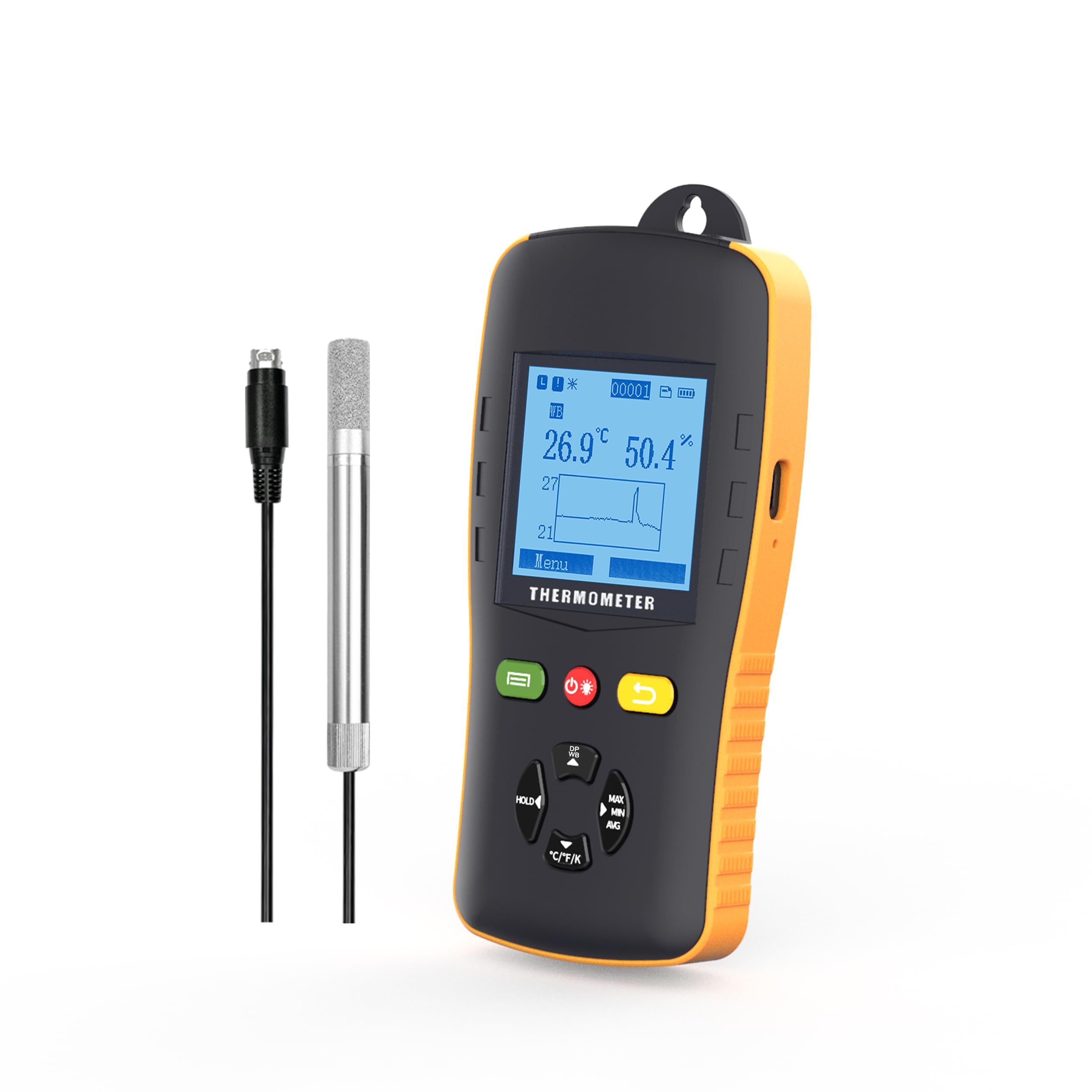
This image shows the Tzone HTD701 data logger actively monitoring and displaying temperature and humidity data, along with a graphical representation of the trends.
7. Data Logging and Reporting
- Setting Logging Parameters: Navigate to the 'Logging' menu to set the logging interval, start time, and file format (TXT, CSV, XLS, PDF).
- Starting Logging: Select 'Start Logging' from the menu to begin recording data. The device will log data at the set interval.
- Stopping Logging: To stop logging, navigate back to the 'Logging' menu and select 'Stop Logging'. Confirm your choice.
- Veri Transferi: Connect the data logger to a computer using the provided USB Type-C cable. The device will automatically generate data reports in the selected format.
- Accessing Reports: The generated reports can be found as removable storage on your computer. No special software is required for report generation.
This image demonstrates the Tzone HTD701 data logger connected to a laptop, showcasing its ability to automatically generate data reports in various formats (TXT, CSV, XLS, PDF) without the need for additional software.
8. Alarms and Settings
- Ayarlara Erişim: Navigate to the 'Menu' on the device and select 'Settings' to adjust various parameters.
- Setting Alarm Limits: In the 'Alert' menu, set the upper and lower limits for temperature and humidity. If readings exceed these limits, an audible alarm will sound.
- Auto-Off Mode: Configure the auto-off duration to conserve battery life.
- Aydınlatma süresi: Adjust the duration for which the screen backlight remains active.
- Kalibrasyon: The device comes with a calibration certificate. Refer to the 'Calibration' menu for any advanced calibration needs, if applicable.
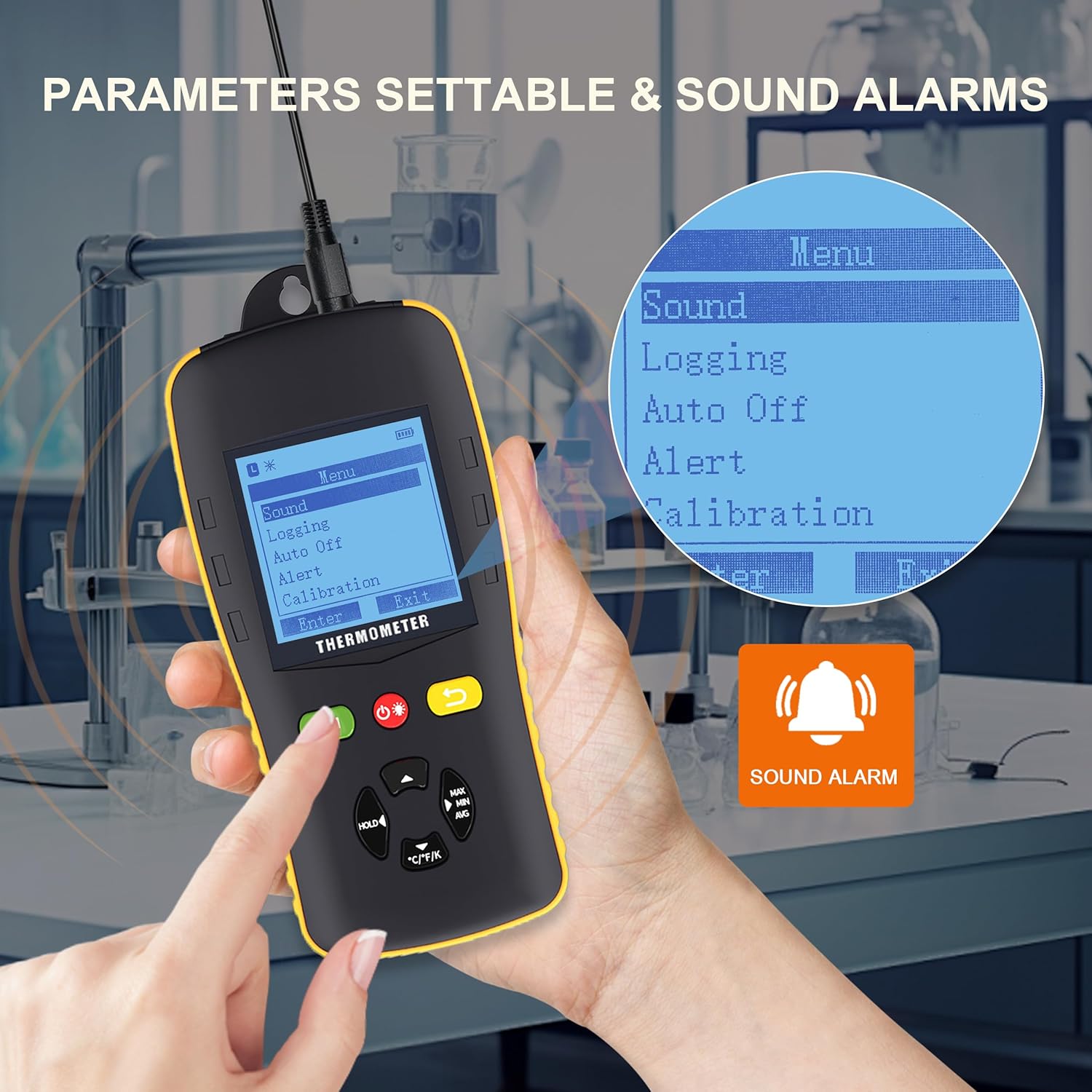
This image shows the Tzone HTD701 data logger's menu interface, illustrating how users can access and adjust various parameters such as sound settings, logging options, auto-off, alert thresholds, and calibration. A sound alarm icon is also visible.
9. Özellikler
| Parametre | Değer |
|---|---|
| Temperature Measurement Range (Environmental) | -40°C ila 125°C |
| Temperature Measurement Range (Dew Point) | -40°C ila 80°C |
| Temperature Measurement Range (Wet Bulb) | -40°C ila 80°C |
| Relative Humidity Measurement Range | %0 ila %100 RH |
| Sıcaklık Birimleri | °C / °F / K |
| Veri Depolama Kapasitesi | 49,920 grup |
| Çözünürlük | 0.1 |
| Ölçüm Oranı | 1 kez/saniye |
| Güç Kaynağı | 3 x 1.5V AA Batteries (included) |
| Bağlantı | USB Tip-C |
| Ürün Ağırlığı | 2.35 pound |
| Paket Boyutları | 10.83 x 8.82 x 3.11 inç |

This image visually summarizes the key technical specifications of the Tzone HTD701 data logger.
10. Bakım
- Temizlik: Wipe the device and probe with a soft, dry cloth. Do not use abrasive cleaners or solvents.
- Pil Değişimi: Replace batteries when the low battery indicator appears on the screen to ensure continuous operation and data integrity.
- Depolamak: When not in use for extended periods, remove the batteries and store the device in its portable box in a cool, dry place away from direct sunlight and extreme temperatures.
- Prob Bakımı: Handle the external probe with care. Avoid bending or damaging the cable and sensor tip.
11. Sorun Giderme
- Cihaz Açılmıyor:
- Pillerin doğru takılıp takılmadığını ve yeterli şarj seviyesine sahip olup olmadığını kontrol edin. Gerekirse değiştirin.
- Yanlış Okumalar:
- Ensure the probe is clean and free from dust or debris.
- Probun ana üniteye güvenli bir şekilde bağlı olduğundan emin olun.
- Allow the device to stabilize in the measurement environment for a few minutes.
- Data Not Logging:
- Check logging settings to ensure a logging interval is set and logging has been initiated.
- Verify that the device has sufficient memory capacity.
- USB Bağlantı Sorunları:
- USB kablosunun hem cihaza hem de bilgisayara doğru şekilde bağlı olduğundan emin olun.
- Bilgisayarınızda farklı bir USB bağlantı noktası deneyin.
- Alarm Çalmıyor:
- Check the 'Alert' settings to ensure alarm limits are correctly configured and the alarm mode is enabled.
- Verify the device's volume settings.
12. Garanti ve Destek
Tzone products are covered by a standard manufacturer's warranty. For specific warranty details, technical support, or service inquiries, please refer to the contact information provided in the product packaging or visit the official Tzone webSite. Satın alma fişinizi, garanti talepleriniz için satın alma belgeniz olarak saklayın.


