1. Giriş
This manual provides detailed instructions for setting up, operating, and maintaining your KALINCO Smart Watch, Model IDW25. Please read this manual thoroughly before using the device to ensure proper function and safety.
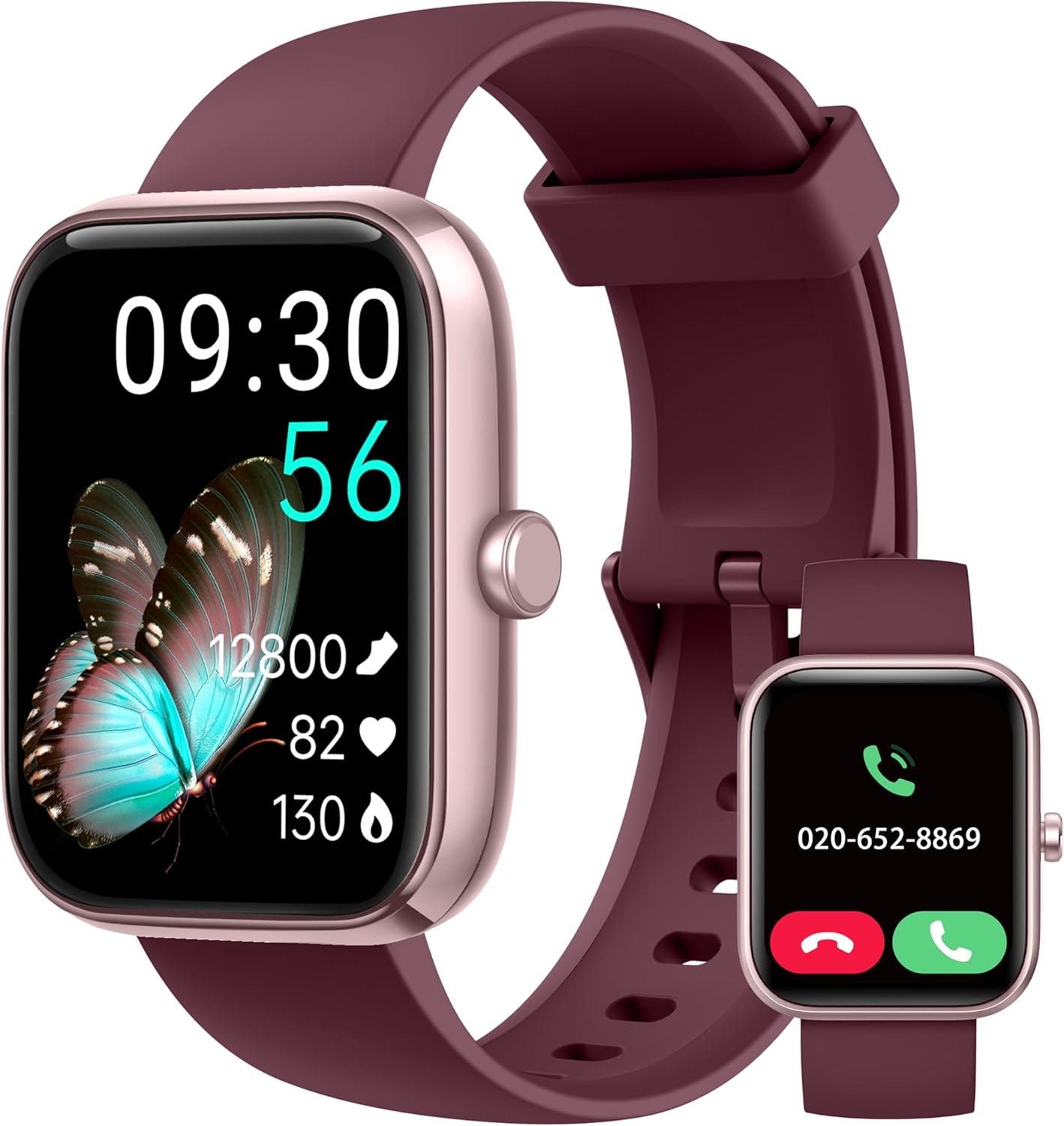
Image: The KALINCO Smart Watch IDW25, featuring a rectangular display and a plum purple silicone strap. The main screen shows time, date, steps, heart rate, and blood oxygen. A smaller inset image shows the watch displaying an incoming call.
2. Paket İçeriği
Paketin içerisinde tüm ürünlerin mevcut olduğundan emin olun:
- KALINCO Smart Watch (Model IDW25)
- Şarj kablosu
- Kullanım Kılavuzu (bu belge)

Image: A visual representation of the KALINCO Smart Watch package contents, including the watch, charging cable, and user manual. Dimensions of the watch and strap are also shown.
3. Kurulum Kılavuzu
3.1 Cihazı Şarj Etme
Before first use, fully charge your KALINCO Smart Watch. The watch has a battery life of approximately 7 days with normal use, 20 days in power-saving mode, and 30 days in standby mode. A full charge takes about 2 hours.
- Manyetik şarj kablosunu saatin arkasındaki şarj bağlantı noktalarına bağlayın.
- Kablonun USB ucunu standart bir USB güç adaptörüne (dahil değildir) veya bir bilgisayarın USB portuna takın.
- Saatin ekranı şarj durumunu gösterecektir.

Image: An illustration detailing the battery performance of the KALINCO Smart Watch, showing 2 hours charging time, 7 days normal use, 20 days power-saving mode, and 30 days standby time.
3.2 Uygulama Kurulumu ve Eşleştirme
The KALINCO Smart Watch requires the "VeryFit" app for full functionality. The watch is compatible with Android 6.0+ and iOS 9.0+ smartphones. It is not compatible with tablets or computers.
- Download the "VeryFit" app from the App Store (for iOS) or Google Play Store (for Android).
- VeryFit uygulamasını açın ve hesap oluşturmak veya giriş yapmak için ekrandaki yönergeleri izleyin.
- Akıllı telefonunuzda Bluetooth’u etkinleştirin.
- In the VeryFit app, navigate to the device pairing section and search for your KALINCO Smart Watch.
- Eşleştirmeyi başlatmak için bulunan cihazlar listesinden saatinizi seçin. Hem saatinizde hem de akıllı telefonunuzda eşleştirme isteğini onaylayın.
Note: The watch strap buckle contains nickel, which may cause allergic reactions in sensitive individuals.
4. Kullanım Talimatları
4.1 Temel Gezinme
- Dokunmatik ekran: Menüler ve özellikler arasında gezinmek için sola, sağa, yukarı veya aşağı kaydırın. Seçmek için dokunun.
- Yan Düğme: Press to wake the screen, return to the home screen, or access the app list. Press and hold to activate Alexa.
- Uyanmak için Yükselt: Enable this feature in the VeryFit app to automatically turn on the screen when you raise your wrist.
4.2 Call and Message Functions
Once connected to your smartphone via the VeryFit app, you can manage calls and receive notifications directly on your watch.
- Çağrıları Cevaplama/Yapma: You can answer incoming calls or make calls directly from the watch when it is connected to your phone.
- Mesaj Bildirimleri: Receive alerts for messages from apps like WhatsApp, SNS, etc. A red dot on the watch face indicates unread notifications.
- Önemli Not: The watch cannot be used to reply to text messages.
- Ayarlar: Adjust sound volume, vibration intensity, or enable silent mode via the watch settings or VeryFit app.
- Rahatsız Etmeyin (DND) Modu: Easily set up DND mode for periods when you wish to avoid interruptions.

Image: A display showing the KALINCO Smart Watch's interface for making and answering calls, including a dial pad, call history, and frequent contacts. The VeryFit app interface for call settings is also visible.

Image: Screenshots of the KALINCO Smart Watch displaying various smart reminders, including SNS notifications (WhatsApp, Facebook), washing hand reminders, walking reminders, and drinking water reminders.
4.3 Alexa Sesli Asistanı
Your KALINCO Smart Watch features built-in Alexa, allowing you to perform various tasks using voice commands.
- Etkinleştirme: Press and hold the power button or tap the Alexa icon on the watch screen to wake Alexa.
- Komutlar: Speak into your watch to ask questions, set alarms, check the weather, control Alexa-compatible smart devices, and more.

Image: A user interacting with the KALINCO Smart Watch's Alexa voice assistant, demonstrating commands like "Alexa, turn off the light," "Alexa, will it rain today?", and "Alexa, set a 10 minute timer."
4.4 Sağlık İzleme
Bu saat, kapsamlı sağlık takibi özellikleri sunmaktadır.
- Nabız İzleme: Continuously monitors your heart rate 24/7 and provides instant alerts for irregular readings.
- Kan Oksijen (SpO2) İzlemesi: Kanınızdaki oksijen seviyesini ölçer.
- Stres İzleme: Gün boyunca stres seviyenizi takip eder.
- Simultaneous Measurement: Utilize the upgraded detection technology to measure heart rate, blood oxygen, and stress simultaneously with a single tap.
- Uyku Takibi: Monitors your sleep patterns and breathing quality in real-time, providing insights into your sleep health.
- Sağlık Hatırlatmaları: Set reminders to drink water, wash hands, and move around to promote healthy habits.
- Adet Döngüsü Takibi: A dedicated feature for women to track and manage their menstrual cycles.

Image: Visuals of the KALINCO Smart Watch displaying heart rate, blood oxygen, stress levels, and sleep duration, highlighting its daily health care capabilities.

Image: A diagram illustrating the one-step health tracking feature, showing how heart rate, blood oxygen, and stress can be measured simultaneously with a single click on the watch.

Image: A screenshot of the VeryFit app displaying detailed sleep analysis, including awake time, REM sleep, light sleep, and deep sleep durations, along with a sleep score.

Image: A visual showing the menstrual cycle tracking feature within the VeryFit app, allowing users to track menstruation, prediction, and ovulation dates.
4.5 Fitness Takibi ve Spor Modları
The watch supports over 100 sports modes, with the ability to select up to 20 to display on the watch.
- Sport Selection: Choose from over 100 sports options in the VeryFit app and sync your preferred 20 to the watch.
- Otomatik Tanıma: The watch can intelligently recognize common exercises like running and walking.
- Veri görüntüleme: View real-time data such as time duration, calories burned, distance, average/max pace, and aerobic training effect directly on the watch. More detailed analysis is available in the VeryFit app.
- Bağlantılı GPS: Utilize your phone's GPS through the VeryFit app to track outdoor activity routes.
- Nefes Eğitimi: Use guided breathing exercises to aid relaxation and recovery after workouts.

Image: A visual demonstrating the KALINCO Smart Watch's extensive sports modes and advanced analysis, showing various exercise metrics like duration, calories, distance, steps, heart rate, and recovery time.

Resim: Bir kullanıcı viewing their exercise data and a map of their route, illustrating the connected GPS feature for outdoor activities.

Image: The KALINCO Smart Watch displaying the breathing training interface, showing a timer and a visual guide for inhalation and exhalation.
4.6 Diğer Özellikler
- Yüzleri İzle: Customize your watch face from various options in the VeryFit app or create your own.
- Telefonumu Bul: Saati kullanarak eşleştirilmiş akıllı telefonunuzu bulun.
- Hava Durumu Bildirimi: Receive weather forecasts directly on your watch.
- Unit Setting & Time Format: Adjust measurement units and time display format.
- Çalar Saat, Kronometre, Zamanlayıcı: Standart zaman tutma fonksiyonları.
- El feneri: Use the watch screen as a temporary light source.
- Screen Brightness & Screen-on Time: Optimum görünüm için ekran ayarlarını yapın viewve pil ömrü.

Image: A selection of customizable watch faces available for the KALINCO Smart Watch, including options to personalize time displays and colors.

Image: Screenshots showing various watch settings and utilities, including wake gesture, brightness adjustment, vibration adjustment, and flashlight function.

Image: Displays of the KALINCO Smart Watch showing weather forecast, music control, camera remote control, and the 'Find Phone' feature.

Image: Screenshots of the KALINCO Smart Watch demonstrating its alarm, stopwatch, timer, and Do Not Disturb (DND) mode functionalities.
5. Bakım
5.1 Saatinizi Temizleme
Regularly clean your watch and strap to ensure hygiene and proper function.
- Saatin ekranını ve gövdesini yumuşak bir bezle silin.amp Kumaş.
- Silikon kayış için hafif sabun ve su kullanın, ardından iyice durulayın ve kurulayın.
- Sert kimyasallar veya aşındırıcı malzemeler kullanmaktan kaçının.
5.2 Suya Dayanıklılık
The KALINCO Smart Watch has an IP68 waterproof rating, making it suitable for water sports like swimming. It also features a draining function to expel water from the speaker.
Important: The watch is not suitable for hot showers, saunas, or deep-sea diving, as extreme temperatures or high-pressure water can compromise the seal.

Image: The KALINCO Smart Watch submerged in water, illustrating its IP68 waterproof rating and showing the "Draining water..." function on the screen.
6. Sorun Giderme
- Saat açılmıyor: Saatinizin tam şarjlı olduğundan emin olun. Saatinizi en az 10 dakika şarj cihazına takın.
- Telefonla eşleştirilemiyor:
- Telefonunuzda Bluetooth'un etkin olduğundan emin olun.
- VeryFit uygulamasının yüklü ve açık olduğundan emin olun.
- Saatin telefonunuzun Bluetooth menzili içinde olup olmadığını kontrol edin.
- Hem telefonunuzu hem de saatinizi yeniden başlatın.
- Ensure your phone's operating system meets the compatibility requirements (Android 6.0+ or iOS 9.0+).
- Yanlış sağlık verileri:
- Saatin bileğinize tam oturduğundan, ancak çok da sıkı olmadığından emin olun.
- Saatin arkasındaki sensörü temizleyin.
- Ölçüm sırasında aşırı hareketlerden kaçınınız.
- Bildirimler görünmüyor:
- Check notification settings in the VeryFit app and on your phone.
- Saatinizin Bluetooth aracılığıyla telefonunuza bağlı olduğundan emin olun.
- Disable DND mode on the watch if it is active.
- Alexa yanıt vermiyor:
- Ensure the watch is connected to your phone and has an active internet connection.
- Check Alexa settings in the VeryFit app.
- Speak clearly and directly into the watch.
For further assistance, refer to the FAQ section within the VeryFit app.
7. Özellikler
| Özellik | Detay |
|---|---|
| Marka | KALINCO |
| Model Numarası | IDW25 |
| Ekran Boyutu | 1.83 inç |
| Ekran Çözünürlüğü | 240*284 |
| Ürün Ağırlığı | 2.89 ons (yaklaşık 82g) |
| Pil Türü | Lityum İyon (1 dahil) |
| Şarj Süresi | Yaklaşık 2 saat |
| Pil Ömrü (Normal Kullanım) | 7 güne kadar |
| Battery Life (Power Saving) | 20 güne kadar |
| Pil Ömrü (Bekleme) | 30 güne kadar |
| Suya Dayanıklılık | IP68 |
| Bağlantı | Bluetooth |
| Özel Özellik | Voice Assistant (Alexa Built-in) |
| Uyumlu Telefon Modelleri | Android 6.0+ and iOS 9.0+ smartphones |
| Renk | Plum Purple |
8. Garanti ve Destek
KALINCO offers a three-year warranty for this product. For warranty claims or technical support, please refer to the following resources:
- VeryFit Uygulaması: The app contains an E-manual, FAQ section, and Wellness Management tools.
- Üretici Webalan: Visit the official KALINCO website for additional support and contact information.


