1. Giriş
Thank you for choosing the ELISWEEN Wireless PC Gaming Controller. This controller is designed to provide a superior gaming experience across multiple platforms, including PC, Nintendo Switch, Android, and iOS devices. Featuring advanced Hall Effect joysticks, programmable back buttons, and customizable vibration, this manual will guide you through its setup, operation, and maintenance to ensure optimal performance.
2. Paket İçeriği
- ELISWEEN Wireless PC Gaming Controller
- USB-C Şarj Kablosu (1.5m)
- 2.4GHz USB Donanım Kilidi
- Kullanıcı Kılavuzu
3. Ürün Bittiview
Familiarize yourself with the controller's components:
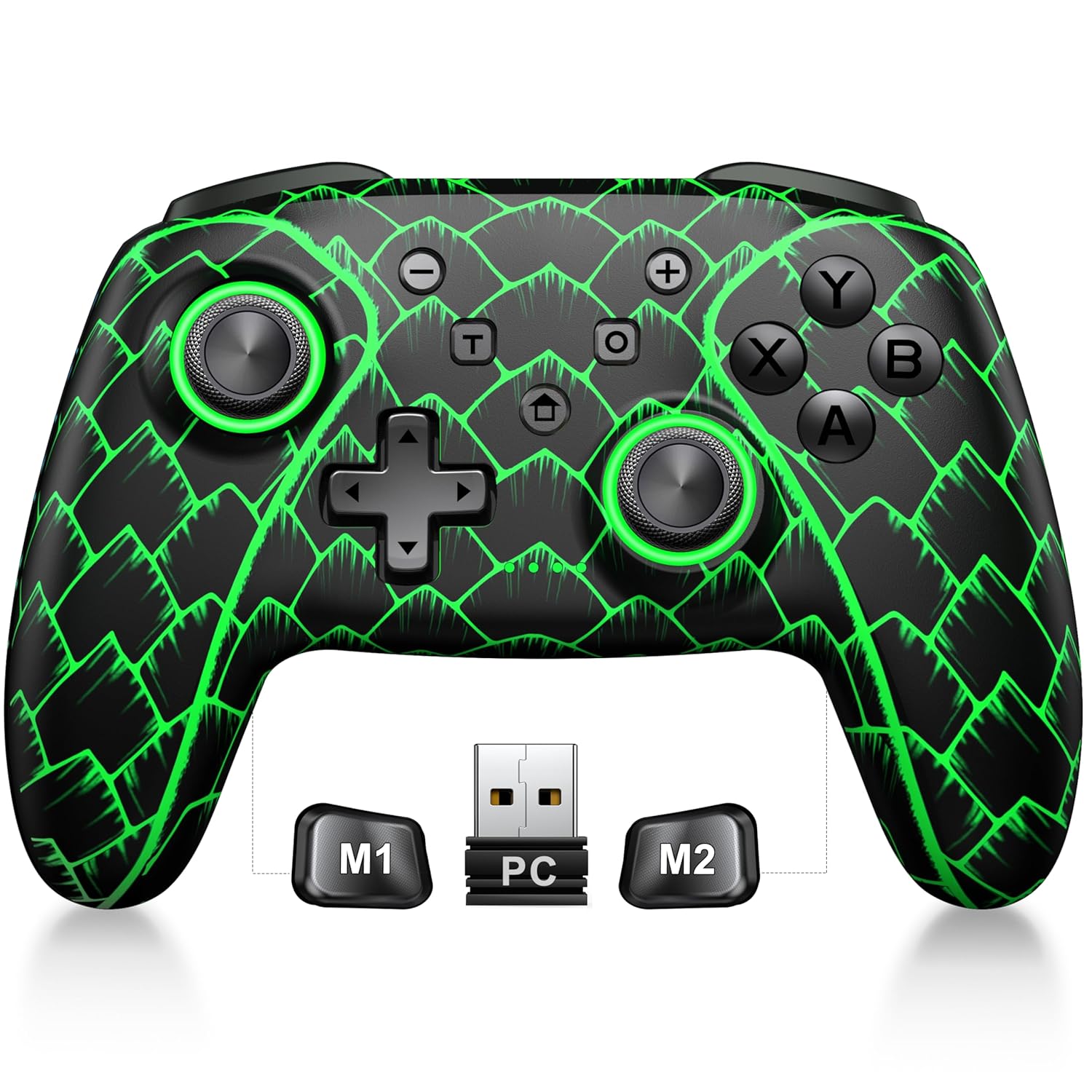
Figure 3.1: ELISWEEN Wireless PC Gaming Controller with its 2.4GHz USB dongle and highlighted M1/M2 programmable buttons.
- Sol/Sağ Analog Çubuklar: Hall Effect joysticks for precise movement.
- Yön Düğmesi: Yönlü giriş.
- Eylem Düğmeleri (A/B/X/Y): Standart oyun giriş tuşları.
- Omuz Düğmeleri (Sol/Sağ): Üstte bulunan düğmeler.
- Trigger Buttons (ZL/ZR): Hall Effect analog triggers.
- M1/M2 Düğmeleri: Programlanabilir geri düğmeleri.
- Ana menü tuşu: Powers on/off and returns to system home screen.
- +/- Düğmeleri: System navigation/menu buttons.
- Ekran Görüntüsü Düğmesi: Ekran görüntüleri yakalar.
- Turbo Düğmesi: Activates/deactivates turbo function.
- USB-C Bağlantı Noktası: Şarj ve kablolu bağlantı için.
4. Kurulum ve Bağlantı
4.1 Kontrol Ünitesinin Şarj Edilmesi
Before first use, fully charge the controller. Connect the USB-C cable to the controller's USB-C port and the other end to a USB power source (e.g., PC, USB wall adapter). The charging indicator will show status and turn off when fully charged. A full charge takes approximately 3 hours.
4.2 Connecting to PC (Wireless 2.4GHz)

Figure 4.1: Multi-platform compatibility of the ELISWEEN controller, including PC, Switch, Android, and iOS.
- Insert the 2.4GHz USB dongle into an available USB port on your PC.
- Press the Home button on the controller to power it on.
- The controller will automatically connect to the dongle. The indicator lights will stabilize once connected.
4.3 Connecting to PC (Wired USB-C)
- Connect the USB-C cable to the controller and the other end to your PC.
- The controller will be recognized as a plug-and-play device.
4.4 Nintendo Switch'e Bağlanma
- Nintendo Switch'inizde Sistem Ayarları > Kumandalar ve Sensörler > Kumandaların Bağlantısını Kes seçeneğine gidin.
- Then, go to Controllers and Sensors > Change Grip/Order.
- Press and hold the Home button on the ELISWEEN controller until the indicator lights begin to flash rapidly.
- Once paired, the indicator light(s) corresponding to the player number will remain solid.
4.5 Connecting to Android/iOS (Bluetooth)
- Android veya iOS cihazınızda Bluetooth'un etkinleştirildiğinden emin olun.
- On the controller, press and hold the X + Home buttons simultaneously until the indicator lights flash rapidly, indicating pairing mode.
- On your device, search for Bluetooth devices and select "STK-7040RG" (or similar) to pair.
- Once connected, the indicator light will stabilize. Supports iOS 13+ MFi titles.
5. Kullanım Talimatları
5.1 Hall Etkili Joystickler
The controller features precision Hall Effect joysticks and triggers, designed to prevent stick drift and provide accurate, responsive control. These magnetic, contactless sensors ensure long-term durability and precision.

Şekil 5.1: Dahili view of Hall Effect joystick technology, highlighting its magnetic, contactless design for enhanced accuracy and durability.
Zero Deadzone Mode: For competitive gaming, activate a temporary 0 deadzone mode by holding the T düğmesi + R3 (right stick click) or L3 (left stick click). A green light confirms activation. To revert to default calibration, press the same combo (blue light indicator). The controller automatically resets to factory default settings upon restart for consistent anti-drift performance.
5.2 Programlanabilir Geri Düğmeleri (M1/M2)
The M1 and M2 back buttons can be programmed to map up to 21 different key combinations, allowing for quick execution of complex actions.

Figure 5.2: The M1 and M2 programmable back buttons, capable of mapping up to 21 different actions for enhanced control.
Refer to the Keylinker App (search "NC300") for detailed instructions on programming and customizing these buttons.
5.3 Turbo Fonksiyonu
The controller supports Turbo fire functionality for 10 action buttons with adjustable speeds (5, 12, or 20 presses per second).
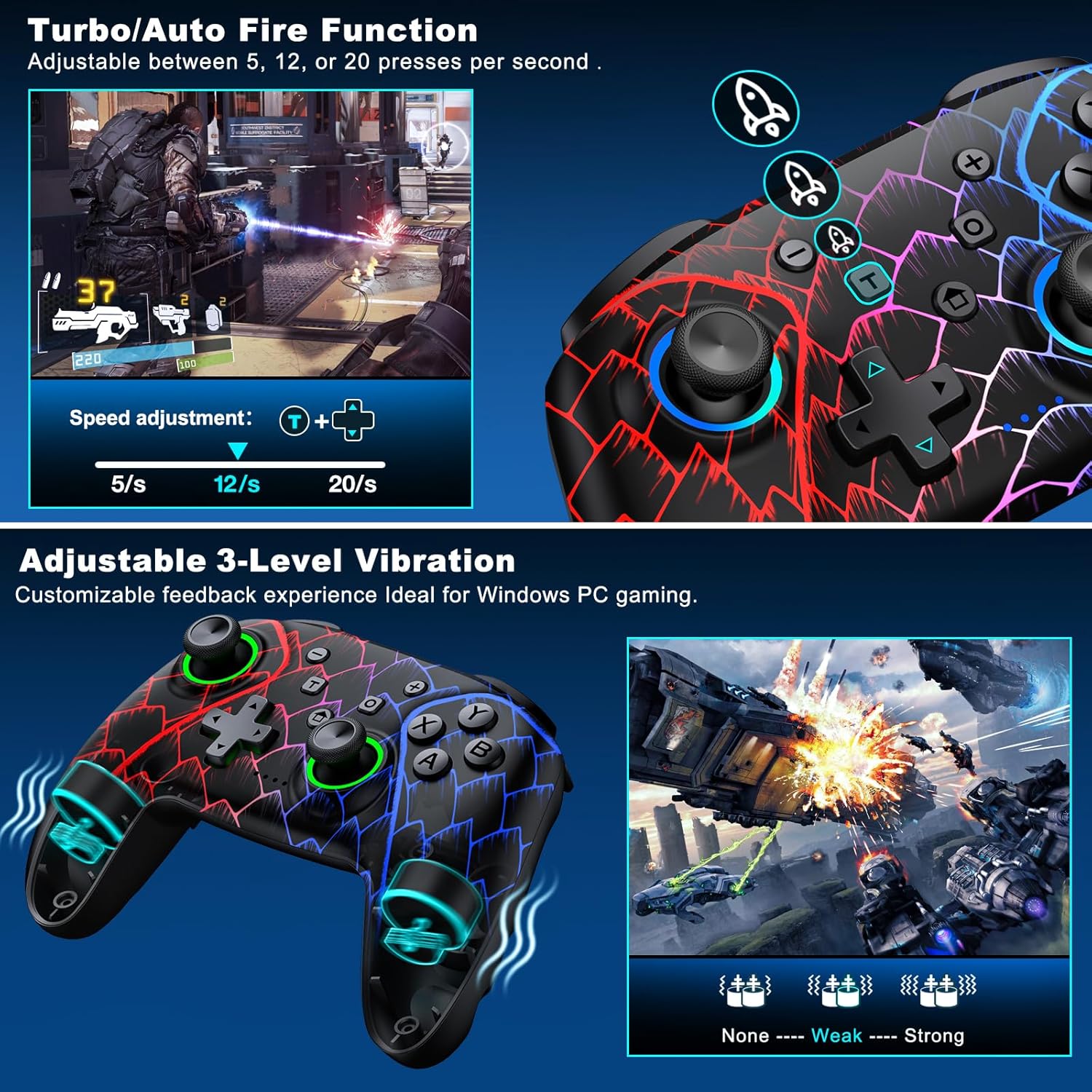
Figure 5.3: Visual representation of the Turbo/Auto Fire function and the adjustable 3-level vibration feature.
- Turbo'yu etkinleştirin: Basın Turbo button + the desired action button.
- Hızı Ayarla: Basmak Turbo + Up arrow (increase) or Aşağı arrow (decrease) on the D-pad.
- Turboyu Temizle: Tutun Eksi düğmesi + Aşağı arrow on the D-pad to instantly clear all Turbo binds.
5.4 Titreşim Ayarı
Experience immersive feedback with dual vibration motors offering 3 intensity levels.
- Adjust intensity by pressing L + R + ZL + ZR simultaneously. Cycle through levels: None, Weak, Strong.
- Note: Vibration is disabled on mobile platforms. Gyro functionality works only with Nintendo systems.
5.5 Hair Trigger Locks
Shorten trigger pulls for faster response times in games requiring quick inputs, such as first-person shooters.
5.6 Pil Ömrü Yönetimi
The controller is equipped with a 1000mAh battery, providing over 20 hours of continuous gameplay on a single charge. Charging takes approximately 3 hours via USB-C.

Figure 5.4: The ELISWEEN controller's 1000mAh battery provides extended playtime with quick charging capabilities.
5.7 Dinamik Aydınlatma Efektleri
Customize the controller's lighting effects via the Keylinker App (search "NC300").
5.8 Otomatik Kapanma
To conserve battery, the controller will automatically power off after 20 minutes of inactivity.
6. Bakım
- Temizlik: Kumanda ünitesini temizlemek için yumuşak, kuru bir bez kullanın. Aşındırıcı temizleyiciler veya çözücüler kullanmayın.
- Depolamak: Kontrol cihazını serin, kuru ve doğrudan güneş ışığından ve aşırı sıcaklıklardan uzak bir yerde saklayın.
- Pil Bakım: Avoid fully discharging the battery frequently. Charge it regularly to prolong its lifespan.
7. Sorun Giderme
- Kontrolör bağlanmıyor:
- Kontrol cihazının şarjlı olduğundan emin olun.
- Verify the correct connection method for your device (2.4GHz dongle for PC, Bluetooth for mobile, pairing for Switch).
- Kontrol cihazını ve bağlandığınız cihazı yeniden başlatmayı deneyin.
- For PC, try a different USB port for the dongle or wired connection.
- Stick drift or inaccurate input:
- Activate the 0 deadzone mode (T + R3/L3) to recalibrate.
- Ensure the controller firmware is up to date via the Keylinker App.
- Düğmeler yanıt vermiyor:
- Kontrolörün düzgün bağlanıp bağlanmadığını kontrol edin.
- Düğmelerin altına herhangi bir yabancı madde sıkışmadığından emin olun.
- Perform a factory reset if issues persist (refer to Keylinker App or contact support).
- Şarj sorunları:
- Farklı bir USB-C kablosu ve güç kaynağı deneyin.
- Ensure the USB-C port on the controller is clean and free of obstructions.
8. Özellikler
| Bağlantı | Bluetooth 5.2, 2.4 GHz Kablosuz, USB-C Kablolu |
| Uyumluluk | PC, Nintendo Switch, Android, iOS (iOS 13+ MFi) |
| Pil Kapasitesi | 1000mAh |
| Oyun zamanı | 20+ saat (yaklaşık) |
| Şarj Süresi | 3 saat (yaklaşık) |
| Joystick'ler | Hall Effect (Drift-Proof) |
| Programlanabilir Düğmeler | 4 Back Buttons (M1/M2) |
| Titreşim | Çift Motor, 3 Ayarlanabilir Seviye |
| Boyutlar | 6.38 x 4.72 x 2.64 inç |
| Ağırlık | 11.99 ons (yaklaşık 340g) |
| Üretici | Qixun Teknolojisi |
| Menşei ülke | Çin |
9. Garanti ve Destek
The ELISWEEN Wireless PC Gaming Controller comes with a standard manufacturer's warranty. For specific warranty terms and conditions, please refer to the product packaging or contact our customer support.
For any technical assistance, troubleshooting, or inquiries, our 24/7 Expert Support team is available to help. Please refer to the contact information provided on the product packaging or our official webalan.


