1. Giriş
Thank you for choosing the Angrox Voice Remote Control. This remote is specifically designed as a replacement for Philips Google Smart TVs, offering enhanced functionality including voice control and dedicated shortcut buttons for popular streaming services. Please read this manual carefully to ensure proper setup and operation.

Resim: Ön ve yan view of the Angrox Voice Remote Control, showcasing ergonomik tasarımı ve tuş dizilimi.
2. Kurulum
2.1 Pil Kurulumu
The remote requires two (2) AAA batteries (not included). Ensure correct polarity when inserting the batteries.
- Kumandanın arkasındaki pil kapağını aşağı doğru kaydırarak çıkarın.
- Insert two AAA batteries, matching the positive (+) and negative (-) terminals as indicated inside the battery compartment.
- Pil kapağını yerine güvenli bir şekilde oturana kadar kaydırarak yerine takın.

Image: A three-step diagram illustrating how to remove the battery cover, insert two AAA batteries, and replace the cover.
2.2 Pairing with Your TV
Before using the remote, it must be paired with your Philips Google Smart TV. This remote supports both infrared and Bluetooth technology for optimal performance.
- Ensure your Philips Google Smart TV is powered on.
- Hold down the "VOL-" button and the "Mic" (Google Assistant) button simultaneously for 5 seconds.
- The remote will initiate the pairing process. All pairing transactions occur in the background, and no further setup is typically required once the pairing is successful.

Image: A hand holding the remote, with an arrow pointing from the 'VOL-' and 'Mic' buttons to a TV screen, illustrating the pairing process.

Image: A visual guide showing the remote and a TV screen with on-screen instructions for pairing, emphasizing holding the VOL- and Mic buttons.
2.3 Uyumlu TV Modelleri
This voice replacement remote is compatible with the following Philips Google Smart TV series:
- 7000 Seri: 75PUL7552/F7, 65PUL7552/F7, 55PUL7552/F7, 50PUL7552/F7, 43PUL7652/F7
- 7600 Seri: 65PUL7672/F7, 55PUL7672/F7, 50PUL7672/F7, 43PUL7672/F7

Image: The remote control centered between two Philips Google Smart TVs, with lists of compatible 7000 and 7600 series models.
3. Kullanım Talimatları
3.1 Düğme İşlevleriview
Familiarize yourself with the various buttons and their functions on your Angrox remote control:
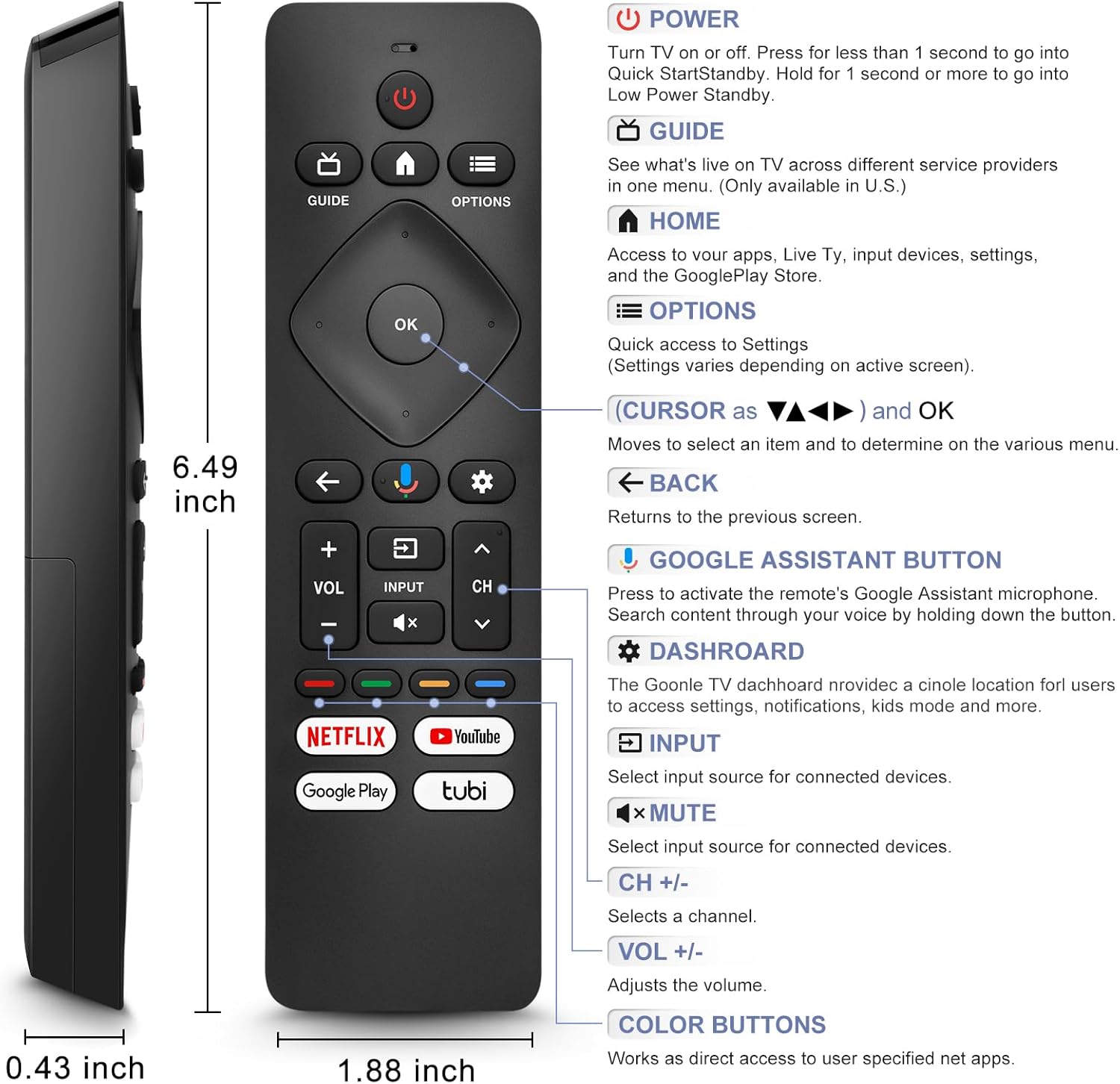
Image: A detailed diagram of the remote control with labels and descriptions for each button, including Power, Guide, Home, Options, Cursor/OK, Back, Google Assistant, Dashboard, Input, Mute, Volume, Channel, and Color Buttons.
- Güç: Press to turn TV on or off. Hold for 1 second for Quick Start Standby, or longer for Low Power Standby.
- Rehber: Access live TV service providers (availability may vary by region).
- Ev: Access apps, Live TV, input devices, settings, and the Google Play Store.
- Seçenekler: Quick access to settings (settings vary based on active screen).
- Cursor (Up/Down/Left/Right) & OK: Menülerde gezinin ve seçimlerinizi onaylayın.
- Geri: Önceki ekrana dön.
- Google Asistan Düğmesi: Press and hold to activate the remote's microphone for voice search.
- Gösterge Paneli: Access the Google TV dashboard for settings, notifications, and kids mode.
- Giriş: Bağlı cihazlar için giriş kaynağını seçin.
- Sesini kapatmak: Televizyonun sesini kapatın veya açın.
- SES +/-: Ses seviyesini ayarlayın.
- CH +/-: Select the next or previous channel.
- Renkli Düğmeler: Provide direct access to user-specified net apps.
3.2 Voice Search Function
The integrated voice function allows for easier and more intuitive interaction with your smart TV. Simply press and hold the Google Assistant button and speak your command or query.
- Basılı tutun Google Asistan düğmesi (mikrofon simgesi).
- Lütfen kumandanın mikrofonuna net bir şekilde konuşun.
- Konuşmanız bitince düğmeyi bırakın.
Examples of voice commands include: "What's the weather today?", "Turn down the volume", "Open YouTube", or searching for specific content.
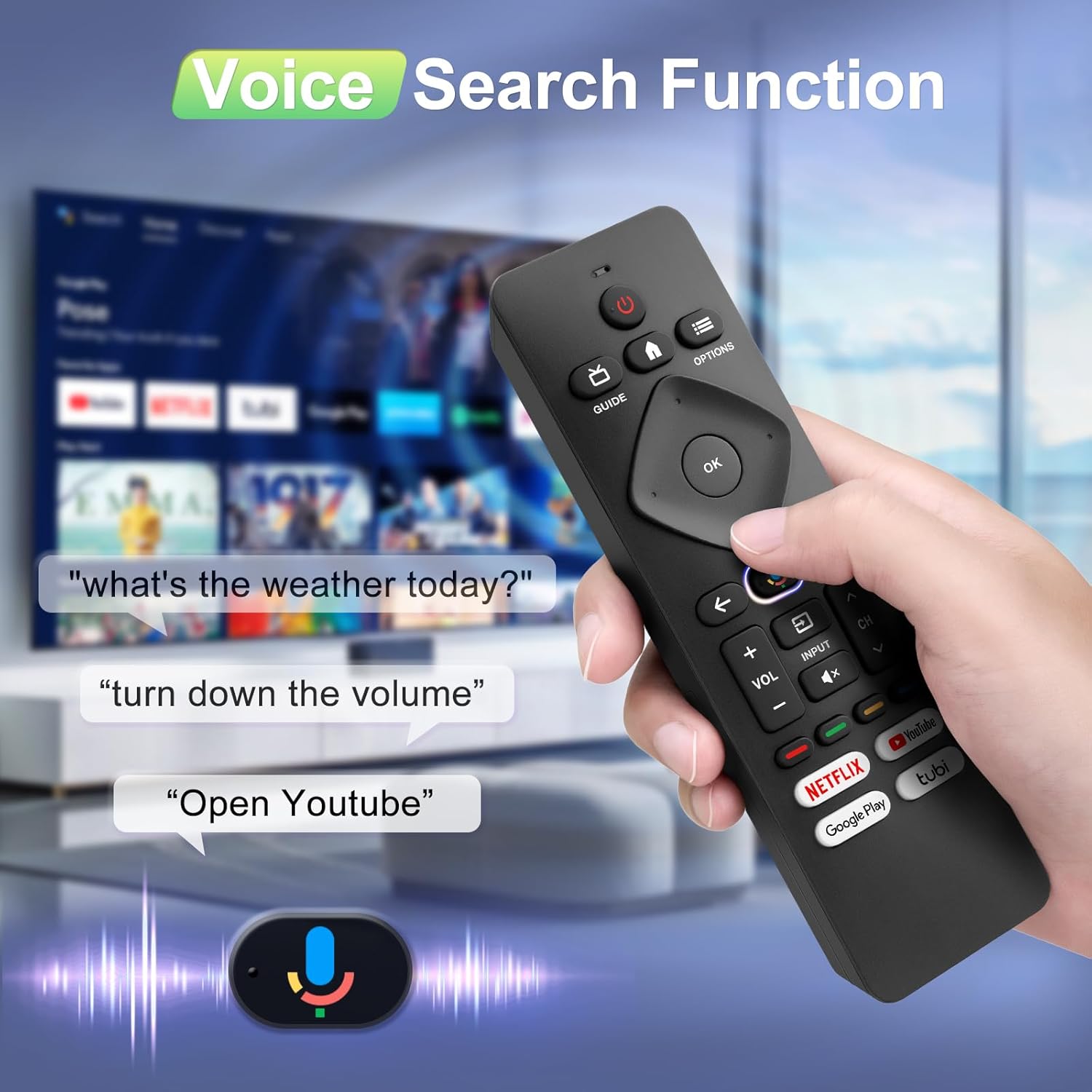
Image: A hand holding the remote, with speech bubbles showing example voice commands like "what's the weather today?" and "Open Youtube", demonstrating the voice search capability.
3.3 Kısayol Düğmesi
The remote features four dedicated shortcut buttons for quick access to popular streaming channels:
- Netflix
- YouTube
- Google Oyun
- Tüp
Pressing these buttons will directly launch the respective application on your TV, provided they are installed and configured.

Image: The remote control highlighting the four dedicated shortcut buttons for Netflix, YouTube, Google Play, and Tubi, with their respective logos.
4. Bakım
Uzaktan kumandanızın uzun ömürlü ve en iyi performansı göstermesi için aşağıdaki bakım yönergelerini izleyin:
- Temizlik: Kumandayı yumuşak, kuru bir bezle silin. Sıvı temizleyiciler veya aşındırıcı malzemeler kullanmayın.
- Pil Değişimi: Replace batteries when the remote's response becomes sluggish or it stops functioning. Always replace both batteries at the same time with new ones.
- Depolamak: Uzaktan kumandayı serin, kuru ve doğrudan güneş ışığından ve aşırı sıcaklıklardan uzak bir yerde saklayın.
- Damlalardan Kaçının: Uzaktan kumandayı fiziksel darbelere karşı koruyun, çünkü düşmeler iç bileşenlere zarar verebilir.
5. Sorun Giderme
Uzaktan kumandanızla ilgili sorun yaşıyorsanız, lütfen aşağıdaki yaygın çözümlere bakın:
- Uzaktan Kumanda Yanıt Vermiyor:
- Pillerin doğru kutuplara takılıp takılmadığını kontrol edin.
- Eski pilleri yeni AAA pillerle değiştirin.
- Uzaktan kumanda ile televizyonun kızılötesi alıcısı arasında herhangi bir engel olmadığından emin olun.
- Ses Fonksiyonu Çalışmıyor:
- Ensure the remote is properly paired with your TV via Bluetooth. Refer to Section 2.2.
- Make sure you are pressing and holding the Google Assistant button while speaking.
- Televizyonunuzun ayarlarını kontrol ederek sesli kontrolün etkinleştirildiğinden emin olun.
- Düğmeler Tepkisiz veya Takılı Kalıyor:
- Clean the remote surface, especially around the buttons, to remove any dirt or debris.
- If buttons remain unresponsive after cleaning and battery replacement, the remote may require replacement.
- Short Remote Distance:
- The remote supports infrared and Bluetooth. Ensure no physical obstructions are blocking the signal.
- The remote is designed for optimal performance within 10 meters (approximately 33 feet) and is available up to 12 meters (approximately 39 feet).
6. Özellikler
| Marka | angroks |
| Model Numarası | URMT26CND002 |
| Uyumlu Cihazlar | Philips Google Smart TVs (7000 & 7600 Series) |
| Bağlantı Teknolojisi | Kızılötesi, Bluetooth |
| Özel Özellikler | Ergonomic, Voice Search, Shortcut Buttons |
| Güç Kaynağı | 2 x AAA Piller (dahil değildir) |
| Ürün Ağırlığı | 2.39 ons (yaklaşık 67.7 gram) |
| Paket Boyutları | 6.73 x 1.93 x 1.02 inç |
| Button Durability | Tested for 5,000-8,000 clicks per button |
7. Garanti ve Destek
Angrox is committed to providing excellent after-sale service. We focus on the compatibility and quality of our replacement remotes. If you have any questions or concerns regarding your order or the product, please do not hesitate to contact us directly. Our professional after-sale service team is available to assist you.
For support, please refer to the contact information provided with your purchase or visit the Angrox store on Amazon.
