1. Ürün Bittiview
The iFFALCON 55U65 is a 55-inch 4K Google TV designed to deliver an immersive entertainment experience. Featuring a frameless design, AI PQ processor for enhanced picture quality, Dolby Audio for rich sound, and integrated Google TV for smart functionality, this television offers a comprehensive viewing solution. It includes built-in Chromecast, voice search capabilities, and a dedicated game mode for optimal performance.
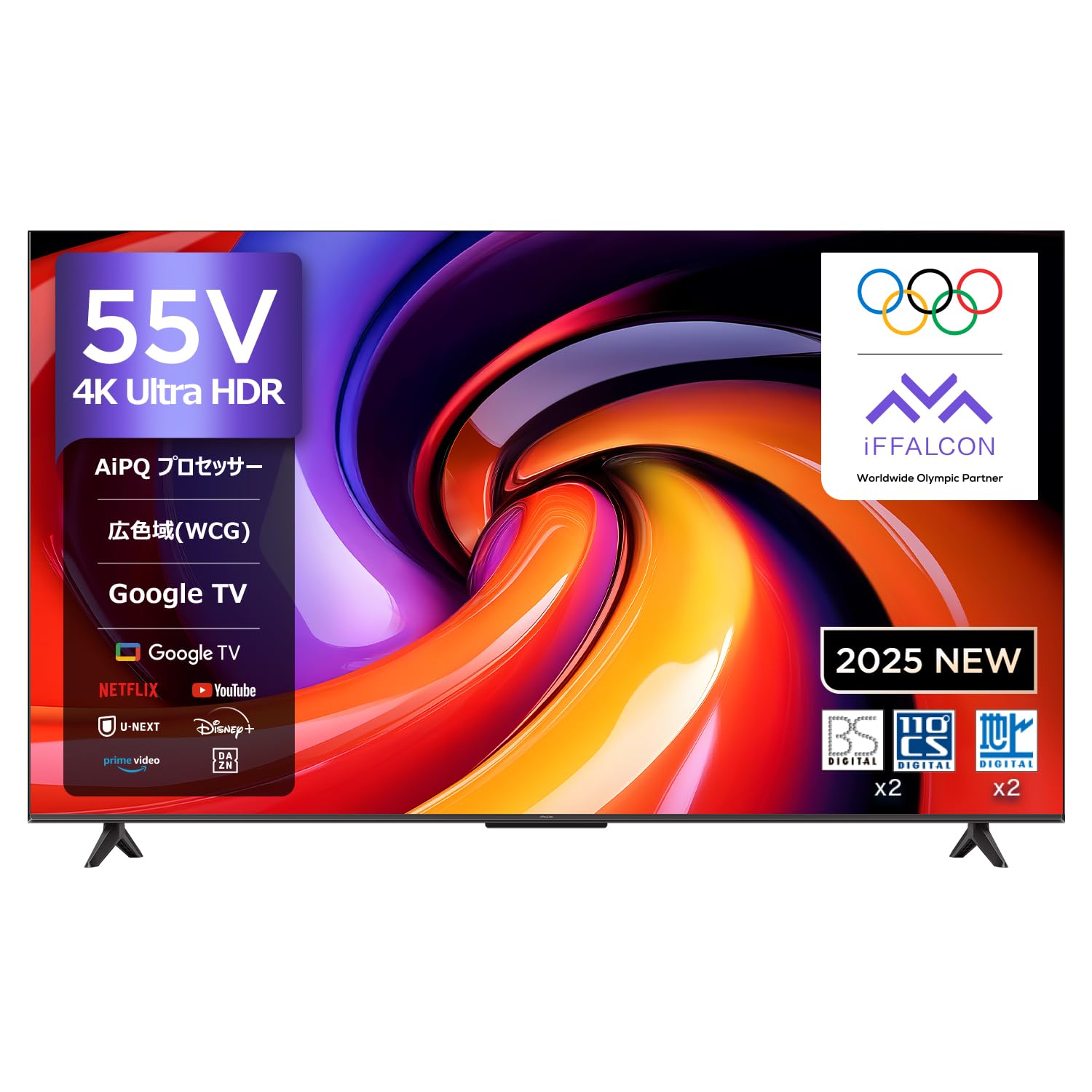
Ön view of the iFFALCON 55U65 55-inch 4K Google TV, showcasinÇerçevesiz tasarımıyla.
2. Kurulum Kılavuzu
2.1 Unboxing and Stand Installation
Follow these steps to safely unbox your iFFALCON TV and attach the stand.
- Carefully cut the tape on the top of the TV box and open it.
- Remove the two stands from the box.
- Remove the top protective foam.
- Lift the TV out of the box and place it face down on the protective foam.
- Identify the included screws for the stand.
- Align each stand with the corresponding slots on the TV's bottom panel.
- Securely fasten the stands using the provided screws and a screwdriver.
This video demonstrates the unboxing process and how to attach the stand to the FPD Canvas 43/50/55 inch TV. It guides users through carefully opening the package, identifying components, removing protective foam, securing the stands with screws, and connecting the power cable.
2.2 Gücün Bağlanması
Once the stand is attached, connect the power cable.
- Güç kablosunu televizyonun güç girişine bağlayın.
- Plug the other end of the power cable into a nearby electrical outlet.
- Remove the protective film from the TV screen.
2.3 İlk Kurulum (Google TV)
Upon first power-on, the TV will guide you through the initial setup process for Google TV. This includes connecting to Wi-Fi, signing in with your Google account, and configuring basic settings.
3. Kullanım Talimatları
3.1 Uzaktan Kumanda
The iFFALCON 55U65 comes with a remote control that supports voice operation. Dedicated buttons provide quick access to popular streaming services.
- Güç Düğmesi: Televizyonu açar veya kapatır.
- Gezinti Paneli (Tamam düğmesi): Menülerde gezinir ve seçimleri onaylar.
- Ses Düğmeleri: Ses seviyesini ayarlar.
- Sesli Asistan Düğmesi: Sesli komutlar için Google Asistan'ı etkinleştirir.
- Hızlı Erişim Düğmeleri: Direct access to services like Netflix, Prime Video, YouTube, and more.
3.2 Google TV Arayüzü
Google TV organizes all your favorite content from various streaming services into one personalized interface. It offers recommendations based on your viewalışkanlıklar.

A screenshot of the Google TV interface, displaying a wide array of streaming content from YouTube, Netflix, Prime Video, Disney+, and more.
3.3 Voice Search with 'Hey Google'
Use the built-in Google Assistant to quickly find content, get information, or control your smart home devices.
- Press the Voice Assistant button on your remote.
- Say "Hey Google" followed by your command, such as "Find action movies" or "Open Netflix."

An image showing a user interacting with the TV using 'Hey Google' voice commands to search for content or control smart home devices.
3.4 Chromecast Built-in & AirPlay 2
Easily cast content from your smartphone or tablet to the TV screen.
- Mobil cihazınızın ve televizyonunuzun aynı Wi-Fi ağına bağlı olduğundan emin olun.
- Open a compatible app on your mobile device (e.g., YouTube, Netflix).
- Tap the Cast icon (for Chromecast) or AirPlay icon (for Apple devices) within the app and select your iFFALCON TV.

An illustration demonstrating AirPlay 2 and Chromecast built-in, allowing users to easily cast videos, photos, and music from Apple and Android devices to the TV.
This video highlights the key features of the FPD Google TV, including its smart interface, seamless streaming experience, and integration with various apps and services.
4. Temel Özellikler
4.1 AI PQ Processor
The AI PQ processor incorporates numerous picture quality adjustment algorithms. With intelligent perception capabilities like AI Clarity, AI Color, AI Contrast, AI Motion, and AI HDR, it optimizes picture quality at the pixel level.

An illustration of the AI PQ processor, emphasizing its role in optimizing picture quality at the pixel level through intelligent perception capabilities.

Visual representation of AI PQ processor's sub-features including AI Clarity for clear images, AI Color for natural colors, AI Contrast for detailed darks and brights, AI Motion for smooth movement, and AI HDR for multi-HDR format processing.
4.2 HDR10 Desteği
Experience stunning brightness, superior shadow detail, and vivid colors with HDR10 technology, enhancing your streaming resolution.

A split image demonstrating the impact of HDR10, revealing superior detail in shadows and vibrant colors compared to non-HDR content.
4.3 MEMC Teknolojisi
Motion Estimation, Motion Compensation (MEMC) technology reduces motion blur and image tearing, providing silky-smooth visuals, especially in fast-paced scenes.

A side-by-side comparison showing the effect of MEMC technology, reducing motion blur and image tearing for smoother visuals.
4.4 Game Master & ALLM
The Game Master feature, combined with Auto Low Latency Mode (ALLM), ensures a smooth and responsive gaming experience by minimizing input lag and eliminating blur or stuttering.

An image depicting a gaming scene on the iFFALCON TV, highlighting the Game Master feature for an optimized gaming experience.

A collage illustrating gaming features like ALLM for smooth console gaming, Wide Game View for expanded field of vision, and the Game Bar for quick access to settings.
4.5 Dolby Ses
Enjoy a rich, clear, and detailed sound experience with Dolby Audio. It delivers an immersive, three-dimensional sound that fills your room, making every scene more engaging.
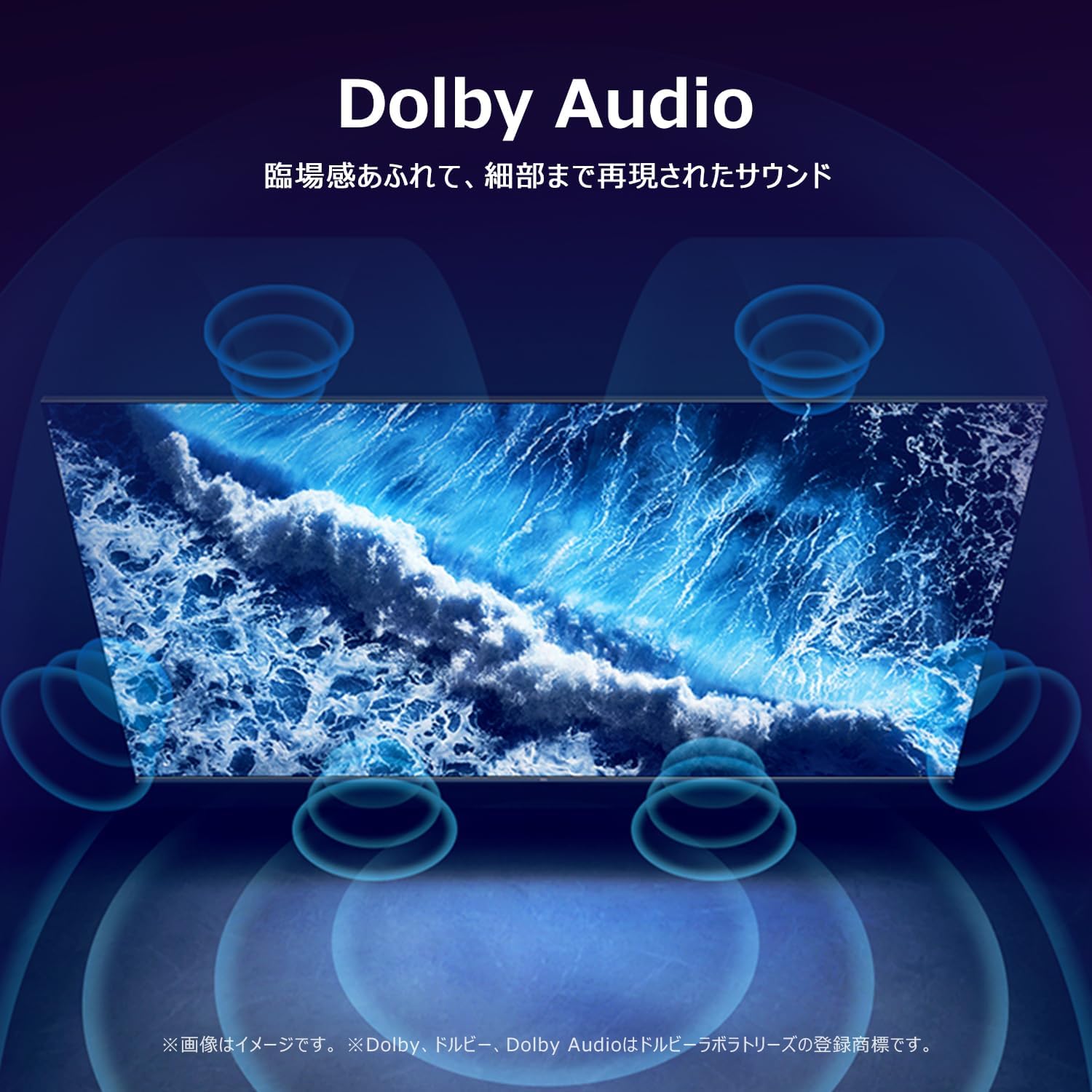
A visual representation of Dolby Audio creating an immersive, three-dimensional sound experience around the viewşey.
4.6 Multi-Eye Care
The TV features Multi-Eye Care technology, including low blue light and flicker-free viewing, to provide a comfortable and healthy viewing environment for movies and games.

Images demonstrating the benefits of Multi-Eye Care technology, including low blue light and flicker-free viewing for comfortable movie and gaming sessions.
4.7 Çerçevesiz Tasarım
The TV boasts a sleek, frameless design that minimizes bezels, allowing the screen to blend seamlessly into your living space and provide a more expansive viewing alanı.

A close-up of the iFFALCON TV highlighting its slim, bezel-less design that blends seamlessly into any room.
Bu videoview of the FPD Tunerless 4K Google TV, showcasing its high-resolution display, smart functionalities, and modern design for an immersive entertainment experience.
5. Özellikler
| Özellik | Detay |
|---|---|
| Ekran Boyutu | 55 inç |
| Görüntü Türü | VA LCD |
| Çözünürlük | 4K UHD |
| Yenileme Hızı | 60 Hz |
| En Boy Oranı | 16:9 |
| Kontrast Oranı | 1000:1 |
| ViewAçı | 178 derece |
| Akıllı TV Platformu | Google televizyon |
| İnternet Hizmetleri | Google TV, Netflix, Rakuten TV, Hulu, U-NEXT, ABEMA, DAZN, FOD, AWA, Prime Video, dTV, TELASA, VideoMarket, YouTube |
| Bağlantı | Bluetooth, HDMI (3 ports), USB (2 ports), Wi-Fi |
| Ses Özellikleri | Dolby Audio, 2.0 Channel Speakers |
| Özel Özellikler | Chromecast, Game Mode, Wide ViewAçı |
| Boyutlar (G x Y x D) | 122.6x75x25.5 cm |
| Ürün Ağırlığı | 9.1 kilo |
| Yıllık Güç Tüketimi | 105 kWh/yıl |
| Dahil Aksesuarlar | User Manual, Remote Control, Warranty Card, Power Cable |
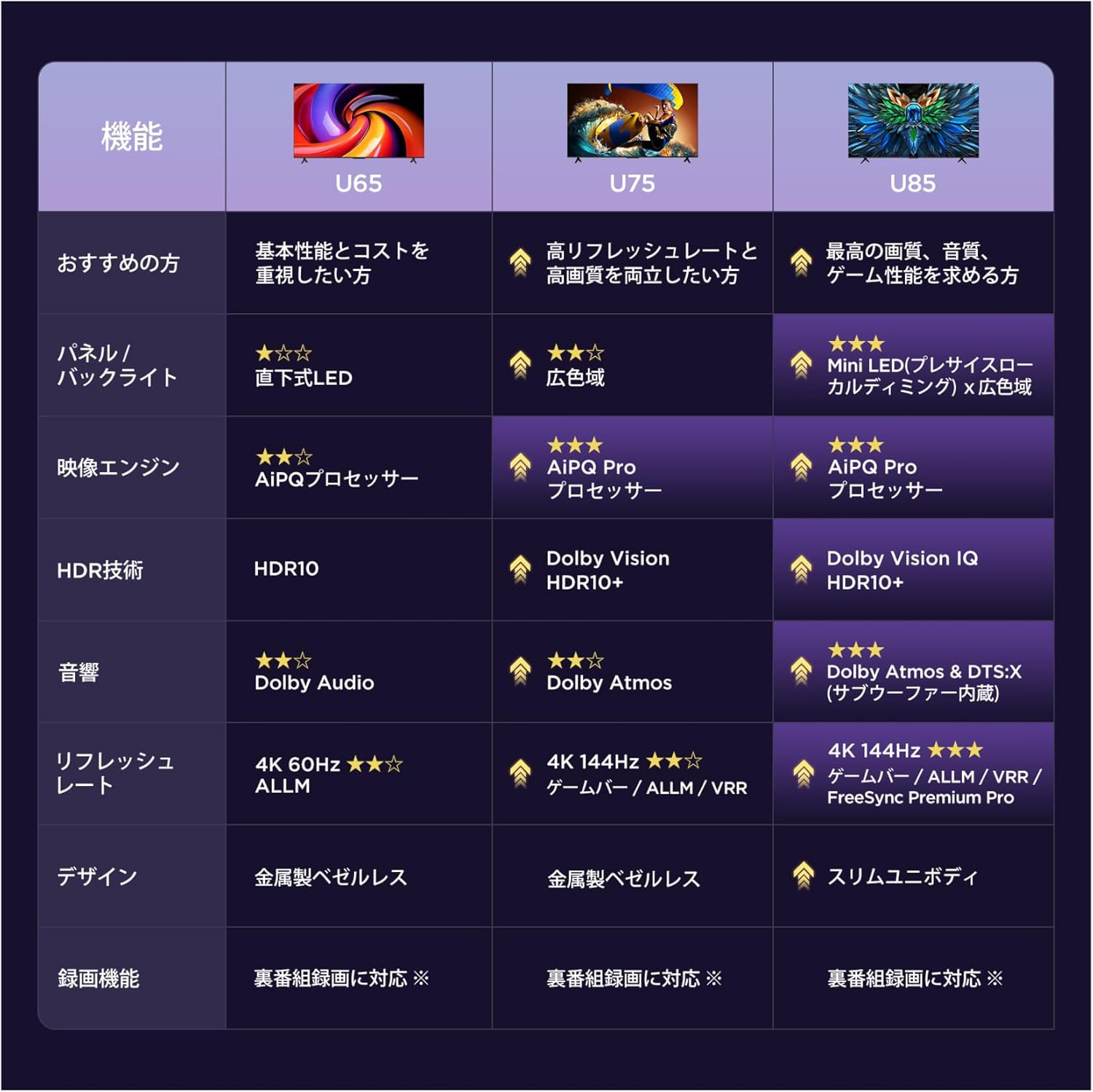
A table comparing key features across iFFALCON's U65, U75, and U85 TV series, highlighting panel type, image engine, HDR technology, audio, refresh rate, and design.

Diagram showing the dimensions of the 55-inch iFFALCON TV, including width (122.6cm), height (75.0cm), and depth (25.5cm), with a recommended viewing distance of approximately 1 meter.
6. Bakım
6.1 Ekranı Temizleme
Ekranı temizlemek için yumuşak, tiftiksiz bir bezle hafifçe silin. İnatçı lekeler için hafifçe silin.ampBezi suyla veya elektronik cihazlar için özel olarak tasarlanmış bir ekran temizleme solüsyonuyla yıkayın. Sert kimyasallar veya aşındırıcı malzemeler kullanmaktan kaçının.
6.2 TV Gövdesinin Temizlenmesi
Wipe the TV body with a soft, dry cloth. Do not use liquid cleaners directly on the TV to prevent damage to internal components.
7. Sorun Giderme
7.1 Güç Yok
- Güç kablosunun hem televizyona hem de elektrik prizine sağlam bir şekilde takılı olduğundan emin olun.
- Başka bir cihazı takarak elektrik prizinin çalışıp çalışmadığını kontrol edin.
- Uzaktan kumandadaki veya televizyonun üzerindeki güç düğmesine basın.
7.2 Görüntü/Ses Yok
- Doğru giriş kaynağının seçildiğinden emin olun (örneğin, HDMI 1, HDMI 2).
- Televizyon ile harici cihazlar arasındaki tüm kablo bağlantılarını (HDMI, ses) kontrol edin.
- Sesin kapalı olmadığından veya çok düşük bir seviyeye ayarlanmadığından emin olun.
7.3 Uzaktan Kumanda Çalışmıyor
- Uzaktan kumandanın pillerini değiştirin.
- Uzaktan kumanda ile televizyonun kızılötesi sensörü arasında herhangi bir engel bulunmadığından emin olun.
- Try pairing the remote control again if it's a Bluetooth remote (refer to the on-screen instructions during initial setup or in the TV settings).
7.4 Ağ Bağlantısı Sorunları
- Wi-Fi yönlendiricinizi kontrol edin ve açık olduğundan ve düzgün çalıştığından emin olun.
- Restart your TV and router.
- Go to the TV's network settings to re-enter your Wi-Fi password or connect to a different network.
8. Garanti ve Destek
Your iFFALCON 55U65 TV comes with a warranty card included in the package. Please refer to the warranty card for detailed terms and conditions.
8.1 Müşteri Desteği
For technical assistance, repairs, or any inquiries regarding your iFFALCON product, please contact TCL customer support. iFFALCON is a sub-brand of TCL, and their support team is equipped to assist you.

TCL customer support details, including a phone number (0120-955-517) and webalan (https://www.tcl.com/jp/ja/support) for repair and assistance.
- Telefon: 0120-955-517
- Çalışma Saatleri: 09:00 - 18:00
- Webalan: https://www.tcl.com/jp/ja/support


